
giriiş
Thank you for choosing the MACAP MI40 Luxe On-Demand Espresso Grinder. This manual provides essential information for the safe and efficient operation, maintenance, and care of your new grinder. Please read all instructions carefully before use and retain this manual for future reference.

The MACAP MI40 Luxe On-Demand Espresso Grinder, featuring a sleek black finish and integrated touchscreen display.
Güvenlik Bilgileri
Yangın, elektrik çarpması ve yaralanma riskini azaltmak için elektrikli aletleri kullanırken her zaman temel güvenlik önlemlerine uyun.
- Öğütücüyü çalıştırmadan önce tüm talimatları okuyun.
- Öğütücüyü, kablosunu veya fişini suya veya başka sıvılara batırmayın.
- Kullanılmadığı zamanlarda, parçaları monte etmeden veya sökmeden önce ve temizlemeden önce fişi prizden çekin.
- Hareketli parçalara temas etmekten kaçının.
- Hiçbir cihazı, kablosu veya fişi hasarlıyken veya cihaz arızalandıktan veya herhangi bir şekilde hasar gördükten sonra çalıştırmayın. Yardım için müşteri desteğine başvurun.
- Üretici tarafından önerilmeyen veya satılmayan aparatların kullanılması yangına, elektrik çarpmasına veya yaralanmaya neden olabilir.
- Açık havada kullanmayınız.
- Kablonun masa veya tezgah kenarından sarkmasına veya sıcak yüzeylere temas etmesine izin vermeyin.
- Ensure the hopper lid is securely in place before operating.
- Only grind whole roasted coffee beans. Do not grind other substances such as nuts, spices, or instant coffee.
Kurmak
1. Paketten çıkarma
- Tüm bileşenleri dikkatlice ambalajından çıkarın.
- Inspect the grinder for any signs of damage. If damaged, do not operate and contact your retailer.
- Tüm koruyucu filmleri ve ambalaj malzemelerini çıkarın.
2. Bileşen Tanımlaması
Familiarize yourself with the main parts of your MI40 Luxe grinder:
- Huni: Bütün kahve çekirdeklerini alır.
- Hazne Kapağı: Covers the hopper.
- Öğütme Ayar Düğmesi: Located below the hopper, used to set grind fineness.
- Dokunmatik Ekran: For programming and selecting dosing options.
- Dosing Spout: Öğütülmüş kahvenin servis edildiği yer.
- Portafilter Tutucu: Supports the portafilter during grinding.
- Güç düğmesi: Located on the side of the grinder.
3. İlk Montaj
- Hazneyi takın: Place the hopper onto the grinder body, ensuring it seats correctly. Rotate it slightly until it locks into position.
- Install the Hopper Lid: Place the lid securely on top of the hopper.
4. Yerleşim
Öğütücüyü sağlam, düz ve kuru bir yüzeye yerleştirin. Cihazın etrafında yeterli havalandırma olduğundan emin olun.
5. Güç Bağlantısı
Güç kablosunu topraklı bir elektrik prizine takın. Ses seviyesinin düşük olduğundan emin olun.tage, öğütücünün derecelendirme etiketinde belirtilen özelliklerle eşleşir.
Kullanım Talimatları
1. Haznenin Doldurulması
Lift the hopper lid and pour whole roasted coffee beans into the hopper. Do not overfill. Replace the lid securely.
2. Grind Adjustment (Nice Grind Control Dial)
The MI40 Luxe features a stepless grind adjustment dial for precise control. To adjust the grind fineness:
- Turn the grinder ON using the power switch.
- Rotate the grind adjustment dial. Turning it clockwise results in a finer grind, and counter-clockwise results in a coarser grind.
- For espresso, start with a fine setting and adjust incrementally based on extraction time and taste. It is recommended to adjust the grind while the burrs are running to prevent jamming.

Ayrıntılı view of the Nice Grind Control Dial for precise grind fineness adjustment.
3. Touchscreen Dosing
The touchscreen allows for programmable dosing for single and double shots.
- Güç Açık: Ensure the grinder is powered on. The touchscreen will illuminate.
- Select Dose: On the main screen, you will see icons for single and double shot doses. Tap the desired dose icon.
- Adjust Dose Time (if needed): To program the dose time, press and hold the desired dose icon until it enters programming mode. Use the '+' and '-' buttons on the screen to adjust the grinding time in seconds. Tap the icon again to save.
- Portafiltreyi yerleştirin: Position your portafilter securely in the portafilter holder beneath the dosing spout.
- Öğütmeye Başlayın: Tap the selected dose icon once to start grinding. The grinder will automatically stop after the programmed time.
- Manual Grinding: Some models may offer a manual grind option, typically by pressing a dedicated button or holding a dose icon briefly. Refer to the on-screen prompts.
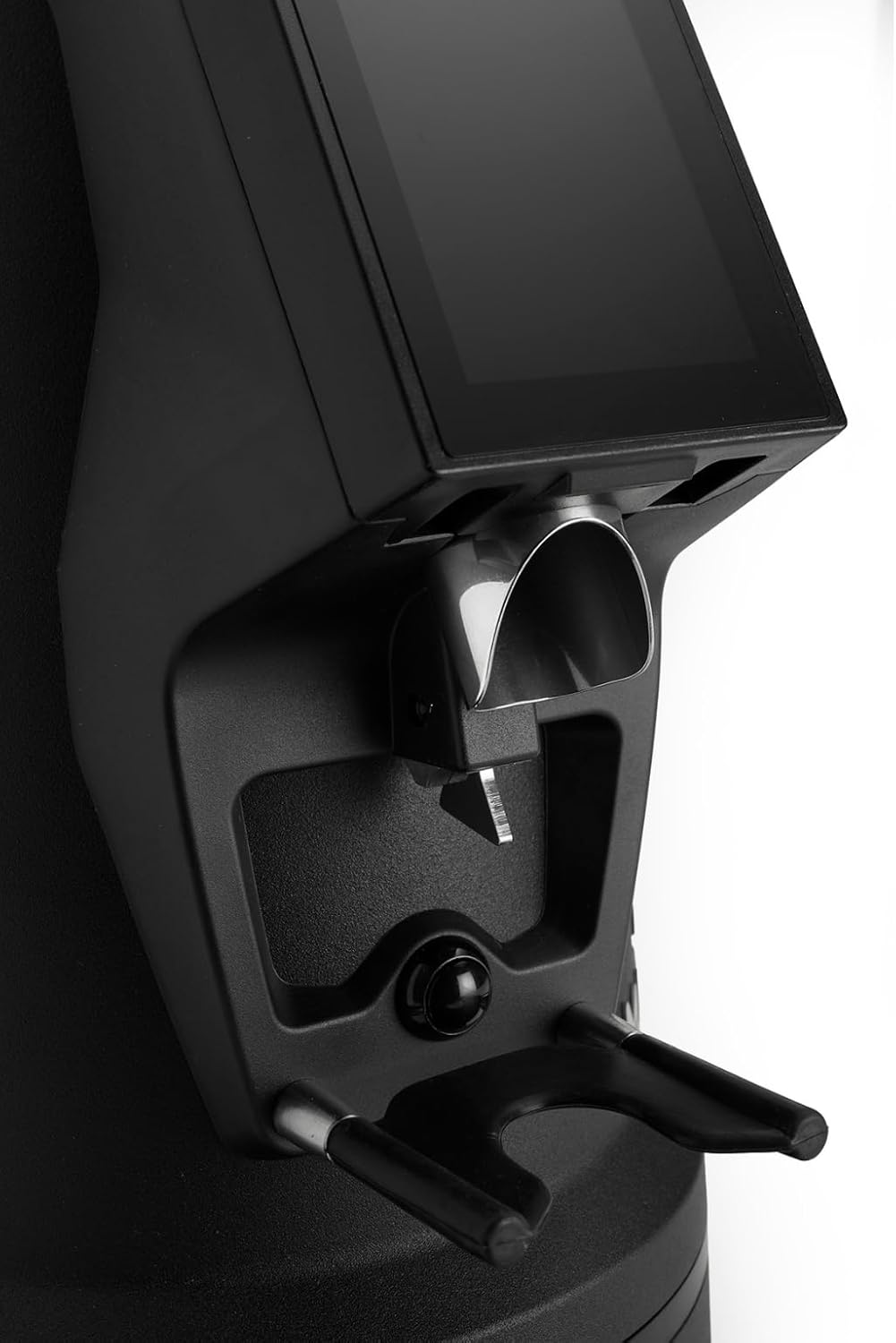
The dosing spout and portafilter holder, designed for efficient and clean coffee dispensing.
Bakım
Regular cleaning and maintenance ensure optimal performance and longevity of your grinder.
1. Günlük Temizlik
- Huni: Haznede kalan tüm kahve çekirdeklerini boşaltın ve haznenin içini kuru bir bezle silin.
- Dosing Spout: Use a brush or vacuum cleaner to remove any residual coffee grounds from the dosing spout and portafilter holder area.
- Dış: Öğütücünün dışını reklamla silinamp Aşındırıcı temizleyiciler kullanmayın veya üniteyi suya batırmayın.
2. Burrs Cleaning (Weekly/Bi-weekly)
To maintain grind consistency, the burrs should be cleaned regularly.
- Öğütücünün fişini çekin: Always disconnect the power before cleaning the burrs.
- Hazneyi Çıkarın: Empty the hopper and remove it from the grinder body.
- Erişim Çapakları: Depending on the model, you may need to unscrew the top burr carrier. Refer to the specific instructions for your MI40 Luxe model.
- Çapakları Temizleyin: Use a stiff brush or a vacuum cleaner to remove all coffee grounds from both the stationary and rotating burrs. Do not use water.
- Yeniden birleştirme: Carefully reassemble the burr carrier and hopper, ensuring all parts are securely in place.
3. Genel Bakım
- Öğütücüyü serin ve kuru bir yerde saklayın.
- Avoid exposing the grinder to direct sunlight or extreme temperatures.
Sorun giderme
Öğütücünüzle ilgili sorunlarla karşılaşırsanız, aşağıdaki yaygın sorunlar ve çözümlere bakın:
| Sorun | Olası Neden | Çözüm |
|---|---|---|
| Öğütücü açılmıyor | No power, power switch off, or safety interlock not engaged. | Check power cord connection, ensure power switch is ON, verify hopper is correctly seated. |
| No coffee grinding / Grinder jams | Beans not feeding, burrs clogged, or grind setting too fine. | Ensure hopper has beans. Unplug, remove hopper, clean burrs. Adjust to a coarser setting. |
| Tutarsız öğütme | Burrs are dirty or worn. | Clean burrs thoroughly. If problem persists, burrs may need replacement. |
| Öğütücü gürültülü | Foreign object in burrs or loose components. | Unplug and inspect burrs for foreign objects. Ensure all parts are securely fastened. |
If the problem persists after attempting these solutions, please contact MACAP customer support or your retailer.
Özellikler
| Özellik | Detay |
|---|---|
| Örnek | MI40 Luxe |
| Marka | Macap |
| Çapak Tipi | Düz Dikenli Meyveler |
| Çapak Boyutu | 65 mm |
| Öğütme Ayarı | Stepless (Nice Grind Control Dial) |
| Dozajlama | Touchscreen Programmable On-Demand |
| Huni Kapasitesi | 2.6 lbs (yaklaşık 1.2 kg) |
| Malzeme | Paslanmaz çelik |
| Ürün Ağırlığı | 19.6 Pound (yaklaşık 8.9 kg) |
| Boyutlar (U x G x Y) | 12" x 7.6" x 22" (yaklaşık 30.5 cm x 19.3 cm x 55.9 cm) |
| Motor | High-Torque |
Garanti ve Destek
Your MACAP MI40 Luxe Grinder is covered by a manufacturer's warranty. For specific warranty terms and conditions, please refer to the warranty card included with your product or visit the official Macap website. For technical support, spare parts, or service inquiries, please contact your authorized Macap dealer or the customer support team.
İletişim Bilgileri:
- Refer to your purchase documentation for retailer contact details.
- Visit the official Macap webKüresel destek bilgileri için site.


