
1. Giriş
Thank you for choosing the GEEKOM GT1 Mega Mini PC. This manual provides essential information for setting up, operating, maintaining, and troubleshooting your device. Please read it carefully before use and keep it for future reference.
The GEEKOM GT1 Mega is a high-performance mini PC equipped with the Intel Core Ultra 9 185H processor, Intel AI Boost (dedicated NPU), and integrated Intel Arc graphics. It is designed for demanding tasks such as AI applications, advanced multitasking, 4K video editing, photo retouching, virtualization, and professional software.
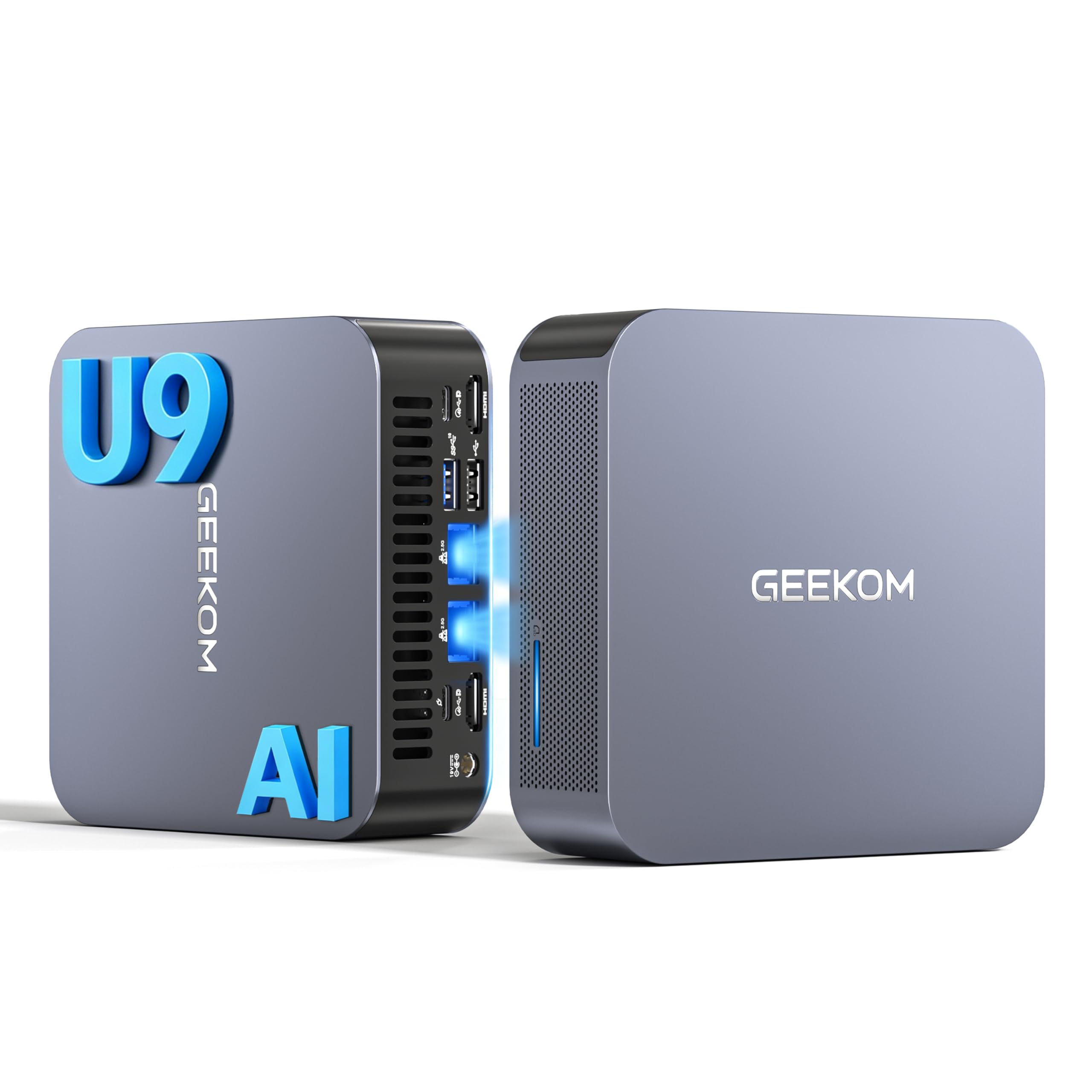
Resim 1.1: Ön view of the GEEKOM GT1 Mega Mini PC.
2. Güvenlik Bilgileri
Cihazınızın hasar görmesini veya kendinizin yaralanmasını önlemek için lütfen aşağıdaki güvenlik kurallarına uyun:
- Yalnızca cihazla birlikte verilen güç adaptörünü kullanın.
- Cihazı suya, neme veya aşırı sıcaklıklara maruz bırakmayın.
- Cihazı doğrudan güneş ışığına veya ısı kaynaklarının yakınına yerleştirmekten kaçının.
- Uygun havalandırmayı sağlayın; havalandırma açıklıklarını kapatmayın.
- Cihazı kendiniz açmaya veya onarmaya çalışmayın. Servis için yetkili personele başvurun.
- Cihazı güçlü manyetik alanlardan uzak tutun.
3. Paket İçeriği
Paketinizde tüm öğelerin mevcut olduğundan emin olun:
- 1 x GEEKOM GT1 Mega Mini PC
- 1 x VESA Montaj Aparatı (Vidalarıyla Birlikte)
- 1 x Güç Adaptörü
- 1 x HDMI Kablosu
- 1 x Kullanım Kılavuzu
- 1 x Teşekkür Kartı

Image 3.1: Contents included in the GEEKOM GT1 Mega Mini PC package.
4. Ürün Bittiview
4.1. Front and Rear Ports
The GEEKOM GT1 Mega Mini PC offers a comprehensive set of ports for versatile connectivity:

Image 4.1: Diagram illustrating the front and rear ports of the GEEKOM GT1 Mega Mini PC.
- Ön Portlar:
- 4 x USB 3.2 Gen2 Type-A (one with Always On power)
- 1 x 3.5mm Kulaklık Jakı
- 1 x Güç Düğmesi
- Arka Portlar:
- 2 x USB4 (40 Gbps, eGPU compatible, one with power delivery)
- 2 adet HDMI 2.0
- 2 x RJ45 2.5Gbps Ethernet Ports
- 1 x USB 3.2 Gen2 Tip-A
- 1 x USB 2.0 Tip-A
- 1 x DC Giriş
- 1 x SD Kart Okuyucu
- 1 x Kensington Kilit Yuvası
4.2. Temel Özellikler
- İşlemci: Intel Core Ultra 9 185H (16 Cores, 22 Threads, up to 5.1 GHz) with Intel AI Boost (NPU).
- Grafikler: Integrated Intel Arc Graphics.
- Hafıza: 16GB DDR5 5600MHz dual-channel RAM (upgradable up to 128GB).
- Depolamak: 1TB NVMe PCIe Gen4 SSD (expandable up to 4TB).
- Ağ: Dual 2.5G Ethernet, WiFi 7, Bluetooth 5.4.
- Ekran Desteği: Up to four 4K displays or one 8K display via USB4 and HDMI.
- Soğutma: IceBlast 2.0 advanced cooling system with dual copper heat pipes and high-efficiency fan.
- Şasi: Premium metallic chassis, 0.78 L volume, withstands pressure up to 200 kg.
5. Kurulum
5.1. İlk Bağlantı
- Ekranı Bağla: Connect your monitor(s) to the Mini PC using the HDMI or USB4 ports. The GT1 Mega supports up to four 4K displays or one 8K display.
- Çevre Birimlerini Bağlayın: Klavyenizi, farenizi ve diğer tüm USB cihazlarınızı mevcut USB bağlantı noktalarına takın.
- Ağa Bağlan: For wired internet, connect an Ethernet cable to one of the 2.5G RJ45 ports. For wireless, ensure your WiFi network is available during initial setup.
- Gücü bağlayın: Connect the power adapter to the DC input port on the Mini PC, then plug the adapter into a power outlet.
5.2. İlk Önyükleme
- Mini bilgisayarın ön tarafındaki güç düğmesine basın.
- The device will boot into Windows 11 Pro. Follow the on-screen instructions to complete the initial Windows setup, including language, region, network connection, and user account creation.
- Once Windows is set up, it is recommended to check for and install any available system updates.

Resim 5.1: Örn.ample of a multi-monitor setup with the GEEKOM GT1 Mega Mini PC.
6. Kullanım Talimatları
6.1. Güç Açma/Kapatma
- Güç Açık: Güç düğmesine bir kez basın.
- Kapat: Windows'ta Başlat düğmesine tıklayın, ardından Güç > Kapat'ı seçin.
- Tekrar başlat: Windows'ta Başlat düğmesine tıklayın, ardından Güç > Yeniden Başlat'ı seçin.
- Uyumak: Windows'ta Başlat düğmesine tıklayın, ardından Güç > Uyku'yu seçin.
6.2. Ağ Bağlantısı
- Kablolu (Ethernet): Connect an Ethernet cable to one of the two 2.5G RJ45 ports. The system will automatically detect the connection.
- Kablosuz (Wi-Fi 7): In Windows, click the network icon in the taskbar, select your Wi-Fi network, enter the password, and connect.
- Bluetooth 5.4: To pair Bluetooth devices, go to Windows Settings > Bluetooth & devices, turn on Bluetooth, and select 'Add device'.
6.3. Ekran Yapılandırması
The Mini PC supports multiple displays. To configure them:
- Masaüstüne sağ tıklayın ve 'Görüntü ayarları'nı seçin.
- Windows will detect connected displays. You can arrange them, change resolution, and set display modes (Extend, Duplicate, Second screen only).
7. Bakım
7.1. Temizlik
- Mini PC'nizin dışını düzenli olarak yumuşak ve kuru bir bezle temizleyin.
- Use compressed air to gently clear dust from the ventilation openings to maintain optimal cooling performance.
- Sıvı temizleyiciler veya aşındırıcı maddeler kullanmayınız.
7.2. Sistem Güncellemeleri
Keep your Windows operating system and drivers updated to ensure optimal performance and security:
- Go to Windows Settings > Windows Update to check for and install system updates.
- Visit the GEEKOM official website for the latest driver updates for your GT1 Mega.
7.3. Hardware Upgrades
The GEEKOM GT1 Mega allows for memory and storage upgrades:
- VERİ DEPOSU: The device supports up to 128GB of DDR5 SODIMM memory.
- SSD: The 1TB NVMe PCIe Gen4 SSD can be expanded up to 4TB. An additional M.2 2242 SATA SSD slot is available for up to 2TB.
For detailed instructions on how to perform hardware upgrades, please refer to the comprehensive guide on the GEEKOM support website or consult a professional technician.

Image 7.1: Illustration of the GEEKOM GT1 Mega's upgradable DDR5 memory and SSD storage.

Resim 7.2: Patlamış view of the GEEKOM GT1 Mega, highlighting the IceBlast 2.0 cooling system components.
8. Sorun Giderme
If you encounter issues with your GEEKOM GT1 Mega, refer to the following common solutions:
| Sorun | Olası Neden | Çözüm |
|---|---|---|
| Güç yok | Power adapter not connected, faulty outlet | Güç adaptörünün hem bilgisayara hem de çalışan bir elektrik prizine güvenli bir şekilde bağlı olduğundan emin olun. Farklı bir priz deneyin. |
| Ekran yok | Monitor not connected, incorrect input source, faulty cable | Check HDMI/USB4 cable connections. Ensure monitor is on and set to the correct input source. Try a different cable or monitor. |
| No internet (Wi-Fi) | Wi-Fi disabled, incorrect password, router issue | Check Wi-Fi settings in Windows. Verify Wi-Fi password. Restart your router. |
| No internet (Ethernet) | Ethernet cable disconnected, network driver issue | Ensure Ethernet cable is securely connected. Check network adapter status in Device Manager. Update network drivers. |
| System slow/unresponsive | Too many applications running, overheating, outdated drivers | Close unnecessary applications. Ensure proper ventilation. Update drivers and Windows. |
If the problem persists, please contact GEEKOM customer support for further assistance.
9. Özellikler
Detailed technical specifications for the GEEKOM GT1 Mega Mini PC:
| Özellik | Şartname |
|---|---|
| Marka | GEEKOM |
| Model Adı | GT1 Mega |
| İşletim Sistemi | Windows 11 Pro |
| CPU Modeli | Intel Core Ultra 9-185H |
| CPU Hızı | 5.1 GHz (Max Turbo Frequency) |
| Grafikler | Entegre Intel Arc Grafikleri |
| Veri deposu | 16 GB DDR5 (5600MHz, expandable to 128 GB) |
| Depolamak | 1 TB NVMe PCIe Gen4 SSD (expandable to 4 TB) |
| Sabit Disk Teknolojisi | SSD |
| Bağlantı | 2x 2.5G Ethernet, Wi-Fi 7, Bluetooth 5.4 |
| USB Bağlantı Noktaları | 2x USB4 (40Gbps), 5x USB 3.2 Gen2 Type-A, 1x USB 2.0 Type-A |
| Video Çıkışı | 2x HDMI 2.0, 2x USB4 (DisplayPort 1.4) |
| Maksimum Ekran Çözünürlüğü | 8K (via USB4), 4K (via HDMI) |
| Ses Çıkışı | 3.5mm Ses Jakı |
| Kart Okuyucu | SD Kart Okuyucu |
| Güç Kaynağı | Type C/EF – 2 pins (European/Hybrid FR-DE plug) |
| Sertifikalar | CE, FCC, RoHS |

Image 9.1: GEEKOM GT1 Mega Mini PC certifications including CB, ROHS, FCC ID, EPR, CEC, UKCA, UL4200A.
10. Garanti ve Destek
The GEEKOM GT1 Mega Mini PC comes with a 3-year manufacturer's warranty and professional technical support.
10.1. Garanti Bilgileri
Your device is covered by a 3-year warranty from the date of purchase, ensuring peace of mind against manufacturing defects. Please retain your proof of purchase for warranty claims.
10.2. Teknik Destek
For any technical issues or support inquiries, please use one of the following methods:
- Contact Seller on Amazon: Log in to your Amazon account, navigate to 'Your Orders', and click 'Get Help' for assistance.
- E-posta Desteği: Send an email to the GEEKOM support team at pan.he@geekom.tw. Our team will respond as soon as possible.