
1. Giriş
Thank you for choosing the AOPUTTRIVER AP-5000N Pinless Moisture Meter. This device is designed for non-destructive measurement of moisture content in various materials such as lumber, drywall, firewood, and masonry. Its advanced sensing technology provides accurate readings without damaging the surface of the material. This manual provides detailed instructions for proper setup, operation, and maintenance to ensure optimal performance and longevity of your device.

Image 1.1: The AP-5000N moisture meter is versatile, suitable for measuring moisture in walls, wood floors, raw wood, and other building materials.
2. Güvenlik Bilgileri
- Cihazı kullanmadan önce tüm talimatları dikkatlice okuyun.
- Do not attempt to disassemble or modify the meter. This may cause damage and void the warranty.
- Cihazı hasardan korumak için sudan ve yüksek nemli ortamlardan uzak tutun.
- Store the meter in a dry, cool place when not in use.
- Pilleri yerel düzenlemelere göre atın.
3. Paket İçeriği
Paketin içinde tüm öğelerin mevcut olduğundan emin olun:
- AP-5000N Pinless Moisture Meter
- Çalıştırma Talimatları Kılavuzu
- Tip-C Veri Kablosu
- Small Screwdriver (for battery compartment, if applicable)
- Depolama Kesesi

Image 3.1: Contents of the AP-5000N package, including the meter, storage pouch, Type-C cable, and screwdriver.
4. Ürün Bittiview
Familiarize yourself with the components and controls of your AP-5000N moisture meter:

Resim 4.1: Ön view of the AP-5000N meter with key features labeled.
- LED Gösterge Işığı: Displays Dry, Mid, or Wet status.
- Dry Indicator: Green light for low moisture.
- Flashlight Indicator: Indicates flashlight is active.
- Duvar Modu: Setting for wall materials.
- Yumuşak Ağaç Modu: Setting for softwood materials.
- Measurement Reading Display: Dijital yüzdetage okuma.
- Güç Açma/Kapatma Düğmesi: Cihazı açmak veya kapatmak için.
- Reading Hold Button: Ekrandaki mevcut okumayı dondurur.
- MID Indicator: Yellow light for medium moisture.
- Wet Indicator: Red light for high moisture.
- Duvarcılık Modu: Setting for masonry materials.
- Sert Ahşap Modu: Setting for hardwood materials.
- Measurement Reading Analog Display: Bar graph for visual moisture level.
- Mod Seçim Düğmesi: Cycles through material modes.
- El Feneri Açma/Kapama Düğmesi: Dahili el fenerini aktif hale getirir.
5. Kurulum
5.1. Pil Kurulumu
The AP-5000N typically uses AAA batteries (not always included). Locate the battery compartment on the back of the device. Use the provided small screwdriver to open the compartment, insert the batteries according to the polarity indicators, and then securely close the compartment.
5.2. İlk Güç Açma
Basın Güç Açma/Kapama Düğmesi to turn on the device. The LCD display will illuminate, and the meter will perform a brief self-test before entering measurement mode.
6. Kullanım Talimatları
6.1. Güç Açma/Kapatma
- Açmak için: Basın Güç Açma/Kapama Düğmesi.
- Kapatmak için: tuşuna basın ve basılı tutun Güç Açma/Kapama Düğmesi for a few seconds, or the device will automatically power off after a period of inactivity to conserve battery life.
6.2. Mod Seçimi
The meter offers different modes for various materials to ensure accurate readings. To select a mode:
- Basın Mod Seçme Düğmesi Tekrar tekrar.
- The LCD display will show the name of the currently selected material (e.g., WALL, MASONRY, SOFTWOOD, HARDWOOD).
- Choose the mode that best matches the material you are testing.
6.3. Ölçüm Alma
The AP-5000N uses non-destructive sensing technology, allowing measurements up to 20mm (0.75 inches) deep without damaging the surface.
- Doğru malzeme modunun seçildiğinden emin olun.
- Gently press the sensing area on the back of the hygrometer flat against the surface of the material you wish to measure.
- The moisture reading will be displayed on the LCD screen.

Image 6.1: The meter can detect moisture up to 19mm (0.75 inches) deep into materials.
6.4. Okunan Metinleri Anlamak
The meter provides moisture readings through a digital LCD display, a tri-color LED bar graph, and an audible alarm.
- LCD Ekran: Shows the exact moisture percentage.
- Tri-color LED Bar Graph:
- Green (DRY): Indicates low moisture levels.
- Yellow (MID): Indicates medium moisture levels.
- Red (WET): Indicates high moisture levels.
- Sesli alarm: The meter will beep and the LED bar will turn red when the humidity exceeds the system's preset wet threshold for the selected material.
- Tutma İşlevi: Basın Reading Hold Button to freeze the current reading on the display for easier recording. Press it again to release the hold.
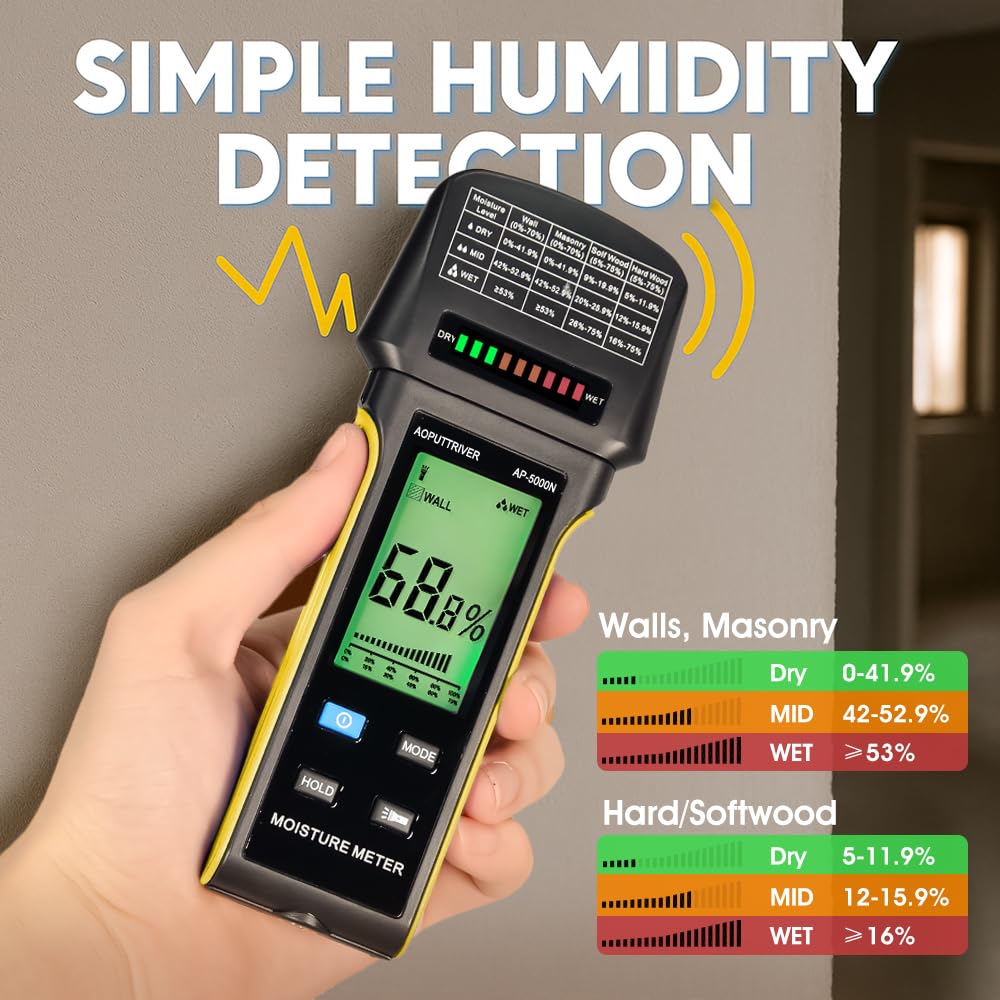
Image 6.2: The display shows digital readings and a color-coded bar graph for quick moisture assessment. Reference the table on the meter for specific ranges.
6.5. El Feneri Fonksiyonu
The meter includes a built-in flashlight for use in dimly lit areas.
- El fenerini açmak için: tuşuna basın El Feneri Açma/Kapama Düğmesi.
- El fenerini kapatmak için: tuşuna basın El Feneri Açma/Kapama Düğmesi Tekrar.

Image 6.3: The integrated flashlight assists in reading the display and inspecting surfaces in low-light conditions.
7. Bakım
- Temizlik: Cihazı yumuşak ve kuru bir bezle silin. Aşındırıcı temizleyiciler veya çözücüler kullanmayın.
- Depolamak: When not in use for extended periods, remove the batteries to prevent leakage. Store the meter in its protective pouch in a cool, dry place, away from direct sunlight and extreme temperatures.
8. Sorun Giderme
- Cihaz açılmıyor: Pillerin montajını kontrol edin ve pillerin bitmediğinden emin olun. Gerekirse değiştirin.
- Yanlış okumalar: Ensure the correct material mode is selected. Make sure the sensing area is flat against the surface and free from dirt or obstructions.
- Ekran soluk veya titriyor: Piller zayıflamış olabilir. Pilleri değiştirin.
- No reading: Ensure the device is properly pressed against the material. The material might be too thin or outside the measurement range.
9. Özellikler
- Modeli: AP-5000N
- Ölçüm Prensibi: Pinless, Non-Destructive Electromagnetic Sensing
- Algılama Derinliği: 20 mm'ye (0.75 inç) kadar
- Görüntülemek: Large Backlit LCD with Tri-color LED Bar Graph
- Ölçüm Modları: Wall, Masonry, Hardwood, Softwood
- Özellikler: Audible Alarm, Low Battery Alarm, Auto Power Off, Hold Function, Flashlight
- Güç Kaynağı: (Typically AAA batteries, user to confirm from device)
- Marka: AOPUTTRIVER
10. Garanti ve Destek
For any questions regarding your AOPUTTRIVER AP-5000N Pinless Moisture Meter, please refer to the contact information provided with your purchase or visit the official AOPUTTRIVER webDestek için lütfen bu siteyi ziyaret edin. Garanti talepleri için lütfen satın alma belgenizi saklayın.