
1. Giriş
Thank you for choosing the hygger Programmable LED Aquarium Light, Model HG160. This light is designed to provide a full spectrum lighting solution for planted aquariums, featuring a 24/7 sunrise and sunset cycle, adjustable colors, and brightness levels. This manual provides detailed instructions for installation, operation, and maintenance to ensure optimal performance and longevity of your aquarium light.
2. Güvenlik Talimatları
- Always unplug the light from the power outlet before performing any maintenance, cleaning, or installation.
- This product is designed for indoor use only. Do not expose to rain or extreme moisture.
- Ensure your hands are dry when handling the power adapter and controller.
- Do not operate the light if any part is damaged, especially the power cord or adapter.
- Çocukların erişemeyeceği yerde saklayınız.
- Ensure the light is securely mounted on the aquarium to prevent accidental falls into the water.
- The light unit is IP68 waterproof, but the controller and power adapter are not. Keep them away from water.
3. Paket İçeriği
Paketin içinde tüm öğelerin mevcut olduğundan emin olun:
- LED Aquarium Light Unit
- Harici Denetleyici
- Uzatılabilir Braketler (önceden takılı veya ayrı)
- Power Adapter (100-240V AC to 24V/2A DC)
- Kullanım Kılavuzu (bu belge)
4. Kurulum ve Kurulum
Follow these steps to install your hygger LED Aquarium Light:
- Bileşenleri Paketinden Çıkarın: Tüm ürünleri ambalajından dikkatlice çıkarın.
- Braketleri Takın: If the extendable brackets are not pre-attached, slide them onto the ends of the light unit.
- Pozisyon Işığı: Place the light unit on top of your aquarium. Adjust the extendable brackets to fit your tank size (e.g., 29-35 inches for the L size model) securely. Ensure the light is centered and stable.
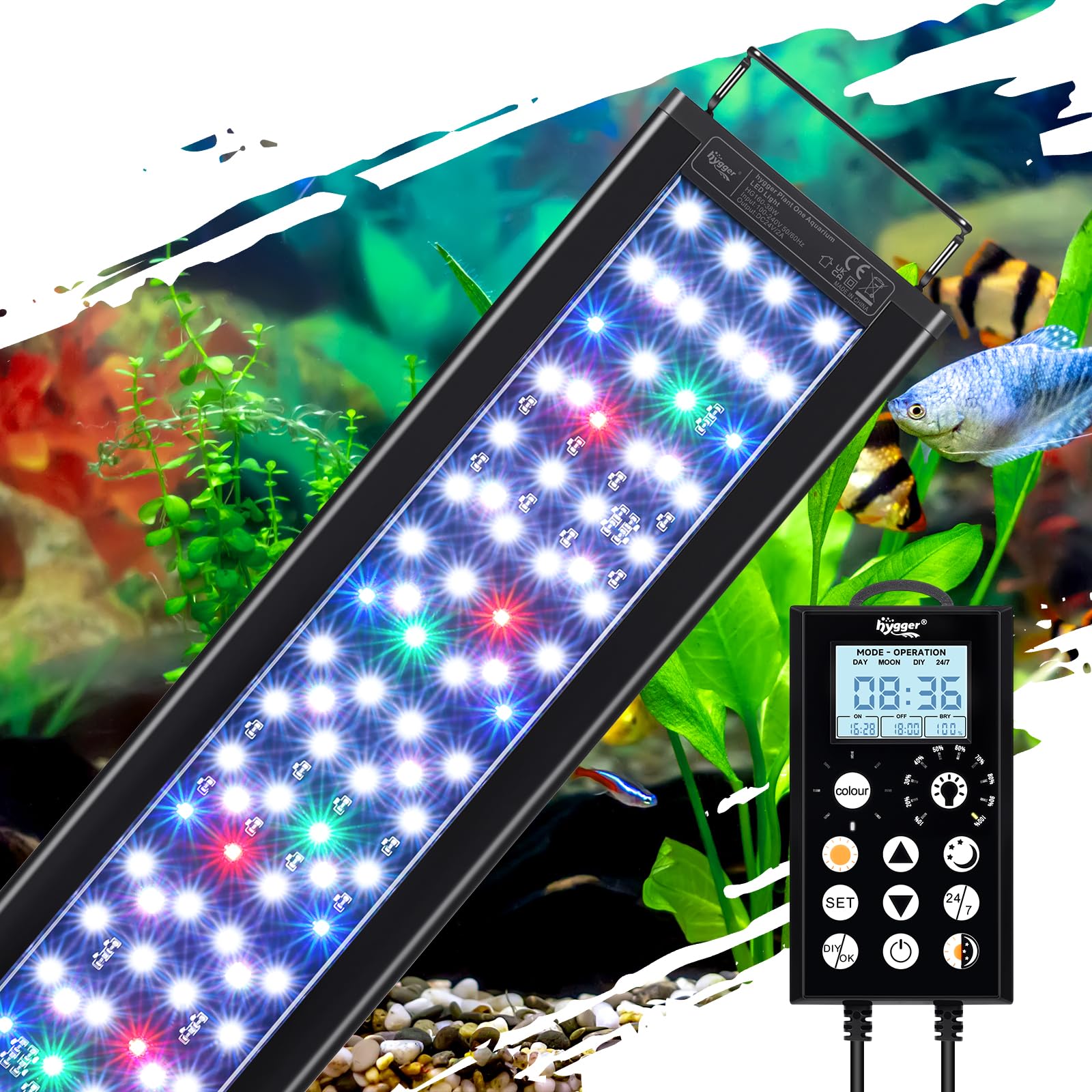
Image: hygger LED Aquarium Light mounted on an aquarium.

Image: Close-up of the adjustable extendable brackets.
- Kontrol Ünitesini Bağlayın: Plug the light unit's cable into the designated port on the external controller.
- Gücü bağlayın: Plug the power adapter into the controller, then plug the adapter into a standard electrical outlet.
5. Kullanım Talimatları
5.1 Kontrolör Üzerindeview
The external controller features an LCD display and several buttons for programming and adjusting the light settings. Familiarize yourself with the button functions:

Image: Detailed diagram of the controller and its functions.
- HOUR/MIN: Adjusts time values.
- AYARLAMAK: Enters settings, confirms selections, or switches between hours/minutes.
- RENK: Cycles through 8 available colors in DIY mode.
- PARLAKLIK: Adjusts 10 levels of brightness.
- YUKARI/AŞAĞI Okları: Adjusts values (time, brightness, color).
- AÇIK/KAPALI: Short press to turn on, long press (3 seconds) to turn off.
- 24/7: Activates the 24/7 automatic daylight cycle.
- GÜN: Activates Sunlight constant mode. Long press (3 seconds) to set the daylight timer.
- GECE: Activates Moonlight constant mode. Long press (3 seconds) to set the moonlight timer.
- DAY+NIGHT: Switches between daylight mode and moonlight mode. Long press (3 seconds) to set the day/night mode timer.
- DIY/OK: Enters DIY mode, confirms end time of each segment.
5.2 Setting Local Time
Before using timed modes, set the current local time on the controller. Refer to the video below for a visual guide on operating the light, which includes time setting.
Video: Instructions on how to operate the hygger HG160 smart aquarium light, including initial setup and time setting.
5.3 24/7 Default Mode
This mode simulates a natural 24-hour sunrise and sunset pattern, providing a stable lighting environment for your aquarium. It turns on at 6:00 AM and off at 11:00 PM with smooth transitions.
- Ensure the local time is set correctly.
- Kısaca basın 24/7 button to activate this mode.

Image: Light intensity graph for the 24/7 mode, illustrating sunrise, daylight, dusk, and moonlight phases.
Video: Demonstrates the hygger IP68 Waterproof LED Aquarium Light with Timer, showing its operation.
Video: Shows the Day and Nightlight functionality of the aquarium light.
Video: Demonstrates the Nightlight Mode of the LED Aquarium Light.
Video: Demonstrates the Daylight Mode of the LED Aquarium Light.
5.4 Kendin Yap Modu
The DIY mode allows you to customize the timing, color, and brightness for up to 5 distinct stages (L1-L5) throughout the day, tailoring the lighting to your specific aquatic ecosystem needs.
- Basın DIY/OK button to enter DIY mode.
- For each segment (L1-L5) in sequence:
- Basmak YUKARI/AŞAĞI arrows to set the start time. Press AYARLAMAK to switch between hours/minutes. Press AYARLAMAK onaylamak için.
- Kısaca basın RENK button to select a color. Press AYARLAMAK onaylamak için.
- Kısaca basın PARLAKLIK button to adjust brightness levels (10%-100%). Press AYARLAMAK onaylamak için.
- Kısaca basın YUKARI/AŞAĞI arrows to set the end time for the current segment.
- Basmak DIY/OK to proceed to the next segment.
- Repeat for all 5 segments.

Image: Illustration of the DIY 5 Stages Mode, demonstrating customizable light phases.
Video: Demonstrates the DIY Mode of the LED Aquarium Light, showing customization options.
5.5 Manual Modes (Day, Night, Daylight & Moonlight)
These modes allow for constant lighting at specific settings:
- Gündüz Modu: Kısaca basın GÜN button for constant sunlight. Long press (3 seconds) to set a specific timer for this mode.
- Gece Modu: Kısaca basın GECE button for constant moonlight. Long press (3 seconds) to set a specific timer for this mode.
- Daylight & Moonlight Mode: Kısaca basın DAY+NIGHT button to switch between daylight and moonlight. Long press (3 seconds) to set a specific timer for this combined mode.

Image: Comparison of Day Mode and Night Mode settings with the controller.

Image: Controller displaying Daylight & Moonlight Mode.
5.6 Renk ve Parlaklık Ayarı
In DIY or manual modes, you can adjust the light's appearance:
- Renkler: Choose from 8 colors: White, Blue, Red, Green, Yellow, Azure, Orange, Purple. Use the RENK Seçenekler arasında geçiş yapmak için düğmeye basın.
- Parlaklık: Adjust between 10 brightness levels (10% to 100%). Use the PARLAKLIK düğmesi veya YUKARI/AŞAĞI oklar.

Image: Visual representation of the 8 color options and 10 brightness levels.
5.7 Akıllı Hafıza Fonksiyonu
The light features intelligent power recovery. In case of a power outage, all settings are restored. However, the local time may need to be reset. The 24/7 cycle will seamlessly resume if no adjustments are made within 5 minutes of reboot.

Image: Illustration of the Smart Memory Function, showing light states before and after a power interruption.
6. Bakım
Regular maintenance ensures the longevity and optimal performance of your aquarium light.
- Temizlik: Unplug the light before cleaning. Wipe the aluminum alloy shell with a soft, damp cloth. Do not use abrasive cleaners or immerse the controller or power adapter in water.
- Isı Dağılımı: The light features a fin-like texture for efficient heat dissipation. Ensure these fins are not obstructed to maintain proper cooling.
- Kablo Denetimi: Güç kablosunu ve bağlantı noktalarını periyodik olarak aşınma veya hasar belirtileri açısından kontrol edin.

Image: Close-up of the aluminum alloy housing with fin-type design for heat dissipation.
Video: Bittiview of the IP68 Waterproof Full Spectrum Aquarium Plant Light, highlighting its features and design.
7. Sorun Giderme
If you encounter issues with your hygger LED Aquarium Light, refer to the following common problems and solutions:
| Sorun | Olası Neden | Çözüm |
|---|---|---|
| Işık açılmıyor. | Güç yok, bağlantı gevşek, adaptör hasarlı. | Check power outlet. Ensure all connections are secure. Inspect power adapter for damage; replace if necessary. |
| Controller screen is blank or malfunctioning. | Güç sorunu, dahili arıza. | Unplug and replug the power. If issue persists, contact customer support. |
| Specific colors are not working. | LED fault, wiring issue. | Ensure the light is not in a mode that restricts color. If problem persists, contact customer support. |
| 24/7 mode not starting or ending correctly. | Incorrect local time setting. | Verify and reset the local time on the controller. |
If troubleshooting steps do not resolve the issue, please contact hygger customer support for assistance.
8. Özellikler
Key technical specifications for the hygger Programmable LED Aquarium Light (Model HG160):
| Özellik | Detay |
|---|---|
| Model Numarası | HG160 |
| Netage | 38 watt |
| LED Miktarı | 150 (94 white, 6 red, 14 blue, 6 green, 30 RGB) |
| Lümen | 1398 lm |
| Renk Sıcaklığı | 12781K |
| CRI (Renk Geriverim İndeksi) | >90 |
| Ürün Boyutları | 28.5"D x 4.3"W x 0.5"H (72.5 cm length) |
| Uygulanabilir Tank Boyutu | 29-35 inç (75-90 cm) |
| Güç Kaynağı | Corded Electric (100-240V AC to 24V/2A DC adapter) |
| Malzeme | Alüminyum Alaşımı |
| Su Geçirmezlik Derecesi | IP68 (light unit only) |
| Ömür | 50,000 saat |
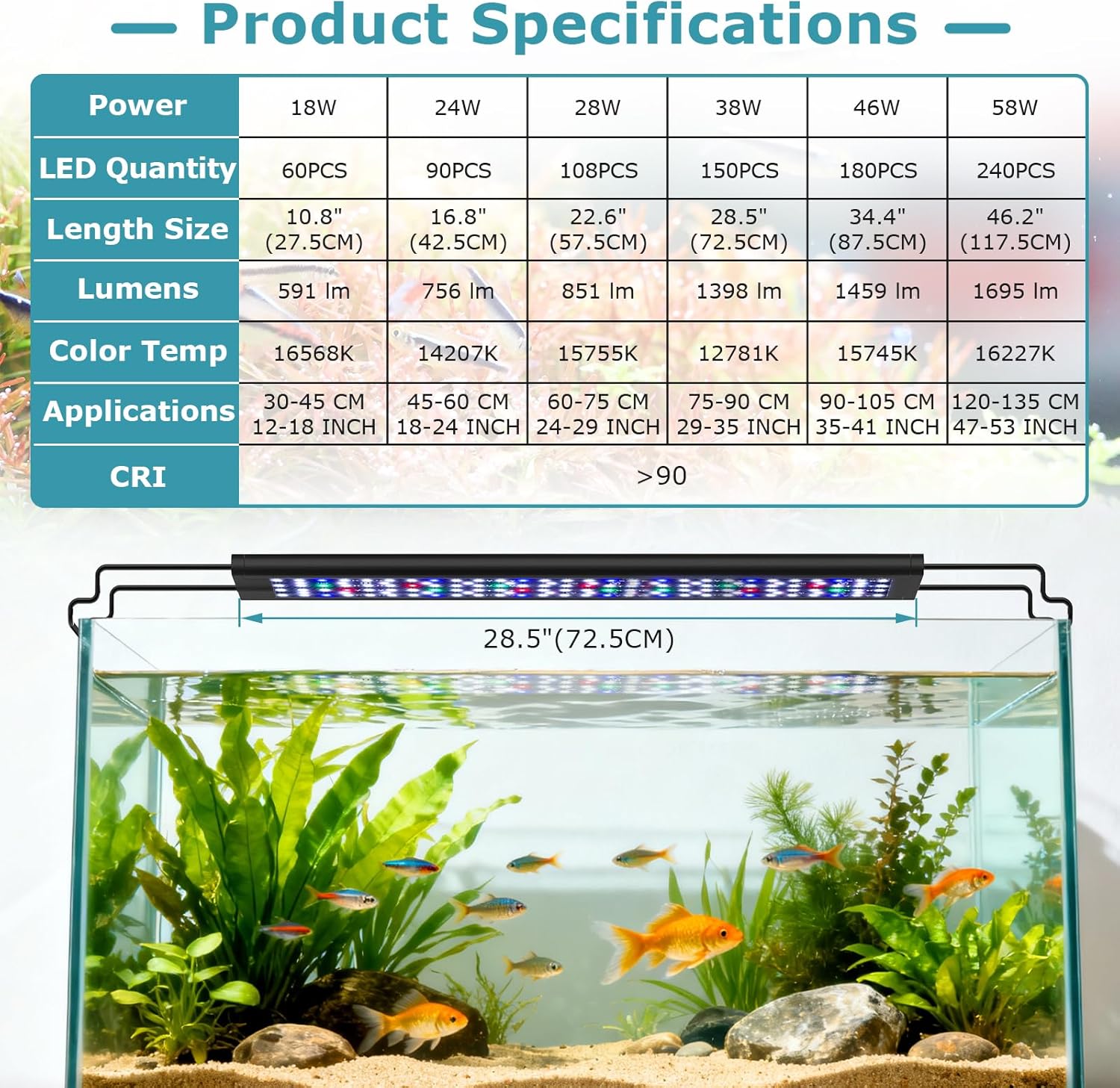
Image: Comprehensive product specifications table for different light sizes.

Image: Details on the 38W full spectrum and high rendering index (CRI >90).
9. Garanti ve Destek
This hygger LED Aquarium Light comes with a 2 yıllık üretici garantisiBu garanti, normal kullanım koşullarında malzeme ve işçilik hatalarını kapsar.
For warranty claims, technical support, or any questions regarding your product, please contact hygger customer service:
- Webalan: www.hygger-online.com (Lütfen resmi bilgileri kontrol edin) web(En güncel iletişim bilgileri için lütfen siteyi ziyaret edin.)
- E-posta: Ürün ambalajına veya resmi talimatlara bakın. webDestek e-postası için site.
Please have your model number (HG160) and proof of purchase ready when contacting support.