
1. Ürün Bittiview
The ANJIELO SMART Wired Video Door Phone Kit is a comprehensive apartment intercom system designed for home security and convenience. This system includes a 10-inch touch monitor, a 1080P doorbell camera, and supports RFID card unlocking. It integrates with the Tuya app for remote access and control.
Temel özellikler şunlardır:
- 10-Inch Touch Monitor: Responsive touch screen with hands-free operation and Wi-Fi connectivity for smartphone integration.
- 1080P Kapı Zili Kamerası: Outdoor unit with waterproof cover, infrared sensor, 148° wide-angle lens, night vision, and vandal-resistant design.
- 3-in-1 Unlocking System: Unlock via IC card, Tuya Smart App, or directly from the indoor monitor.
- Özelleştirilebilir Hareket Algılama: Define specific monitoring areas to reduce false alerts.
- Two-Way Audio & Multi-Device Alerts: Communicate with visitors from any linked monitor or smartphone and receive call alerts across devices.
- Kablolu Bağlantı: The indoor monitor and outdoor doorbell are connected via a 4-wire system for stable communication.
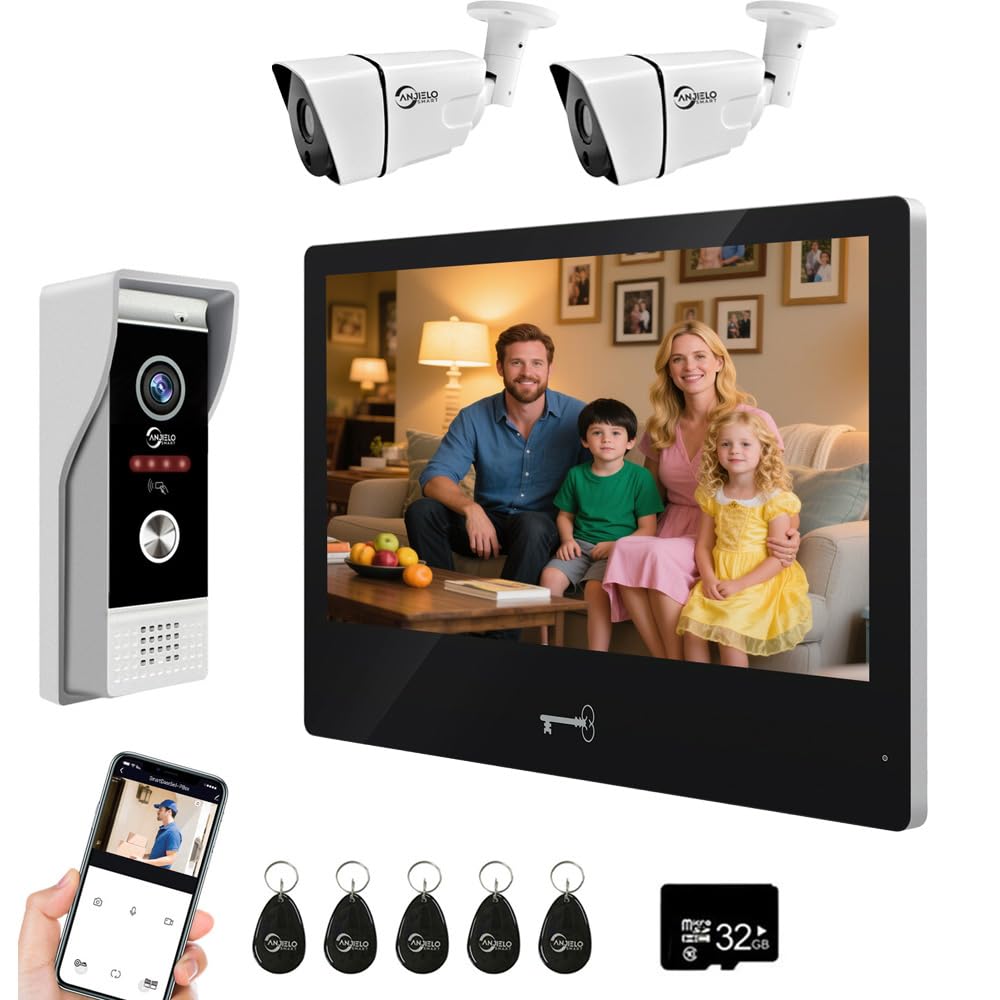
Image: Main components of the ANJIELO SMART Wired Video Door Phone Kit, showing the indoor monitor and outdoor doorbell unit.
2. Kutuda Neler Var?
Lütfen kutuyu açtığınızda paket içeriğini dikkatlice kontrol edin:
- Outdoor doorbell unit
- Dahili monitör ünitesi
- 1080P Camera (integrated into doorbell)
- ID Cards (5 included for unlocking)
- SD Kart (kayıt için)
- 3-meter 4-core cable (for doorbell connection)
- 1.2-meter external power supply (for monitor)
3. Kurulum ve Kurulum
3.1 Kablolama ve Bağlantı
The indoor monitor and outdoor doorbell are connected via a 4-wire system. Each doorbell includes a 3-meter 4-core cable for standard installation. The monitor requires a 1.2-meter external power supply. You can extend the distance between the monitor and doorbell, or between multiple monitors, using standard RVV4/Cat5/Cat6 wires. The maximum recommended distance is 300ft.
The main monitor connects to your home Wi-Fi network (2.4GHz band only) to enable real-time viewing of visitor information on your smartphone via the Tuya app. Note that while the monitor uses Wi-Fi for app connectivity, the primary connection between the monitor and doorbell is wired.

Image: Detailed wiring diagram illustrating the 4-wire connection between the indoor monitors, outdoor doorbell, and an electronic lock.
3.2 Montaj
Both the indoor monitor and outdoor doorbell are designed for surface mounting. Ensure you choose a suitable location for each component, considering wiring access and optimal camera view kapı zili için.
3.3 Güç Kaynağı
The indoor monitor operates on DC 12V, 2A, supplied by the included external power adapter. The outdoor doorbell unit receives its power directly from the indoor unit via the 4-wire connection.
4. Kullanım Talimatları
4.1 Indoor Touch Monitor
The 10-inch TFT-LCD touch screen monitor has a resolution of 1024x680. You can adjust the volume and color settings directly from the monitor interface. It features 7-chord melody rings for doorbell alerts.
4.2 Kapı Zili Kamerası
The outdoor doorbell camera provides 1080P video resolution with a 148° wide-angle lens. It includes infrared LEDs for night vision, ensuring clear visibility even in low-light conditions. The unit is built with a waterproof cover and is designed to be vandal-resistant.

Image: Comparison of day and night vision capabilities of the doorbell camera, demonstrating clear visibility in both conditions.
4.3 3-in-1 Unlocking System
The system offers three methods to unlock a connected 12V electronic lock:
- IC Kartı: Use one of the five included IC cards by tapping it on the doorbell unit.
- Tuya Akıllı Uygulaması: Remotely unlock the door using the Tuya app on your smartphone.
- İç Mekan Monitörü: Unlock directly from the indoor touch monitor interface.

Image: Visual representation of the three unlocking methods: App Remote Unlock, Monitor Unlock, and Card Unlock.
4.4 Hareket Algılama
To receive notifications when movement is detected, enable the Motion Detection feature in the monitor settings. By default, the entire camera field is monitored. You can customize the monitoring area by selecting specific grid squares on the screen. Transparent squares are excluded from detection, while colored squares are active.

Image: Screenshot of the monitor interface showing how to define the motion detection area by selecting grid squares.
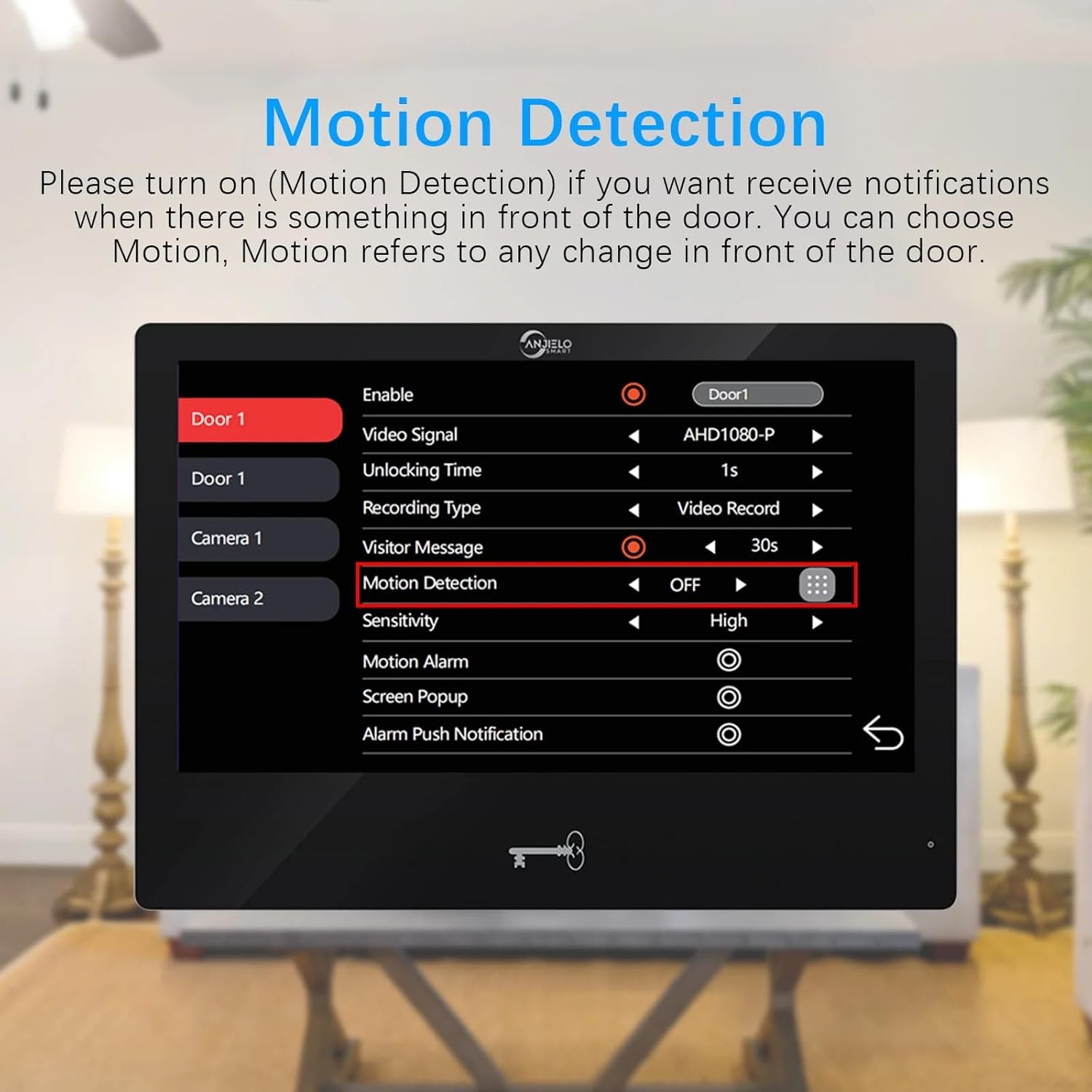
Image: Screenshot of the motion detection settings menu, showing options to enable/disable and adjust sensitivity.
4.5 Two-Way Audio and Multi-Device Alerts
When the doorbell rings, all linked indoor monitors and connected smartphones (via Tuya app) will receive the call. This allows you to see, hear, and speak to visitors from any location. You can also unlock the door directly from any monitor. The system supports internal audio communication and call forwarding between multiple indoor monitors.

Image: A user interacting with a visitor via the indoor monitor, demonstrating the two-way audio feature.
4.6 Kayıt Fonksiyonu
The system can record calls, visitor messages, motion detection events, and alarms. To utilize this function, an SD card must be inserted into the indoor monitor. You can review the log of recorded events directly on the monitor. Long-press a file to access delete options.
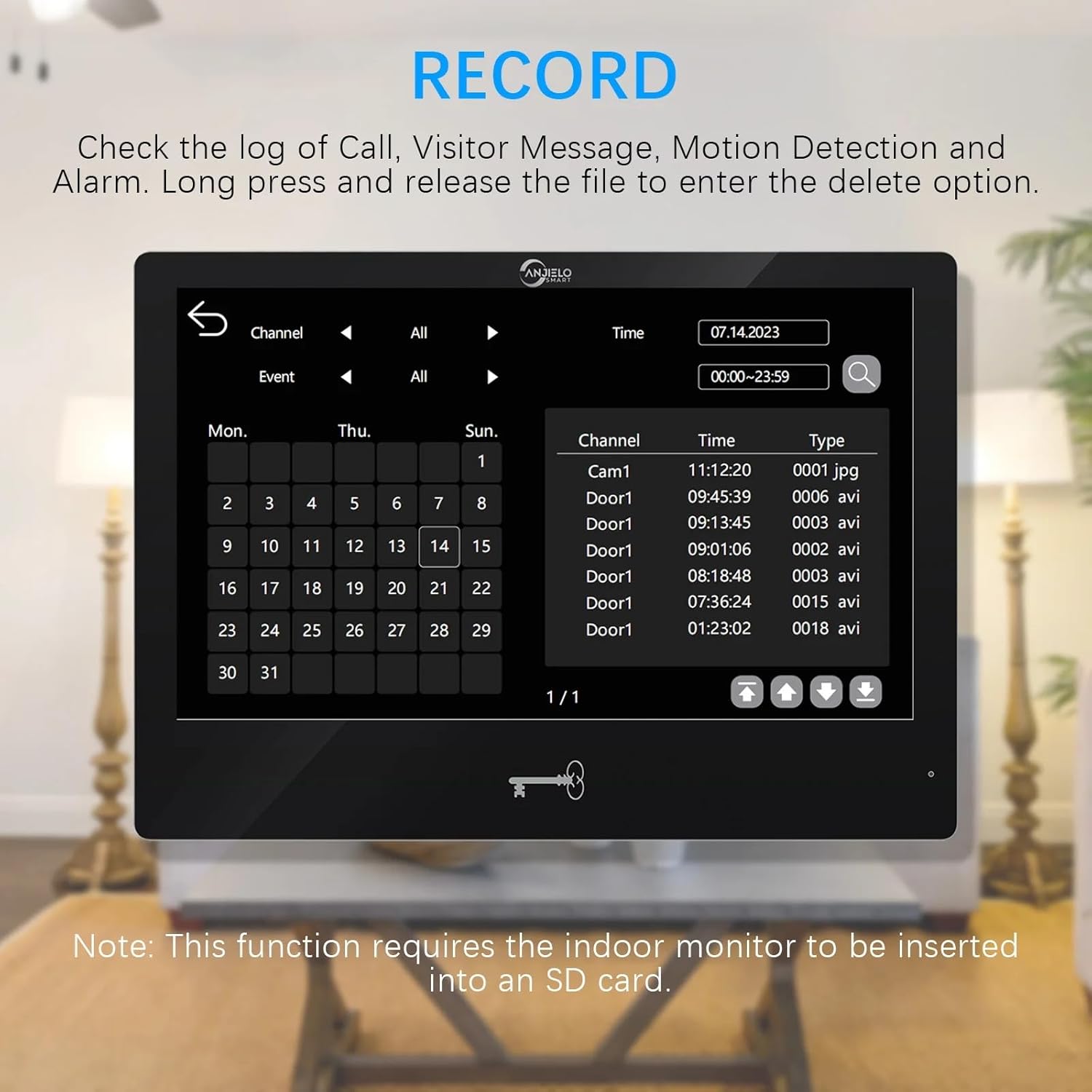
Image: Screenshot of the monitor displaying the recording log, showing dates, times, and types of recorded events.
5. Bakım
To ensure optimal performance and longevity of your ANJIELO SMART Video Door Phone Kit, follow these maintenance guidelines:
- Temizlik: Gently wipe the monitor screen and doorbell camera lens with a soft, dry, or slightly damp bez. Aşındırıcı temizleyiciler veya solventler kullanmaktan kaçının.
- Dış ünite: Periodically check the outdoor doorbell unit for any obstructions (e.g., dirt, spiderwebs) that might block the camera view veya mikrofon.
- Kablolama: Ensure all wired connections remain secure and free from damage.
- SD Kart Yönetimi: Düzenli olarak tekrarview and delete old recordings from the SD card to prevent it from becoming full, especially if continuous recording is enabled.
- Yazılım Güncellemeleri: Check the Tuya app or manufacturer's website for any available firmware updates for the system to ensure you have the latest features and security enhancements.
6. Sorun Giderme
If you encounter issues with your video door phone kit, refer to the following common troubleshooting steps:
- No Video/Audio from Doorbell:
- Check all 4-wire connections between the doorbell and the indoor monitor. Ensure they are securely connected and not damaged.
- Verify the indoor monitor is powered on and receiving power.
- Monitör Wi-Fi'ye Bağlanmıyor:
- Ensure your Wi-Fi router is operating on the 2.4GHz band. The monitor does not support 5GHz Wi-Fi.
- Check the Wi-Fi signal strength at the monitor's location.
- Restart your Wi-Fi router and the indoor monitor.
- Re-attempt the Wi-Fi setup process via the Tuya app.
- Unlocking Not Working:
- Ensure the electronic lock is properly connected to the doorbell unit (2-wire connection).
- Verify the electronic lock is a standard 12V type.
- If using an IC card, ensure it is correctly registered with the system and being tapped in the correct area on the doorbell.
- If using the Tuya app, ensure the app is connected to the monitor and the unlock command is being sent successfully.
- Hareket Algılama Tetiklenmiyor/Çok Fazla Yanlış Alarm:
- Check the motion detection settings on the monitor. Ensure it is enabled and the sensitivity is appropriately set.
- Adjust the customized monitoring area to exclude irrelevant zones (e.g., moving trees, busy street).
- SD kartta kayıt yok:
- Ensure an SD card is properly inserted into the indoor monitor.
- Check if the SD card is full. Delete old recordings if necessary.
- Verify that recording options (e.g., video record, snapshot) are enabled in the monitor settings.
7. Özellikler
| Bileşen | Şartname |
|---|---|
| Marka | ANJIELO AKILLI |
| Model Adı | 64202BC+65112-EX-B |
| Bağlantı Teknolojisi | Wired (Doorbell to Monitor), Wi-Fi (Monitor to App) |
| Önerilen Kullanımlar | İç/Dış Mekan |
| Kurulum Türü | Screw In (Surface Mount) |
| Kontrol Yöntemi | Uygulama, Dokunmatik |
| Uyarı Tipi | Ses ve Hareket |
| Güç Kaynağı | Kablolu Elektrik |
| Uyumlu Cihazlar | Smartphone (via Tuya App) |
| Dış Mekan Kapı Zili: | |
| Kamera Sensörü | 1 / 2.7 CMOS |
| Tanım | 1080P |
| Mercek | 3.2mm |
| View Açı | 148° |
| LEDs for Night Vision | IR LEDs (120°) |
| Güç Tüketimi | 200mA maksimum |
| Güç Kaynağı | İç üniteden beslenir |
| Çalışma Sıcaklığı | -40℃ ~ +50℃ |
| Boyut | 120mm * 33mm * 52mm |
| Indoor Touch Monitor: | |
| Ekran | 10 inch TFT-LCD touch screen |
| Çözünürlük | 1024x680 |
| Yüzükler | 7-chord melody rings |
| Bağlantı Yolu | 4-wires, WIFI TUYA solution |
| Panel Malzemesi | Acrylic/ABS cover |
| Giriş Voltage | AC 100-240V 50/60Hz |
| Çalışma Hacmitage | DC 12V, 2A |
| Boyut | 272mm x 170mm x 21mm (7.8 × 5.1 × 0.8 inches) |
8. Garanti ve Destek
For warranty information and technical support, please refer to the documentation provided with your purchase or contact ANJIELO SMART customer service directly. Keep your purchase receipt as proof of purchase for any warranty claims.