
giriiş
This manual provides detailed instructions for the setup, operation, and maintenance of your Tivoli Audio PAL BT (Gen 3) Portable Bluetooth FM Radio. Please read this manual thoroughly before using your device to ensure proper function and longevity.

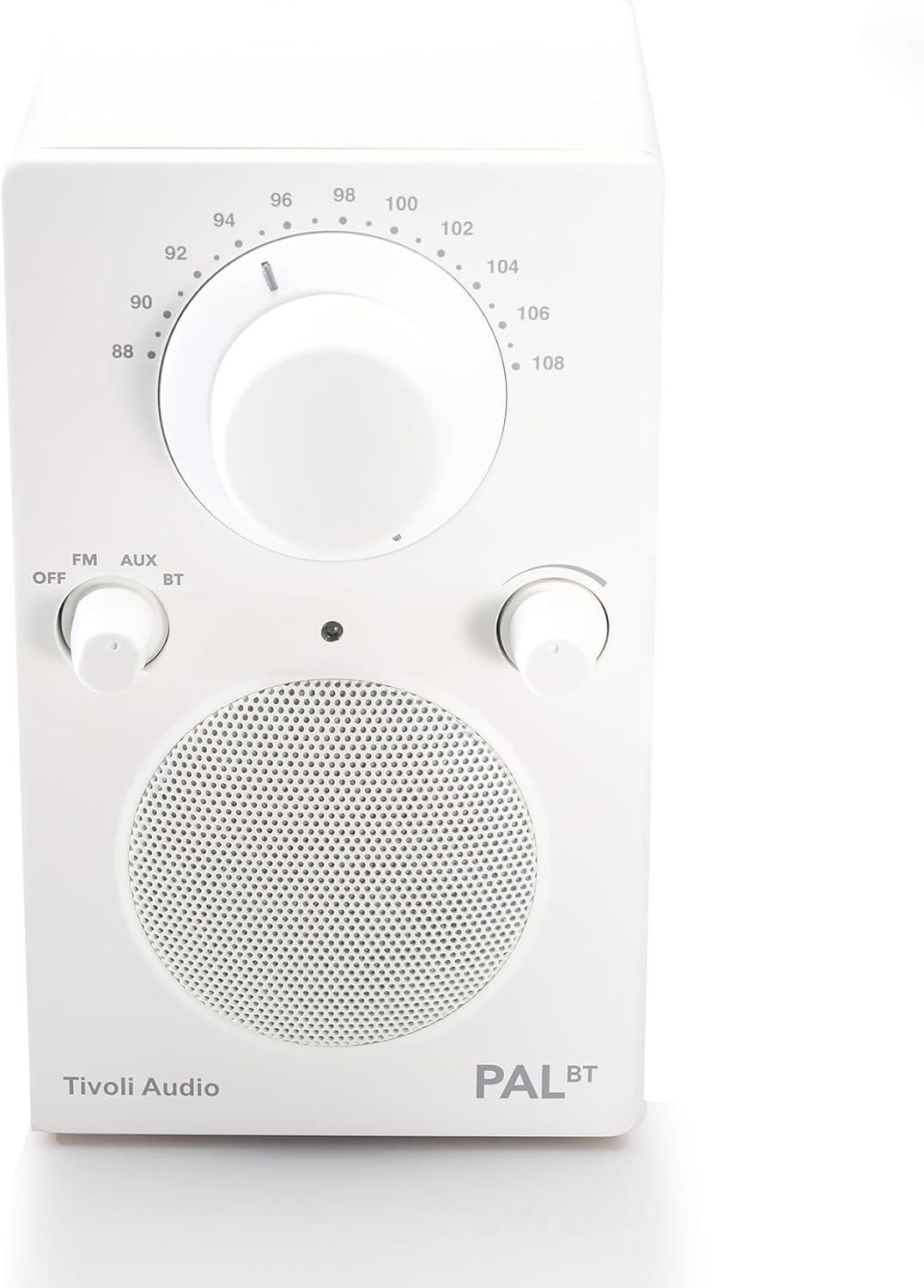
Image: The Tivoli Audio PAL BT (Gen 3) radio, showcasinkompakt tasarımı ve ön kontrolleri ile.
Paket İçeriği
Paketinizde tüm öğelerin mevcut olduğundan emin olun:
- Tivoli Audio PAL BT (Gen 3) Portable Bluetooth FM Radio
- USB-C Şarj Kablosu
- Kullanım Kılavuzu (bu belge)
Kurmak
1. Pilin Şarj Edilmesi
The PAL BT (Gen 3) features a built-in rechargeable battery. Before first use, fully charge the device.
- Locate the USB-C charging port on the back or side of the unit.
- Connect the provided USB-C cable to the radio and to a compatible USB power adapter (not included) or a powered USB port.
- The charging indicator light will illuminate. Allow several hours for a full charge. A full charge provides over 14 hours of playback.
Resim: Yan view of the Tivoli Audio PAL BT (Gen 3), illustrating its portable design and potential location for the USB-C charging port.
2. Açma/Kapama
Use the multi-function knob on the front of the unit to control power and source selection.
- To power on, rotate the knob from "OFF" to "FM", "AUX", or "BT".
- To power off, rotate the knob to "OFF".
Kullanım Talimatları
1. Kontroller Üzeriview
The PAL BT (Gen 3) features three main control knobs:
- Source/Power Knob: Selects between OFF, FM, AUX, and Bluetooth (BT) modes.
- Ayar Düğmesi: FM radyo frekansını ayarlar.
- Ses Düğmesi: Ses çıkış seviyesini kontrol eder.

Resim: Ön view of the PAL BT (Gen 3) highlighting the control knobs and FM frequency dial.
2. FM Radyonun Çalıştırılması
- Rotate the Source/Power knob to "FM".
- En iyi sinyal alımı için teleskopik anteni uzatın.
- Rotate the Tuning knob to select your desired FM station.
- Ses seviyesi düğmesini tercih ettiğiniz dinleme seviyesine ayarlayın.
3. Bluetooth (BT) Pairing
The PAL BT (Gen 3) uses Bluetooth 5.0 for wireless audio streaming.
- Rotate the Source/Power knob to "BT". The Bluetooth indicator light will begin to flash, indicating it is in pairing mode.
- Bluetooth özelliği olan cihazınızda (örneğin akıllı telefon, tablet) Bluetooth ayarlarına gidin ve Bluetooth'u etkinleştirin.
- Arama available devices. You should see "Tivoli PAL BT" or similar in the list.
- Select "Tivoli PAL BT" to connect. Once paired, the Bluetooth indicator light on the radio will glow solid.
- You can now stream audio from your device to the PAL BT (Gen 3).
4. Yardımcı Giriş
Yardımcı giriş kullanarak harici ses kaynaklarını bağlayın.
- Rotate the Source/Power knob to "AUX".
- Connect a 3.5mm audio cable (not included) from your external audio device's headphone jack or line-out to the AUX input port on the PAL BT (Gen 3).
- Harici cihazınızdan ses oynatın.
- Adjust the Volume knob on the PAL BT (Gen 3) and your external device for optimal sound.
5. Kulaklık Çıkışı
For private listening, connect headphones to the dedicated output.
- Plug a standard 3.5mm headphone jack into the headphone output port.
- The internal speaker will mute automatically.
- Adjust the Volume knob for comfortable listening.
Bakım
Temizlik
To maintain the appearance of your PAL BT (Gen 3):
- Temizlemeden önce mutlaka cihazın fişini çekin.
- Yüzeyleri silmek için yumuşak, kuru bir bez kullanın.
- Avoid using abrasive cleaners, solvents, or strong detergents, as these can damage the finish.
Pil Bakımı
Pil ömrünü en üst düzeye çıkarmak için:
- Pilin sık sık tamamen boşaltılmasından kaçının.
- If storing the unit for an extended period, charge it to approximately 50% every few months.
- Üniteyi aşırı sıcaklıklara maruz bırakmayın.
Hava Direnci
The PAL BT (Gen 3) is designed with a weather-resistant housing, making it suitable for outdoor use. However, it is not waterproof. Avoid submerging the unit in water or exposing it to heavy rain for prolonged periods.
Sorun giderme
| Sorun | Olası Neden | Çözüm |
|---|---|---|
| Güç yok | Battery discharged; Unit not turned on. | Charge the battery using the USB-C cable; Rotate the Source/Power knob to an active source (FM, AUX, BT). |
| Ses yok | Ses seviyesi çok düşük; Yanlış kaynak seçildi; Kulaklık bağlı. | Increase volume; Select correct source; Disconnect headphones. |
| Zayıf FM alımı | Anten uzatılmamış; Sinyal zayıf. | Teleskopik anteni tamamen açın; daha iyi sinyal almak için radyoyu yeniden konumlandırın. |
| Bluetooth eşleştirmiyor | Radio not in pairing mode; Device too far; Previously paired device connected. | Ensure radio is in BT mode and indicator is flashing; Move device closer; Disconnect from other devices or forget "Tivoli PAL BT" on your device and re-pair. |
Özellikler
- Model Numarası: PALBT3-3059-NA
- Bağlantı: Bluetooth 5.0, FM Tuner, Auxiliary Input
- Güç Kaynağı: Pille Çalışır (USB-C şarj)
- Pil Ömrü: Over 14 hours (playback)
- Boyutlar (U x G x Y): 3.6" x 4.5" x 6"
- Özel Özellikler: Portable, Weather-Resistant Housing
- Dahil Bileşenler: Kullanım Kılavuzu
Garanti Bilgileri
The Tivoli Audio PAL BT (Gen 3) comes with a 2 yıllık garanti from the date of purchase. This warranty covers manufacturing defects and workmanship under normal use. Please retain your proof of purchase for warranty claims. For full warranty terms and conditions, please visit the official Tivoli Audio website veya müşteri desteği ile iletişime geçin.
Müşteri Desteği
If you encounter any issues not covered in this manual or require further assistance, please contact Tivoli Audio customer support:
- Webalan: www.tivoliaudio.com/support
- E-posta: Refer to the Tivoli Audio webiletişim bilgileri için site.
- Telefon: Refer to the Tivoli Audio webiletişim bilgileri için site.
When contacting support, please have your product model number (PAL BT (Gen 3)) and purchase information ready.