
1. Üzeriview
The Xiaomi Redmi Note 15 Pro 5G is a high-performance smartphone designed for robust daily use. It features a massive 6580 mAh battery, IP66/IP68 dust and water resistance, a 200 MP camera, and a 6.83-inch 1.5K AMOLED display. This manual provides essential information for setting up, operating, and maintaining your device.

Resim: Çoklu views of the Xiaomi Redmi Note 15 Pro 5G smartphone, showcasinTasarımı ve kamera modülü.
2. Kutuda Neler Var?
Xiaomi Redmi Note 15 Pro 5G cihazınızın kutusunu açtığınızda aşağıdaki öğeleri bulmalısınız:
- Xiaomi Redmi Not 15 Pro 5G Akıllı Telefon
- USB Cable (USB Type-C)
- SIM Çıkarma Aleti
- Koruyucu Kılıf
- Holding Ring (Keyring)
Note: A power adapter is not included with this device.
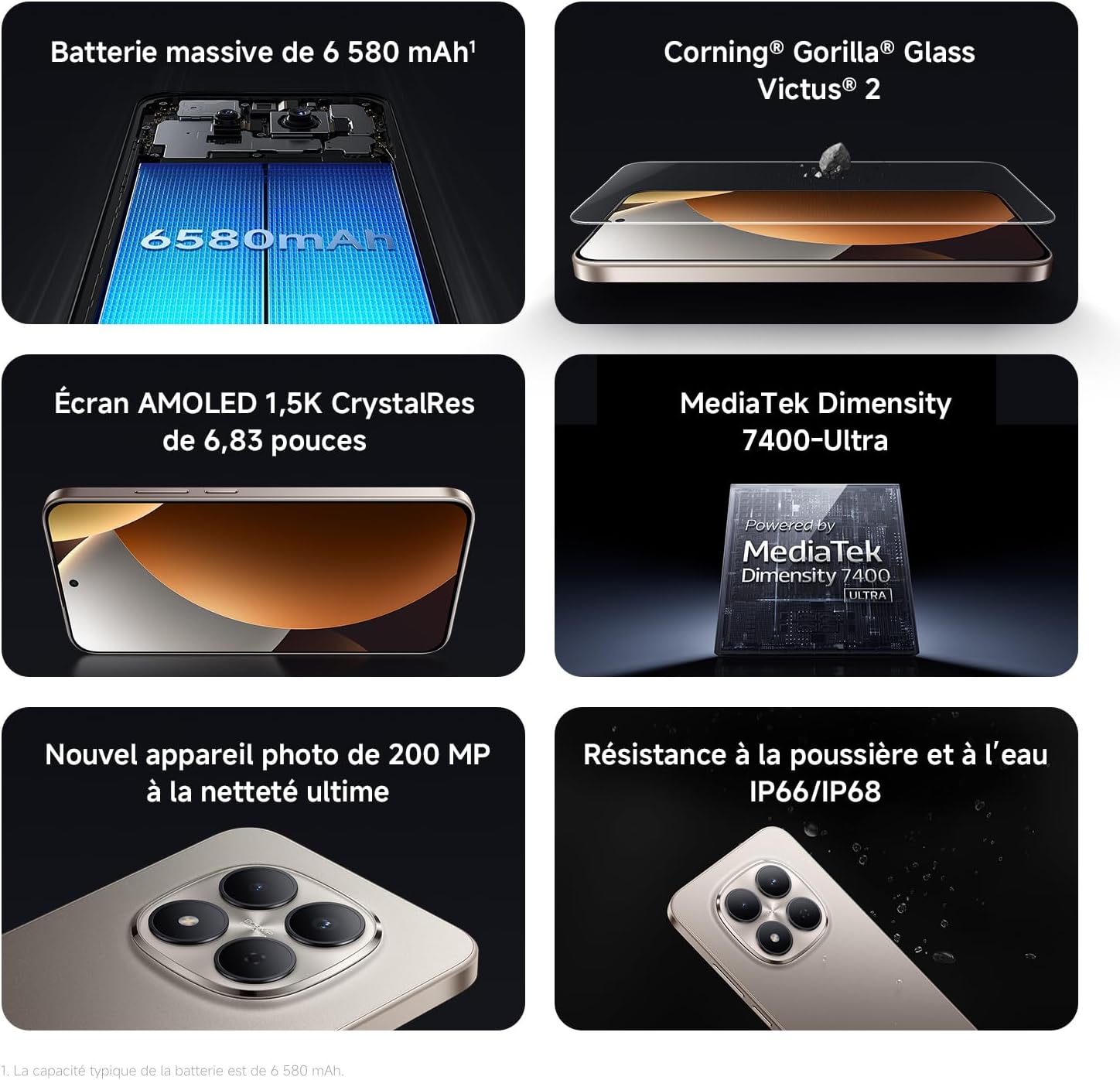
Image: Contents of the Xiaomi Redmi Note 15 Pro 5G box, showing the smartphone, USB-C cable, SIM ejection tool, protective case, and holding ring.
3. Temel Özellikler
- Massive 6580 mAh Battery with 45W Turbo Charging: Equipped with an ultra-large silicon-carbon battery for extended usage while maintaining a slim and light design. Supports 45W turbo charging and up to 22.5W reverse charging.
- IP66 / IP68 Dust and Water Resistance: The device has successfully passed 2-meter water resistance tests for 24 hours. It is designed to withstand daily splashes, accidental immersion, or drops in water without affecting performance.
- New 200 MP Ultra-Clear Camera System: Features a 4th generation 200 MP main sensor combined with a large 1/1.4-inch sensor, offering unprecedented image detail.
- Immersive 6.83-inch 1.5K Eye-Care AMOLED Display: Utilizes flagship-level luminous materials for reduced power consumption and a peak brightness of 3200 nits, ensuring clear visibility even in bright sunlight.
- Yapay Zeka Asistanı: Intelligent optimization with a single gesture, enhancing imaging capabilities and creative efficiency.
- Corning Gorilla Glass Victus 2: Reinforced front glass for enhanced shock and scratch resistance, ensuring long-term durability.
- MediaTek Dimensity 7400-Ultra Processor: Built on a 4nm TSMC process with an octa-core architecture up to 2.6 GHz, providing powerful multitasking, smooth gaming, and stable performance.
- Xiaomi HyperOS 2: Offers a faster, smarter, and smoother user experience with 6 years of security updates.

Image: Diagram illustrating the 6580 mAh battery capacity of the Redmi Note 15 Pro 5G.

Image: The Redmi Note 15 Pro 5G with water droplets, demonstrating its IP66/IP68 dust and water resistance.

Resim: Yakın çekim view of the 200 MP camera module on the Redmi Note 15 Pro 5G.

Image: The 6.83-inch 1.5K AMOLED display of the Redmi Note 15 Pro 5G with its specifications.

Image: Before and after images demonstrating AI photo optimization on the Redmi Note 15 Pro 5G.

Image: Illustration of Corning Gorilla Glass Victus 2 durability on the Redmi Note 15 Pro 5G.

Image: Technical image showing RAM chips, indicating up to 24GB RAM with memory extension on the Redmi Note 15 Pro 5G.

Image: Screenshot of the Xiaomi HyperOS 2 interface on the Redmi Note 15 Pro 5G.
4. Kurulum
4.1. SIM Kartın Takılması
- Cihazınızın yan tarafında bulunan SIM kart tepsisini bulun.
- Insert the SIM ejection tool into the small hole next to the tray and press firmly until the tray pops out.
- Nano-SIM kartlarınızı altın renkli kontaklar aşağı bakacak şekilde tepsiye yerleştirin. Doğru hizalandıklarından emin olun.
- Carefully push the SIM card tray back into the device until it clicks into place.
4.2. İlk Güç Açma ve Kurulum
- Güç tuşuna (genellikle sağ tarafta bulunur) Xiaomi logosu görünene kadar basılı tutun.
- Dilinizi, bölgenizi seçmek ve bir Wi-Fi ağına bağlanmak için ekrandaki talimatları izleyin.
- Google hizmetlerine ve Play Store'a erişmek için Google hesabınızla oturum açın veya yeni bir hesap oluşturun.
- Set up your screen lock (PIN, pattern, password, fingerprint, or face unlock) for security.
- Review Kurulum işlemini tamamlamak için şartlar ve koşulları kabul edin.
5. Kullanım Talimatları
5.1. Temel Gezinme
- Ana Ekran: Ana ekranlar arasında gezinmek için sola veya sağa kaydırın.
- Uygulama Çekmecesi: Yüklü tüm uygulamalara erişmek için ekranın altından yukarı doğru kaydırın.
- Bildirimler ve Hızlı Ayarlar: için ekranın üst kısmından aşağı doğru kaydırın. view bildirimler ve hızlı ayarlara erişim geçişleri.
- Son Uygulamalar: Swipe up from the bottom and hold, or tap the square navigation button (if enabled) to see recently used applications.
5.2. Kamera Kullanımı
The 200 MP camera system offers various modes for capturing photos and videos.
- Ana ekranınızdan veya uygulama çekmecenizden Kamera uygulamasını açın.
- Swipe left or right on the screen to switch between modes like Photo, Video, Portrait, Pro, and more.
- Fotoğraf çekmek için deklanşöre, video kaydını başlatmak/durdurmak için kayıt düğmesine dokunun.
- Use the zoom options (e.g., 0.6x, 1x, 2x) or pinch to zoom for different perspectives.
- Access settings (gear icon) for advanced options like resolution, aspect ratio, and AI enhancements.

Image: A hand holding the Redmi Note 15 Pro 5G, displaying the camera interface with various modes and controls.
5.3. Ekran Ayarları
Ekranınızı en iyi şekilde özelleştirin. viewve rahatlık.
- Git Ayarlar > Ekran.
- Adjust brightness, enable Adaptive brightness, or activate Reading mode for eye comfort.
- Change the Refresh rate (up to 120Hz) for smoother scrolling and animations.
- Select Color scheme and adjust color temperature to your preference.
5.4. Pil Yönetimi
Optimize your battery life and utilize charging features.
- Erişim Ayarlar > Pil ile view usage statistics and enable Battery Saver modes.
- Use the provided USB Type-C cable with a compatible 45W charger for turbo charging.
- To use reverse charging, connect a compatible device to your smartphone via a USB-C to USB-C cable.
6. Medya Entegrasyonu
6.1. Ürün Bittiview Video
Video: A seller-provided overview of the Redmi Note 15 Pro, showcasing its design, interface, and camera features. This video highlights the device's smooth operation and aesthetic appeal.
7. Bakım
7.1. Cihazınızı Temizleme
- Telefonunuzun ekranını ve gövdesini temizlemek için yumuşak, tüy bırakmayan bir bez kullanın.
- Sert kimyasallar veya aşındırıcı malzemeler kullanmaktan kaçının.
- For speaker and port cleaning, the device features a function to expel water and dust. Access this feature through the settings or a dedicated app.

Image: Screenshot of the Redmi Note 15 Pro 5G showing a speaker cleaning function on the screen, which uses high-frequency vibration to expel residual water and dust.
7.2. Yazılım Güncellemeleri
En iyi performansı, güvenliği ve yeni özelliklere erişimi sağlamak için yazılım güncellemelerini düzenli olarak kontrol edin ve yükleyin.
- Git Ayarlar > Telefon hakkında > MIUI sürümü (or HyperOS version) to check for updates.
8. Sorun Giderme
8.1. Cihaz Yanıt Vermiyor
- Yeniden başlatmayı zorlamak için Güç düğmesini yaklaşık 10-15 saniye basılı tutun.
- If the issue persists, ensure the device is charged. Connect it to a charger and wait a few minutes before attempting to power it on again.
8.2. Ağ Bağlantı Sorunları
- Toggle Airplane mode on and off from Quick Settings.
- Cihazınızı yeniden başlatın.
- SIM kartınızın doğru şekilde takılıp takılmadığını kontrol edin.
- Git Ayarlar > SIM kartlar ve mobil ağlar to ensure your mobile data is enabled and the correct network type is selected.
8.3. Uygulamaların Çökmesi veya Donması
- Sorunlu uygulamanın önbelleğini ve verilerini temizleyin (Ayarlar > Uygulamalar > Uygulamaları yönet > [Uygulama Adı] > Verileri temizle).
- Uygulamayı kaldırıp yeniden yükleyin.
- Cihazınızın yazılımının güncel olduğundan emin olun.
8.4. Fabrika Ayarlarına Sıfırlama
Eğer kalıcı sorunlarla karşılaşırsanız fabrika ayarlarına sıfırlama yapmanız gerekebilir. Uyarı: Bu işlem cihazınızdaki tüm verileri silecektir. Devam etmeden önce önemli verilerinizi yedekleyin.
- Git Ayarlar > Telefon hakkında > Fabrika ayarlarına sıfırlama.
- Sıfırlamayı onaylamak için ekrandaki talimatları izleyin.
9. Özellikler
| Özellik | Detay |
|---|---|
| Marka | XIAOMI |
| Model Adı | Redmi Note 15 Pro 5G |
| İşletim Sistemi | Hyper OS |
| Veri deposu | 12 GB |
| Depolama Kapasitesi | 512 GB |
| CPU Modeli | Mediatek Boyut 7400 |
| Ekran Boyutu | 6.83 inç |
| Ekran Çözünürlüğü | 1560x720 |
| Yenileme Hızı | 120 Hz |
| Görüntü Türü | AMOLED |
| Kablosuz Taşıyıcı | Kilidi Açıldı |
| Renk | Siyah |
| SIM Kart Yuvaları | Çift SIM |
| giriş Arabirim | USB Tip C |
| Su Direnç Seviyesi | Waterproof (IP66/IP68) |
| Ön Kamera Çözünürlüğü | 20 MP |
| Arka Kamera Çözünürlüğü | 200 Megapiksel |
| Pil Kapasitesi | 6580 mAh |
| Hücresel Teknoloji | 5G |
| Bağlantı Teknolojisi | Bluetooth, NFC, USB, Wi-Fi |
| Model Yılı | 2026 |

Image: Technical specifications and feature legends for the Redmi Note 15 Pro 5G.
10. Garanti ve Destek
Your Xiaomi Redmi Note 15 Pro 5G comes with a 2 yıllık üretici garantisiBu garanti, normal kullanım koşullarında malzeme ve işçilik hatalarını kapsar.
For warranty claims, technical support, or service inquiries, please contact Xiaomi customer service or visit the official Xiaomi support webSite. Garanti geçerliliği için satın alma belgenizi saklayın.