
1. Kurulum
1.1 Paket İçeriği
- AULA MINI60 HE PRO Keyboard
- USB-C Kablosu
- Tuş Çektirmesi
- Kullanım Kılavuzu (bu belge)
1.2 Bağlantı Seçenekleri
The AULA MINI60 HE PRO supports three connection modes: Bluetooth 5.0, 2.4GHz wireless, and USB-C wired. Use the switch on the keyboard to select your preferred mode.

Image: Tri-mode connectivity options for the AULA MINI60 HE PRO keyboard.
USB-C Kablolu Bağlantı:
- Verilen USB-C kablosunu klavyenin USB-C portuna bağlayın.
- Kablonun diğer ucunu bilgisayarınızdaki boş bir USB portuna takın.
- Ensure the mode switch on the keyboard is set to 'Wired' or 'USB-C'.
2.4GHz Kablosuz Bağlantı:
- 2.4GHz USB dongle'ı bilgisayarınızdaki kullanılabilir bir USB portuna takın.
- Klavyedeki mod anahtarının '2.4G' konumuna ayarlandığından emin olun.
- Klavyenin otomatik olarak bağlanması gerekir. Bağlanmazsa, sorun giderme bölümüne bakın.
Bluetooth 5.0 Bağlantısı:
- Ensure the mode switch on the keyboard is set to 'BT'.
- Cihazınızda (PC, Mac, tablet, akıllı telefon) Bluetooth'u etkinleştirin ve yeni cihazları arayın.
- Select 'AULA MINI60 HE PRO' from the list of available devices to pair.
1.3 Klavyeyi Şarj Etme
The keyboard is equipped with a 4000mAh battery. Connect the USB-C cable to the keyboard and a power source (e.g., computer USB port, USB wall adapter) to charge. The RGB lighting may indicate charging status.
1.4 Web-Sürücü Tabanlı Kurulum
The AULA MINI60 HE PRO utilizes a web-based driver for customization. This eliminates the need for software downloads and ensures compatibility across various operating systems (Windows, macOS, Linux).
- Bir tane aç web bağlı cihazınızdaki tarayıcı.
- Navigate to the official AULA web driver portal (refer to product packaging or official webtam olarak site URL).
- The interface allows for key remapping, macro creation, RGB lighting customization, and performance adjustments.
Resim: Web-based driver interface for keyboard customization.
2. Kullanım Talimatları
2.1 Temel Özellikler
Hall Etkili Manyetik Anahtarlar:
The keyboard features advanced Hall Effect magnetic switches, providing precise and consistent actuation. These switches offer adjustable actuation points and rapid trigger mode for enhanced responsiveness.
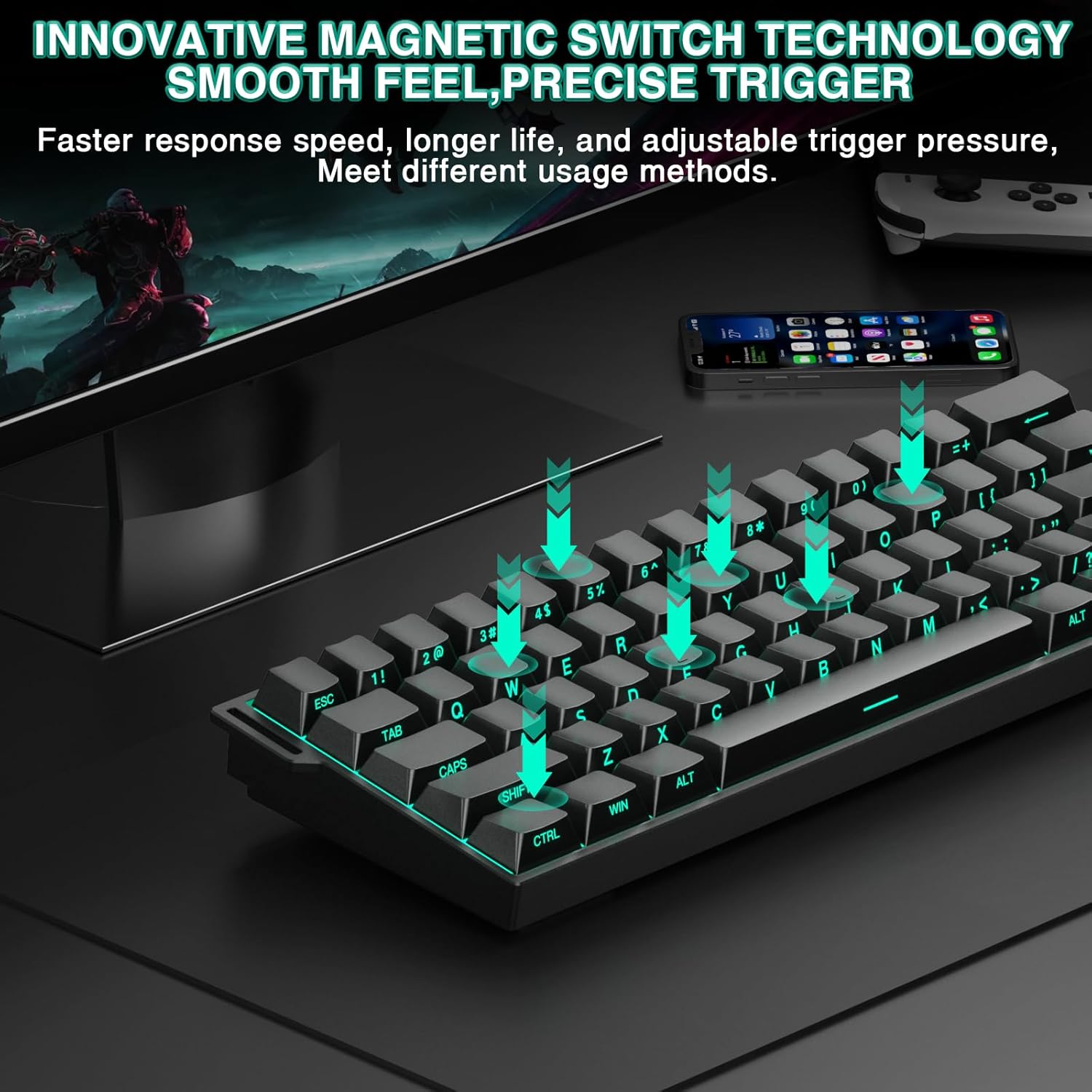
Image: Illustration of magnetic switch technology.
Adjustable Actuation & Rapid Trigger Mode:
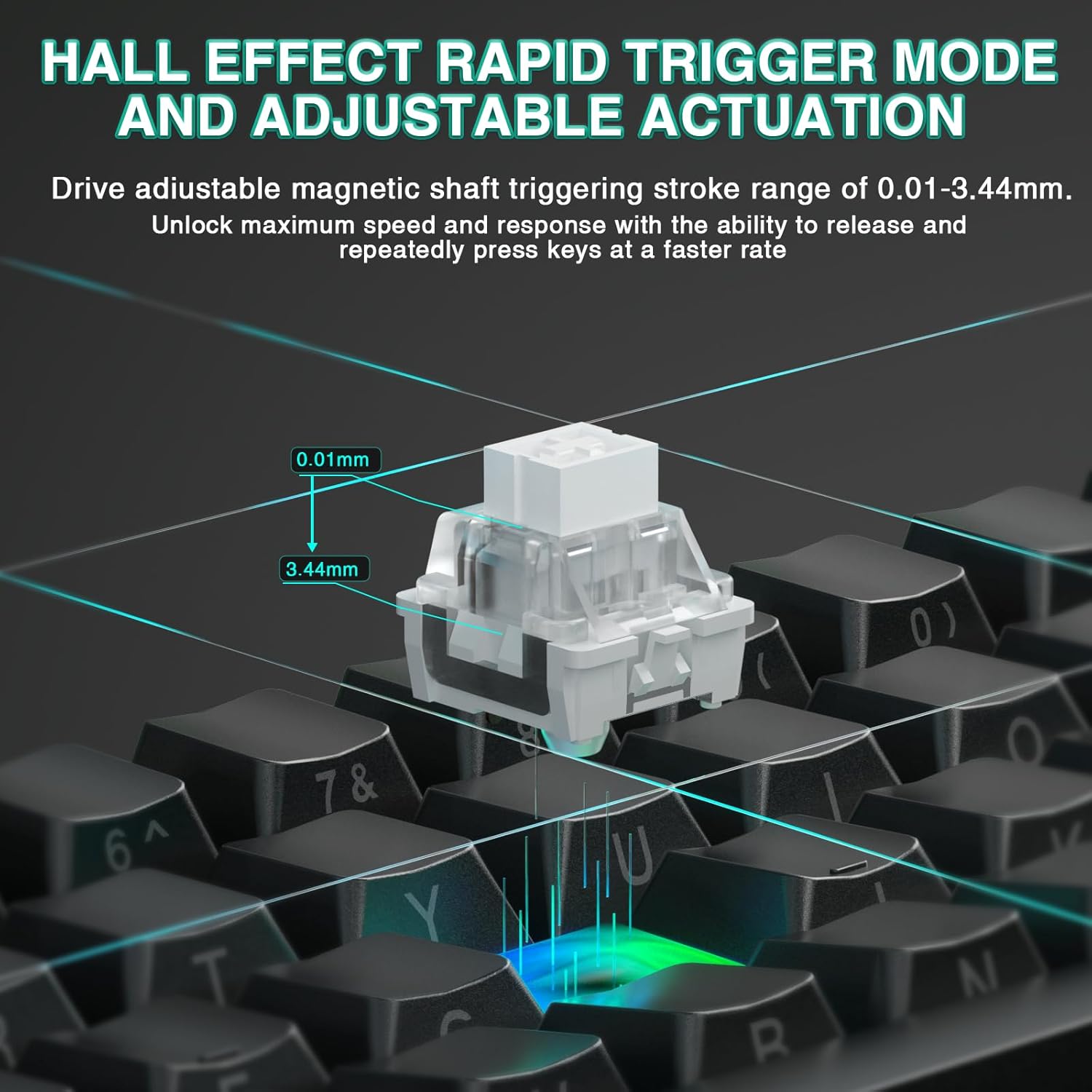
Customize the actuation distance of each key from 0.01mm to 3.44mm using the web driver. Rapid Trigger mode allows keys to reactivate instantly upon reset, enabling faster repeated inputs. The ultra-low RT step distance of 0.01mm ensures quick response times.

Image: Hall Effect magnetic switch with adjustable actuation.
8000 Hz Yoklama Hızı:
The keyboard supports an 8000 Hz polling rate, providing ultra-fast response times and minimal input lag for competitive gaming.
%60 Kompakt Tasarım:
The MINI60 HE PRO features a compact 60% layout, optimizing desk space while retaining essential functionality. This design is suitable for various uses, including gaming, work, and travel.

Image: The 60% compact design of the keyboard.
2.2 Dinamik RGB Aydınlatma
The keyboard offers 19 RGB backlight effects and 16.8 million customizable colors. The lower light position design illuminates side-printed PBT keycaps.
RGB Control Shortcuts:
- FN + Boşluk: Turn RGB lighting ON/OFF.
- FN + [: Aydınlatma hızını azaltın.
- FN + ]: Aydınlatma hızını artırın.
- FN + Alt (Right): Switch lighting effect mode.
- FN + Ctrl (Sağ): Switch lighting effect color.
- FN + Yukarı Ok: Increase light brightness.
- FN + Aşağı Ok: Decrease light brightness.
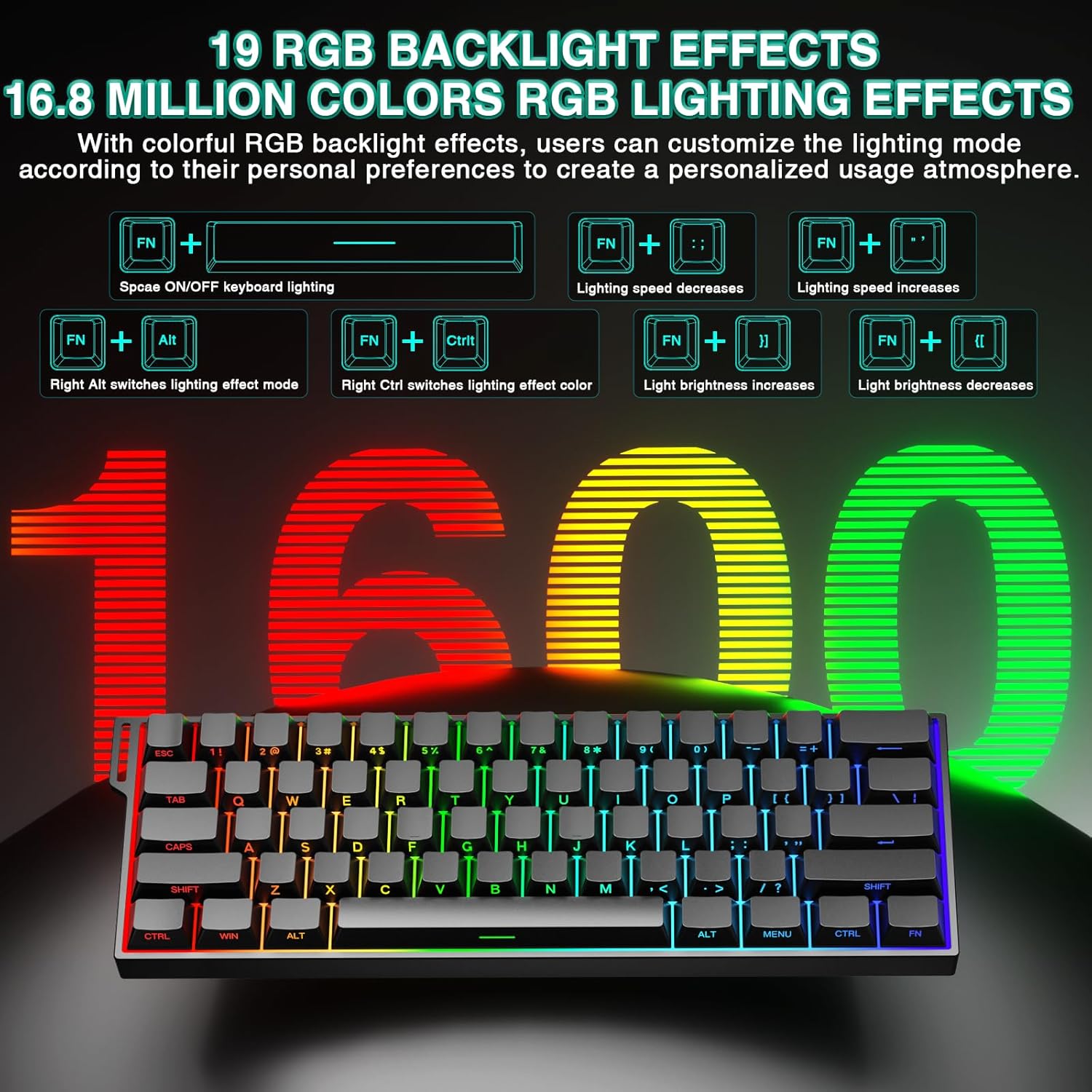
Image: RGB lighting effects and control shortcuts.
2.3 Çalışırken Değiştirilebilir Tasarım
The keyboard features full-key hot-swappable sockets, allowing for easy replacement of switches without soldering. This enables customization with most 2-pin magnetic switches on the market.
2.4 Ses-Dampening Padding
Internal sound-dampening foam and other layers are integrated to reduce switch noise and improve the acoustic profile klavyenin.
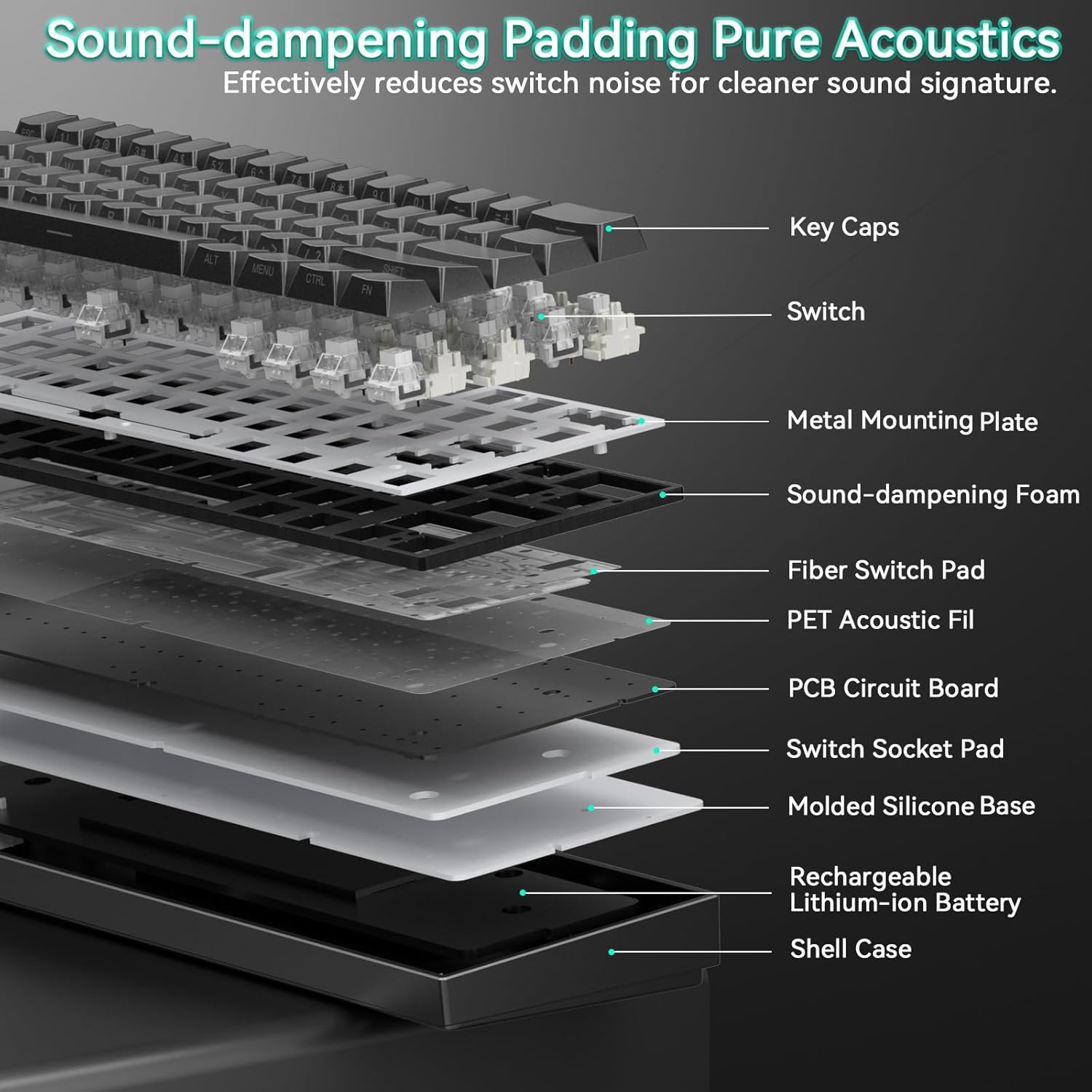
Image: Internal structure showing sound-dampkatmanları oluşturuyor.
2.5 Ürün Üzeriview Video
Video: Bir fazlaview of the AULA Mini60 HE Gaming Keyboard, highlighting its Hall Effect Magnetic Switches and various features. This video is provided by CORBOBO Direct.
3. Bakım
3.1 Klavyeyi Temizleme
En iyi performansı ve görünümünü korumak için klavyenizi düzenli olarak temizleyin:
- Temizlemeden önce klavyeyi tüm güç kaynaklarından ayırın.
- Yumuşak, tiftiksiz bir bez kullanın ve hafifçe kurulayın.ampened with water or a mild cleaning solution to wipe the keycaps and chassis. Avoid excessive moisture.
- Tuş başlıkları arasındaki toz ve kalıntıları temizlemek için basınçlı hava kullanın.
- Do not use harsh chemicals, abrasives, or solvents, as these may damage the keyboard's finish or keycap legends.
3.2 Tuş Takımı ve Anahtar Değişimi
The hot-swappable design allows for easy replacement of keycaps and switches.
- Use the provided keycap puller to gently remove keycaps. Grip the keycap firmly and pull straight up.
- Once the keycap is removed, use a switch puller (not included, but commonly available) to carefully extract the switch from its socket.
- Align the pins of the new switch with the holes in the PCB socket and press down gently until it clicks into place. Ensure the switch is seated correctly to avoid bending pins.
- Place the desired keycap onto the new switch stem and press down firmly.
4. Sorun Giderme
4.1 Klavye Yanıt Vermiyor
- Bağlantıyı kontrol et: Ensure the keyboard is properly connected via USB-C, 2.4GHz dongle, or Bluetooth. Verify the mode switch is set correctly.
- Pil Seviyesi: If using wireless modes, check the battery level. Connect the keyboard via USB-C to charge.
- Cihazı Yeniden Başlat: Bilgisayarınızı veya cihazınızı yeniden başlatmayı deneyin.
- Driver/Software: Erişim web-based driver to ensure no conflicting settings or profile'ler aktif.
4.2 RGB Aydınlatma Sorunları
- Parlaklık/Mod: Use the FN key combinations (FN + Space, FN + Up/Down Arrow, FN + Right Alt, FN + Right Ctrl) to adjust brightness and switch lighting modes/colors.
- Web Sürücü: Customize lighting effects and settings through the web-tabanlı sürücü.
4.3 Anahtarların Kaydedilmemesi veya Çift Yazılması
- Anahtar Kontrolü: If a specific key is affected, gently remove the keycap and inspect the switch for any visible damage or debris. Consider replacing the switch if it's faulty.
- Actuation Settings: İçinde web driver, check the actuation distance settings. Extremely low actuation points might cause unintended triggers.
- Yazılım güncellemesi: Kontrol et web driver for any available firmware updates for the keyboard.
5. Özellikler
| Özellik | Detay |
|---|---|
| Model Numarası | MINI60 HE |
| Marka | ÇORBOBO |
| Bağlantı Teknolojisi | 2.4G Kablosuz, Bluetooth 5.0, USB-C Kablolu |
| Klavye Açıklaması | Hall Effect Keyboard, Magnetic Switch Rapid Trigger Mechanical Gaming Keyboard Wireless |
| Özel Özellikler | Hall Effect Keyboard, Hot-Swappable, Magnetic Switch Keyboard, Rapid Trigger Keyboard, Side-Printed PBT Keycaps, RGB Backlit |
| Uyumlu Cihazlar | Oyun Konsolu, Dizüstü Bilgisayar, PC, Akıllı Telefon, Tablet |
| Klavye Arka Aydınlatma Renk Desteği | RGB (16.8 milyon renk) |
| Malzeme | Plastik |
| Ürün Ağırlığı | 2.38 pound |
| Paket Boyutları | 13.54 x 6.69 x 2.24 inç |
| Piller | 1 x 9V pil (dahil) |
| Üretici | AULA |
6. Garanti ve Destek
6.1 Garanti Bilgileri
Please refer to the product packaging or the official CORBOBO website for detailed warranty terms and conditions. Typically, products come with a limited manufacturer's warranty covering defects in materials and workmanship.
6.2 Müşteri Desteği
For technical assistance, troubleshooting, or warranty claims, please contact CORBOBO customer support through their official website or the retailer where the product was purchased. Keep your proof of purchase handy when contacting support.