
giriiş
This manual provides essential information for the safe and efficient use of your Motorola Edge 70 smartphone. Please read it carefully before using your device. Keep this manual for future reference.
The Motorola Edge 70 is a high-performance smartphone featuring a 6.67-inch Super HD 120Hz AMOLED display, a triple 50MP camera system with flicker sensor, a 50MP selfie camera, a 4800mAh Silicon-Carbon battery with 68W TurboPower charging, and runs on Android 16 with Moto AI enhancements. It boasts a slim 5.99mm design, military-grade durability, and IP68/IP69 water and dust resistance.
Kutuda Neler Var?
Ürün ambalajınızda tüm öğelerin mevcut olduğundan emin olun:
- Motorola Edge 70 Akıllı Telefon
- USB Kablosu (Tip-C)
- Telefon Kılıfı
- SIM İtici Aracı
Note: A power adapter is not always included and may need to be purchased separately. For optimal charging, use a 68W TurboPower charger.
Kurmak
1. SIM Kartın Takılması
- Cihazınızın yan tarafında bulunan SIM kart tepsisini bulun.
- SIM kart çıkarma aracını tepsinin yanındaki küçük deliğe yerleştirin ve tepsi dışarı çıkana kadar sıkıca bastırın.
- Place your Nano-SIM card(s) into the tray with the gold contacts facing down. Ensure they are correctly seated. The Motorola Edge 70 supports Dual SIM.
- Tepsiyi cihazla aynı hizaya gelene kadar dikkatlice yuvaya geri itin.
2. İlk Güç Açma ve Yapılandırma
- Motorola logosu görünene kadar Güç düğmesini (yan tarafta bulunur) basılı tutun.
- Dilinizi seçmek, bir Wi-Fi ağına bağlanmak ve Google hesabınızla oturum açmak için ekrandaki talimatları izleyin.
- You will be guided through setting up security features such as fingerprint recognition and a screen lock (PIN, pattern, or password).
- Transfer data from your old device if prompted, or set up as a new device.
Kullanım Talimatları
Ekran ve Gezinme
The Motorola Edge 70 features a vibrant 6.67-inch AMOLED Extreme display with a 120Hz refresh rate, offering smooth visuals and incredible contrast. The display has a resolution of 2712 x 1220 pixels and a peak brightness of 4500 nits for excellent visibility even in bright sunlight.

Açık bir view of the Motorola Edge 70, highlighting its expansive 6.67-inch pOLED display with vivid colors and sharp details, ideal for an immersive visual experience.
Navigate your device using intuitive touchscreen gestures. Swipe up from the bottom to access the app drawer, swipe down from the top for notifications and quick settings, and use gestures or navigation buttons for home, back, and recent apps.
Kamera Özellikleri
Capture stunning photos and videos with the Motorola Edge 70's advanced camera system. It includes a triple 50MP rear camera setup with a flicker sensor and a 50MP front-facing camera.
- Ana Kamera: 50MP sensor with Optical Image Stabilization (OIS) for clear shots, even in low light.
- Ultra-wide & Macro Vision: A versatile lens for capturing expansive landscapes or detailed close-ups.
- Ön Kamera: 50MP for high-resolution selfies and 4K video recording.

The image focuses on the Motorola Edge 70's advanced camera setup, featuring three 50MP lenses, Optical Image Stabilization (OIS) for the main sensor, 4K video recording for the front camera, and versatile ultra-wide and macro vision options.
The camera software includes Moto AI for enhanced photo optimization, improving details, contrast, and sharpness. It also supports HDR video recording for richer colors and dynamic range.
Pil ve Şarj
The device is equipped with a 4800mAh Silicon-Carbon battery, designed for extended usage. It supports 68W TurboPower fast charging, allowing for quick recharges. Additionally, 15W wireless charging is supported.

This visual representation details the Motorola Edge 70's battery capabilities, including an estimated 50 hours of usage, the 4800mAh Silicon-Carbon battery, and support for 68W TurboPower wired charging and 15W wireless charging.
To charge, connect the provided USB-C cable to the phone's charging port and to a compatible power adapter. For wireless charging, place the device on a compatible wireless charging pad.
Performans ve Depolama
Powered by the Snapdragon 7 Gen 4 processor, the Motorola Edge 70 delivers fast and efficient performance for all your tasks. It comes with 12GB of RAM and 512GB of internal storage, providing ampUygulamalar, fotoğraflar ve videolar için alan.

Bu görüntü genel bir bakış sunmaktadır.view of the Motorola Edge 70's powerful internal hardware, including the Snapdragon 7 Gen 4 processor for efficient performance, and details on its 12GB RAM (expandable to 24GB) and 512GB of internal storage.
Moto Yapay Zeka Özellikleri
Moto AI integrates intelligent features to simplify daily tasks and enhance user experience. This includes smart photo organization, notification management, and generative AI capabilities for creative tasks.

This image illustrates the intuitive Moto AI features on the Motorola Edge 70, showcasing how it simplifies daily tasks such as organizing photos, managing notifications, and utilizing generative AI for creative purposes.
Bakım
- Temizlik: Cihazınızın ekranını ve gövdesini temizlemek için yumuşak, tiftiksiz bir bez kullanın. Aşındırıcı malzemelerden veya sert kimyasallardan kaçının.
- Yazılım Güncellemeleri: En iyi performansı, güvenliği ve yeni özelliklere erişimi sağlamak için yazılım güncellemelerini düzenli olarak kontrol edin ve yükleyin. Ayarlar> Sistem> Sistem güncellemeleri.
- Pil Bakım: Pil ömrünü uzatmak için aşırı sıcaklıklardan kaçının ve cihazı uzun süre tam şarjlı veya tam deşarjlı bırakmayın.
- Suya Dayanıklılık: The device is IP68/IP69 rated for water and dust resistance. This means it can withstand immersion in up to 1.5 meters of fresh water for up to 30 minutes. However, it is not waterproof. Avoid exposing it to saltwater, chlorinated water, or other liquids. If the device gets wet, dry it thoroughly before charging or using ports.

The image highlights the Motorola Edge 70's slim profile, its military-grade certification for robustness, and its IP68/IP69 rating for water and dust resistance, demonstrating its durable construction.
Sorun giderme
- Cihaz Yanıt Vermiyor: If your device is frozen or unresponsive, press and hold the Power button for about 10-15 seconds to force a restart.
- Pil Hızla Boşalıyor: Arka planda çalışan uygulama kullanımını kontrol edin, ekran parlaklığını azaltın, kullanılmadığı zamanlarda GPS veya Bluetooth gibi gereksiz özellikleri devre dışı bırakın ve yazılımınızın güncel olduğundan emin olun.
- Ağ Bağlantı Sorunları: Try restarting your device. Check if Airplane Mode is off. Verify your SIM card is correctly inserted. Contact your service provider if issues persist.
- Uygulama Çöküyor: Uygulamanın önbelleğini ve verilerini temizleyin (Ayarlar > Uygulamalar > [Uygulama Adı] > Depolama ve önbellek). If the issue continues, uninstall and reinstall the app.
- Fabrika ayarları: As a last resort for persistent software issues, you can perform a factory reset. This will erase all data on your device, so ensure you back up important information first. Go to Ayarlar > Sistem > Sıfırlama seçenekleri > Tüm verileri sil (fabrika ayarlarına sıfırlama).
Özellikler
Detailed technical specifications for the Motorola Edge 70:
| Özellik | Şartname |
|---|---|
| Marka | Motorola |
| Model Adı | Kenar 70 |
| İşletim Sistemi | Android 16 |
| RAM Bellek Boyutu | 12 GB |
| CPU Hızı | 2.5 GHz |
| Depolama Kapasitesi | 512 GB |
| Ekran Boyutu | 6.67 inç |
| Çözünürlük | 2712 x 1220 piksel |
| Yenileme Hızı | 120 Hz |
| Görüntü Türü | OLED |
| Piksel Yoğunluğu | 393 ÜFE |
| Arka Kamera Çözünürlüğü | 50 MP (Triple Camera) |
| Ön Kamera Çözünürlüğü | 50 MP |
| Video Yakalama Çözünürlüğü | 1080p |
| Pil Kapasitesi | 4800 mAh |
| Şarj etme | 68W TurboPower, 15W Wireless |
| SIM Kart Yuvaları | Dual SIM (Nano) |
| Bağlantı Teknolojisi | 5G, CDMA, GSM, LTE |
| Biyometrik Tanımlama | Parmak İzi Tanıma |
| Su Direnç Seviyesi | IP68/IP69 |
| Boyutlar | 15.9x7.4x0.6 cm |
| Ağırlık | 159 Gram |
| Yıl Modeli | 2025 |
| UPC | 840493608020 |
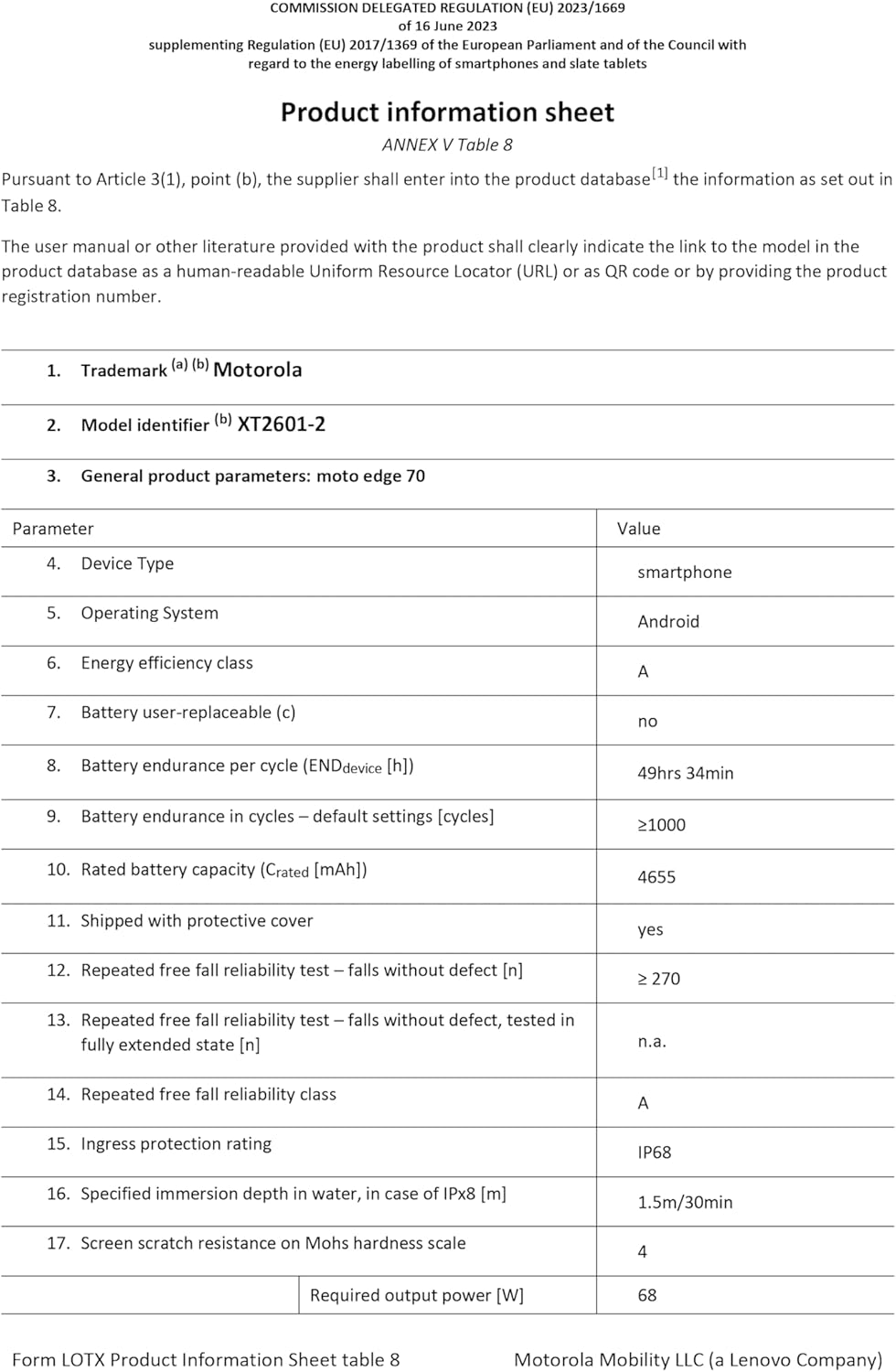
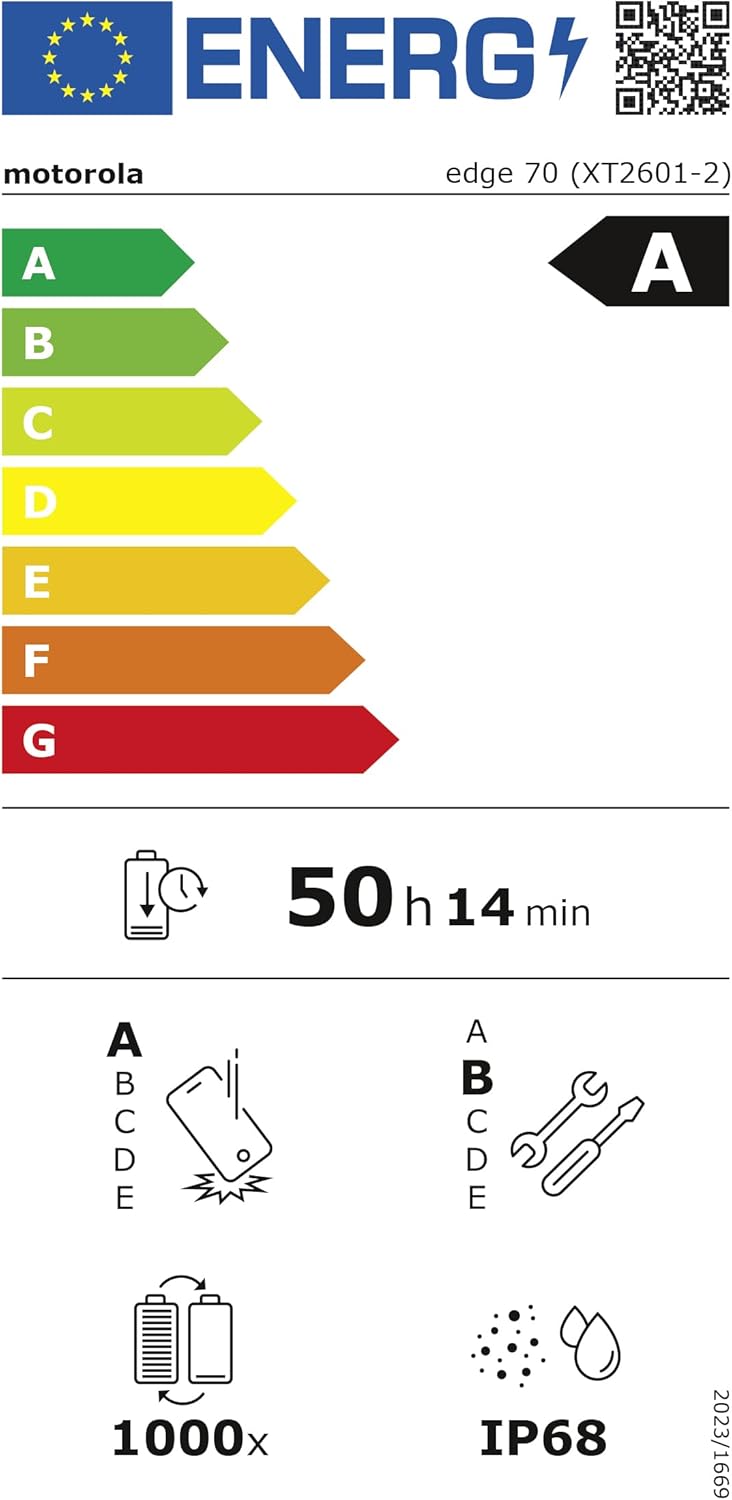
The EU Energy Label for the Motorola Edge 70, indicating its 'A' energy efficiency rating and an estimated battery endurance of 50 hours. More details can be found on the EPREL veritabanı.
Garanti ve Destek
Your Motorola Edge 70 comes with a 2 yıllık üretici garantisi satın alma tarihinden itibaren. Bu garanti, normal kullanımda malzeme ve işçilikteki kusurları kapsar.
For warranty claims, technical support, or further assistance, please visit the official Motorola support webSiteyi ziyaret edin veya müşteri hizmetleriyle iletişime geçin. Garanti geçerliliği için satın alma belgenizi saklayın.
Resmi Motorola Desteği: www.motorola.com/support