
1. Giriş
This manual provides essential information for the safe and efficient use of your Haier H55C95EUX 55-inch OLED 4K HDR Smart TV. Please read these instructions thoroughly before operating your television and retain them for future reference.
The Haier H55C95EUX features a 55-inch OLED display for deep blacks and vibrant colors, 4K HDR resolution, a 144Hz refresh rate for smooth motion, integrated Harman Kardon sound, and the Google TV operating system for smart functionality and voice control.

Resim 1.1: Üzeriview of Haier C95 Series OLED TV features, highlighting Harman Kardon audio, 144Hz gaming, Dolby Vision IQ, Dolby Atmos, HDR10+, Google TV, and 3GB RAM with 32GB storage.
2. Güvenlik Bilgileri
Yangın, elektrik çarpması ve yaralanma riskini azaltmak için bu televizyonu kullanırken her zaman temel güvenlik önlemlerine uyun.
- Güç Kaynağı: Televizyonu yalnızca 220-240V, 50/60Hz AC güç kaynağına bağlayın.
- Havalandırma: Televizyonun etrafında yeterli havalandırma olduğundan emin olun. Havalandırma açıklıklarını kapatmayın.
- Su ve Nem: Televizyonunuzu yağmura veya neme maruz bırakmayın. Vazo gibi sıvı dolu nesneleri televizyonun üzerine koymayın.
- Temizlik: Temizlemeden önce televizyonu prizden çıkarın. Yumuşak, kuru bir bez kullanın. Sıvı temizleyiciler veya aerosol temizleyiciler kullanmayın.
- Montaj: If wall-mounting, ensure the wall mount is compatible with the VESA standard (100 x 100 mm) and can support the TV's weight.
- Çocuklar: Supervise children to ensure they do not play with the television.
3. Kutuda Neler Var?
Kutuyu dikkatlice açın ve tüm eşyaların eksiksiz ve hasarsız olduğundan emin olun.
- Haier H55C95EUX 55-inch OLED 4K HDR Smart TV
- Uzaktan kumanda
- Kullanım Kılavuzu (bu belge)
- Güç kablosu
- TV Sehpası Bileşenleri (varsa)
4. Kurulum
4.1 Fiziksel Kurulum
Before installation, consider the TV's dimensions to ensure proper placement.

Resim 4.1: Ön view dimensions of the 55-inch Haier TV, indicating a width of 1225mm and a height of 749mm.

Image 4.2: Detailed dimensions of the Haier 55-inch TV, showing measurements with and without the stand.
Stand Kurulumu
- Ekranın hasar görmesini önlemek için televizyonu yumuşak ve düz bir yüzeye yüzü aşağı bakacak şekilde yerleştirin.
- Attach the stand components to the designated slots on the bottom of the TV using the provided screws.
- Televizyonu dik konumda yerleştirmeden önce standın sağlam bir şekilde sabitlendiğinden emin olun.
Duvara Montaj
If wall-mounting, use a VESA-compatible mount (100 x 100 mm) and follow the mount manufacturer's instructions. Ensure the wall can support the TV's weight.
4.2 Cihazları Bağlama
Televizyonunuz, harici cihazları bağlamak için birden fazla bağlantı noktasına sahiptir.
- HDMI: Connect Blu-ray players, game consoles, or set-top boxes to the HDMI 2.1 ports for high-quality audio and video.
- USB BAĞLANTI: Medya oynatmak için USB depolama aygıtlarını bağlayın.
- Ethernet: Sabit kablolu internet bağlantısı için.
- Bluetooth: Kablosuz kulaklıkları veya diğer Bluetooth cihazlarını bağlayın.
4.3 İlk Çalıştırma ve Kurulum
- Güç kablosunu televizyona ve prize bağlayın.
- Uzaktan kumandanın veya televizyonun güç düğmesine basın.
- Follow the on-screen instructions to complete the initial setup, including language selection, network connection (Wi-Fi or Ethernet), and Google TV account login.
5. TV'nizi Çalıştırma
5.1 Uzaktan Kumanda
The included remote control allows you to navigate the TV's features. It may feature a solar cell for eco-friendly charging and USB-C for backup charging.

Image 5.1: The Haier TV remote control, featuring navigation, volume, and app access buttons.
5.2 Google TV Arayüzü
Your TV runs on Google TV, providing access to a wide range of streaming services, apps, and personalized content.

Image 5.2: The Google TV home screen, showcasinÇeşitli yayın uygulamaları ve içerik önerileri.
Ses Kontrolü
Use the built-in voice control feature to search for content, launch apps, and control your TV hands-free. Simply say "Hey Google" or press the voice assistant button on your remote.

Image 5.3: Demonstrating voice control functionality with the Haier TV and Google TV.
5.3 Görüntü ve Ses Ayarları
OLED Teknolojisi
The OLED display provides absolute blacks and infinite contrast for a lifelike viewDeneyim.

Image 5.4: Visual representation of OLED technology, showcasing deep blacks and vibrant colors.
Harman Kardon Sound
Experience immersive audio with clear dialogues and cinematic depth, delivered by the integrated Harman Kardon sound system.

Image 5.5: Depiction of the Harman Kardon sound system, emphasizing clear and powerful audio.
Dolby Atmos
Enjoy three-dimensional, immersive sound that moves around you, enhancing your audio experience.
144Hz Yenileme Hızı
The 144Hz refresh rate ensures smooth and fluid motion, ideal for fast-paced content like gaming and sports.

Image 5.6: Visual comparison illustrating the fluidity of 144Hz motion compared to 60Hz, particularly beneficial for gaming.
6. Bakım
6.1 TV'nizin Temizlenmesi
- Televizyonu temizlemeden önce mutlaka fişini çekin.
- Ekranı ve kasayı silmek için yumuşak, kuru ve tiftiksiz bir bez kullanın.
- İnatçı izler için hafifçe silinampBezi su veya özel bir ekran temizleyici ile temizleyin. Temizleyiciyi asla doğrudan ekrana püskürtmeyin.
- Aşındırıcı temizleyiciler, cilalar veya çözücüler kullanmaktan kaçının.
6.2 Yazılım Güncellemeleri
Your Haier TV may receive software updates to improve performance and add new features. Ensure your TV is connected to the internet to receive these updates automatically or check for them manually through the settings menu.
7. Sorun Giderme
Televizyonunuzda sorunlarla karşılaşırsanız aşağıdaki yaygın çözümlere başvurun:
| Sorun | Olası Çözüm |
|---|---|
| Güç Yok | Check if the power cable is securely connected to the TV and the wall outlet. Ensure the outlet is functioning. Try pressing the power button on the TV itself. |
| Görüntü yok, ancak ses var. | Giriş kaynağını kontrol edin. Bağlı cihazın açık ve düzgün çalıştığından emin olun. Farklı bir HDMI kablosu veya bağlantı noktası deneyin. |
| Ses yok, ancak görüntü mevcut. | Check the volume level. Ensure the TV is not muted. Verify audio output settings (e.g., internal speakers, external sound system). Check audio cables if using external speakers. |
| Uzaktan Kumanda Çalışmıyor | Check the remote control's battery level. Ensure there are no obstructions between the remote and the TV's IR sensor. If it's a solar remote, ensure it has sufficient light exposure. |
| Ağ Bağlantı Sorunları | Restart your router and modem. Check Wi-Fi password. If using Ethernet, ensure the cable is connected properly. Try connecting to a different network if available. |
8. Özellikler
| Özellik | Detay |
|---|---|
| Model Adı | H55C95EUX |
| Ekran Boyutu | 55 inç |
| Ekran Teknolojisi | OLED |
| Çözünürlük | 4K (3840x2160) |
| Yenileme Hızı | 120 Hz (Motion Enhancement: 144Hz) |
| Desteklenen HDR Formatı | Dolby Vizyonu |
| İşletim Sistemi | Google televizyon |
| Dahili Depolama | 32 GB |
| Ses Sistemi | Harman Kardon 2.1 Sound System |
| Surround Sound Format | Dolby Atmos |
| Bağlantı | Bluetooth, Ethernet, HDMI (x4), USB (x1) |
| Kablosuz Teknoloji | Bluetooth, Wi-Fi |
| Kontrol Yöntemi | Remote Control, Voice |
| Ürün Boyutları (DxGxY) | 29.5P x 122.5l x 76.8H cm (with stand) |
| VESA Montaj Standardı | 100x100 mm |
| Enerji Verimliliği Sınıfı (SDR) | F (77 kWh/1000h) |
| Enerji Verimliliği Sınıfı (HDR) | G (70 kWh/1000h) |
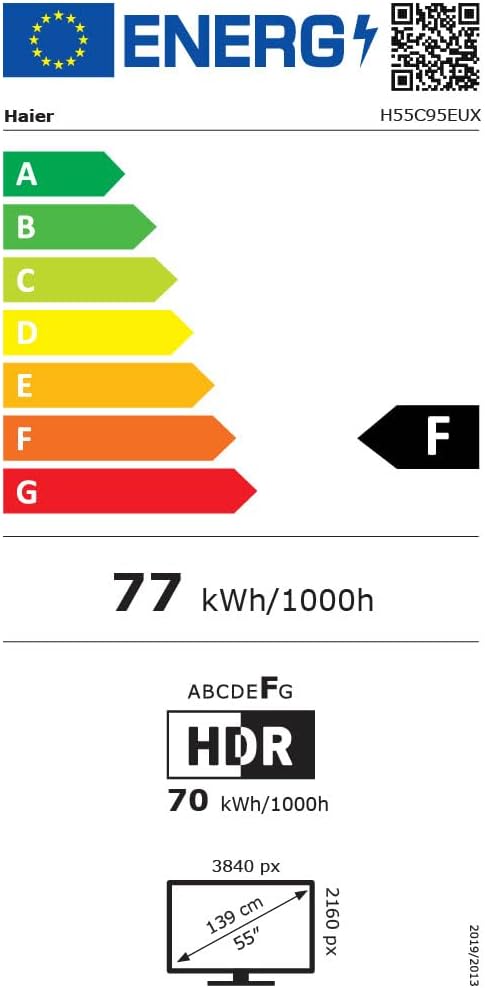
Image 8.1: EU Energy Label for the Haier H55C95EUX TV. For more details, visit the EPREL veritabanı.
9. Garanti ve Destek
Your Haier H55C95EUX television comes with a 2 yıllık üretici garantisiLütfen garanti talepleriniz için satın alma belgenizi saklayın.
For technical support, service, or further inquiries, please refer to the contact information provided on the official Haier webweb sitemizi veya yerel yetkili servis merkezinizi ziyaret edin.