
giriiş
Thank you for choosing the TOZO NC9 Bluetooth 5.3 Hybrid ANC Wireless Earbuds. These earbuds are designed to provide a superior audio experience with advanced features such as Hybrid Active Noise Cancellation, clear call quality, and extended battery life. This manual will guide you through the setup, operation, and maintenance of your new earbuds.
Paket İçeriği
Lütfen paketinizde tüm öğelerin mevcut olduğundan emin olun:
- TOZO NC9 Wireless Earbuds (Left and Right)
- Şarj Kutusu
- Ear Tips (Multiple Sizes)
- USB-C Şarj Kablosu
- Kullanım Kılavuzu (bu belge)
Ürün Bittiview
Familiarize yourself with the components of your TOZO NC9 earbuds and charging case.
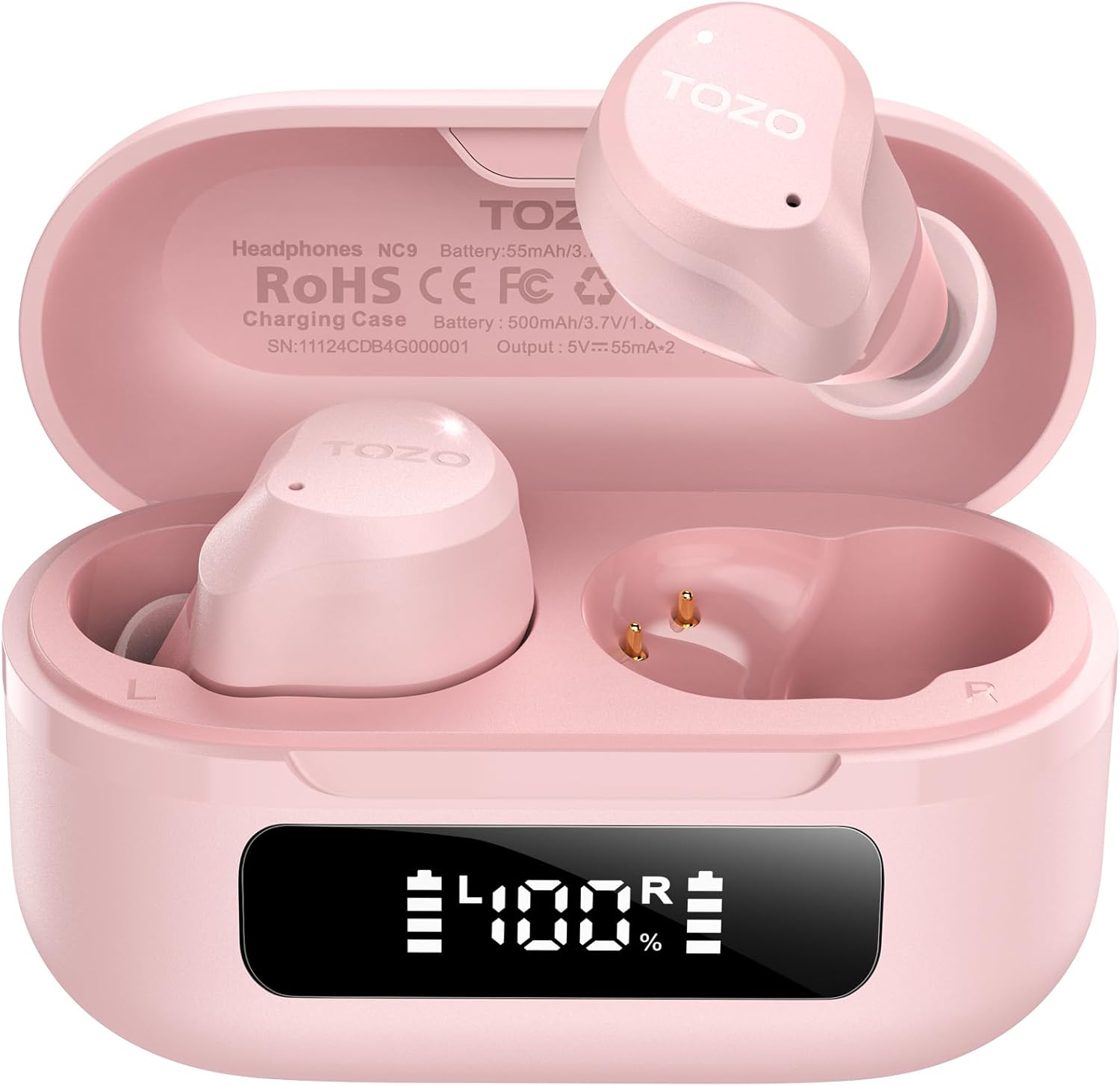
Image: The TOZO NC9 earbuds shown with their charging case. The earbuds are pink and feature an in-ear design. The charging case is also pink with a smooth, compact form factor. This image provides a general view Ürün bileşenlerinin.

Image: The TOZO NC9 earbuds are placed inside their open charging case, revealing an LED display on the front of the case that shows battery percentage. This illustrates how the earbuds are stored and charged within the case.

Image: A detailed diagram illustrating the internal driver components of the TOZO NC9 earbud, highlighting the OrigX Acoustics Technology. This visual explains the audio engineering behind the sound quality.
Kurmak
1. Kulaklıkları ve Kutuyu Şarj Etme
İlk kullanımdan önce kulaklıklarınızı ve şarj kutusunu tamamen şarj edin.
- Kulaklıkları şarj kutusuna yerleştirin. Yerlerine doğru şekilde oturduğundan emin olun.
- USB-C şarj kablosunu kasanın üzerindeki şarj portuna ve bir güç kaynağına bağlayın.
- The LED display on the charging case will indicate the charging status. A full charge may take approximately 5 hours if completely depleted.

Image: The TOZO NC9 charging case with earbuds, displaying "60 hrs" to indicate the total playtime. This image emphasizes the extended battery life of the product.

Image: A close-up of the TOZO NC9 charging case's LED display showing "100%" battery charge, with the "SmartPow Power Management" logo. This highlights the intelligent battery optimization feature.
2. Cihazınızla Eşleştirme
The TOZO NC9 earbuds use Bluetooth 5.3 for a stable connection.
- Şarj kutusunu açın. Kulaklıklar otomatik olarak eşleştirme moduna geçecektir.
- Cihazınızda (akıllı telefon, tablet, bilgisayar) Bluetooth ayarlarına gidin.
- Arama Kullanılabilir cihazlar listesinden "TOZO NC9"u seçin ve bağlanmak için onu seçin.
- Bağlantı sağlandıktan sonra sesli bir uyarı duyacaksınız ve kulaklıklarınız kullanıma hazır hale gelecektir.

Image: A visual representation of the TOZO App interface on a smartphone, showing various settings like ANC modes, EQ adjustments, and white noise tracks. This demonstrates the app's capabilities for customizing the earbud experience.
Kullanım Talimatları
Dokunmatik Kontroller
The TOZO NC9 earbuds feature intuitive touch controls. Specific functions can be customized via the TOZO App.
| Aksiyon | İşlev |
|---|---|
| Tek Musluk (Sol/Sağ) | Oynat/Duraklat, Çağrıyı Cevapla |
| Çift Dokunuş (L) | Önceki Parça |
| Çift Dokunuş (R) | Sonraki Parça |
| Üçlü Musluk (Sol/Sağ) | Sesli Asistanı Etkinleştir |
| Uzun Basma (Sol/Sağ) | Switch ANC/Transparency/Normal Mode, Reject Call |
Aktif Gürültü Önleme (ANC) Modları
The TOZO NC9 offers Hybrid ANC to reduce ambient noise by up to 45dB, along with a Transparency Mode.
- Aktif Gürültü Önleme (ANC) Modu: Dış gürültüyü azaltır, seyahat veya gürültülü ortamlar için idealdir.
- Şeffaflık Modu: Kulaklıkları çıkarmadan çevrenizi duymanızı sağlar; konuşmalar veya farkındalık için kullanışlıdır.
- Normal Mod: Gürültü engelleme veya şeffaflık özelliği olmayan standart ses deneyimi.
Cycle through these modes by long-pressing either earbud (customizable via app).

Image: A person wearing TOZO NC9 earbuds on an airplane, illustrating the effectiveness of the up to 45dB advanced noise cancellation feature for a peaceful listening experience.
Kristal Netliğinde Aramalar
Equipped with 6 ENC (Environmental Noise Cancellation) microphones, the NC9 ensures your voice is clear during calls, even in noisy environments.

Image: A person wearing TOZO NC9 earbuds while walking in a city environment, making a phone call. This image highlights the crystal-clear call quality provided by the six ENC microphones, minimizing background noise.
TOZO Uygulama Entegrasyonu
Download the TOZO App for enhanced control and customization:
- Adjustable Noise Control Modes (6 options)
- 32 Preset EQ Modes and access to over 2000 user-shared EQs
- 100+ White Noise Tracks
- Yazılım güncellemeleri
The app allows for a personalized audio experience.
Bakım
Temizlik
- Kulaklıklarınızı, özellikle kulak uçlarını ve şarj temas noktalarını yumuşak, kuru ve tiftiksiz bir bezle düzenli olarak temizleyin.
- Aşındırıcı temizleyiciler veya çözücüler kullanmayınız.
Depolamak
- Kullanmadığınız zamanlarda kulaklıklarınızı şarj kutusunda saklayarak hem koruyun hem de şarjlı kalmasını sağlayın.
- Serin ve kuru bir yerde, aşırı sıcaklıklardan uzakta saklayınız.
Suya Dayanıklılık (IPX8)
The TOZO NC9 earbuds are IPX8 waterproof, meaning they are protected against immersion in water up to 1 meter for up to 30 minutes. This makes them suitable for workouts and light rain, but they are not designed for swimming or prolonged submersion.

Image: A person wearing TOZO NC9 earbuds while reading, demonstrating the ergonomic design for all-day comfort and a secure fit. This image emphasizes the comfort aspect of the earbuds.
Sorun giderme
| Sorun | Olası Çözüm |
|---|---|
| Kulaklıklar şarj olmuyor | Kulaklıkların kutuya doğru şekilde yerleştirildiğinden emin olun. Şarj kablosunu ve güç kaynağını kontrol edin. Şarj temas noktalarını temizleyin. |
| Cihazla eşleştirilemiyor | Ensure Bluetooth is enabled on your device. Place earbuds in case, close, then open to re-enter pairing mode. Forget "TOZO NC9" from your device's Bluetooth list and try pairing again. |
| Bir kulaklıktan ses gelmiyor | Place both earbuds back in the case, close it, then open again. Ensure both earbuds are charged. Perform a factory reset (refer to TOZO App or online support for specific steps). |
| ANC etkili bir şekilde çalışmıyor | Ensure ear tips provide a good seal. Try different sized ear tips. Ensure ANC mode is activated. |
| Kötü çağrı kalitesi | Ensure microphones are not obstructed. Check network signal. |
For further assistance, please refer to the TOZO App or contact TOZO customer support.
Özellikler
| Model Adı | Kuzey Karolina 9 |
| Bluetooth Sürümü | 5.3 |
| Gürültü Kontrolü | Hybrid Noise Reduction (up to 45dB ANC) |
| Mikrofonlar | 6 ENC Mikrofonu |
| Ses Sürücüsü Türü | Dynamic (10mm drivers) |
| Frekans Aralığı | 15 Hz - 20,000 Hz |
| Pil Ömrü (Kulaklıklar) | Yaklaşık 14 saat (tek şarj) |
| Toplam Oynanma Süresi (Kılıflı) | 60 saate kadar |
| Suya Dayanıklılık Derecesi | IPX8 (Su Geçirmez) |
| Kontrol Türü | Dokunmatik Kontrol, Uygulama Kontrolü |
| Uyumlu Cihazlar | Phones, Laptops, Tablets, Smart Speakers |
| GTIN / UPC | 810102982537 |
Garanti ve Destek
TOZO products come with a standard warranty. For detailed warranty information, product registration, or technical support, please visit the official TOZO webSite üzerinden satın alabilir veya müşteri hizmetleriyle iletişime geçebilirsiniz. Garanti talepleriniz için satın alma fişinizi saklayın.
İade politikasi: The product has a return policy duration of 30 days for refund/replacement.