giriiş
This manual provides essential instructions for the proper installation, operation, and maintenance of your Mouse Computer m-Book N500SD-M2SH2 keyboard. Please read this manual thoroughly before using the product to ensure optimal performance and longevity. Keep this manual for future reference.
Güvenlik Bilgileri
- Do not expose the keyboard to liquids, moisture, or extreme temperatures.
- Klavyeyi düşürmekten veya sert darbelere maruz bırakmaktan kaçının.
- Klavyeyi kendiniz sökmeye veya onarmaya çalışmayın. Yetkili servis personeline başvurun.
- Keep the keyboard away from direct sunlight and heat sources.
- Use only with compatible Mouse Computer m-Book N500SD-M2SH2 laptops.
Paket İçeriği
Paketinizin aşağıdaki öğeleri içerdiğini doğrulayın:
- Mouse Computer m-Book N500SD-M2SH2 Keyboard (Japanese Layout, Black, Backlit)
- Kullanım Kılavuzu (bu belge)
Kurmak
Before proceeding with installation, ensure your laptop is powered off and disconnected from any power source. It is recommended to consult a professional for keyboard replacement if you are unfamiliar with laptop disassembly.
- Uyumluluk Kontrolü: To ensure you have purchased the correct product, please verify your laptop's model or the product's part number (N500SD-M2SH2) before purchase.
- Removal of Old Keyboard: Carefully remove the existing keyboard from your laptop. This typically involves detaching retaining clips or screws and disconnecting the ribbon cables.
- Installation of New Keyboard: Align the new keyboard with the designated slot on your laptop. Gently connect the ribbon cables to their respective connectors on the motherboard, ensuring they are securely latched.
- Secure the Keyboard: Fasten any retaining clips or screws to secure the new keyboard in place.
- Güç Açık: Reconnect your laptop's power source and power it on to test the new keyboard.
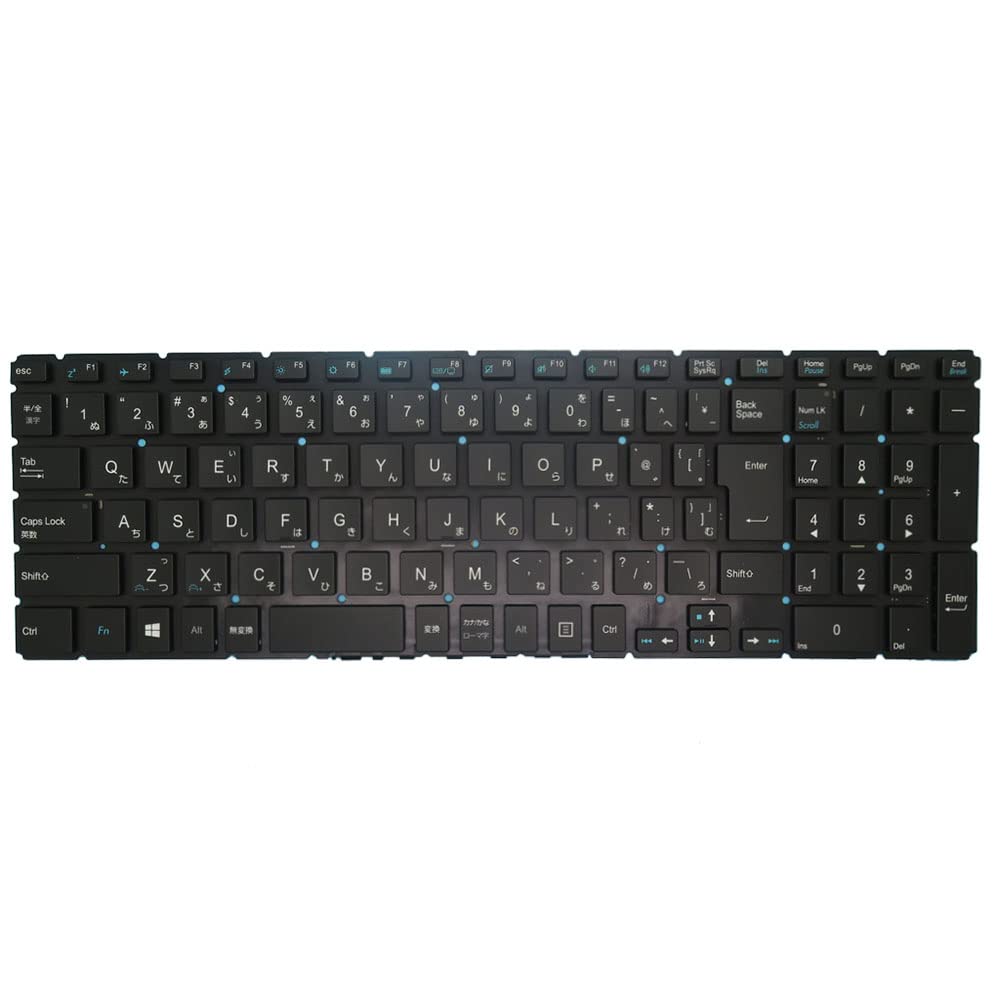
Bu görüntü tam metni görüntüler view of the Mouse Computer m-Book N500SD-M2SH2 keyboard, showing its Japanese layout and black finish.
Kullanım Talimatları
Temel Klavye İşlevleri
The keyboard functions as a standard Japanese layout (JP JA) input device. All alphanumeric keys, symbols, and modifier keys (Shift, Ctrl, Alt, Fn) operate as expected for a Japanese keyboard.
Arka Işık İşlemi
This keyboard features a backlight. The backlight can typically be controlled using a dedicated function key combination, often Fn + Fx (where 'x' is a specific function key, usually indicated by a backlight icon). Refer to your laptop's specific documentation for the exact key combination to toggle or adjust backlight brightness.
Function (Fn) Keys
The Fn key, located typically near the left Ctrl key, can be pressed in combination with the F1-F12 keys (and sometimes other keys) to activate special functions such as:
- Volume control (mute, decrease, increase)
- Parlaklık ayarı
- Wireless/Bluetooth toggle
- External display output
- Uyku modu
The specific functions may vary based on your laptop model. Consult your laptop's user manual for detailed information on Fn key operations.
Bakım
Temizlik
To clean the keyboard, power off your laptop and disconnect it from the power source. Use a soft, lint-free cloth lightly dampened with water or a mild cleaning solution. Avoid spraying liquids directly onto the keyboard. For dust and debris between keys, use compressed air.
Depolamak
When not in use for extended periods, store the keyboard in a clean, dry environment away from extreme temperatures and direct sunlight.
Sorun giderme
- Tuşlar Yanıt Vermiyor: Ensure the ribbon cables are securely connected. Restart your laptop. If the issue persists, the keyboard may be faulty.
- Arka Işık Çalışmıyor: Check your laptop's function key settings and ensure the backlight is enabled. Verify the correct Fn key combination for backlight control.
- Incorrect Key Input: Ensure the correct keyboard layout is selected in your operating system settings (Japanese layout).
- Fiziksel Hasar: If the keyboard has been physically damaged, replacement may be necessary.
Özellikler
| Marka | Genel |
| Üretici | Genel |
| Model Numarası | N500SD-M2SH2 |
| Ürün Boyutları | 43x18x7 cm |
| Ürün Ağırlığı | 300 gr |
| Piller Dahil | HAYIR |
| ASIN | B0FVL599MC |
| İlk Mevcut Tarih | 10 Ekim 2025 |
Garanti ve Destek
This product is covered by a standard limited warranty. For warranty claims or technical support, please contact your retailer or the point of purchase. When seeking support, providing detailed information about the issue and, if applicable, any disassembled photos for inspection can assist in a quicker resolution.
For further assistance, please refer to the contact information provided by your seller or the manufacturer.