
giriiş
This manual provides essential information for setting up, operating, and maintaining your TCL 32S5K 32-inch HD QLED Google Smart TV. Please read this manual thoroughly before using your television to ensure safe and optimal performance. Keep this manual for future reference.
Güvenlik Bilgileri
Yangın, elektrik çarpması ve yaralanma riskini azaltmak için bu televizyonu kullanırken her zaman temel güvenlik önlemlerine uyun. Televizyonu yağmur veya neme maruz bırakmayın. Televizyonun kapağını açmayın.asing; refer all servicing to qualified personnel. Ensure proper ventilation and avoid placing the TV near heat sources. Use only the power cord and accessories specified by the manufacturer.
Paket İçeriği
Paketin içinde tüm öğelerin mevcut olduğundan emin olun:
- TCL 32S5K 32-inch HD QLED Google Smart TV
- Uzaktan kumanda
- Güç Kablosu
- TV Sehpası (2 adet) ve Vidalar
- Hızlı Başlangıç Kılavuzu
- Garanti Kartı
Kurmak
Fiziksel Kurulum
Stand Kurulumu: Place the TV screen-down on a soft, flat surface. Attach the two stand pieces to the designated slots on the bottom of the TV using the provided screws. Ensure the stand is securely fastened.
Duvara Montaj: If wall-mounting, ensure you use a VESA-compatible wall mount (not included) and follow the wall mount manufacturer's instructions. Disconnect the power cord before mounting.
Cihazları Bağlama
Connect your external devices to the appropriate ports on the TV. Refer to the image below for port locations and types.

Figure 1: Rear and Side Connectivity Ports. This image illustrates the various input and output ports available on the TCL 32S5K Smart TV, including USB 2.0, LAN, Antenna/Cable In, Digital Audio Out (Optical), HDMI 1, HDMI 2, and AV In adapter.
- HDMI Ports (1, 2): Blu-ray oynatıcıları, oyun konsollarını, kablo/uydu alıcılarını veya HDMI özellikli diğer cihazları bağlayın.
- USB 2.0 Bağlantı Noktası: Medya oynatmak için USB depolama aygıtlarını bağlayın.
- LAN Bağlantı Noktası: Kablolu internet bağlantısı için bir Ethernet kablosu bağlayın.
- Anten/Kablo Girişi: Anten veya kablolu TV sinyalini bağlayın.
- Dijital Ses Çıkışı (Optik): Connect to an external audio receiver or soundbar for digital audio.
- AV Giriş Adaptörü: Birlikte verilen adaptörü kullanarak kompozit video ve stereo ses çıkışlarına sahip eski cihazları bağlayabilirsiniz.
İlk Açılış ve Google TV Kurulumu
After connecting all necessary cables, plug the power cord into an electrical outlet. Press the power button on the remote control or on the TV. Follow the on-screen instructions to complete the initial setup, which includes selecting your language, connecting to a Wi-Fi network, and signing in to your Google account to access Google TV features.
İşletim
Uzaktan Kumanda Fonksiyonları
The remote control allows you to navigate the Google TV interface, adjust volume, change channels, access apps, and control playback. Familiarize yourself with the button layout for easy operation.
Google TV Arayüzü
Google TV organizes your favorite movies, shows, and live TV from across your apps and subscriptions. Use the remote to browse recommendations, search for content, and manage your watch list. Access the Google Play Store to download additional applications.
Bağlantı Özellikleri
- Wifi: Connects your TV to your home wireless network for internet access and streaming.
- Bluetooth: Pair Bluetooth-enabled devices such as headphones or game controllers for a personalized experience.
- Googlecast (Chromecast built-in): Cast content from your compatible mobile devices or computer directly to your TV screen.
Resim ve Ses Ayarları
Your TCL 32S5K TV features QLED technology, Full HD resolution, HDR10 support, and Dolby Audio for an enhanced viewing and listening experience. Adjust picture modes (e.g., Standard, Vivid, Movie) and sound modes (e.g., Standard, Music, Movie) through the TV settings menu to suit your preferences.

Figure 2: Image Quality Features. This image highlights the key display technologies of the TCL 32S5K Smart TV, including QLED for vibrant colors, FHD (Full High Definition) for clear resolution, and HDR10 for enhanced contrast and brightness.
Bakım
TV'nizi Temizleme
Temizlemeden önce daima televizyonun fişini çekin. Ekranı ve kasayı silmek için yumuşak, kuru bir bez kullanın. İnatçı lekeler için hafifçe silin.ampen the cloth with water or a mild, non-abrasive screen cleaner. Never spray cleaner directly onto the screen or allow liquids to enter the TV's openings.
Yazılım Güncellemeleri
Your Google TV may receive automatic software updates. Ensure your TV is connected to the internet to receive these updates, which can improve performance and add new features. You can also manually check for updates in the TV's settings menu.
Sorun giderme
Televizyonunuzda sorunlarla karşılaşırsanız aşağıdaki yaygın çözümlere başvurun:
- Güç Yok: Televizyonun ve elektrik prizinin güç kablosunun sağlam bir şekilde takılı olup olmadığını kontrol edin. Farklı bir priz deneyin.
- Resim Yok/Resim Kötü: Ensure all cables are correctly connected. Check the input source. Adjust picture settings. If using an antenna, check signal strength.
- Ses yok/Ses kalitesi düşük: Check volume levels and mute settings. Ensure external audio devices are properly connected and selected as the audio output.
- Uzaktan Kumanda Çalışmıyor: Pilleri değiştirin. Uzaktan kumanda ile televizyonun kızılötesi sensörü arasında herhangi bir engel olmadığından emin olun.
- Ağ Bağlantı Sorunları: Restart your router and modem. Reconnect to the Wi-Fi network in the TV settings. For wired connections, ensure the Ethernet cable is properly connected.
- Google TV Slow/Unresponsive: Restart the TV by unplugging it for a few minutes and plugging it back in. Clear cache for problematic apps in settings.
Sürekli devam eden sorunlar için TCL destek ekibine başvurun. website veya müşteri hizmetleriyle iletişime geçin.
Özellikler
Below are the technical specifications for the TCL 32S5K Smart TV:
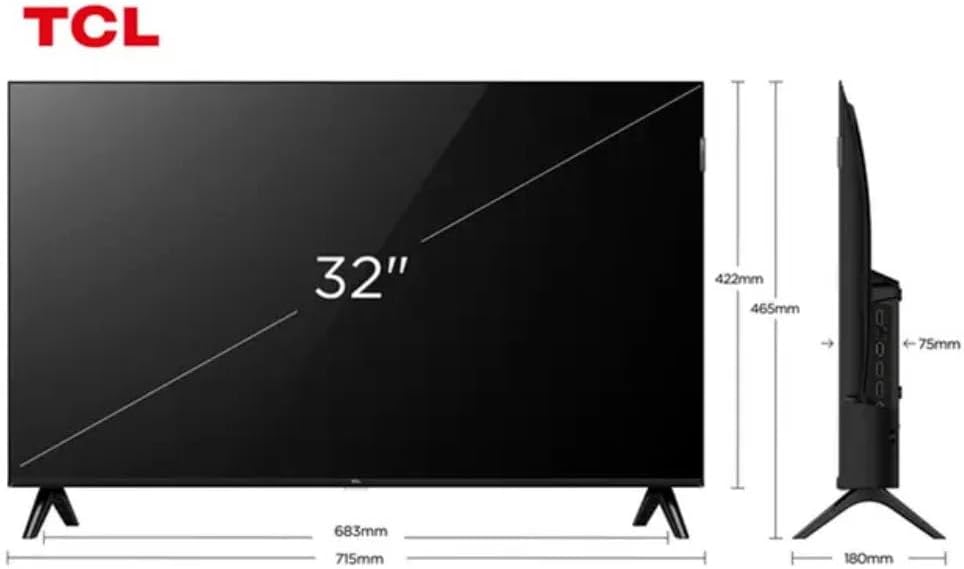
Figure 3: TV Dimensions. This image provides a detailed diagram of the TCL 32S5K Smart TV's physical dimensions, including screen size (32 inches), width (715mm), height (422mm without stand, 465mm with stand), and depth (75mm).
| Özellik | Tanım |
|---|---|
| Model Adı | 32S5K |
| Ekran Boyutu | 32 inç |
| Ekran Teknolojisi | QLED |
| Çözünürlük | 1080p (Tam HD) |
| Yenileme Hızı | 60 Hz |
| Bağlantı | Bluetooth, Ethernet, HDMI, USB, Wi-Fi |
| Toplam HDMI Bağlantı Noktaları | 2 |
| Özel Özellikler | Integrated Speaker, Google TV, Googlecast Integrated, HDR10, Dolby Audio |
| Ürün Boyutları (D x G x Y) | 7.6P x 71.6L x 42.3A centimeters (approx. 3 x 28.2 x 16.7 inches) |
| Üretici | TCL |
| Menşei ülke | Brezilya |
Garanti ve Destek
Garanti Bilgileri
The TCL 32S5K Smart TV comes with a 1 yıllık üretici garantisi. This warranty covers defects in materials and workmanship under normal use. Please retain your proof of purchase for warranty claims. For specific terms and conditions, refer to the warranty card included in your package or visit the official TCL webalan.
Müşteri Desteği
If you require technical assistance, have questions about your product, or need to initiate a warranty claim, please contact TCL customer support. You can typically find contact information on the TCL official websitenizde veya ürün dokümanlarınızda.
Before contacting support, please have your TV model number (32S5K) and serial number ready, along with a detailed description of the issue.