
1. Giriş
Thank you for choosing the PureMate 12L/Day Dehumidifier. This appliance is designed to effectively remove excess moisture from your indoor environment, helping to prevent dampness, condensation, mould, and musty odours. By maintaining optimal humidity levels, it contributes to a healthier and more comfortable living space. Please read this manual thoroughly before operating the dehumidifier to ensure safe and efficient use.
This dehumidifier features a 12-litre per day extraction capacity, an automatic humidity sensor, a digital display, a 24-hour timer, auto shut-off, and options for continuous drainage or manual tank emptying. It is also equipped with castor wheels and a carry handle for easy portability.
2. Güvenlik Talimatları
To reduce the risk of fire, electric shock, or injury, always observe the following basic safety precautions:
- Cihazı kullanmadan önce tüm talimatları dikkatlice okuyun.
- Ensure the power supply matches the rating label on the dehumidifier.
- Do not operate the dehumidifier with a damaged cord or plug. If the supply cord is damaged, it must be replaced by the manufacturer, its service agent, or similarly qualified persons to avoid a hazard.
- Always place the unit on a firm, level surface.
- Maintain at least 20 cm (8 inches) clearance around the unit for proper air circulation.
- Hava giriş veya çıkışına nesneler sokmayın.
- Cihazı ısı kaynaklarından, doğrudan güneş ışığından ve yanıcı maddelerden uzak tutun.
- Temizlemeden, taşımadan veya herhangi bir bakım işlemi yapmadan önce cihazın fişini çekin.
- Bu cihaz, fiziksel, duyusal veya zihinsel yetenekleri kısıtlı olan veya deneyim ve bilgi eksikliği bulunan kişiler (çocuklar dahil) tarafından, güvenliklerinden sorumlu bir kişi tarafından cihazın kullanımıyla ilgili olarak gözetim veya talimat sağlanmadığı sürece kullanılmak üzere tasarlanmamıştır.
- Çocukların cihazla oynamamalarını sağlamak için gözetim altında tutulmaları gerekir.
- Do not use the appliance in areas where water is likely to splash onto it.
3. Ürün Bittiview
The PureMate 12L/Day Dehumidifier is designed for efficient moisture removal and ease of use. Below are the key components and features.

Resim 3.1: Ön view of the PureMate 12L/Day Dehumidifier, showing its compact design and the '12L Per Day' capacity label.
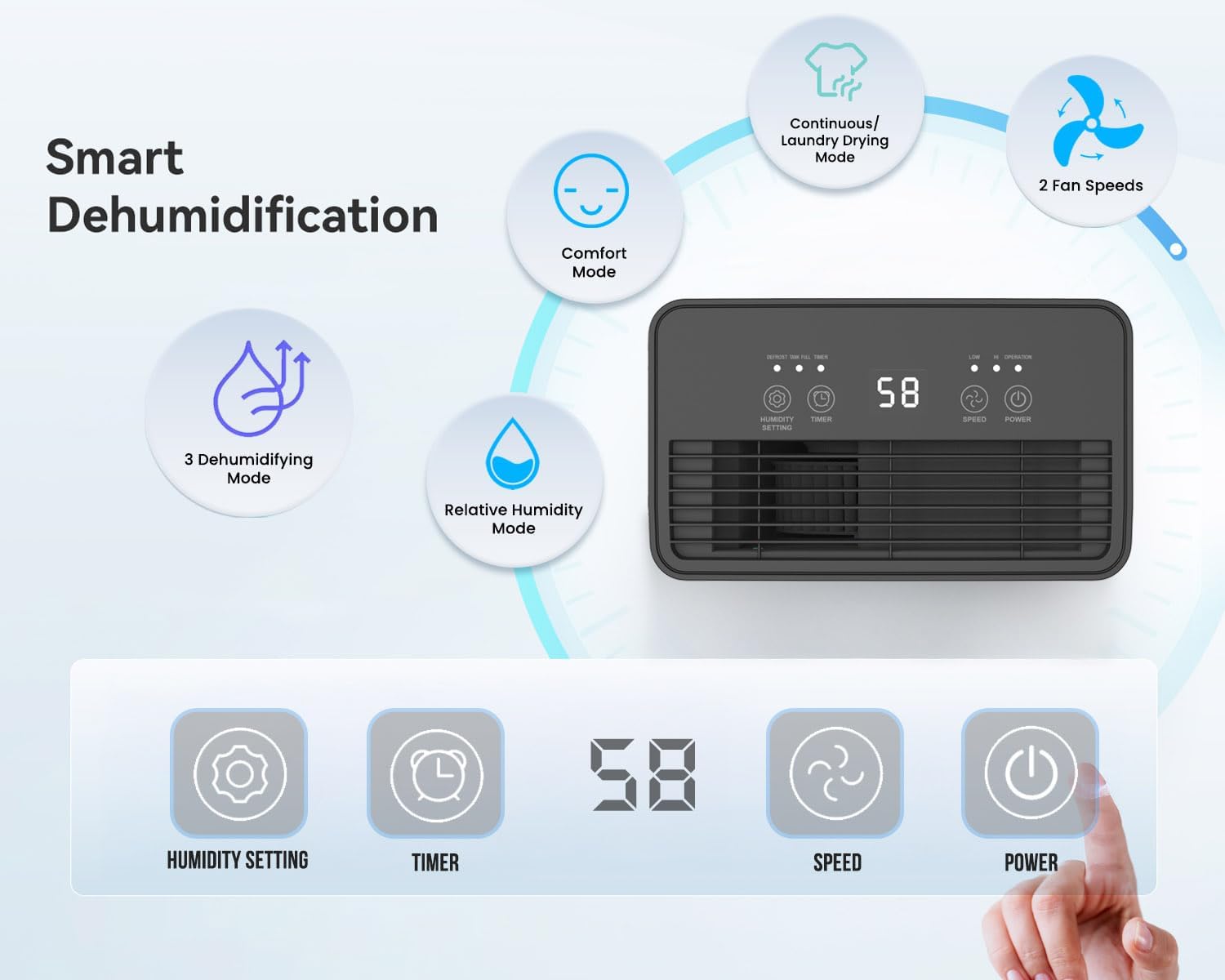
Resim 3.2: Illustration of the dehumidifier's smart features and control panel. It highlights Comfort Mode, Continuous/Laundry Drying Mode, 2 Fan Speeds, 3 Dehumidifying Modes, Relative Humidity Mode, and the digital display with buttons for Humidity Setting, Timer, Speed, and Power.
Temel Özellikler:
- Güçlü Nem Giderme: Extracts up to 12 litres of moisture per day.
- Customisable Humidity Control: Offers Continuous Mode, Comfort Mode, and adjustable Relative Humidity (30-90% RH).
- Dijital Ekran ve Kontroller: Intuitive LED display and touch panel for easy operation.
- 24 Saatlik Zamanlayıcı: Allows scheduled operation.
- Otomatik kapanma: Activates when the 2-litre water tank is full.
- Çift Drenaj Seçenekleri: Manual tank emptying or continuous drainage via a hose.
- Yıkanabilir Hava Filtresi: Improves air quality by capturing dust.
- Taşınabilir Tasarım: Equipped with castor wheels and an integrated handle for easy movement.
- Düşük Gürültülü Çalışma: Operates quietly at 33-37 dB.
4. Kurulum
4.1 Paketin açılması
- Nem alma cihazınızı ambalajından dikkatlice çıkarın.
- Tüm ambalaj malzemelerini, bantları ve koruyucu filmleri çıkarın.
- Retain the packaging for future storage or transport if needed.
4.2 Yerleştirme
Proper placement is crucial for optimal performance and safety.
- Place the dehumidifier on a firm, level surface to prevent vibration and water spillage.
- Ensure there is at least 20 cm (8 inches) of clear space around the air inlet and outlet to allow for proper airflow. Do not block these openings.
- Üniteyi ısı üreten cihazların yakınına veya doğrudan güneş ışığına maruz kalacak şekilde yerleştirmekten kaçının.
- For best results, close all doors and windows in the room where the dehumidifier is operating to create an enclosed environment.
4.3 Güç Bağlantısı
- Ensure the power cord is fully extended and not damaged.
- Güç kablosunu ses düzeyine uygun, topraklanmış bir elektrik prizine takın.tagBirimin gereksinimleri.
5. Kullanım Talimatları
The dehumidifier features an intuitive touch control panel and digital display for easy operation.

Resim 5.1: Close-up of the dehumidifier's touch control panel and the removable 2-litre water tank, illustrating the high-extraction capacity and drainage options.
5.1 Güç Açma/Kapatma
- Basın GÜÇ Kontrol panelindeki düğme, cihazı açıp kapatmak için kullanılır.
5.2 Dehumidifying Modes
Nem alma cihazı, farklı ihtiyaçlara uygun çeşitli çalışma modları sunar:
- Relative Humidity Mode: Basın NEM AYARI button to set your desired humidity level between 30% and 90% RH (Relative Humidity) in 5% increments. The unit will automatically adjust its operation to maintain this level.
- Konfor Modu: This mode automatically sets the target humidity based on the current room temperature for optimal comfort.
- Sürekli Mod: The unit operates continuously without targeting a specific humidity level, ideal for very damp conditions or for drying laundry.
- Çamaşır Kurutma Modu: Similar to Continuous Mode, this setting is optimized for drying clothes indoors by continuously removing moisture from the air.

Resim 5.2: Visual representation of the Continuous mode and various humidity solutions provided by the dehumidifier, including dry laundry, protection against black mould, and elimination of window condensation.
5.3 Fan Hızı
- Basın HIZ button to cycle between different fan speeds (e.g., Low, High). Higher fan speed results in faster dehumidification.
5.4 24 Saatlik Zamanlayıcı
- Basın ZAMANLAYICI button to set the desired operating duration (in hours) for the unit to turn on or off automatically.
- Each press increases the timer setting. Once the desired time is set, the unit will operate for that duration or turn off after that duration, depending on its current state.

Resim 5.3: Depicts the 24-hour timer function and the quiet operation of the dehumidifier (33-37 dB), allowing for undisturbed use even during sleep.
5.5 Digital Display and Indicator Lights
- The digital display shows the current room humidity level or the set humidity/timer value.
- Nem Gösterge Işığı: The unit features an LED light that changes color based on the ambient humidity level:
- KIRMIZI: Humidity level is greater than 65%.
- YEŞİL: Humidity level is between 40% and 55%.
- MAVİ: Humidity level is less than 40%.
- Otomatik Çözme Fonksiyonu: The unit automatically performs defrosting when frost builds up on the evaporator coils, ensuring efficient operation in cooler temperatures.

Resim 5.4: Illustrates the Automatic Dehumidification Mode, where the unit adjusts target humidity based on room temperature, and the Auto Defrost Function. Also shows the Humidity Indicator Light with its color codes (Red, Green, Blue) for different humidity ranges.
6. Drenaj Seçenekleri
The PureMate dehumidifier offers two methods for water drainage:
6.1 Manual Water Tank Emptying
- The dehumidifier is equipped with a 2-litre water tank.
- When the tank is full, the unit will automatically shut off, and an indicator light (usually 'Full' or 'Tank Full') will illuminate.
- Su deposunu dikkatlice üniteden dışarı çekin.
- Toplanan suyu bir lavaboya veya gidere boşaltın.
- Reinsert the empty water tank firmly into the unit. The dehumidifier will resume operation.
6.2 Sürekli Drenaj
- For maintenance-free operation, you can connect a 12mm hose (not included) for continuous drainage.
- Locate the continuous drainage outlet on the back or side of the unit.
- Attach one end of a 12mm hose to this outlet.
- Ensure the other end of the hose is placed in a drain or a larger container, ensuring a downward slope for gravity drainage.
- Once connected, the water will bypass the internal tank and drain directly.
7. Bakım
Düzenli bakım, nem alma cihazınızın optimum performans göstermesini ve uzun ömürlü olmasını sağlar.
7.1 Hava Filtresinin Temizlenmesi
The washable air filter helps to capture dust and improve air quality. Clean it regularly, typically every two weeks, or more often if used in a dusty environment.
- Nem alma cihazınızı kapatın ve fişini prizden çekin.
- Hava filtresini bulun ve çıkarın (genellikle ünitenin arkasında veya yan tarafında bulunur).
- Gently wash the filter under running tap water. For stubborn dirt, use a soft brush and mild detergent.
- Rinse thoroughly and allow the filter to air dry completely before reinserting it. Do not use a dryer or direct heat.
- Once dry, place the filter back into its position.
7.2 Su Deposunun Temizlenmesi
Clean the water tank periodically to prevent mould and bacteria growth.
- Cihazınızı kapatın ve fişini çekin.
- Su deposunu çıkarın.
- Wash the tank with warm water and a mild detergent. Rinse thoroughly.
- Dry the tank completely before placing it back into the dehumidifier.
7.3 Dış Cephenin Temizlenmesi
- Nem alma cihazının dış yüzeyini yumuşak bir bezle silin.amp Kumaş.
- Yüzeye zarar verebileceğinden aşındırıcı temizleyiciler, çözücüler veya sert kimyasallar kullanmayın.
8. Sorun Giderme
Nem alma cihazınızla ilgili sorunlarla karşılaşırsanız, lütfen aşağıdaki yaygın sorunlar ve çözümlerine bakın:
| Sorun | Olası Neden | Çözüm |
|---|---|---|
| Nem alma cihazı çalışmıyor. | No power supply. Power cord not plugged in. Water tank full or not correctly inserted. | Güç bağlantısını kontrol edin. Su deposunu boşaltın ve doğru şekilde yerine takın. |
| No water collected or very little water collected. | Room humidity is already low. Temperature is too low (below 5°C). Air filter is clogged. Dehumidifier is in continuous drainage mode. | Increase target humidity setting. Ensure room temperature is adequate. Clean the air filter. Check if continuous drainage hose is properly connected and draining. |
| Birim gürültülü. | Cihaz düz bir zeminde değil. Hava filtresi tıkalı. | Place unit on a flat, stable surface. Clean the air filter. |
| Hava akışı zayıf. | Air inlet/outlet blocked. Air filter clogged. | Ensure clear space around the unit. Clean the air filter. |
If the problem persists after trying these solutions, please contact PureMate customer support.
9. Özellikler
Detailed technical specifications for the PureMate 12L/Day Dehumidifier PM411.

Resim 9.1: Diagram illustrating the dimensions of the PureMate Dehumidifier: 41.5cm Height, 29cm Width, 17cm Depth.
| Özellik | Şartname |
|---|---|
| Marka | Saf Mate |
| Model Adı | PM411 |
| Nem Alma Kapasitesi | 12 Litres per Day |
| Tank Hacmi | 2 Litre |
| Ürün Boyutları (D x G x Y) | 17x29x41.5 cm |
| Ürün Ağırlığı | 8 kilo |
| Çalışma Modu | Automatic, Continuous |
| Özel Özellikler | Countdown Timer, Programmable |
| Üst Sıcaklık Derecesi | 30 Derece Santigrat |
10. Garanti ve Destek
For warranty information, please refer to the warranty card included with your product or visit the official PureMate website. If you require technical support, troubleshooting assistance beyond this manual, or have any questions regarding your PureMate 12L/Day Dehumidifier, please contact PureMate customer service through their official channels.