
giriiş
Thank you for choosing the LIORQUE Wireless Weather Station YGH6208. This device provides accurate indoor and outdoor temperature and humidity readings, weather forecasts, and features a DCF radio-controlled clock with alarm functions. This manual will guide you through the setup, operation, and maintenance of your weather station.
Paket İçeriği
- 1 x LIORQUE Wireless Weather Station (Main Unit)
- 1 x Dış Mekan Sensörü
- 3 x AAA Batteries (for Main Unit)
- 2 x AAA Batteries (for Outdoor Sensor)
- 1 x Kullanım Kılavuzu (bu belge)
Ürün Bittiview
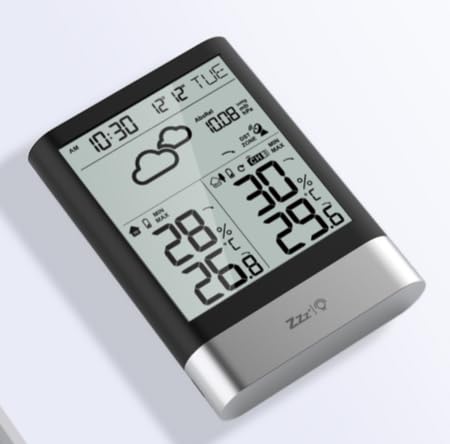
Resim 1: LIORQUE Wireless Weather Station Main Unit. This image shows the front view of the main display unit, highlighting its LCD screen and compact design.
Ana Ünite Özellikleri:
- 4.3-inch LCD screen with backlight
- İç sıcaklık ve nem göstergesi
- Dış mekan sıcaklık ve nem göstergesi
- Hava tahmini simgeleri
- DCF radio-controlled clock with manual setting option
- Double alarm clock with snooze function
- Calendar and day of the week display (7 languages)
- Max/Min temperature and humidity records
- Air pressure display and weather trend
- 12/24 saat zaman göstergesi
Dış Mekan Sensörünün Özellikleri:
- Wireless transmission up to 100m (open area)
- Sıcaklık ve nem ölçümü
- Supports hanging or standing placement
- Data updated every 30 seconds
- Supports up to 3 sensors (one included)
Kurmak
1. Pil Kurulumu
- Dış Mekan Sensörü: Open the battery compartment cover on the back of the outdoor sensor. Insert 2 x AAA batteries, ensuring correct polarity (+/-). Close the cover.
- Ana Ünite: Open the battery compartment cover on the back of the main unit. Insert 3 x AAA batteries, ensuring correct polarity (+/-). Close the cover.
- The main unit will power on and display indoor readings.
2. Sensör Eşleştirme
After installing batteries in both units, the main unit will automatically search for the outdoor sensor. The outdoor temperature and humidity should appear on the main unit's display within a few minutes. If the outdoor readings do not appear:
- Ensure both units are within range (up to 100m in open air).
- Dış mekan sensörünün pil bölmesindeki "TX" düğmesine basarak manuel olarak sinyal gönderebilirsiniz.
- On the main unit, press and hold the "CHANNEL" button to initiate a manual search for the sensor.
3. Başlangıç Ayarları (Saat, Tarih, Birimler)
The weather station will attempt to synchronize with the DCF radio signal for automatic time setting. This may take several hours, especially in areas with weak signals. You can manually set the time and date if needed.
- Manuel Zaman Ayarı: Press and hold the "MODE" button to enter time setting mode. Use the "UP" and "DOWN" buttons to adjust values and "MODE" to confirm and move to the next setting (e.g., 12/24 hour format, hour, minute, year, month, day, language for day of week).
- Sıcaklık Birimleri: Press the "°C/°F" button to switch between Celsius and Fahrenheit.
- Air Pressure Units: Press the "BARO" button to cycle through air pressure units (e.g., hPa, inHg).
Kullanım Talimatları
Bilgiyi Görüntüle
The 4.3-inch LCD screen displays various information:
- Saat ve Tarih: Bugünkü saat, tarih ve haftanın günü.
- Kapalı Mekanlarda Okuma: Mevcut iç mekan sıcaklığı ve nem oranı.
- Açık Havada Okuma: Current outdoor temperature and humidity from the connected sensor.
- Hava Durumu tahmini: Icons indicating predicted weather conditions (e.g., sunny, cloudy, rainy).
- Hava Basıncı: Current atmospheric pressure and trend.
- Arka aydınlatma: The screen backlight activates with a light touch and returns to normal brightness after 10 seconds to conserve battery.
Çalar Saat Fonksiyonu
The weather station features a double alarm clock with snooze.
- Alarmların Ayarlanması: "ALARM" düğmesine basın. view Alarm 1. Press "ALARM" again to view Alarm 2. Hold "ALARM" to enter alarm setting mode. Use "UP" and "DOWN" to adjust the hour and minute, and "ALARM" to confirm.
- Alarmları Etkinleştirme/Devre Dışı Bırakma: Sırasında viewing an alarm, press "UP" to toggle it on or off. An alarm icon will appear when active.
- Erteleme İşlevi: When an alarm sounds, press any button (except "ALARM OFF") to activate snooze. The alarm will sound again after a set interval. Press "ALARM OFF" to stop the alarm completely.
Maksimum ve Minimum Kayıtlar
The weather station records the maximum and minimum indoor/outdoor temperature and humidity values.
- Press the "MAX/MIN" button once to display maximum recorded values.
- Press "MAX/MIN" again to display minimum recorded values.
- Press "MAX/MIN" a third time to return to current readings.
- To clear records, hold the "MAX/MIN" button while viewkayıtları inceliyoruz.
Bakım
- Pil Değişimi: Ekranda düşük pil göstergesi belirdiğinde hem ana ünitedeki hem de dış mekan sensöründeki pilleri değiştirin. Her zaman tüm pilleri aynı anda değiştirin.
- Temizlik: Clean the display and unit surfaces with a soft, damp bezle silin. Aşındırıcı temizleyiciler veya çözücüler kullanmayın.
- Dış Mekan Sensörünün Yerleştirilmesi: For optimal performance and longevity, install the outdoor sensor in a shaded area, protected from direct sunlight and rain. Ensure it is within the 100m wireless range of the main unit.
Sorun giderme
| Sorun | Olası Çözüm |
|---|---|
| No outdoor temperature/humidity display. |
|
| Zaman gösterimi hatalı. |
|
| Ekran soluk veya boş. |
|
| Weather forecast seems inaccurate. |
|
Özellikler
- Modeli: YGH6208
- Marka: LIORQUE
- Görüntüleme Türü: LCD
- Güç Kaynağı (Ana Ünite): 3 x AAA pil (dahil)
- Güç Kaynağı (Dış Mekan Sensörü): 2 x AAA pil (dahil)
- Kablosuz Menzili: 100m'ye kadar (açık alan)
- Sıcaklık Doğruluğu: ±0.5 °C
- Sensör Teknolojisi: Funk (Kablosuz)
- Özel Özellikler: DCF Radio Clock, Alarm, Snooze, Weather Forecast, Max/Min Records, Backlight
- Dahil Bileşenler: Weather Station Main Unit, Outdoor Sensor
Garanti ve Destek
LIORQUE products are designed for reliability and performance. For warranty information or technical support, please refer to the contact details provided with your purchase or visit the official LIORQUE webLütfen garanti talepleriniz için satın alma belgenizi saklayın.