
1. Giriş
The AJAZZ AKP03 Macro Keypad Stream Controller is a versatile device designed to enhance productivity and streamline workflows for gamers, streamers, and professionals. Featuring six programmable keys with LCD displays, three physical knobs, and three toggle switches, it offers extensive customization options for various tasks.
This manual provides detailed instructions for setting up, operating, and maintaining your AKP03 device, ensuring optimal performance and user experience.
2. Ürün Özellikleri
- Six Programmable Macro Keys: Customizable LCD displays for single or continuous actions.
- Three Physical Knobs: For precise control over various functions.
- Three Toggle Switches: Additional control options.
- Tek Tıkla Çalıştırma: Instant execution of macro commands, text input, application launches, and media control.
- Intuitive Driver Software: Drag-and-drop functionality for easy key assignment and property configuration.
- Geniş Uyumluluk: Seamless integration with platforms like Streamlabs, Twitch, YouTube, and various software applications on Windows and Mac.
- Removable 40° Stand: Provides an ergonomic viewing angle and stable placement.

Şekil 2.1: Üzeriview of the AJAZZ AKP03 Macro Keypad, highlighting its programmable buttons, toggle switches, and scroll wheels.
3. Paket İçeriği
Paketinizde tüm öğelerin mevcut olduğundan emin olun:
- AJAZZ AKP03 Macro Keypad Stream Controller
- USB-C - USB-A Kablosu
- Removable 40° Stand
- Kullanım Kılavuzu (bu belge)
4. Kurulum
4.1 Fiziksel Bağlantı
- Attach the removable 40° stand to the bottom of the AKP03 for an ergonomic angle, if desired.
- Connect the provided USB-C cable to the USB-C port on the AKP03.
- Kablo'nun USB-A ucunu bilgisayarınızdaki (PC veya Mac) kullanılabilir bir USB bağlantı noktasına bağlayın.
- Cihaz otomatik olarak açılacaktır.

Figure 4.1: Attaching the removable 40° stand to the AKP03.
4.2 Yazılım Kurulumu
To unlock the full customization capabilities of your AKP03, you must install the dedicated driver software.
- Aç şunu web browser and navigate to the official AJAZZ webalan: www.a-jazz.com.
- Locate the 'Driver Download' section.
- Arama 'AKP03' or browse for the corresponding driver for your model.
- Download the driver software compatible with your operating system (Windows or macOS).
- Yükleyiciyi çalıştırın ve yüklemeyi tamamlamak için ekrandaki talimatları izleyin.
- İstendiğinde bilgisayarınızı yeniden başlatın.
Video 4.1: Demonstrates the software installation process and initial setup for the AJAZZ Macro Keypad.
5. Kullanım Talimatları
5.1 Customizing Keys and Knobs
The AKP03's driver software provides a user-friendly interface for customization:
- Launch the 'Stream Dock AJAZZ' software from your desktop or applications folder.
- The software will display a visual representation of your AKP03.
- To assign an action, drag and drop a desired function (e.g., launch application, media control, macro command) from the software's library onto one of the six programmable keys.
- For knobs, select the knob in the software and assign functions such as volume control, scrolling, or zooming.
- You can configure properties for each assigned action, including specific file yollar, web URLs, or macro sequences.
- The LCD displays on the keys will update to show the assigned icon or text.
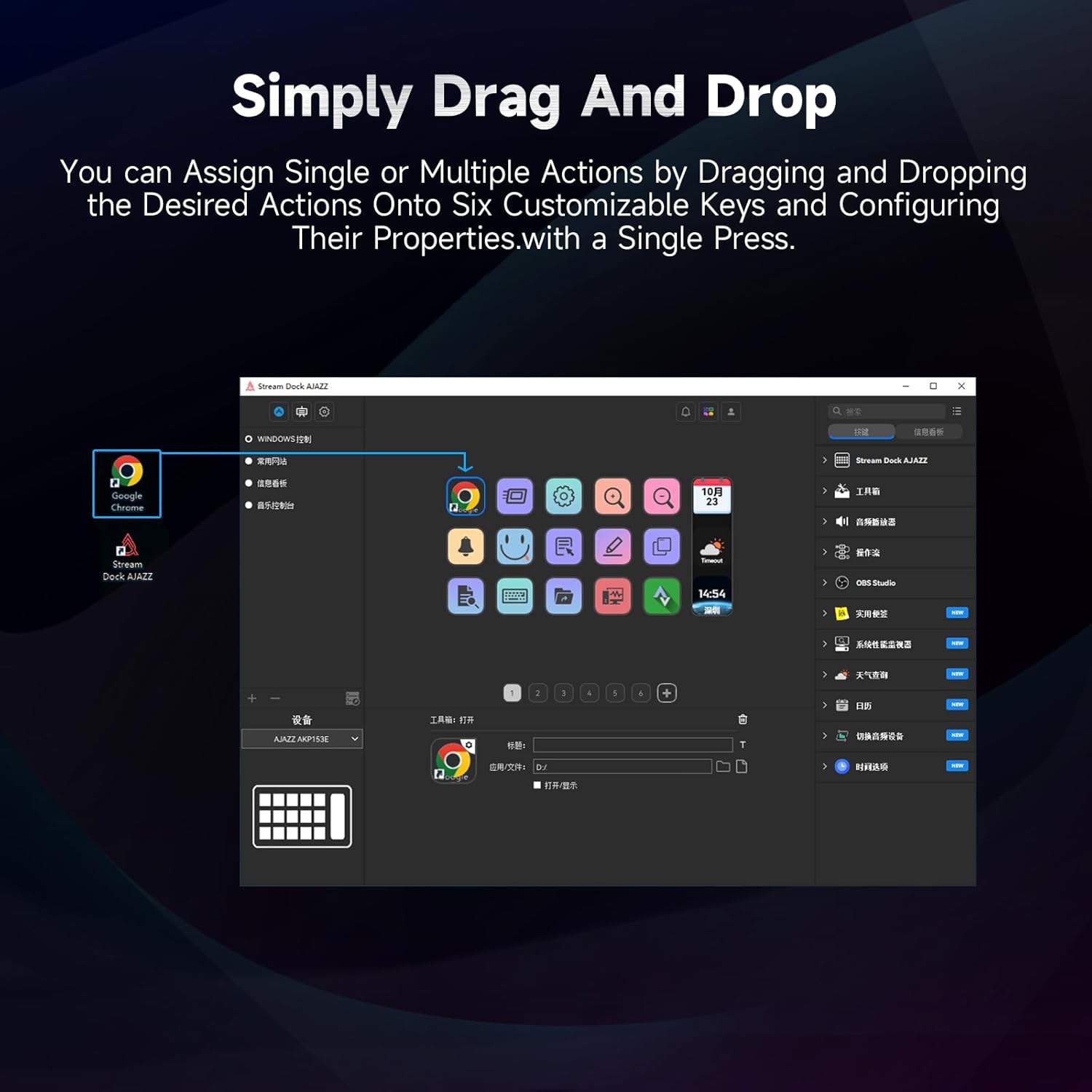
Figure 5.1: Customizing keys using the drag-and-drop interface in the AJAZZ software.
Video 5.1: Demonstration of assigning actions to keys for launching web pages and software with a single click.
5.2 Using Profiles and Pages
The software supports multiple profiles and pages, allowing you to switch between different sets of key assignments for various applications or tasks.
- Yeni uzman oluşturfiles for specific games, editing software, or streaming setups.
- Her profesyonelin içindefile, you can create multiple pages of key assignments, accessible by navigating through the device's buttons or software interface.
- The AKP03 automatically switches to the relevant profile when a linked application is in focus.
Video 5.2: Illustrates the multi-functional capabilities and profile switching of the AKP03 for various tasks.
6. Bakım
To ensure the longevity and optimal performance of your AJAZZ AKP03, follow these maintenance guidelines:
- Temizlik: Use a soft, dry cloth to wipe the surface of the device. Avoid abrasive cleaners or solvents.
- Depolamak: Cihazı serin, kuru ve doğrudan güneş ışığından ve aşırı sıcaklıklardan uzak bir yerde saklayın.
- Kablo Bakımı: Hasar görmesini önlemek için USB kablosunu aşırı derecede bükmekten veya döndürmekten kaçının.
- Yazılım Güncellemeleri: AJAZZ'ı düzenli olarak kontrol edin. webYazılım ve donanım yazılımı güncellemeleri için site; uyumluluğu sağlamak ve yeni özelliklere erişimi güvence altına almak amacıyla kullanılır.
7. Sorun Giderme
If you encounter issues with your AKP03, refer to the following common troubleshooting steps:
- Cihaz tanınmadı:
- USB kablosunun hem AKP03'e hem de bilgisayarınıza güvenli bir şekilde bağlandığından emin olun.
- Farklı bir USB bağlantı noktasına bağlanmayı deneyin.
- Bilgisayarınızı yeniden başlatın.
- Verify that the driver software is correctly installed and up to date.
- Tuşlar Yanıt Vermiyor:
- Check the software to ensure keys are properly assigned and the correct profile aktiftir.
- Ensure the driver software is running in the background.
- Yazılım Sorunları:
- Sürücü yazılımını yeniden yükleyin.
- Check for software updates on the AJAZZ webalan.
8. Özellikler
| Özellik | Detay |
|---|---|
| Marka | AJAZZ |
| Model Adı | AKP03 |
| Uyumlu Cihazlar | PC, Dizüstü Bilgisayar |
| Denetleyici Türü | Klavye |
| Bağlantı Teknolojisi | USB-C |
| Düğme Miktarı | 6 Programmable Keys (with LCD displays), 3 Physical Knobs, 3 Toggle Switches |
| Ürün Ağırlığı | 0.32 Kilogram |
| Ürün Boyutları (U x G x Y) | 5 x 3 x 2 inç |
| Güç Kaynağı | Kablolu Elektrik |
9. Garanti ve Destek
9.1 Garanti Bilgileri
The AJAZZ AKP03 Macro Keypad Stream Controller comes with a 1 Yıllık Sınırlı Garanti Satın alma tarihinden itibaren geçerlidir. Bu garanti, üretim hatalarını ve normal kullanım koşullarındaki arızaları kapsar. Yanlış kullanım, kazalar, yetkisiz değişiklikler veya hatalı montajdan kaynaklanan hasarları kapsamaz.
Garanti talepleri için lütfen satın alma belgenizi saklayın.
9.2 Müşteri Desteği
For technical assistance, troubleshooting, or warranty inquiries, please contact AJAZZ customer support:
- Webalan: www.a-jazz.com (Refer to the 'Support' or 'Contact Us' section)
- E-posta: [Insert Customer Support Email, if available]
- Telefon: [Insert Customer Support Phone Number, if available]
Ürünle ilgili her türlü soru veya endişenizde size yardımcı olmak için destek ekibimiz hazırdır.