
1. Giriş
This manual provides detailed instructions for the installation, setup, and operation of your JOYING JY-TT163N4 Android 13 Car Stereo. This unit is designed specifically for Toyota Corolla models manufactured between 2008 and 2013, offering advanced features such as Android 13 operating system, 9-inch touch screen, CarPlay, Android Auto, GPS navigation, and Bluetooth connectivity.
Lütfen kurulum ve kullanımdan önce, doğru çalışma ve güvenlik için bu kılavuzu dikkatlice okuyun.
2. Paket İçeriği
Aşağıda listelenen tüm öğelerin paketinizde bulunduğunu doğrulayın:
- 9" Radio Unit (x1)
- Single Din Cage (x1)
- Left & Right Bracket (x1)
- WiFi Antenna (x1)
- GPS Anteni (x1)
- 4G Anten (x2)
- External Mic (x1)
- USB Kablosu (x2)
- AR Cable (x1)
- Screen Ribbon Cable (x1)
- Güç Kablosu (x1)
- Kullanıcı Kılavuzu (x1)

Figure 2.1: All included accessories for the JOYING JY-TT163N4 car stereo.
3. Kurulum Kılavuzu
Profesyonel montaj önerilir. Montaja başlamadan önce aracın elektrik bağlantısının kesildiğinden emin olun.
3.1. Uyumluluk Kontrolü
This unit is designed for Toyota Corolla 2008-2013. Please verify your car's dashboard configuration to ensure compatibility, especially regarding JBL amplifier systems and screen sizes.

Figure 3.1: Dashboard compatibility for models without factory JBL amplifier (Option A).
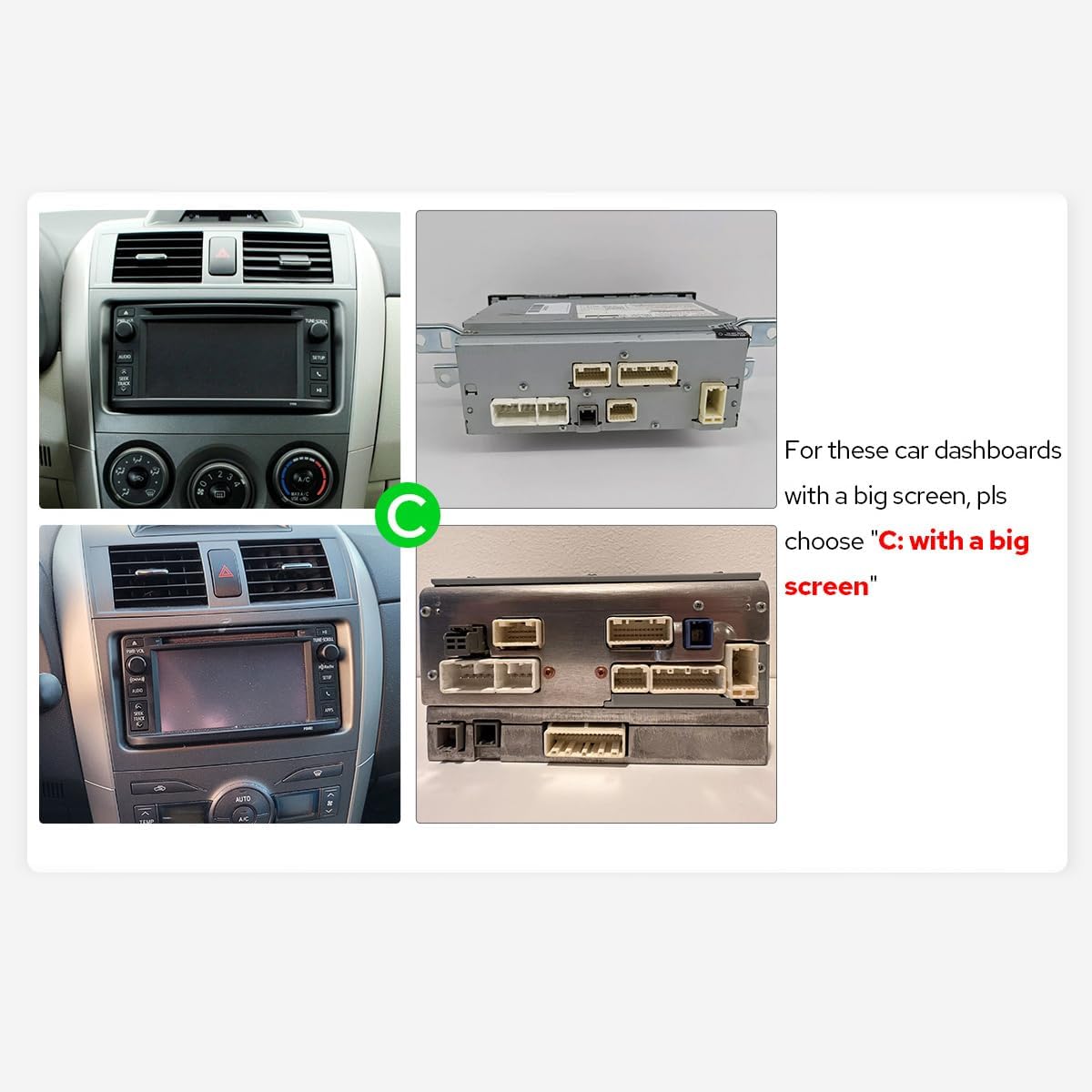
Figure 3.2: Dashboard compatibility for models with a big screen (Option C).
3.2. Kablo Bağlantıları
Connect the provided cables to the corresponding ports on the car stereo and your vehicle's harness. Ensure all connections are secure.

Şekil 3.3: Arka view Araç teybinin, bağlantı noktaları etiketlenmiş şekilde.
Video 3.1: This video demonstrates the general wiring operation for car stereo installation. It shows how to connect the power cable, RCA harness, USB adapter cables, radio antenna, and GPS antenna to the head unit.
Video 3.2: This video illustrates the installation effect of a car stereo in a Toyota Corolla 2009-2013 model, providing a visual reference for the final appearance.
4. İlk Kurulum
4.1. İlk Önyükleme
Upon inserting the car key, the unit will start up and enter the user interface within 2 seconds (initial boot may take 30-40 seconds).
4.2. AC Settings
To adjust AC settings, including temperature units (Fahrenheit) and display options:
- Navigate to the main home screen.
- Tap on 'My Car'.
- Select 'Setting'.
- Choose 'AC setting'.
- Toggle the 'Fahrenheit' option to your preference.
- Ensure 'Display large Air' is enabled for full AC display.
- Click 'Confirm' to save changes.
Video 4.1: This video demonstrates how to access and adjust the AC settings on your car stereo, including switching between Celsius and Fahrenheit and enabling the large air display option.
5. Kullanım Talimatları
5.1. CarPlay ve Android Auto
Connect your mobile phone via USB cable or Bluetooth to share apps, navigation, make calls, and listen to music on the larger screen.

Figure 5.1: Built-in CarPlay and Android Auto interfaces.
Video 5.1: This video demonstrates the main functions of the car stereo, including how to connect and use CarPlay, Android Auto, and Mirror Link features.
Video 5.2: This video provides instructions on how to set up and use Wireless CarPlay and Android Auto with the car stereo.
Video 5.3: This video guides users through the process of connecting their smartphone to the car stereo for CarPlay and Android Auto functionality.
Video 5.4: This video demonstrates the steps to connect your device to the car stereo for CarPlay functionality.
5.2. Ayna Bağlantısı
Mirror your smartphone screen directly onto the car stereo display for enhanced viewing of apps and content.
Video 5.5: Bu kısa ön izlemeview video demonstrates the wireless mirroring feature, showing a smartphone screen duplicated on the car stereo display.
5.3. GPS Navigasyonu
The unit features precise GPS engines and includes GPS antennas for accurate positioning and faster real-time navigation. Offline maps are supported in areas where data download is available.
5.4. Bluetooth 5.0
Supports audio streaming, automatic phone book transfer, and hands-free calling. Note: It primarily supports phone and OBD dongle connections.
5.5. Medya Oynatma
Enjoy music and videos from various sources. The unit supports split-screen multitasking, allowing you to run two applications simultaneously.
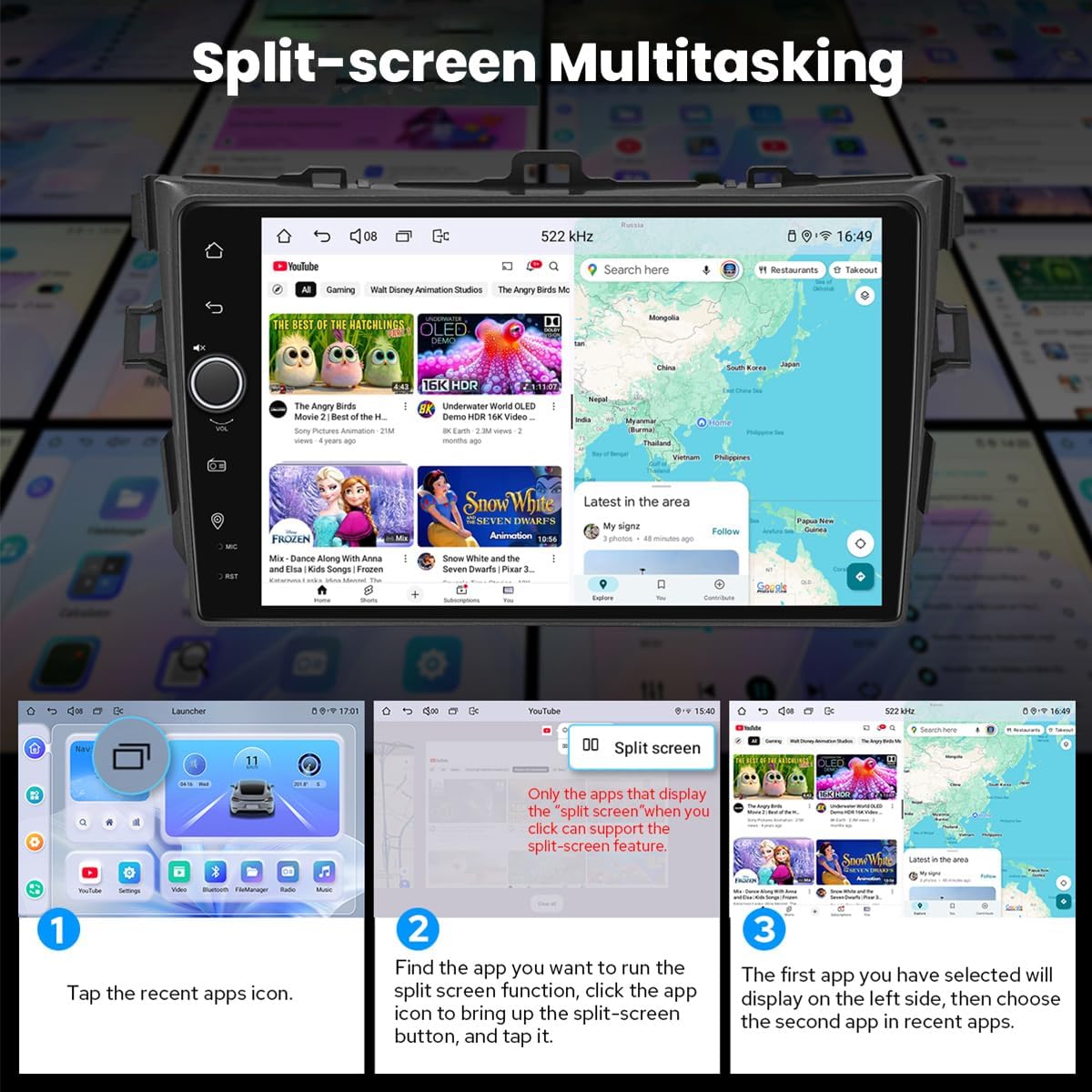
Figure 5.2: Split-screen multitasking interface.
5.6. Personalized Settings
Customize your stereo with various options including car boot logos, wallpapers, and changeable button colors.

Figure 5.3: Personalized settings options.
5.7. Sound Enjoyment
Equipped with a TDA7851 DSP chip, a 48-Band Graphic Equalizer, and 4x50W Max Output Power. Supports aftermarket amplifiers with 4 Audio Outputs, 1 SUB Output, Fiber Optical Output, SPDIF Coaxial Output, and Center Channel Output.

Figure 5.4: High-quality sound features.
5.8. Built-in 4G Module
Insert a SIM card for internet access. Supports FDD-LTE: B2/B4/B5/B7/B12/B13/B14/B17/B25/B26/B38/B66/B71 and TDD-LTE: B41. Does not support phone calls or SMS.
5.9. HDMI Çıkışı
Provides full digital image and sound output for external displays like headrest monitors, offering 1080P clear picture without stuttering. HDMI cable is not included.
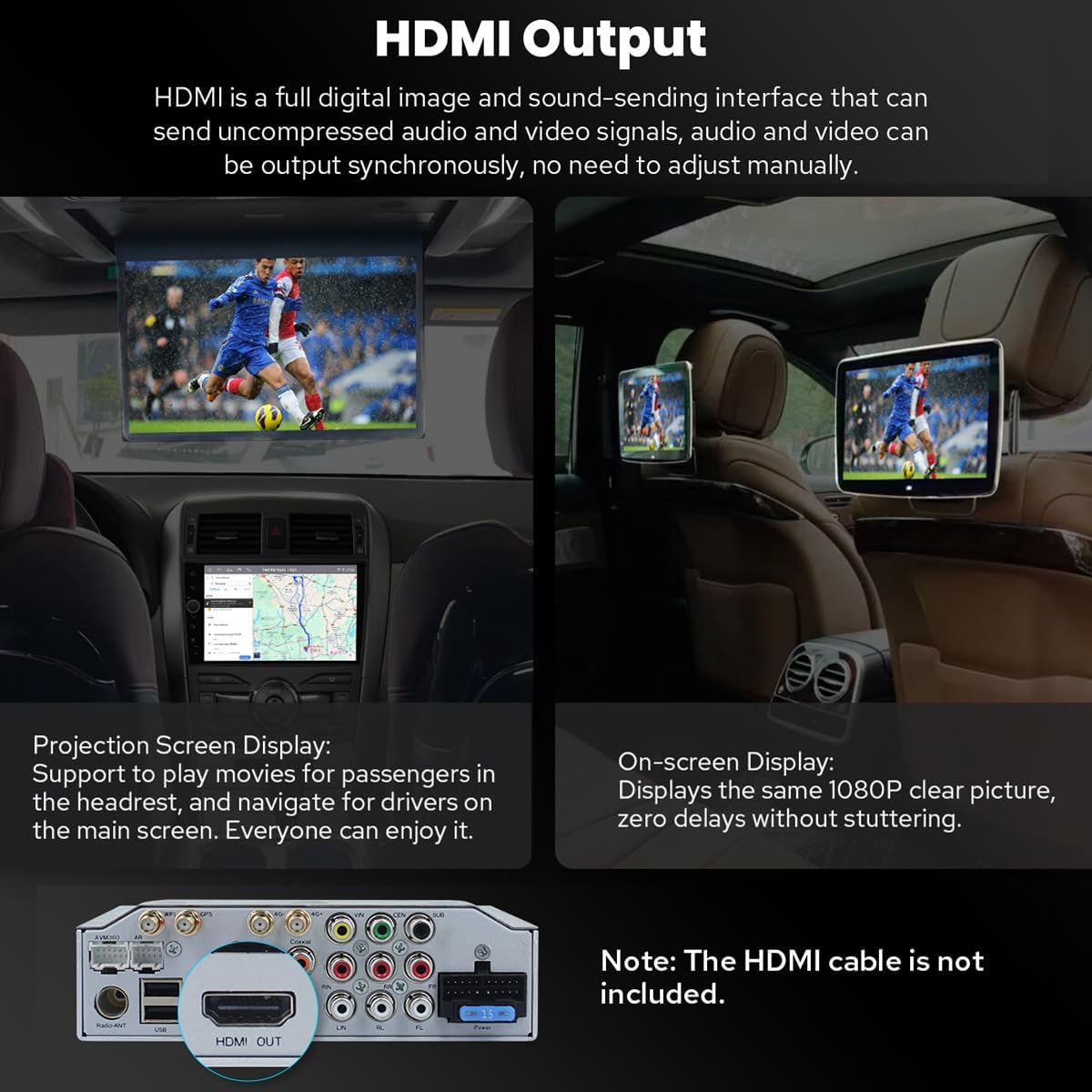
Figure 5.5: HDMI Output functionality.
5.10. Diğer Özellikler
Includes Picture-in-Picture, 3 USB Ports, Micro SD Card Slot, and 4G SIM Card Slot.

Şekil 5.6: Üzeriview of additional features.
6. Bakım
6.1. Ekranın Temizlenmesi
Ekranı nazikçe silmek için yumuşak, tiftiksiz bir bez kullanın. İnatçı lekeler için hafifçe silin.ampBezi su veya ekran temizleyicisiyle silin. Sert kimyasallardan veya aşındırıcı malzemelerden kaçının.
6.2. Soğutma Sistemi
The unit features a dual heat sink design for superior heat dissipation and improved temperature control. A warning value can be set for volume or CPU temperature; if exceeded, the fan will automatically activate to prevent overheating.

Figure 6.1: Cooling system features.
6.3. WiFi Signal
An independent WiFi antenna ensures stable signal quality and provides fast and smooth internet access, supporting 802.11a/b/g/n/AC standards across 2.4GHz/5GHz spectral bands.

Figure 6.2: WiFi signal features.
7. Sorun Giderme
If you encounter any issues, please refer to the following general troubleshooting steps:
- Güç Yok: Tüm güç bağlantılarını ve sigortaları kontrol edin. Kontak anahtarının açık olduğundan emin olun.
- Ses Yok: Verify speaker connections, volume levels, and audio output settings.
- Bluetooth Bağlantı Sorunları: Hem müzik çalarınızda hem de cihazınızda Bluetooth'un etkinleştirildiğinden emin olun. Cihazların eşleştirmesini kaldırıp yeniden eşleştirmeyi deneyin.
- GPS Sinyal Kaybı: GPS anteninin düzgün bir şekilde takıldığından ve net bir görüş alanına sahip olduğundan emin olun view gökyüzünün.
- Dokunmatik Ekran Tepki Vermiyor: Cihazı yeniden başlatmayı deneyin. Sorun devam ederse, destek ekibiyle iletişime geçin.
For more specific issues, consult the detailed troubleshooting section in the full user manual or contact JOYING customer support.
8. Özellikler
| Özellik | Şartname |
|---|---|
| Ürün Model Numarası | JY-TT163N4 |
| Ekran Boyutu | 9 inç |
| Ekran Boyutu | 9 inç |
| Dokunmatik Ekran Türü | Kapasitif |
| İşletim Sistemi | Android, iOS (CarPlay/Android Auto aracılığıyla) |
| Bellek Depolama Kapasitesi | 64 GB |
| Bağlantı Teknolojisi | Bluetooth, Ethernet, USB, Wi-Fi |
| Özel Özellik | Bluetooth, Dokunmatik Ekran |
| Ses Çıkışı Modu | Stereo |
| Harita türü | Kuzey Amerika |
| Üretici | SEVİNÇLİ |
9. Garanti ve Destek
9.1. Garanti Bilgileri
This JOYING car stereo comes with a 2 Yıllık Garanti Satın alma tarihinden itibaren geçerlidir. Lütfen garanti talepleriniz için satın alma belgenizi saklayın.
9.2. Müşteri Desteği
For technical assistance, troubleshooting, or warranty inquiries, please contact JOYING customer support through the retailer where the product was purchased or visit the official JOYING webiletişim bilgileri için site.