
1. Giriş
The JIGUUN 1500W Pure Sine Wave Power Inverter converts 12V DC battery power to 110-120V AC household power. This device is designed to provide clean, stable power for various applications, including home use, RVs, camping, cars, and trucks. It features multiple AC outlets, a USB charging port, and an LCD display for monitoring system status.
2. Güvenlik Bilgileri
UYARI: Bu güvenlik talimatlarına uyulmaması ciddi yaralanmalara veya mal hasarına neden olabilir.
- Read the entire manual before operating the inverter.
- İnverter çevresinde yeterli havalandırma olduğundan emin olun. Soğutma deliklerini kapatmayın.
- İnvertörü suya, yağmura veya aşırı neme maruz bırakmayın.
- Do not operate the inverter near flammable materials or in environments with explosive gases.
- İnvertörü yalnızca 12V DC güç kaynağına bağlayın. Başka voltaj kaynaklarına bağlamak yasaktır.tagüniteye zarar verebilir.
- Aşırı ısınmayı ve ark oluşumunu önlemek için tüm bağlantıların sıkı ve güvenli olduğundan emin olun.
- İnvertörü açmayınasing. İçerisinde kullanıcının müdahale edebileceği herhangi bir parça bulunmamaktadır.
- İnverter çalışırken çocukları cihazdan uzak tutun.
- Herhangi bir bakım veya temizlik işlemi yapmadan önce mutlaka invertörü bataryadan ayırın.
- The inverter generates heat; avoid touching the casing during prolonged operation.
3. Paket İçeriği
Paketinizde tüm öğelerin mevcut olduğundan emin olun:
- 1x JIGUUN 1500W Pure Sine Wave Inverter
- 1x Kullanım Kılavuzu
- 2 Sets of Battery Cables (2x Red, 2x Black)
- 1x Uzaktan Kumanda
- 10x 30A Spare Fuses (Note: Fuses are pre-installed; these are spares)
- 1x Alligator Clip Safety Ground
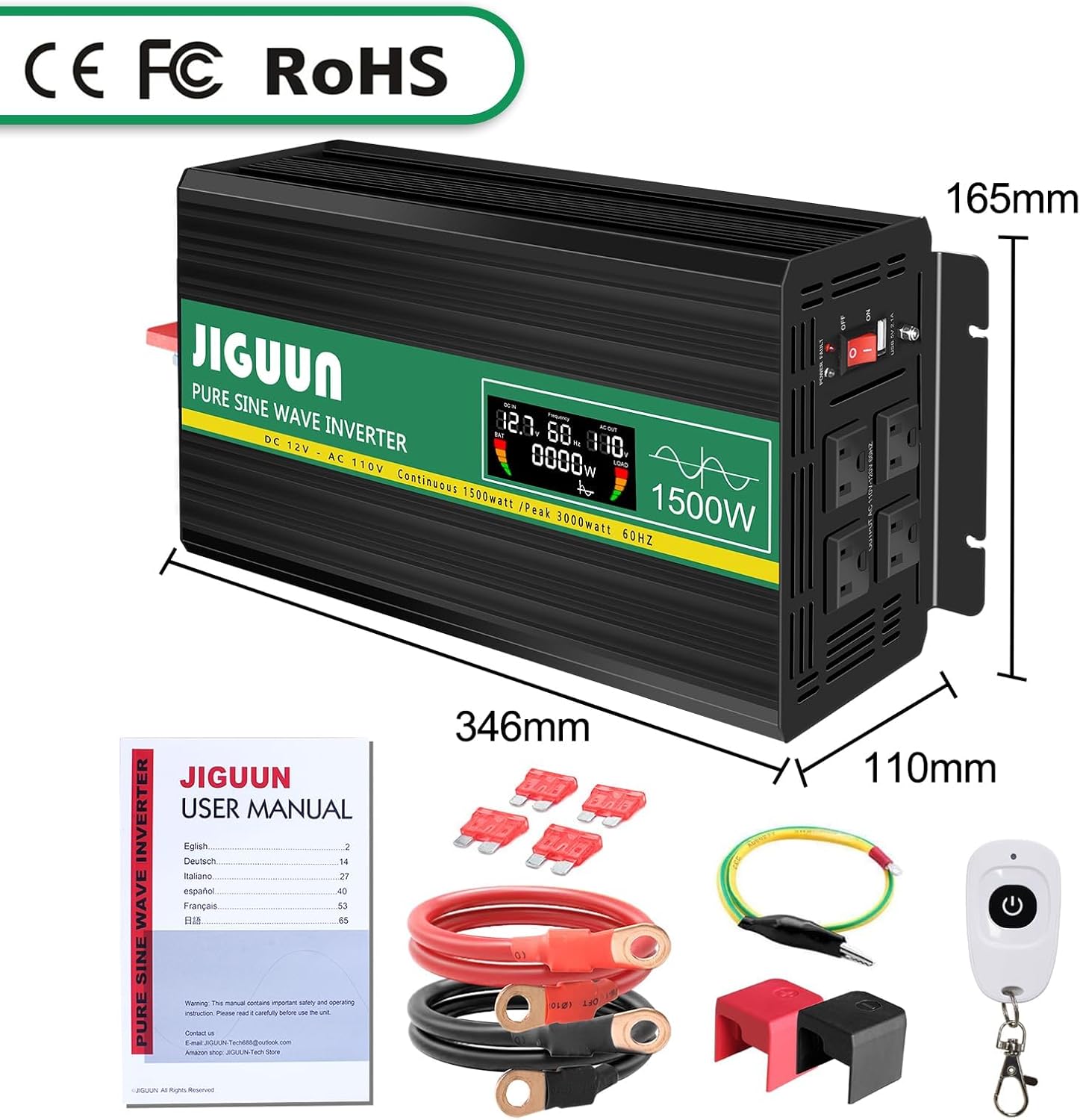
Image: Contents of the JIGUUN 1500W Pure Sine Wave Inverter package.
4. Ürün Özellikleri
- Saf Sinüs Dalgası Çıkışı: Provides clean, stable power suitable for sensitive electronics.
- Yüksek Güç Çıkışı: Continuous 1500W, Peak 3000W.
- Giriş/Çıkış: 12V DC input to 110-120V AC output.
- Çoklu Çıkışlar: 3 AC outlets and 1x 2.1A USB charging port.
- LCD Ekran: Giriş/çıkış ses seviyelerini gösterir.tage, output frequency, and load power for real-time monitoring.
- Kapsamlı Koruma: Includes under-voltage, aşırı hacimtage, overload, over-temperature, short circuit, AC ground terminal, and reverse connection protection.
- Verimli Soğutma: Equipped with 2 high-speed heat dissipation silent fans that activate when temperature exceeds 45°C.
- Dayanıklı Tasarım: Aluminum alloy shell for lasting protection.
- Uzaktan kumanda: Rahat çalışma için.
5. Bileşen Tanımlaması

Image: Front and Rear Panel Components.
Ön Panel:
- AC Receptacles (x3): For connecting AC-powered devices.
- USB Ports (2.1A): USB ile çalışan cihazları şarj etmek için.
- Açma / kapama düğmesi: To power the inverter on or off.
- Güç Göstergesi: Çalışma durumunu gösteren LED ışık.
- LCD Ekran: Shows real-time operational data.
Arka panel:
- DC Giriş Terminalleri: Red for positive (+), Black for negative (-). Connect battery cables here.
- Soğutma fanları: Two high-speed fans for heat dissipation.
- Yer Terminali: Emniyet topraklaması için.
6. Kurulum ve Kurulum
- Pili Hazırlayın: Ensure your 12V DC battery has sufficient capacity for the appliances you intend to power. Insufficient battery capacity may prevent high-power appliances from running.
- Hacmi Sağlatage Eşleştirme: Confirm that the inverter's input voltage (12V DC) matches your battery's voltage.
- Akü Kablolarını Bağlayın:
- Kırmızı pil kablosunu invertörün pozitif (+) terminaline ve 12V pilinizin pozitif (+) terminaline bağlayın.
- Siyah pil kablosunu invertörün negatif (-) terminaline ve 12V pilinizin negatif (-) terminaline bağlayın.
- Ensure connections are tight and secure. Use the provided wrench for the inverter terminals.
- Topraklama: Connect the alligator clip safety ground to the inverter's ground terminal and to a suitable ground point (e.g., vehicle chassis).
- İlk Güç Açma: Before connecting any appliances, turn the inverter's ON/OFF switch to the "ON" position. The LCD display should illuminate, showing input voltage ve diğer parametreler.
- Cihazları Bağlayın: Once the inverter is powered on and stable, connect your AC-powered devices to the AC outlets and USB devices to the USB port. Ensure the total wattage of connected equipment does not exceed the inverter's continuous power rating (1500W).
IMPORTANT: Do not connect the inverter directly to an AC circuit breaker panel or any other AC power source. This inverter is for DC to AC conversion only.
7. Kullanım Talimatları
Açma/Kapatma:
- To turn on the inverter, press the ON/OFF switch to the "ON" position.
- To turn off the inverter, press the ON/OFF switch to the "OFF" position.
LCD Ekranın Kullanımı:
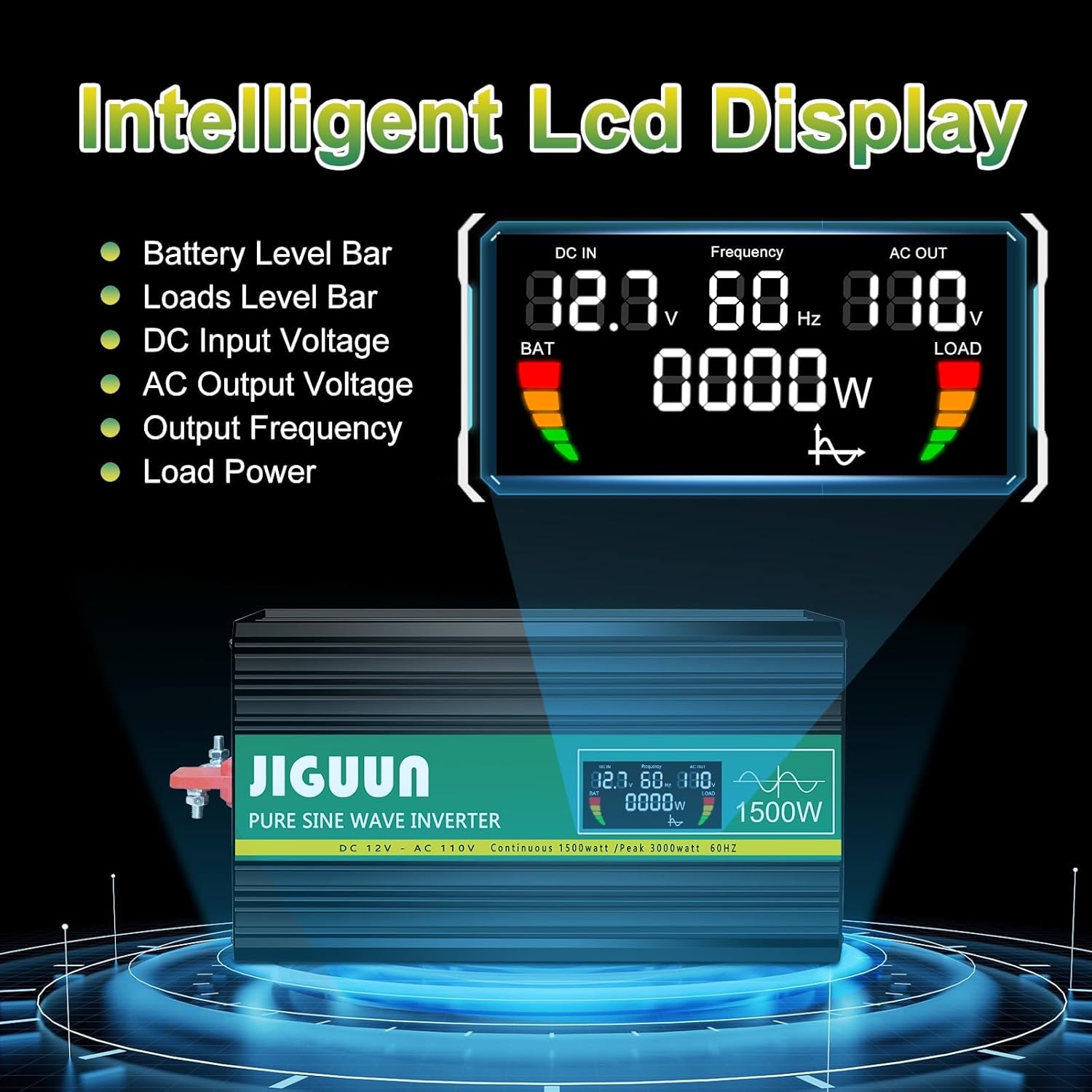
Image: Intelligent LCD Display.
Akıllı LCD ekran gerçek zamanlı bilgi sağlar:
- Pil Seviyesi Çubuğu: Kalan pil şarjını gösterir.
- Load Level Bar: Shows the current power draw from connected devices.
- DC Giriş Hacmitage: hacmi görüntülertage from your 12V battery.
- AC Çıkış Hacmitage: Çıkış hacmini gösterirtage (110-120V AC).
- Çıkış Frekansı: Çıkış frekansını (60Hz) gösterir.
- Yük Gücü: Mevcut su seviyesini gösterir.tage being used by connected appliances.
Uzaktan Kumandanın Kullanımı:

Image: Remote Control for convenient operation.
The included remote control allows you to power the inverter on and off from a distance, providing convenience in various setups.
Bağlantı Cihazları:
- Plug AC appliances into the 3-prong AC outlets.
- Plug USB devices into the 2.1A USB charging port.
- Always ensure the total power consumption of all connected devices does not exceed the inverter's continuous power rating (1500W). Overloading the inverter will trigger protection mechanisms.
8. Protection System

Image: Upgraded BMS System Protection Features.
The JIGUUN inverter incorporates an advanced protection system to ensure safe and reliable operation:
- Cilt Altındatage Koruma: Giriş DC voltajında değişiklik olursa invertörü kapatır.tage drops too low (10.0±0.5V DC) to protect the battery from over-discharge.
- Aşırı Hacimtage Koruma: Giriş DC voltajında değişiklik olursa invertörü kapatır.tage exceeds a safe level (15.0±0.5V DC).
- Aşırı Yük Koruması: Bağlı yük, invertörün kapasitesini aşarsa otomatik olarak kapanır.
- Aşırı Sıcaklık Koruması: Activates cooling fans when the internal temperature exceeds 45°C and shuts down if it becomes too high.
- Kısa Devre Koruması: Çıkışta oluşabilecek kısa devrelere karşı koruma sağlar.
- AC Ground Terminal: Provides a safety ground connection.
- Ters Bağlantı Koruması: Protects the inverter and battery from damage due to incorrect polarity connection.
If any protection is triggered, the inverter will typically shut down. Disconnect the load, resolve the issue, and then restart the inverter.
9. Bakım
- Temizlik: İnverterin dış yüzeyini periyodik olarak kuru, yumuşak bir bezle temizleyin. Soğutma deliklerinin toz ve kirden arındırılmış olduğundan emin olun. Sıvı temizleyiciler kullanmayın.
- Bağlantılar: Regularly check all DC input connections to ensure they are tight and free from corrosion. Loose connections can cause overheating.
- Depolamak: When not in use for extended periods, store the inverter in a cool, dry place away from direct sunlight and moisture. Disconnect it from the battery.
- Akü Bakımı: Ensure your 12V battery is properly maintained and charged according to its manufacturer's instructions. A healthy battery is crucial for optimal inverter performance.
10. Sorun Giderme
| Sorun | Olası Neden | Çözüm |
|---|---|---|
| İnverter açılmıyor. | No power from battery; loose connections; low battery voltage. | Pil bağlantılarını ve ses seviyesini kontrol edintage. Ensure battery is charged. |
| AC çıkışı yok. | Overload; short circuit; over-temperature; low/high input voltage. | Reduce load. Check for short circuits. Allow inverter to cool. Check battery voltage. |
| Fanlar sürekli çalışıyor veya çok gürültülü. | Ağır yük veya yetersiz havalandırma nedeniyle yüksek iç sıcaklık. | Ensure adequate ventilation. Reduce load. Clean vents if blocked. |
| Connected appliance not working correctly. | Appliance power requirement exceeds inverter capacity; appliance not compatible with pure sine wave. | Cihazın suyunu kontrol edin.tage. Ensure appliance is suitable for pure sine wave power. |
If troubleshooting steps do not resolve the issue, please contact JIGUUN customer support.
11. Özellikler
| Parametre | Değer |
|---|---|
| Çıkış Dalgası | Saf sinus dalgası |
| Sürekli Çıkış Gücü | 1500W |
| Dalgalanma Çıkış Gücü | 3000W |
| Nominal Giriş Hacmitage | 12-13.2V DC |
| Nominal Çıkış Hacmitage | 110-120V AC |
| Çıkış Frekansı | 60Hz |
| Giriş Aşırı Hacmitage Kapatma | 15.0±0.5V DC |
| Giriş Hacmi DüşüktagAlarm | 10.5±0.5V DC |
| Giriş Düşük Voltage Kapatma | 10.0±0.5V DC |
| Soğutma Fanı Aktivasyonu | 45°C |
| Dönüşüm Verimliliği | >%90 |
| Ürün Ağırlığı | 8 pound |
| Paket Boyutları | 13 x 11 x 6 inç |
12. Garanti ve Destek
The JIGUUN 1500W Pure Sine Wave Power Inverter comes with a 1 yıllık garanti, including free replacement for manufacturing defects.
For any questions, issues, or support needs during use, please feel free to contact the JIGUUN team. We are committed to assisting you.
Contact information can typically be found on the product packaging or through the retailer's support channels.
