
1. Kurulum Kılavuzu
This section provides instructions for the initial setup of your OPPO A6 Pro 5G CPH2781 smartphone.
1.1 Kutudan Çıkarma ve İlk İnceleme
Tüm bileşenleri ambalajından dikkatlice çıkarın. Aşağıdaki öğelerin mevcut olduğundan emin olun:
- OPPO A6 Pro 5G CPH2781 device
- 80W SUPERVOOC Flash Charge adapter
- USB Type-C kablosu
- SIM çıkarma aracı
- Hızlı Başlangıç Kılavuzu ve Güvenlik Bilgileri
Devam etmeden önce cihazda gözle görülür bir hasar olup olmadığını kontrol edin.
1.2 SIM Kart ve Depolama Kurulumu
The OPPO A6 Pro 5G supports Dual SIM functionality. Follow these steps to install your SIM cards:
- Cihazın yan tarafında bulunan SIM kart tepsisini bulun.
- SIM kart çıkarma aracını tepsinin yanındaki küçük deliğe yerleştirin ve tepsi dışarı çıkana kadar hafifçe bastırın.
- Nano-SIM kartlarınızı tepsideki belirtilen yuvalara yerleştirin. Altın temas noktalarının aşağı baktığından emin olun.
- Carefully reinsert the SIM card tray into the device until it clicks into place.
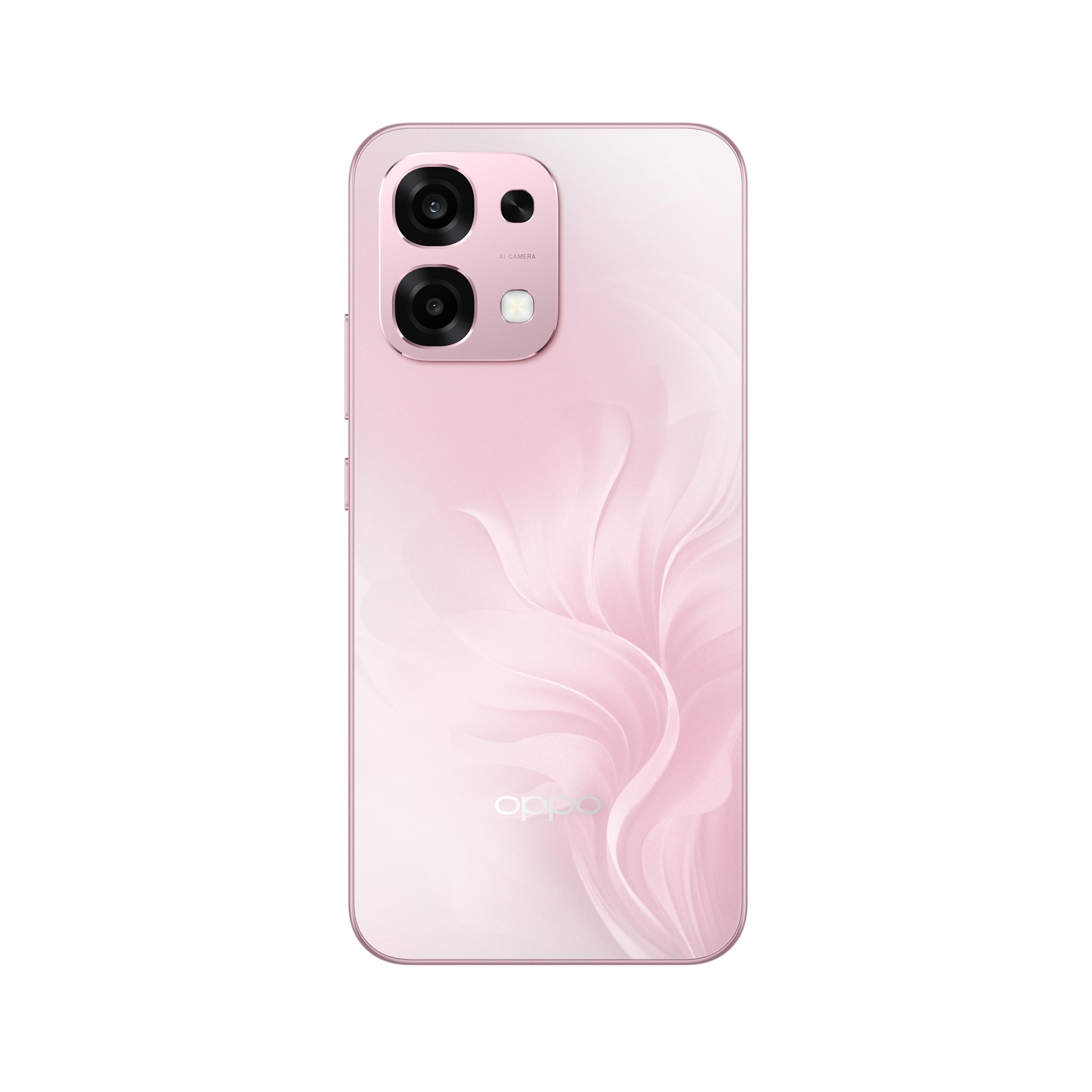
Şekil 1: Arka view of the OPPO A6 Pro 5G CPH2781, highlighting the camera array and device color.
1.3 Açma ve İlk Yapılandırma
Cihazınızı ilk kez açmak için:
- Ekranda OPPO logosu görünene kadar (sağ tarafta bulunan) Güç düğmesini basılı tutun.
- Dilinizi, bölgenizi seçmek ve bir Wi-Fi ağına bağlanmak için ekrandaki talimatları izleyin.
- Google hizmetlerine ve Play Store'a erişmek için Google hesabınızla oturum açın veya yeni bir hesap oluşturun.
- Complete the setup wizard, including setting up screen lock methods (PIN, pattern, password, or Face Recognition).
1.4 Cihazı Şarj Etme
Your OPPO A6 Pro 5G is equipped with 80W SUPERVOOC Flash Charge technology for rapid charging. Use the provided 80W SUPERVOOC adapter and USB Type-C cable for optimal charging performance.
- USB Type-C kablosunu telefonun alt kısmında bulunan şarj girişine bağlayın.
- Connect the other end of the cable to the 80W SUPERVOOC adapter.
- Adaptörü elektrik prizine takın.
- Ekranda şarj göstergesi belirecektir.
2. Kullanım Talimatları
This section covers the basic operation and key features of your OPPO A6 Pro 5G CPH2781.
2.1 Navigating ColorOS
Your device runs on ColorOS, OPPO's customized Android operating system. Common navigation gestures include:
- Yukarı kaydırın: Access the app drawer (if enabled) or return to the home screen.
- Aşagı kaydır: Open the notification panel and quick settings.
- Sola/Sağa Kaydır: Navigate between home screen pages.
- Musluk: Bir öğe seçin veya bir uygulama açın.
- Uzun basma: Bağlamsal menülere erişin veya uygulama simgelerini taşıyın.
2.2 Ekran Özellikleri
The OPPO A6 Pro 5G features a 6.57-inch 120Hz AMOLED Ultra Bright Display, providing vivid colors and smooth scrolling. You can adjust display settings such as brightness, color mode, and refresh rate in the Settings menu under "Display & Brightness".
2.3 Kamera Kullanımı
The device is equipped with an advanced camera system. To open the camera, tap the Camera app icon on your home screen or lock screen. Key features include:
- Fotoğraf Modları: Standart, Portre, Gece, Profesyonel, Panorama.
- Video Kaydı: Supports various resolutions and frame rates.
- Yapay Zeka Kamerası: Utilizes artificial intelligence for scene recognition and optimal photo settings.

Figure 2: Detail of the OPPO A6 Pro 5G CPH2781 camera module.
2.4 Yapay Zeka Özellikleri
The OPPO A6 Pro 5G integrates several AI-powered features to enhance user experience:
- AI Eraser 2.0: Fotoğraflarda nesne kaldırma konusunda akıllı çözüm.
- AI Assistance for Documents: Helps in scanning and managing documents.
- AI Assistant for Notes: Enhances note-taking capabilities.
2.5 Bağlantı
Your device supports 5G cellular technology, Bluetooth, and LTE. AI LinkBoost 3.0 automatically optimizes network performance for stable connections.
- Wifi: Ayarlar > Wi-Fi üzerinden kablosuz ağlara bağlanın.
- Bluetooth: Pair with other Bluetooth devices via Settings > Bluetooth.
- Mobil ağ: Manage 5G/LTE settings via Settings > Mobile Network.
3. Bakım ve Özen
Proper maintenance ensures the longevity and optimal performance of your OPPO A6 Pro 5G CPH2781.
3.1 Pil Bakımı
Cihaz 6500 mAh'lik bir batarya ile donatılmıştır. Pil ömrünü en üst düzeye çıkarmak için:
- Aşırı sıcaklıklardan kaçının.
- Use the provided 80W SUPERVOOC Flash Charge adapter and cable.
- Pilin sık sık tamamen boşaltılmasından kaçının.
- Gerektiğinde güç tasarrufu modlarını etkinleştirin.
3.2 Su ve Toz Direnci
The OPPO A6 Pro 5G CPH2781 has an IP69 rating, indicating resistance to dust and high-pressure water jets. While resistant, it is not waterproof under all conditions. To maintain resistance:
- Ensure the SIM tray is fully closed and sealed.
- Cihazı suya daldırmaktan kaçının.
- Do not expose the device to saltwater, chlorinated water, or other liquids.
- If the device gets wet, wipe it dry with a clean, soft cloth before charging.
3.3 Fiziksel Koruma
The device is certified to military standards for durability. It also comes with a built-in screen protector. For additional protection:
- Consider using a protective case.
- Avoid dropping the device or exposing it to severe impacts.
- Ekranı ve gövdeyi yumuşak, tüy bırakmayan bir bezle temizleyin.
4. Sorun Giderme
This section addresses common issues you might encounter with your OPPO A6 Pro 5G CPH2781.
4.1 Cihaz Açılmıyor
- Pilin şarjlı olduğundan emin olun. Cihazı en az 10 dakika şarj cihazına takın.
- Perform a forced restart by pressing and holding the Power button and Volume Up button simultaneously for about 10-15 seconds.
4.2 Zayıf Ağ Bağlantısı
- SIM kartınızın doğru şekilde takılıp takılmadığını kontrol edin.
- Verify that mobile data is enabled in Settings.
- Cihazı yeniden başlatmayı deneyin.
- Ağ ayarlarını sıfırlayın (Ayarlar > Sistem ayarları > Yedekleme ve sıfırlama > Telefonu sıfırla > Ağ ayarlarını sıfırla).
- Ağ kapsama alanında olduğunuzdan emin olun.
4.3 Uygulamaların Çökmesi veya Donması
- Uygulamayı kapatıp yeniden açın.
- Clear the app's cache and data (Settings > Apps > App management > [App Name] > Storage usage > Clear cache/Clear data).
- Uygulamayı Google Play Store'dan en son sürüme güncelleyin.
- Ensure your ColorOS is up to date (Settings > About device > Up to date).
4.4 Pilin Hızlı Bitmesi
- Ayarlar > Pil bölümünden pil kullanımını kontrol ederek, çok fazla pil tüketen uygulamaları belirleyebilirsiniz.
- Ekran parlaklığını ve ekran zaman aşımını azaltın.
- Kullanılmadığı zamanlarda GPS, Bluetooth veya Wi-Fi gibi gereksiz özellikleri devre dışı bırakın.
- Enable power-saving mode.
5. Özellikler
Below are the key technical specifications for the OPPO A6 Pro 5G CPH2781.
| Özellik | Şartname |
|---|---|
| Marka | Karşıt |
| Model Adı | A6 Pro (CPH2781) |
| İşletim Sistemi | ColorOS |
| RAM Bellek | 8 GB (16 GB'a genişletilebilir) |
| Depolama Kapasitesi | 256 GB |
| CPU Modeli | MediaTek Helio G100 |
| Ekran Boyutu | 6.57 inç |
| Görüntü Türü | AMOLED |
| Yenileme Hızı | 120 Hz |
| Pil Kapasitesi | 6500 mAh |
| Şarj Teknolojisi | 80W SUPERVOOC Hızlı Şarj |
| Hücresel Teknoloji | 5G |
| SIM Kart Yuvası Sayısı | Çift SIM |
| Su Direnç Seviyesi | IP69 (Su geçirmez) |
| Biyometrik Güvenlik | Yüz Tanıma |
| Bağlayıcı Türü | USB Tip C |
| Dahili Medya | Ekran Koruyucu |
6. Garanti Bilgileri
Your OPPO A6 Pro 5G CPH2781 comes with a 2 yıllık üretici garantisiBu garanti, normal kullanım koşullarında malzeme ve işçilik hatalarını kapsar.
Please retain your proof of purchase for warranty claims. The warranty does not cover damage caused by misuse, accidents, unauthorized modifications, or normal wear and tear. For detailed terms and conditions, please refer to the warranty card included in your product packaging or visit the official OPPO webalan.
7. Müşteri Desteği
For further assistance, technical support, or service inquiries regarding your OPPO A6 Pro 5G CPH2781, please contact OPPO customer service through the following channels:
- Resmi OPPO Webalan: Ziyaret etmek OPPO Desteği SSS, sorun giderme kılavuzları ve iletişim bilgileri için.
- OPPO Store: Ayrıca resmi web sitesini de ziyaret edebilirsiniz Amazon'da OPPO Mağazası Ürün bilgileri ve ilgili aksesuarlar için.
- Servis Merkezleri: Locate authorized OPPO service centers in your region for in-person support.
When contacting support, please have your device model (CPH2781) and serial number ready.