
1. Giriş
This manual provides detailed instructions for the safe and effective use of your Moukey MPS5 Portable Karaoke Machine. Please read this manual thoroughly before operating the device and retain it for future reference. The MPS5 is a versatile portable speaker system designed for various audio playback needs, including karaoke, music streaming, and public address, featuring wireless microphones and multiple connectivity options.
2. Kutuda Neler Var?
Carefully unpack all items from the box. Ensure all components listed below are present and in good condition.
- Moukey MPS5 Portable Karaoke Machine (1 unit)
- Kablosuz Mikrofonlar (2 adet)
- USB Şarj Kablosu (1 adet)
- 3.5mm AUX Cable (1 unit)
- Shoulder Strap (1 unit)
- Kullanım Kılavuzu (1 adet)
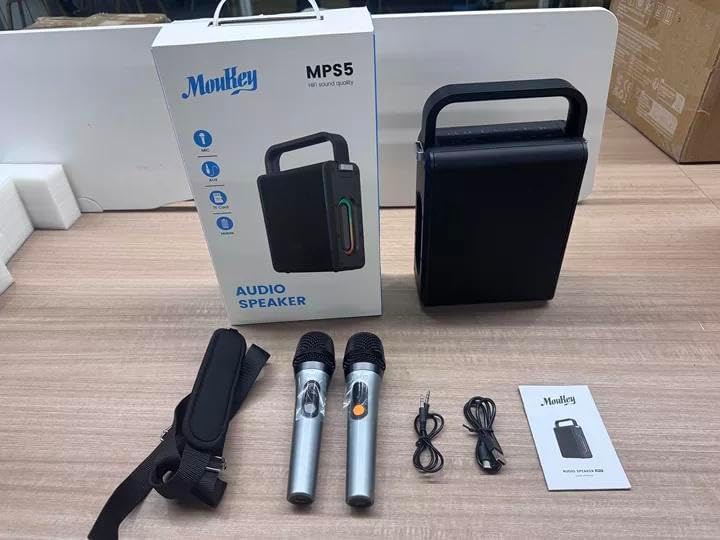
Image: All components included in the Moukey MPS5 package.
3. Ürün Bittiview
The Moukey MPS5 is a compact yet powerful portable karaoke machine. It features a robust design with integrated LED lighting on the sides, enhancing the user experience. A sturdy handle and an included shoulder strap provide convenient portability.
Resim: Ön view of the Moukey MPS5 speaker.

Resim: Yan view of the Moukey MPS5, showing the LED lighting.
4. Temel Özellikler
- Excellent Sound Output: The MPS5 delivers 200W peak power (RMS 60W) through a 4-inch woofer and two 2-inch tweeters, providing full-range stereo sound with enhanced bass.
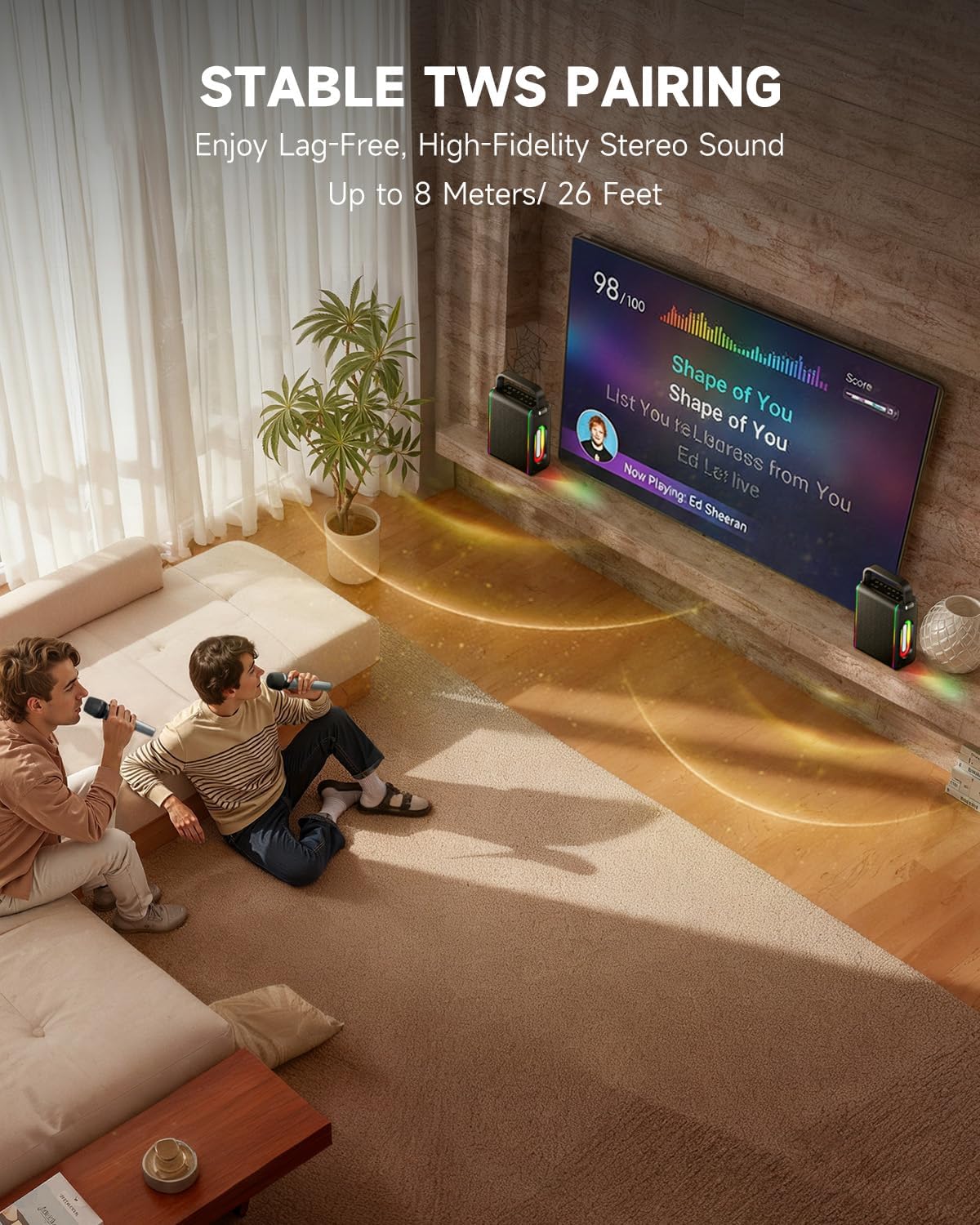
- Powerful Functionality: Supports Bluetooth 5.3 for wireless connection to various devices. Also includes Micro TF card, Flash USB, MP3, and AUX IN playback options. Features stable TWS (True Wireless Stereo) pairing for connecting two MPS5 units for a wider stereo soundstage.
- Ultra Uzun Pil Ömrü: The rechargeable battery provides up to 8 hours of continuous music playback on a 2-hour charge, suitable for extended use indoors or outdoors.
- Hafif ve Taşınabilir Tasarım: Weighing only 2kg, the MPS5 is designed for easy transport. It can be carried by hand using the integrated handle or with the included shoulder strap.
- Çift Kablosuz Mikrofon: Includes two 2.4Ghz rechargeable microphones with a connection range of up to 60 feet and up to 8 hours of use time per charge (2-3 hours charging time). Features one-tap connectivity for effortless pairing.

Image: Internal speaker components of the MPS5.

Image: MPS5 connected to multiple devices via Bluetooth.

Image: Battery life and charging details for the MPS5.

Image: Demonstrating the portability of the MPS5 with hand and shoulder strap options.

Image: The two wireless microphones for the MPS5.
5. Kurulum
5.1 Hoparlör ve Mikrofonların Şarj Edilmesi
Before first use, fully charge the MPS5 speaker and both wireless microphones.
- Konuşmacı: Connect the provided USB Type-C cable to the charging port on the speaker and to a compatible USB power adapter (not included). The charging indicator light will show charging status. A full charge takes approximately 2 hours.
- Mikrofonlar: Each microphone has a charging port. Connect them to a USB power source using the provided USB cable. Charging time for microphones is 2-3 hours.
5.2 Güç Açma/Kapatma
- To power on the speaker, press and hold the power button (U) on the top panel for 2 seconds.
- To power off, press and hold the power button (U) tekrar 2 saniye boyunca.
5.3 Bluetooth Eşleştirme
- Ensure the MPS5 speaker is powered on and in Bluetooth mode (indicated by a blue LED). If not, press the 'M' (Mode) button to switch to Bluetooth mode.
- Mobil cihazınızda (akıllı telefon, tablet vb.) Bluetooth'u etkinleştirin ve kullanılabilir cihazları arayın.
- Select 'Moukey MPS5' from the list of devices to pair. A voice prompt will confirm successful connection.
5.4 TWS (Gerçek Kablosuz Stereo) Eşleştirme
To achieve stereo sound, you can pair two Moukey MPS5 speakers together.
- Ensure both MPS5 speakers are powered on and in Bluetooth mode, but not connected to any other device.
- On one of the speakers, double-press the 'M' (Mode) button. The speaker will enter TWS pairing mode.
- The two speakers will automatically connect to each other. A voice prompt will confirm successful TWS pairing.
- Once TWS is established, connect your mobile device to one of the MPS5 speakers via Bluetooth as described in section 5.3. Both speakers will then play audio in stereo.
Video: Hızlı bir bakışview of the MPS5 Karaoke Machine, demonstrating TWS pairing and other features.
6. Kullanım Talimatları
6.1 Kontrollerview
The top panel of the MPS5 speaker features several buttons for controlling playback, volume, and microphone settings.
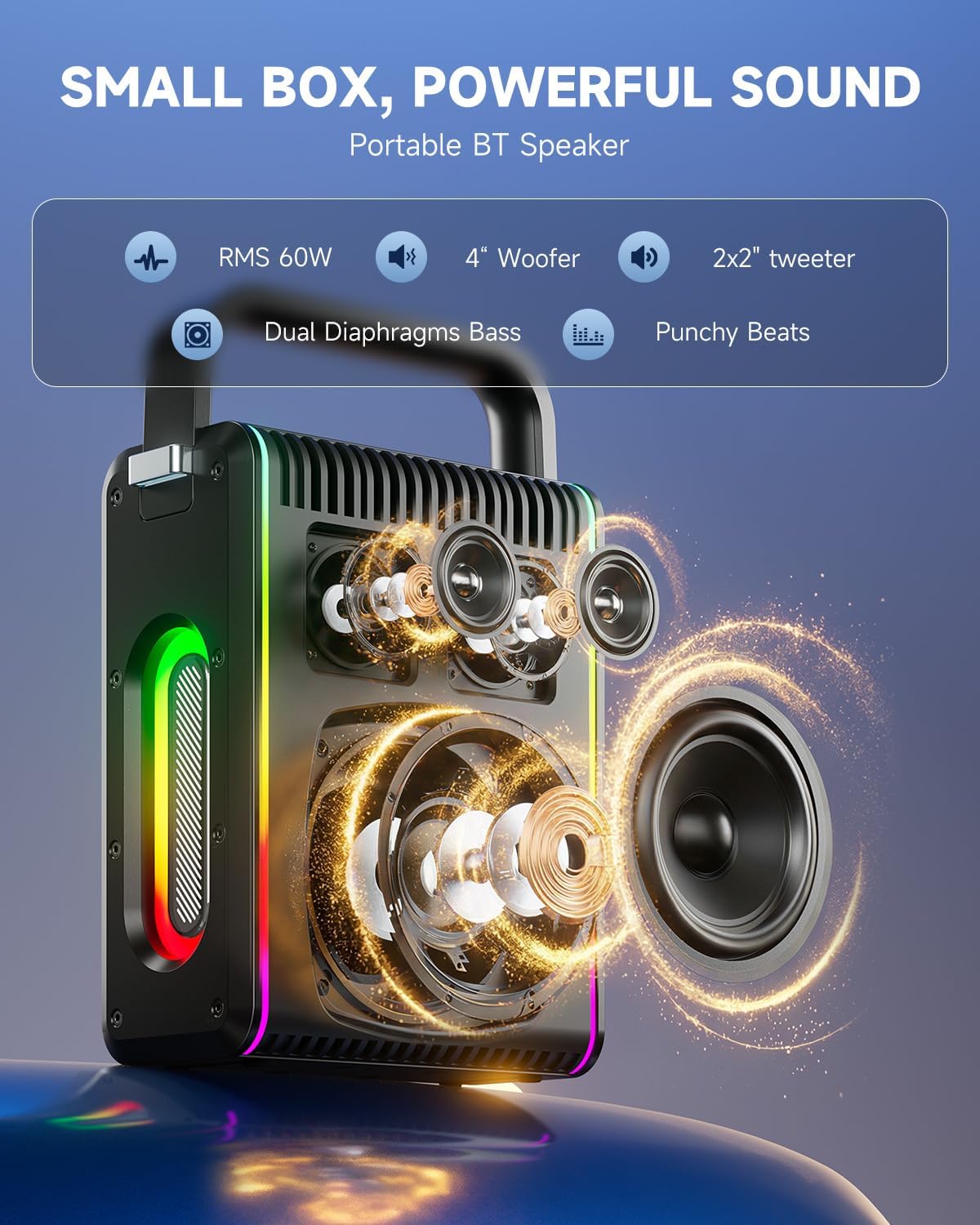
Image: Top control panel of the MPS5.
- Güç düğmesi (U): Açmak/kapatmak için 2 saniye basılı tutun.
- Mod Düğmesi (M): Short press to cycle through input modes (Bluetooth, AUX, USB, TF Card). Double-press to initiate TWS pairing.
- Microphone Volume (Mic - / Mic +): Bağlı mikrofonların ses seviyesini ayarlar.
- Echo Adjustment (R- / R+): Mikrofonlar için yankı efektini ayarlar.
- Oynat durdur (▶): Geçerli parçayı oynatır veya duraklatır.
- Volume Down (-): Decreases the main speaker volume.
- Volume Up (+): Increases the main speaker volume.
- EQ A/E: Short press to switch between EQ modes. Long press to toggle between original sound and accompaniment elimination.
6.2 Mikrofon Kullanımı
The MPS5 comes with two wireless microphones for karaoke and vocal performances.
- Güç Açma/Kapatma: Mikrofonu açmak veya kapatmak için mikrofon üzerindeki güç düğmesine basılı tutun.
- Eşleştirme: The microphones are pre-paired with the speaker. If re-pairing is needed, ensure the speaker is on, then power on the microphone. They should connect automatically.
- Microphone Disconnect/Reconnect: Press the dedicated microphone button on the speaker's control panel to quickly disconnect or reconnect the microphones.
6.3 Ses Giriş Modları
In addition to Bluetooth, the MPS5 supports several wired and local storage input options.

Image: Input ports on the MPS5 speaker.
- AUX Girişi: Connect an external audio device using the 3.5mm AUX cable. Select AUX mode using the 'M' button.
- USB Oynatma: MP3 ses dosyası içeren bir USB flash sürücü takın fileUSB portuna takın. Hoparlör otomatik olarak USB moduna geçecek ve oynatmaya başlayacaktır.
- TF Kart Oynatma: Insert a Micro TF card containing MP3 audio fileTF kart yuvasına takın. Hoparlör otomatik olarak TF kart moduna geçecek ve oynatmaya başlayacaktır.
6.4 LED Aydınlatma
The MPS5 features dynamic LED lighting on its sides. Use the dedicated LED button (if available, or refer to the 'M' button for light control if combined) to cycle through different light modes or turn them off.
7. Bakım
- Temizlik: Hoparlörün dışını temizlemek için yumuşak ve kuru bir bez kullanın. Sıvı temizleyiciler veya aşındırıcı malzemeler kullanmayın.
- Depolamak: Cihazı serin, kuru ve doğrudan güneş ışığından ve aşırı sıcaklıklardan uzak bir yerde saklayın.
- Pil Bakım: Pil ömrünü uzatmak için, pili sık sık tamamen boşaltmaktan kaçının. Cihazı uzun süre kullanmasanız bile düzenli olarak şarj edin.
8. Sorun Giderme
If you encounter issues with your Moukey MPS5, refer to the following common problems and solutions:
| Sorun | Olası Neden | Çözüm |
|---|---|---|
| Güç yok | Pil bitmiş. | Hoparlörü, kutu içeriğinde bulunan USB Type-C kablosuyla şarj edin. |
| Hoparlörden ses gelmiyor | Ses seviyesi çok düşük veya tamamen kısık. Yanlış giriş modu seçildi. | Increase volume using the '+' button. Press 'M' to cycle through input modes. |
| Bluetooth eşleştirme başarısız oldu | Hoparlör eşleştirme modunda değil. Cihaz çok uzakta. | Ensure speaker is in Bluetooth mode. Move device closer to speaker. Try restarting both devices. |
| Mikrofon çalışmıyor | Microphone is off or uncharged. Microphone is disconnected. | Ensure microphone is charged and powered on. Press the microphone button on the speaker to reconnect. |
| TWS eşleştirmesi başarısız oldu | Speakers are already connected to another device. | Ensure both speakers are not connected to any other Bluetooth device before initiating TWS pairing. |
9. Özellikler
- Marka: Fare yavrusu
- Model Numarası: MPS5
- Çıkış Watttage: 200 Watt (Tepe)
- Bağlantı Teknolojisi: Bluetooth 5.3
- Ses Girişi: Bluetooth, TF card, USB, MP3, AUX, Wired microphones
- Kanal Sayısı: 2
- Güç Kaynağı: Pil ile çalışır
- Bağlantı Tipi: USB Tip C
- Öğe Boyutları (U x G x Y): 2.36 x 6.3 x 12.2 inç
- Ürün Ağırlığı: Yaklaşık 2 kg
- Uyumlu Cihazlar: Smartphone, Tablet, Laptop, MP3 Player, Microphone
- Renk: Black with Silver Accents
10. Garanti ve Destek
The Moukey MPS5 Portable Karaoke Machine comes with a 1 Yıllık Garanti Satın alma tarihinden itibaren geçerlidir. Bu garanti, normal kullanım koşullarında üretim hatalarını ve işçilik kusurlarını kapsar. Garanti talepleri için lütfen satın alma belgenizi saklayın.
For technical support, troubleshooting assistance, or warranty inquiries, please contact Moukey customer service through the retailer where the product was purchased or visit the official Moukey webiletişim bilgileri için site.