
1. Giriş
This manual provides essential information for the safe and effective use of your TOPUTURE TP4 Foldable Walking Pad Treadmill with Incline. Please read this manual thoroughly before initial use and retain it for future reference. This treadmill is designed for walking and light running in home and office environments, offering a compact and versatile fitness solution.
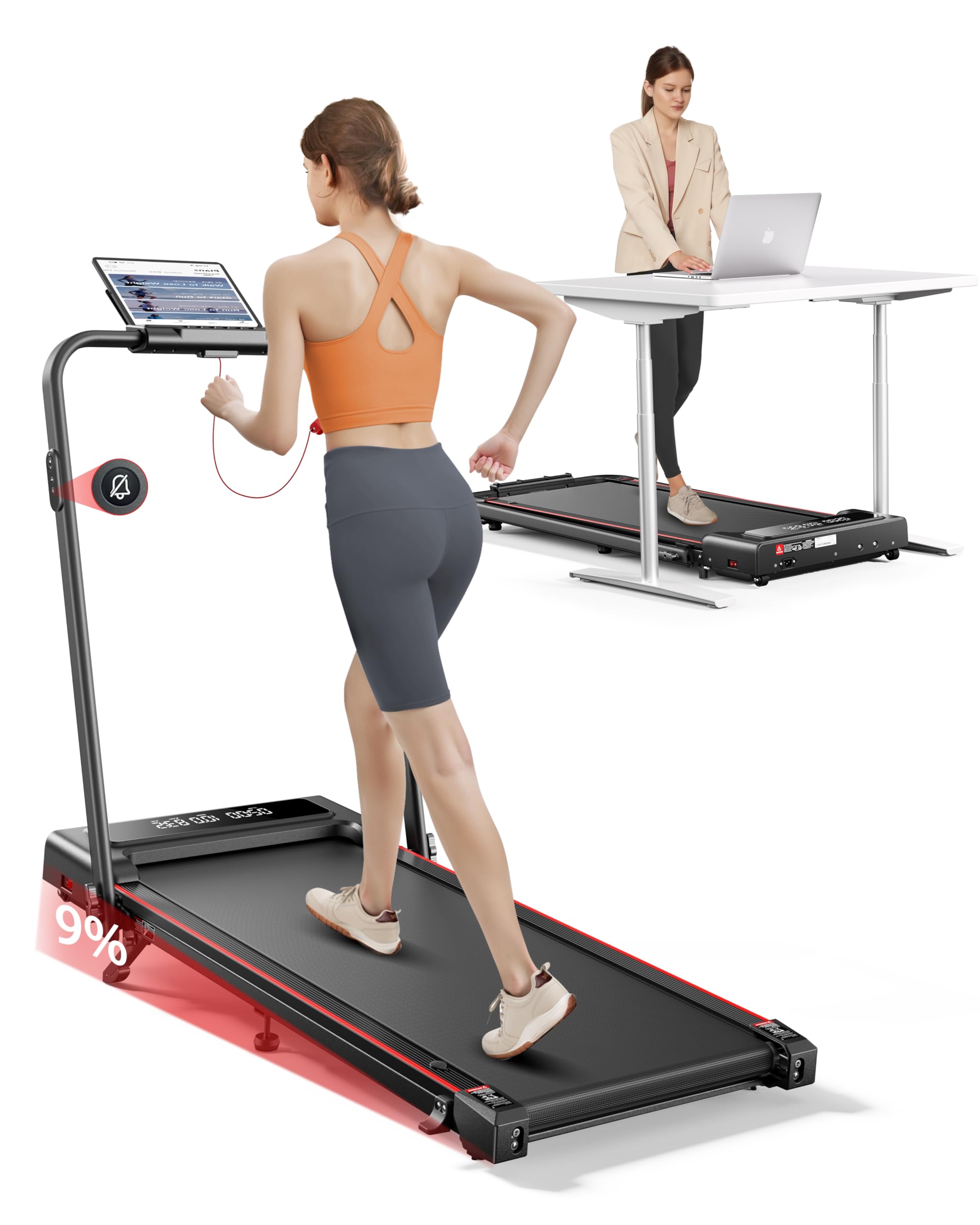
Image 1.1: The TOPUTURE TP4 Foldable Walking Pad Treadmill in both walking pad and treadmill configurations.
2. Önemli Güvenlik Talimatları
To reduce the risk of serious injury, read all instructions before using this equipment. The manufacturer assumes no responsibility for personal injury or property damage sustained by or through the use of this product.
- Koşu bandını her zaman düz ve sağlam bir yüzeye yerleştirin.
- Koşu bandının etrafında yeterli boşluk olduğundan emin olun (arkada en az 2 metre ve her iki tarafta 0.6 metre).
- Çalışma sırasında çocukları ve evcil hayvanları koşu bandından uzak tutun.
- Do not use the treadmill if you weigh more than the maximum weight capacity (300 lbs / 136 kg).
- Uygun spor ayakkabı giyin.
- Eğer ağrı, baş dönmesi veya nefes darlığı yaşarsanız, egzersizi hemen bırakın.
- Kullanmadığınız zamanlarda veya temizlik/bakım yapmadan önce koşu bandının fişini prizden çekin.
- Güç kablosu veya fişi hasarlıysa koşu bandını çalıştırmayın.
- Bu cihaz, güvenliklerinden sorumlu bir kişi tarafından cihazın kullanımıyla ilgili olarak gözetim veya talimat sağlanmadığı sürece, fiziksel, duyusal veya zihinsel yetenekleri kısıtlı olan veya deneyim ve bilgi eksikliği bulunan kişiler tarafından kullanılmak üzere tasarlanmamıştır.

Image 2.1: Illustration of the multi-layer running belt designed for shock absorption and joint protection.
3. Paket İçeriği
Carefully unpack the box and ensure all items are present and undamaged. If any parts are missing or damaged, contact customer support.
- TOPUTURE TP4 Walking Pad Treadmill
- Güç Kablosu
- Uzaktan kumanda
- Güvenlik Anahtarı
- Alet Takımı (küçük ayarlamalar için)
- Kullanım Kılavuzu (bu belge)
- Yağlama Yağı
4. Kurulum
4.1 Koşu Bandının Açılması
The TOPUTURE TP4 comes pre-assembled. Simply remove it from the packaging and unfold it according to the following steps:
- Place the treadmill on a flat, hard surface.
- Gently lift the handle until it locks into the upright position.
- Kullanmadan önce tüm kilitleme mekanizmalarının güvenli bir şekilde kilitlendiğinden emin olun.

Image 4.1: Illustration of the treadmill's folding mechanism and compact storage dimensions.
4.2 Eğim Ayarı
The treadmill features a manual incline adjustment to simulate uphill walking, increasing calorie burn and workout intensity. The incline can be set up to 9%.
- Ayak pedini açın: Locate the adjustable footpads at the rear of the treadmill.
- İğneyi takın: Verilen pimi kullanarak ayak dayama yerini istenen eğim seviyesinde sabitleyin.
- Orta ayak pedini ayarlayın: Ensure the middle footpad is also adjusted to provide stable support.

Image 4.2: Visual representation of the 9% manual incline feature and its effect on calorie expenditure.

Image 4.3: Step-by-step instructions for adjusting the treadmill's manual incline.
5. Kullanım Talimatları
5.1 Güç Açma/Kapatma
Connect the power cord to a grounded outlet. Flip the power switch located at the front of the treadmill to the 'ON' position. The LED display will illuminate.
5.2 Uzaktan Kumandanın Kullanımı
The treadmill is operated via a silent remote control. Ensure the safety key is in place before starting. The remote allows you to:
- Start/Stop the treadmill.
- Adjust speed (increase/decrease).
- Switch between modes (Walking, Running, Climbing, Working).
- Activate mute function for quiet operation.

Image 5.1: The dual LED display showing real-time data and the remote control for easy adjustments.
5.3 Ekranı Anlamak
The dual LED display provides real-time workout data:
- Zaman: Antrenmanınızın süresi.
- Hız: Current speed in MPH or KM/H.
- Mesafe: Toplam kat edilen mesafe.
- Kalori: Yakılan tahmini kalori miktarı.
5.4 Çalışma Modları
The TOPUTURE TP4 offers four distinct modes to suit various fitness needs:
- Walking Mode (0.6-5 MPH): Ideal for casual walking or under-desk use.
- Running Mode (5-7.6 MPH): Daha yoğun kardiyo egzersizleri için.
- Climbing Mode (0.6-3 MPH): Utilizes the incline feature for uphill simulation.
- Working Mode (0.6-1.5 MPH): Low speed for active work at a standing desk.

Image 5.2: Demonstrates the versatility of the treadmill in both walking and running configurations.
5.5 Smart App Connection
Enhance your workout experience by connecting the treadmill to the dedicated smart app via Bluetooth.
- Download the app from your device's app store.
- Akıllı telefonunuzda veya tabletinizde Bluetooth'u etkinleştirin.
- Open the app and follow the on-screen instructions to pair with your treadmill.
Bu uygulama size şunları yapmanıza olanak tanır:
- Sync exercise data in real-time.
- Access personalized training plans.
- Track your progress and set goals.
- Participate in running challenges.

Image 5.3: The smart app interface displaying workout statistics and training programs.
6. Bakım
Düzenli bakım, koşu bandınızın uzun ömürlü olmasını ve optimum performans göstermesini sağlar.
6.1 Yağlama
The running belt requires periodic lubrication to reduce friction and wear. Use the provided lubricating oil.
- Koşu bandını fişten çekin.
- Koşu bandının kenarını kaldırın.
- Apply a small amount of lubricating oil evenly under the belt, about 10-20ml.
- Run the treadmill at a low speed (e.g., 1 MPH) for 5 minutes to distribute the oil.
- Kullanım sıklığına bağlı olarak 3-6 ayda bir yağlayın.

Image 6.1: Instructions for lubricating the running belt and adjusting its tension.
6.2 Temizlik
Koşu bandının yüzeylerini bir bezle silin.amp Her kullanımdan sonra bir bezle silin. Aşındırıcı temizleyiciler veya çözücüler kullanmayın.
6.3 Kayış Ayarı
If the running belt shifts or slips, it may need adjustment. Use the included tool kit to adjust the tension bolts at the rear of the treadmill. Refer to the detailed instructions in the tool kit for precise adjustment.
7. Sorun Giderme
Koşu bandınızla ilgili sorunlarla karşılaşırsanız, aşağıdaki yaygın sorunlara ve çözümlere bakın:
| Sorun | Olası Neden | Çözüm |
|---|---|---|
| Koşu bandı açılmıyor. | Power cord not connected, power switch off, safety key not in place. | Check power cord connection, ensure power switch is ON, insert safety key. |
| Koşu bandı kayıyor veya duruyor | Kayış çok gevşek, yetersiz yağlama. | Adjust belt tension (refer to 6.3), apply lubricating oil (refer to 6.1). |
| Çalışma sırasında olağandışı gürültü | Loose parts, motor issue, belt friction. | Check for loose screws, lubricate belt, contact support if noise persists. |
| Uzaktan kumanda yanıt vermiyor | Battery low, interference. | Replace remote control battery, ensure no obstructions between remote and treadmill. |
8. Özellikler
| Özellik | Detay |
|---|---|
| Model Numarası | TP4 |
| Ürün Boyutları (Katlanmamış) | 126 x 62 x 106.7 cm (50 x 23 x 42 inç) |
| Katlama Boyutu | 126 x 58.4 x 11.4 cm (50 x 23 x 4.5 inç) |
| Ürün Ağırlığı | 25.4 kg (56 lbs) |
| Malzeme | Alaşımlı Çelik |
| Motor Beygir Gücü | 2.5 beygir |
| Hız Aralığı | 0.6 - 7.6 MPH (approx. 1 - 12.2 km/h) |
| Maksimum Eğim Yüzdesitage | %9 (Manuel) |
| Maksimum Kullanıcı Ağırlığı | 300 lbs (136 kg) |
| Ölçümleri Görüntüle | Yakılan Kalori, Mesafe, Hız, Zaman |
| Özel Özellikler | Compact Design, Foldable, Lightweight, Manual Incline, Shock Absorbent, App Control, Remote Control |
9. Garanti ve Destek
9.1 Garanti Bilgileri
The TOPUTURE TP4 Foldable Walking Pad Treadmill is covered by a TWO-YEARS warranty Satın alma tarihinden itibaren geçerlidir. Bu garanti, normal kullanım koşullarındaki üretim ve işçilik hatalarını kapsar. Yanlış kullanım, kaza, yetkisiz değişiklikler veya uygunsuz bakımdan kaynaklanan hasarları kapsamaz.
9.2 Müşteri Desteği
For any questions, technical assistance, or warranty claims, please contact our customer support team. To expedite your request, please have your order ID and product model number (TP4) ready.
Satıcıyla Nasıl İletişime Geçilir:
- Amazon hesabınıza giriş yapın.
- Go to "Your Orders."
- Find the relevant order ID for your TOPUTURE TP4 Treadmill.
- "Satıcıyla İletişime Geç" seçeneğine tıklayın.