
giriiş
This manual provides comprehensive instructions for the setup, operation, maintenance, and troubleshooting of your T-Wolf T60 Wired 60% Mechanical Keyboard. Please read this manual carefully before using the product to ensure proper function and longevity.
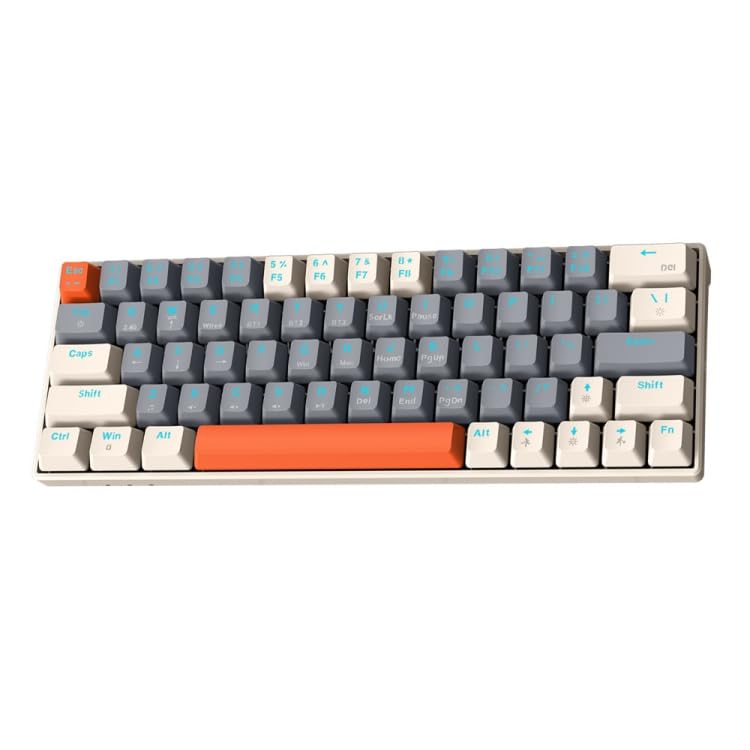
Image: T-Wolf T60 Wired 60% Mechanical Keyboard. This image displays the compact design of the keyboard, highlighting its 63-key layout and wired connectivity.
Kurmak
- Kutudan Çıkarma: Carefully remove the keyboard and all included accessories from the packaging. Verify that all components are present: T-Wolf T60 keyboard and USB-C to USB cable.
- Klavyeyi Bağlama:
- Klavyedeki USB-C portunu bulun.
- Insert the USB-C end of the provided cable into the keyboard's USB-C port.
- Insert the USB-A end of the cable into an available USB 2.0 port on your computer (PC, desktop, or laptop).
- Sürücü Kurulumu: The T-Wolf T60 keyboard is plug-and-play. Your operating system should automatically detect and install the necessary drivers. No manual driver installation is typically required.
- İlk Test: Open a text editor or word processor and type to confirm the keyboard is functioning correctly.
Operasyon
The T-Wolf T60 is a 60% mechanical keyboard with 63 keys, designed for efficient typing and gaming. It features RGB backlighting and multi-key anti-ghosting.
- Temel Anahtar İşlevler: All standard alphanumeric and symbol keys function as expected. Due to the compact 60% layout, some functions (like F-keys, arrow keys, and navigation keys) are accessed via a Function (Fn) key combination. Refer to the keyboard's keycap legends for specific Fn key combinations.
- RGB Arka Aydınlatma: Klavyede özelleştirilebilir RGB arka aydınlatma bulunuyor.
- To cycle through different lighting modes, use the designated Fn key combination (e.g., Fn + \ or Fn + P).
- To adjust brightness, use the designated Fn key combination (e.g., Fn + Up/Down arrow keys, if available via Fn layer).
- To change lighting speed, use the designated Fn key combination (e.g., Fn + Left/Right arrow keys, if available via Fn layer).
- Multi-Key Anti-Ghosting: This feature ensures that multiple simultaneous key presses are registered accurately, which is beneficial for fast-paced gaming and complex commands.
Bakım
Doğru bakım, klavyenizin ömrünü uzatmaya yardımcı olur.
- Temizlik:
- Temizlemeden önce klavyeyi bilgisayarınızdan ayırın.
- Tuş başlıkları arasındaki toz ve kalıntıları temizlemek için basınçlı hava kutusu kullanın.
- Tuş takımlarını ve klavye yüzeyini yumuşak, hafif nemli bir bezle silin.amp, tiftiksiz bir bez kullanın. Aşırı nemden kaçının.
- Do not use harsh chemicals, abrasive cleaners, or solvents, as these can damage the keyboard's finish and keycap legends.
- Depolamak: Uzun süre kullanılmayacaksa klavyeyi doğrudan güneş ışığından ve aşırı sıcaklıklardan uzakta, temiz ve kuru bir ortamda saklayın.
- Kablo Bakımı: Avoid bending or twisting the USB-C cable excessively to prevent internal damage.
Sorun giderme
If you encounter issues with your T-Wolf T60 keyboard, refer to the following common solutions:
- Klavye Yanıt Vermiyor:
- USB-C kablosunun hem klavyeye hem de bilgisayara güvenli bir şekilde bağlandığından emin olun.
- Klavyeyi bilgisayarınızdaki farklı bir USB portuna bağlamayı deneyin.
- Sorunun klavyeden mi yoksa orijinal bilgisayarın ayarlarından mı kaynaklandığını belirlemek için klavyeyi başka bir bilgisayarda test edin.
- Bilgisayarınızı yeniden başlatın.
- RGB Arka Aydınlatma Çalışmıyor veya Yanlış Ayarlanmış:
- Klavyenin düzgün şekilde bağlandığından ve güç aldığından emin olun.
- Try cycling through the RGB modes using the Fn key combinations mentioned in the Operation section.
- Check if the brightness is set to maximum.
- Anahtarlar Kayıt Olmuyor veya Çift Yazılıyor:
- Clean the keyboard thoroughly, especially around the affected keys, using compressed air.
- Tuş başlıklarının altında herhangi bir kalıntının kalmadığından emin olun.
- Sorun devam ederse, bu bir donanım arızasına işaret ediyor olabilir.
Özellikler
| Özellik | Detay |
|---|---|
| Marka | T-KURT |
| Örnek | T60 |
| Bağlantı Teknolojisi | USB-C (Kablolu) |
| Uyumlu Cihazlar | PC, desktop, laptop |
| Klavye Açıklaması | Oyun, Mekanik |
| Anahtar Sayısı | 63 |
| Özel Özellikler | RGB Backlighting, Multi-Key Anti-Ghosting |
| Malzeme | Plastik |
| Klavye Düzeni | Q klavye |
Garanti ve Destek
Garanti bilgileri ve teknik destek için lütfen satın alma işleminizle birlikte verilen belgelere bakın veya doğrudan perakendeci/üretici ile iletişime geçin. Garanti talepleriniz için satın alma belgenizi saklayın.
Manufacturer: T-Wolf


