
1. Giriş
This manual provides detailed instructions for the installation, operation, and maintenance of your SILENTWARE VIEWWHITE A-RGB Mid-Tower PC Case. Please read this manual thoroughly before beginning assembly to ensure proper setup and to maximize the performance and longevity of your system components.
The SILENTWARE VIEWWHITE is a high-performance mid-tower PC case designed for optimal airflow and aesthetic appeal. It features tempered glass panels, four pre-installed 120mm A-RGB fans, and comprehensive compatibility for various PC components.
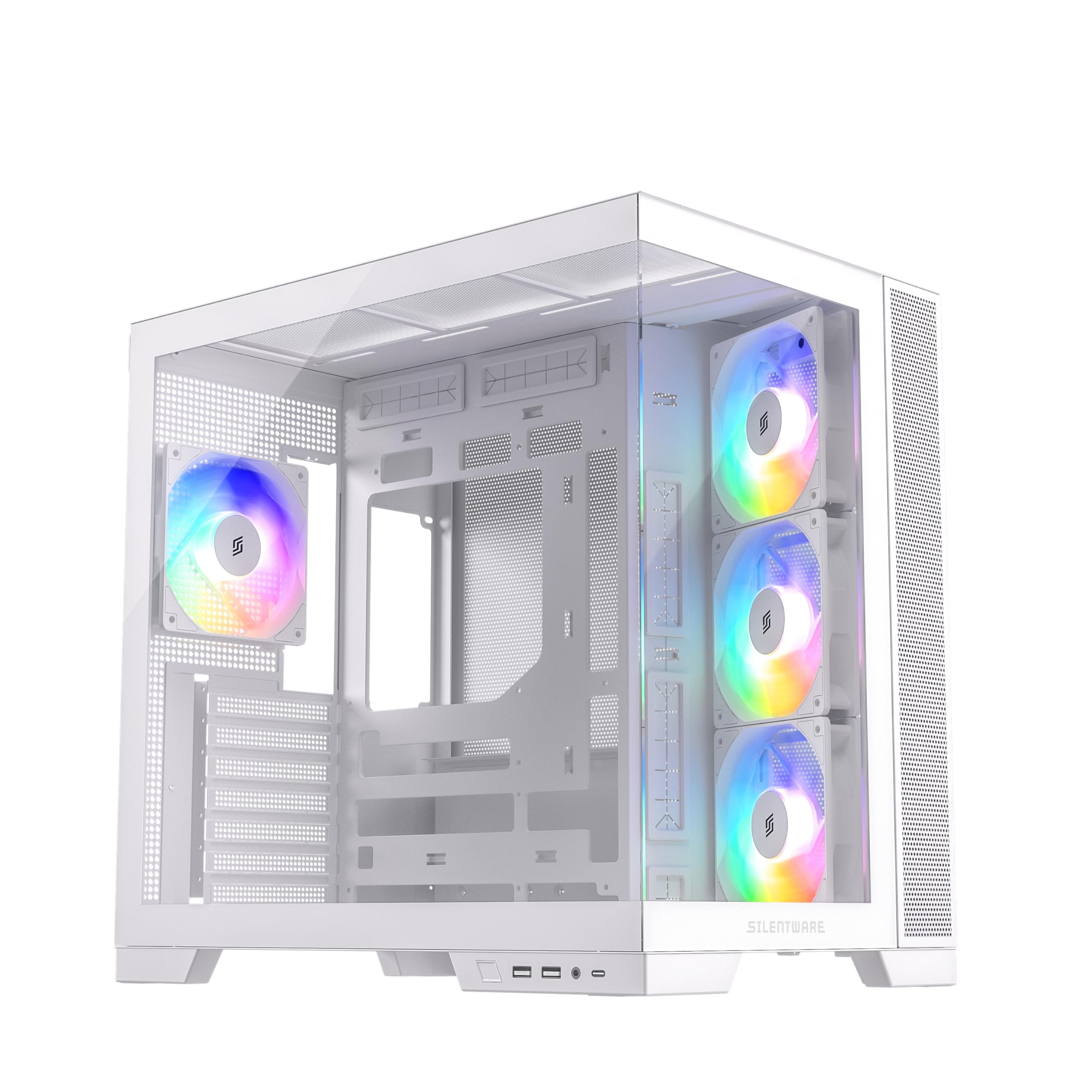
Şekil 1.1: Üzeriview of the SILENTWARE VIEWWHITE A-RGB Mid-Tower PC Case.
2. Kurulum ve Kurulum
Before starting, ensure you have all necessary components and tools. It is recommended to work on a clean, flat surface and to use anti-static precautions.
2.1 Kutunun Açılması
Carefully remove the PC case from its packaging. Inspect for any damage that may have occurred during shipping. Retain the packaging for future transport or warranty claims.
2.2 Panellerin Sökülmesi
The SILENTWARE VIEWWHITE features tempered glass panels on the front and side. To access the interior for component installation:
- Locate the thumbscrews or latches securing the side tempered glass panel.
- Carefully remove the screws/release the latches and gently slide or lift the panel off. Place it on a soft, flat surface to prevent scratches.
- The top panel can also be removed for easier access and radiator installation.

Figure 2.1: Top panel removed for access to the interior.
2.3 Anakart Kurulumu
The case supports ATX, mATX, and ITX motherboards.
- Install the necessary motherboard standoffs if they are not pre-installed for your motherboard size.
- Anakartınızı kasanın arkasındaki destek ayakları ve giriş/çıkış kalkanı açıklığıyla hizalayın.
- Anakartı vidalarla sabitleyin.
2.4 Güç Kaynağı Kurulumu
Güç kaynağı ünitesi (PSU) kasanın alt kısmına monte edilmiştir.
- Güç kaynağını kasanın arka tarafından belirlenmiş bölmesine kaydırın.
- Secure the PSU with screws from the exterior rear of the case.
- Utilize the integrated cable management system for a clean build. The case supports PSUs up to 200mm in length.
2.5 Depolama Sürücüsü Kurulumu
The case provides space for 2x SSDs and 1x HDD.
- Locate the SSD mounting points (typically behind the motherboard tray).
- Secure SSDs with screws.
- Install HDDs in the designated drive cage, usually located near the PSU shroud.
2.6 Grafik Kartı (GPU) Kurulumu
Bu kasa, 410 mm uzunluğa kadar olan ekran kartlarını destekler.
- Kasanın arka tarafındaki gerekli genişletme yuvası kapaklarını çıkarın.
- Insert your GPU into the PCIe slot on the motherboard.
- GPU'yu vidalarla sabitleyin.
2.7 Cooling System (Fans & Radiators)
The case comes with four pre-installed 120mm A-RGB fans: three inverted airflow fans at the front and one at the rear. It supports various radiator configurations:
- Tepe: 360 mm'ye kadar radyatör
- Taraf: 280 mm'ye kadar radyatör
- Arka: 120 mm'ye kadar radyatör
Ensure all fans are connected to the motherboard or a fan controller for power and RGB control.
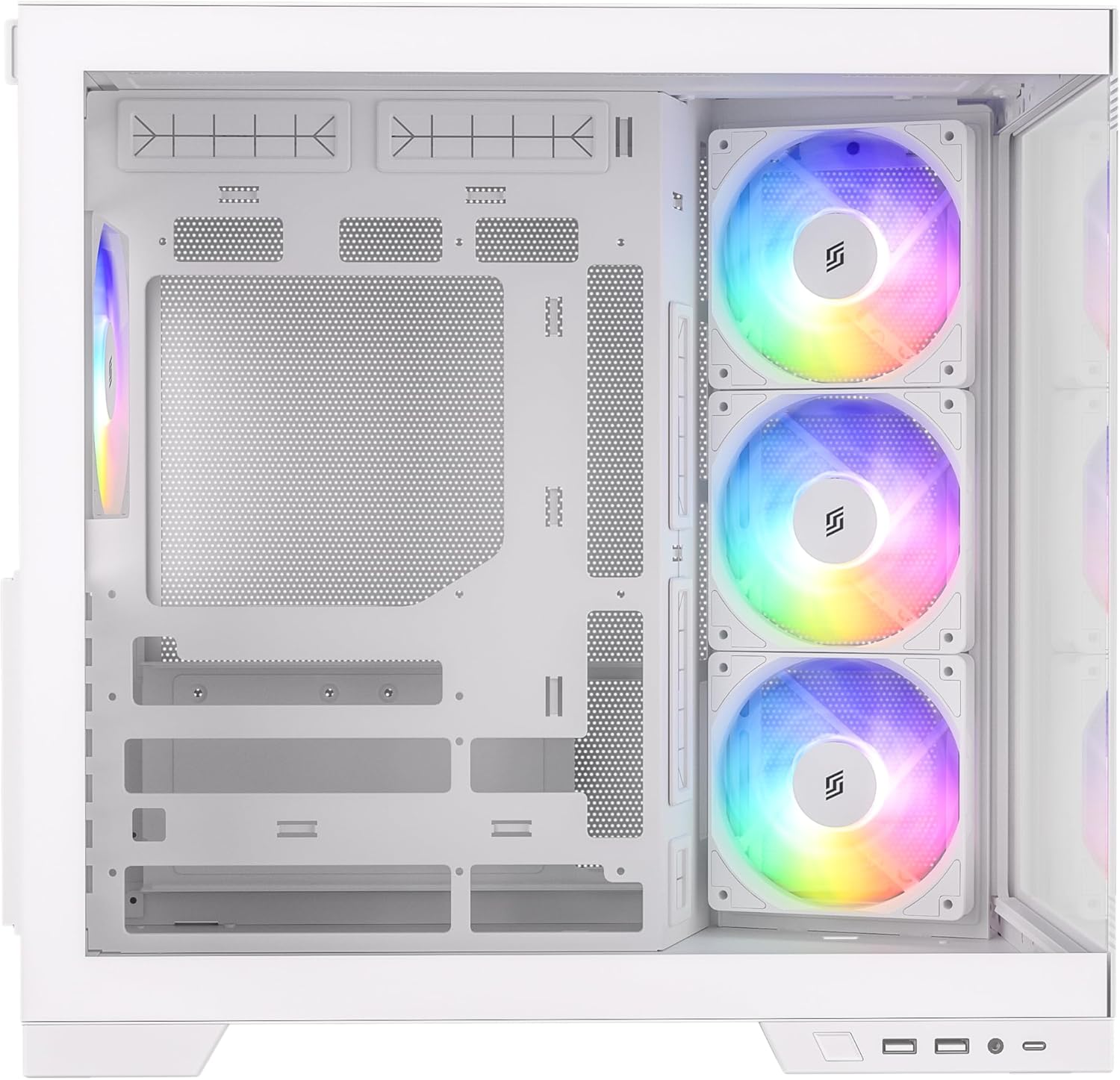
Şekil 2.2: Dahili view highlighting fan placement and component space.
2.8 Ön Giriş/Çıkış Paneli Bağlantıları
Connect the front I/O panel cables to your motherboard. These include:
- USB 3.0 (x2)
- USB-C (x1)
- HD Audio (for headphone and microphone jacks)
- Power Button, Reset Button, Power LED, HDD LED
Bağlantı noktalarının konumları için anakartınızın kullanım kılavuzuna bakın.
3. Operating the A-RGB Fans
The pre-installed A-RGB fans offer flexible lighting and speed control.
3.1 Fan Bağlantıları
Each fan has two connectors:
- 4-pin PWM connector: For fan speed control. Connect this to a 4-pin fan header on your motherboard.
- 3-pin A-RGB connector: For addressable RGB lighting control. Connect this to a 3-pin 5V A-RGB header on your motherboard. Do not connect to a 4-pin 12V RGB header, as this may damage the LEDs.
3.2 Yazılım Kontrolü
Once connected, you can control the fan speed and A-RGB lighting effects through your motherboard's proprietary software (e.g., ASUS Aura Sync, MSI Mystic Light, Gigabyte RGB Fusion, ASRock Polychrome Sync). Refer to your motherboard's manual for instructions on using its specific software.

Figure 3.1: A-RGB fans providing illumination and airflow.
4. Bakım
Düzenli bakım, bilgisayar bileşenlerinizin optimum performans göstermesini sağlar ve kullanım ömrünü uzatır.
4.1 Toz Temizliği
Dust accumulation can impede airflow and cause components to overheat. It is recommended to clean your PC case every 3-6 months, or more frequently in dusty environments.
- Bilgisayarınızı kapatın ve fişini prizden çekin.
- Remove the side and top panels.
- Use compressed air to blow dust out of the case, especially from fan blades, radiator fins, and mesh filters. Hold fan blades gently to prevent over-spinning.
- Wipe down interior surfaces with a microfiber cloth.
4.2 Temperli Cam Bakımı
The tempered glass panels require careful handling.
- Clean glass panels with a soft, lint-free cloth and a non-abrasive glass cleaner.
- Avoid harsh chemicals or abrasive materials that could scratch the glass.
- Always handle glass panels by their edges to prevent fingerprints and smudges.
5. Sorun Giderme
Bu bölümde karşılaşabileceğiniz yaygın sorunlar ele alınmaktadır.
5.1 Fans Not Spinning or Lighting Up
- Güç Bağlantılarını Kontrol Edin: Ensure the 4-pin PWM fan connectors are securely plugged into the motherboard fan headers.
- Check RGB Connections: Verify that the 3-pin A-RGB connectors are securely plugged into the 5V A-RGB headers on your motherboard. Confirm you are not using a 12V RGB header.
- Anakart Yazılımı: Ensure your motherboard's RGB control software is installed and configured correctly. Sometimes, a BIOS update or a fresh installation of the software can resolve issues.
- Fan Controller: If using an external fan controller, ensure it is powered and correctly connected to the fans and motherboard.
5.2 Zayıf Hava Akışı / Yüksek Sıcaklıklar
- Toz Oluşumu: Bakım bölümünde açıklandığı gibi toz filtrelerini ve fan kanatlarını temizleyin.
- Fan Yönlendirmesi: Ensure fans are oriented correctly for optimal airflow (front fans typically intake, rear/top fans exhaust). The pre-installed front fans are inverted for intake.
- Kablo yönetimi: Poor cable management can obstruct airflow. Re-route cables to minimize obstruction.
5.3 Front I/O Ports Not Working
- Anakart bağlantılarını kontrol edin: Verify that all front I/O cables (USB 3.0, USB-C, HD Audio, power/reset switches) are correctly connected to their respective headers on the motherboard. Refer to your motherboard manual.
- Sürücü Kurulumu: Ensure all necessary motherboard drivers, especially for USB ports, are installed.
6. Özellikler
Below are the technical specifications for the SILENTWARE VIEWWHITE A-RGB Mid-Tower PC Case:
| Özellik | Şartname |
|---|---|
| Marka | SILENTWARE |
| Model Numarası | VIEWBEYAZ |
| Dava Türü | Orta Kule |
| Renk | Beyaz |
| Malzeme | Tempered Glass (Front & Side), Steel |
| Anakart Uyumluluğu | ATX, mATX, ITX |
| Önceden yüklenmiş Fanlar | 4x 120mm A-RGB (3x Front, 1x Rear) |
| GPU Uzunluğu Açıklığı | 410 mm'ye kadar |
| CPU Soğutucu Yükseklik Boşluğu | 160 mm'ye kadar |
| Radyatör Desteği (Üst) | 360 mm'ye kadar |
| Radyatör Desteği (Yan) | 280 mm'ye kadar |
| Radyatör Desteği (Arka) | 120 mm'ye kadar |
| Sürücü bölmeleri | 2 adet 2.5 inç SSD, 1 adet 3.5 inç HDD |
| Ön G / Ç Bağlantı Noktaları | 2x USB 3.0, 1x USB-C, Audio In/Out |
| Güç Kaynağı Türü | ATX (Bottom Mount, up to 200mm) |
| Boyutlar (D x G x Y) | 28.5x42.5x41.5 cm |

Şekil 6.1: Ürün boyutları.
7. Garanti Bilgileri
SILENTWARE products are covered by a limited warranty against defects in materials and workmanship. The specific warranty period and terms may vary by region and retailer. Please retain your proof of purchase for warranty claims.
For detailed warranty information, please refer to the warranty card included with your product or visit the official SILENTWARE webalan.
8. Destek
If you encounter any issues not covered in this manual or require further assistance, please contact SILENTWARE customer support.
- Webalan: Visit the official SILENTWARE webSSS, sürücü indirmeleri ve destek kaynakları için site.
- E-posta: Refer to your product packaging or the SILENTWARE webMüşteri hizmetleri e-posta adresleri için site.
- Telefon: Check the SILENTWARE website for regional support contact numbers.
Destek ekibiyle iletişime geçerken lütfen ürün model numaranızı hazır bulundurun (VIEWWHITE) and proof of purchase ready.