
1. Giriş
Thank you for choosing the MERCUSYS MC510 2K 3MP Outdoor WiFi Camera. This manual provides detailed instructions for the installation, operation, and maintenance of your security camera. Please read this manual carefully before use to ensure proper functionality and safety. The MC510 offers 2K 3MP resolution, 360-degree panoramic view, color night vision, two-way audio, smart motion detection, and IP65 weather resistance for reliable outdoor surveillance.

Image: MERCUSYS MC510 2K Pan/Tilt Wi-Fi Camera mounted on a wall, highlighting its 2K resolution and IP65 weather resistance.
2. Güvenlik Bilgileri
- Güç adaptörünün yerel elektrik şebekesine uygun olduğundan emin olun.
- Fotoğraf makinesini aşırı sıcaklıklara, neme veya aşındırıcı ortamlara maruz bırakmayın.
- Kamerayı güçlü elektromanyetik alanların yakınına yerleştirmekten kaçının.
- Fotoğraf makinesini ve aksesuarlarını çocukların erişemeyeceği yerde saklayın.
- Sadece üretici tarafından belirtilen aksesuarları kullanın.
- Temizlik veya bakım yapmadan önce elektrik bağlantısını kesin.
- The camera is IP65 rated for outdoor use, but avoid submerging it in water.
3. Paket İçeriği
Paketinizde tüm öğelerin mevcut olduğundan emin olun:
- MC510 Camera × 1
- Güç Adaptörü × 1
- Mounting Sticker × 1
- Montaj Braketi × 1
- Mounting Screws × 4 + Bracket Screws × 2
- Montaj Dübelleri × 4
- Waterproof Gasket × 1
- Hızlı Başlangıç Kılavuzu
4. Ürün Bittiview
The MERCUSYS MC510 is a versatile outdoor security camera designed to provide comprehensive surveillance with advanced features.
Temel Özellikler:
- 2K QHD with 360° View: Provides clear 2K 3MP video and full 360° horizontal coverage to see every corner and detail.
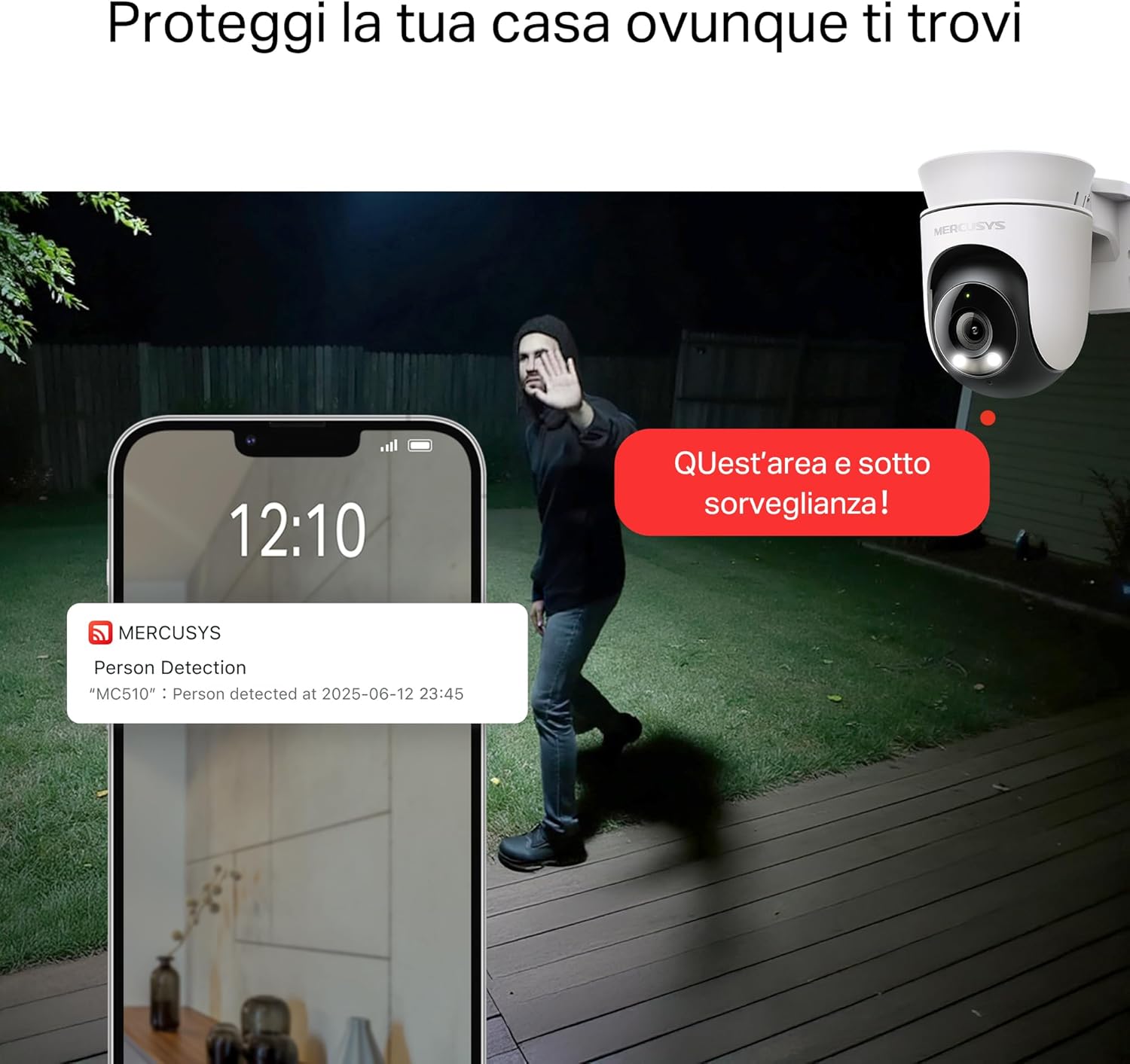
- Smart Motion Detection and Person Tracking: Automatically detects and tracks motion or people, ensuring key activities remain in focus.
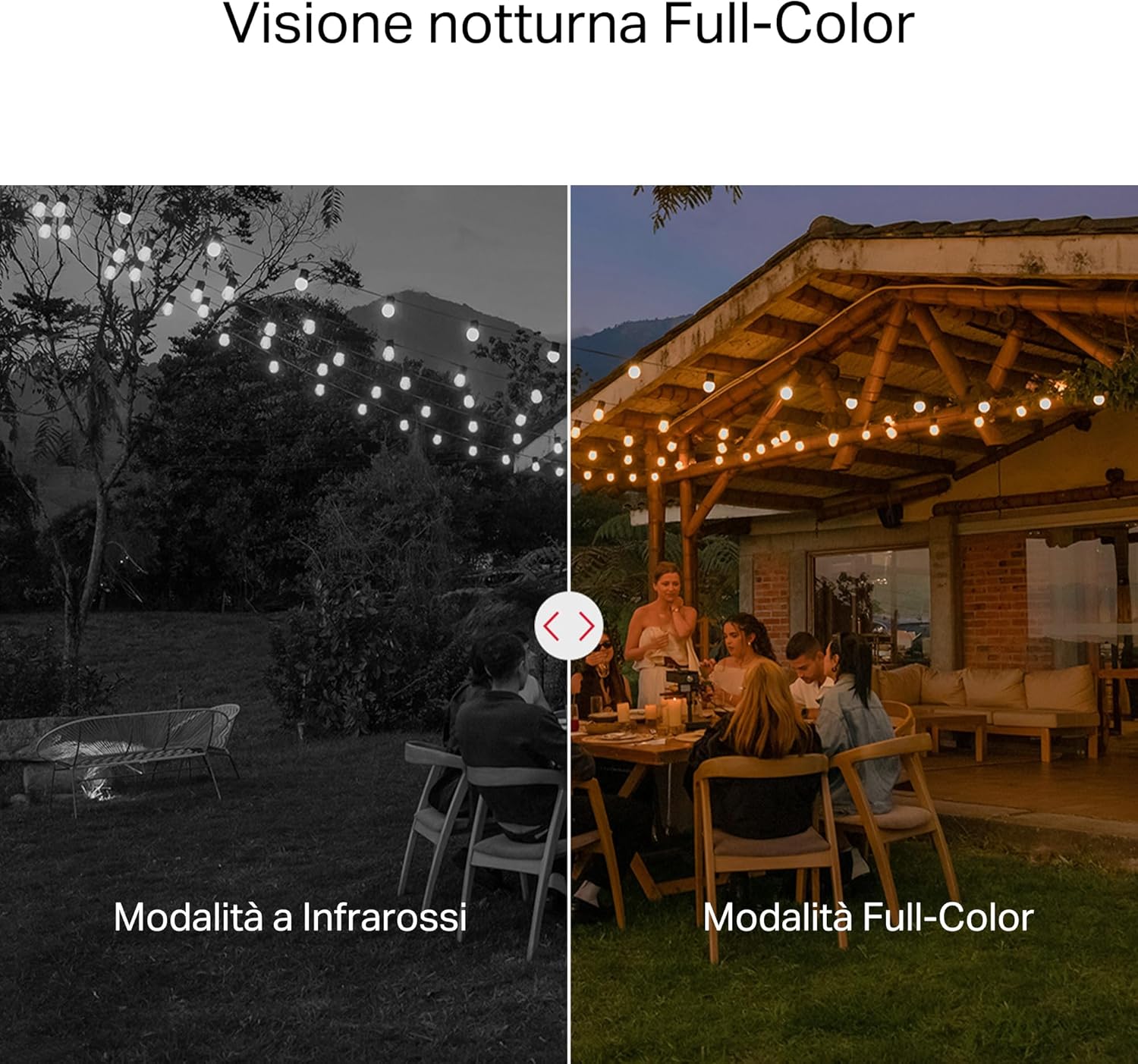
- Renkli Gece Görüşü: Provides vivid and detailed images even at night for 24/7 protection.
- Özelleştirilebilir Aktivite Alanları: Helps filter out irrelevant events and sends alerts only when necessary.
- Yerel ve Bulut Depolama: Supports microSD cards up to 512GB and cloud storage for secure and flexible video backup.
- Weatherproof for Outdoor Use: IP65 certified for reliable performance in rain, dust, or snow. Easily mounts on walls, ceilings, or poles.
- Privacy Protection with Lens Shield: Activate the physical lens cover when surveillance is not needed for greater peace of mind at home.
- İki Yönlü Ses: Kamera aracılığıyla doğrudan iletişim kurun.
Visual Features:

High-resolution 2K 3MP video capture.
360-degree panoramic rotation for full coverage.
Full-Color Night Vision for clear images in low light.

Physical lens shield for enhanced privacy.
5. Kurulum
5.1 Fiziksel Kurulum
The MC510 camera is designed for outdoor use and can be mounted on walls, ceilings, or poles. Its IP65 rating ensures protection against dust and water jets.
- Bir Konum Seçin: İstenilen ortamı sağlayan uygun bir dış mekan seçin. viewGörüş açısı iyi ve Wi-Fi sinyali istikrarlı.
- Montaj: Use the provided mounting sticker to mark drill holes. Drill holes, insert anchors, and secure the mounting bracket with screws. Attach the camera to the bracket.
- Güç Bağlantısı: Connect the power adapter to the camera and plug it into a power outlet. Ensure the waterproof gasket is properly installed for outdoor power connections.

Image: The camera is shown mounted outdoors, demonstrating its weather-resistant design.
5.2 Uygulama Yükleme ve Bağlantı
The MC510 connects exclusively via Wi-Fi. An Ethernet port is not available.
- Uygulamayı indirin: Download the official MERCUSYS app from your smartphone's app store (iOS or Android).
- Hesap oluşturmak: Uygulamayı açın ve yeni bir hesap oluşturun veya zaten bir hesabınız varsa giriş yapın.
- Kamera Ekle: Follow the in-app instructions to add your MC510 camera. This typically involves scanning a QR code on the camera and connecting it to your home Wi-Fi network.
5.3 MicroSD Kart Kurulumu
For local storage, install a microSD card (up to 512GB, not included).
- Kapat: Disconnect the camera from power before inserting or removing the microSD card.
- Yuvayı Bul: Refer to the camera's physical design to locate the microSD card slot, often protected by a cover.
- Kartı Takın: MicroSD kartı yerine oturana kadar yavaşça yuvaya yerleştirin.
- Kartı Biçimlendir: After powering on the camera and connecting it to the app, navigate to the camera settings to format the microSD card.

Image: Close-up of the camera showing the microSD card slot, indicating flexible storage options.
6. Kullanım Talimatları
6.1 Canlı View & Geri çalma
- Canlı View: Open the MERCUSYS app and select your MC510 camera to view canlı yayın.
- Pan/Tilt Kontrolü: Use the controls in the app to remotely rotate the camera horizontally (pan) and vertically (tilt) to adjust the viewaçı.
- Playback: Kayıtlı foo'ya erişintage from the app's playback section. You can filter by date and event.

Image: Illustration of 360-degree rotation with motion tracking.
6.2 Hareket Algılama ve Takip
- Algılamayı Etkinleştir: In the app settings, enable motion detection and person tracking.
- Customize Activity Zones: Kameranın görüş alanı içinde belirli alanları tanımlayın view where you want motion to be detected. This helps reduce false alarms.
- Uyarı Al: The camera will send notifications to your smartphone when motion or a person is detected in the monitored zones.

Image: A person running in a yard, with detection boxes, demonstrating motion detection and tracking.
6.3 İki Yönlü Ses
Dahili mikrofon ve hoparlör, çift yönlü iletişime olanak tanır.
- Activate Audio: Canlı yayında view Uygulamanın arayüzünde, kamera aracılığıyla konuşmak için mikrofon simgesine dokunun.
- Dinlemek: The speaker icon allows you to hear audio from the camera's vicinity.

Image: A person detected by the camera, with a phone notification and an on-screen alert, demonstrating customizable alarms and two-way audio.
6.4 Renkli Gece Görüşü
The MC510 provides full-color night vision for enhanced clarity in low-light conditions.
- Otomatik Aktivasyon: Color night vision activates automatically in low-light conditions.
- Kızılötesi Modu: The camera also supports traditional infrared night vision (black and white) if preferred or in extremely dark environments.

Image: Comparison of infrared (monochrome) and full-color night vision modes.
6.5 Privacy Zone & Lens Shield
Protect your privacy by defining privacy zones or activating the physical lens shield.
- Gizlilik Bölgeleri: In the app, you can set up specific areas within the camera's view to be excluded from recording.
- Lens Shield: For complete privacy, use the app to activate the physical lens shield, which covers the camera lens.
7. Bakım
7.1 Temizlik
- Temizlemeden önce kameranın kapalı olduğundan emin olun.
- Fotoğraf makinesinin gövdesini silmek için yumuşak, kuru bir bez kullanın.
- For the lens, use a lens cleaning cloth to avoid scratches. Do not use harsh chemicals or abrasive cleaners.
7.2 Firmware Güncellemesi
Regularly check for firmware updates through the MERCUSYS app. Updates provide new features, performance improvements, and security enhancements. Follow the in-app instructions to perform updates.
8. Sorun Giderme
If you encounter issues with your MERCUSYS MC510 camera, refer to the following common problems and solutions:
| Sorun | Olası Çözüm |
|---|---|
| Kamera Wi-Fi'ye bağlanmıyor | Ensure the camera is within range of your Wi-Fi router. Check Wi-Fi password. Restart the camera and router. The MC510 only supports Wi-Fi connection, no Ethernet. |
| Video kalitesi zayıf | Check your Wi-Fi signal strength. Ensure the camera lens is clean. Adjust camera placement to avoid glare or obstructions. |
| Motion detection issues | Verify motion detection is enabled in the app. Adjust sensitivity settings. Ensure activity zones are correctly configured. |
| MicroSD card not working | Ensure the card is inserted correctly. Format the microSD card via the app. Try a different compatible microSD card. Power cycle the camera after inserting the card. |
| Çift yönlü ses yok. | Check microphone and speaker settings in the app. Ensure your phone's volume is up. |
9. Özellikler
| Özellik | Detay |
|---|---|
| Marka | MERKÜSLER |
| Model Adı | MC510 |
| İç/Dış Mekan Kullanımı | Dış mekan |
| Bağlantı Protokolü | Wifi |
| Montaj Tipi | Tavan, Direk, Duvar |
| Hareketsiz Görüntü Çözünürlüğü | 3 MP |
| Uluslararası Koruma Derecelendirmesi | IP65 |
| Kablosuz Teknoloji | Wifi |
| Piller Gerekli | HAYIR |
| Video Yakalama Çözünürlüğü | 2K 3 MP |
| Video Yakalama Formatı | MPEG-4 |
| Öğe Sayısı | 1 |
| Dahil Bileşenler | MC510 Camera, Power Adapter, Mounting Sticker, Mounting Bracket, Mounting Screws, Mounting Anchors, Waterproof Gasket, Quick Start Guide |
| Menşei ülke | Çin |
| Üretici | TP-Link |
| Ürün Boyutları | 14.1x9.3x12.2 cm |
10. Garanti ve Destek
Garanti bilgileri ve teknik destek için lütfen resmi MERCUSYS web sitesine başvurun. website or contact their customer service. Details can typically be found in the Quick Start Guide included with your product or on the manufacturer's webalan.
Çevrimiçi destek: Ziyaret etmek www.mercusys.com for FAQs, user manuals, and support resources.