
1. Giriş
This manual provides detailed instructions for the installation, operation, and maintenance of your ANRAN 4G LTE Cellular Security Camera, Q04 Solar Security Camera, and F2M3 Solar Light Security Camera systems. Please read this manual thoroughly before using the product to ensure correct usage and optimal performance. Keep this manual for future reference.
Important Notice: The 4G LTE Cellular Solar Security Camera does not support WiFi connection. It operates exclusively on a 4G LTE cellular network.
2. Paket İçeriği
Lütfen paketi teslim aldığınızda içeriğini kontrol edin. Herhangi bir ürün eksik veya hasarlıysa, müşteri desteğiyle iletişime geçin.
- ANRAN 4G LTE Cellular Security Camera (with integrated solar panel)
- ANRAN Q04 Solar Security Camera (optional, 2-pack)
- ANRAN F2M3 Solar Light Security Camera (optional, 2-pack)
- Montaj Braketi ve Vidaları
- USB Şarj Kablosu
- Kullanıcı Kılavuzu
- SIM Card (pre-installed or included separately for 4G models)
- MicroSD Card (optional, e.g., 32GB)
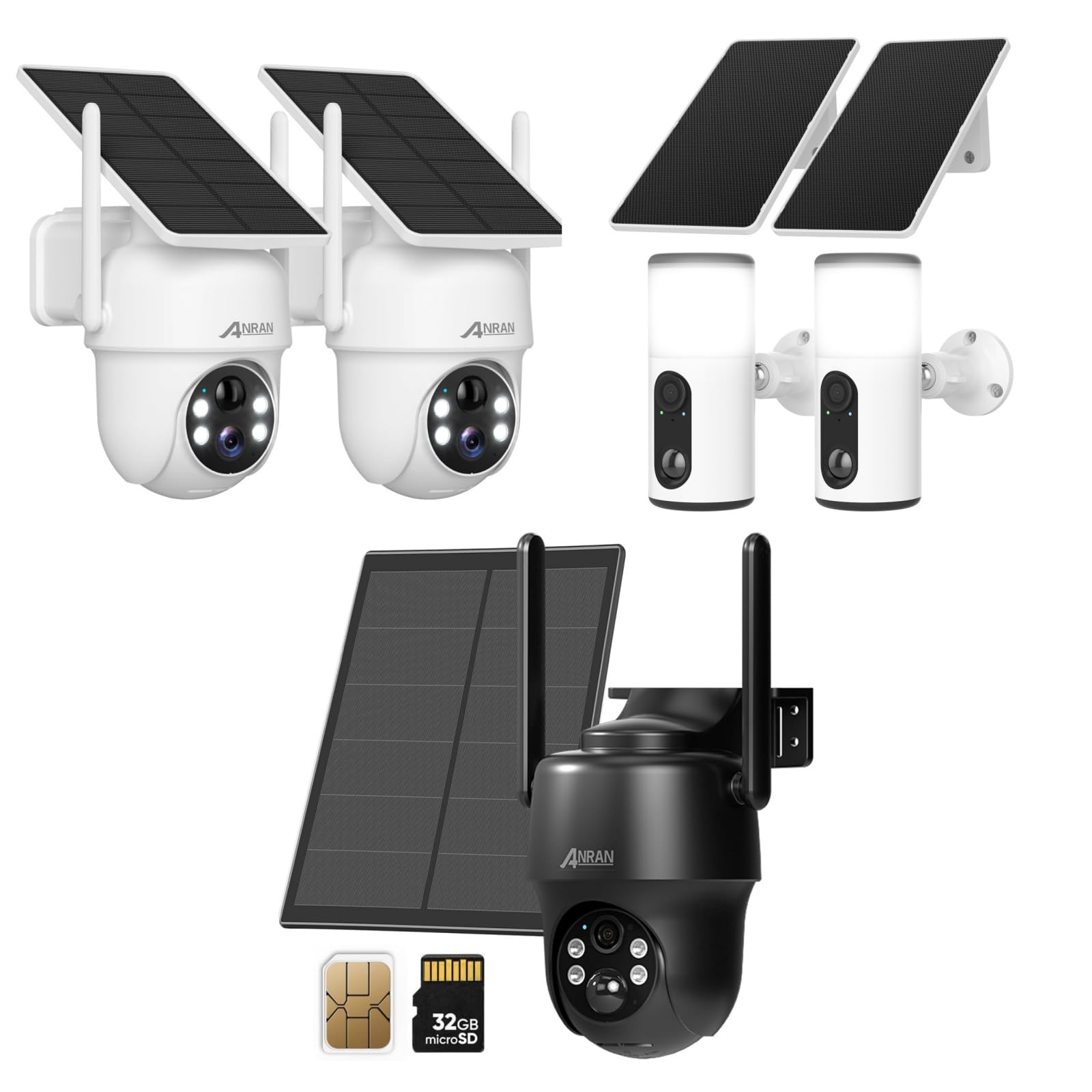
Image 2.1: ANRAN 4G LTE Cellular Security Camera with its solar panel, a SIM card, and a 32GB microSD card, illustrating typical package components.

Image 2.2: Two ANRAN Q04 Solar Security Cameras, typically sold as a pair, featuring integrated solar panels and a white finish.

Image 2.3: Two ANRAN F2M3 Solar Light Security Cameras, designed to function as both a security camera and a light source, shown with their solar panels.
3. Ürün Bittiview
The ANRAN security camera systems offer wire-free surveillance solutions, powered by solar energy and utilizing either 4G LTE cellular networks or local WiFi (for Q04/F2M3 models, if applicable). Each model is designed for outdoor use with robust construction.
3.1. ANRAN 4G LTE Cellular Security Camera
- Bağlantı: 4G LTE cellular network only (no WiFi support).
- Güç: Integrated solar panel for continuous charging.
- Özellikler: Pan-Tilt-Zoom (PTZ) capabilities, night vision, motion detection.
- Depolamak: Supports microSD card for local storage.

Image 3.1: An ANRAN 4G LTE Cellular Security Camera mounted on a tree, highlighting its wire-free operation and solar power capabilities. It explicitly states '4G' and 'not support WiFi'.
3.2. ANRAN Q04 Solar Security Camera
- Bağlantı: Typically WiFi-enabled (refer to specific product details for confirmation).
- Güç: Integrated solar panel.
- Tasarım: Compact dome-style camera.
3.3. ANRAN F2M3 Solar Light Security Camera
- Bağlantı: Typically WiFi-enabled (refer to specific product details for confirmation).
- Güç: Integrated solar panel (3W) and 5000 mAh battery.
- İşlevsellik: Combines security camera features with an integrated wall light.

Resim 3.2: Yakın çekim view of the ANRAN F2M3 Solar Light Security Camera, illustrating its dual function as a wall light and a camera, powered by a 3W solar panel and a 5000 mAh battery.
4. Kurulum
4.1. İlk Şarj
Before first use, fully charge the camera's internal battery using the provided USB cable. Connect the cable to the camera's charging port and a 5V/2A power adapter (not included). The charging indicator light will show the charging status.
4.2. SIM Card and MicroSD Card Installation (for 4G LTE Cellular Camera)
- Locate the SIM card slot and microSD card slot on the camera (usually under a rubber seal).
- Insert the 4G LTE SIM card into the SIM slot with the gold contacts facing down and the notched corner oriented correctly. Ensure it clicks into place.
- Insert the microSD card (Class 10 or higher, up to 128GB recommended) into the microSD slot with the gold contacts facing down.
- Securely close the rubber seal to maintain waterproofing.
4.3. Uygulama İndirme ve Hesap Kaydı
- ANRAN uygulamasını App Store (iOS) veya Google Play Store (Android) üzerinden indirin.
- Uygulamayı açın ve e-posta adresinizi veya telefon numaranızı kullanarak yeni bir hesap kaydedin.
- Kayıt işlemini tamamlamak için ekrandaki talimatları izleyin.
4.4. Camera Pairing with App
- Power on the camera. Wait for the status indicator light to flash, indicating it's ready for pairing.
- ANRAN uygulamasında yeni bir cihaz eklemek için '+' simgesine dokunun.
- Select the appropriate camera model (e.g., 4G Camera, Solar Camera).
- Follow the in-app instructions to scan the QR code on the camera or manually enter the device ID.
- For 4G cameras, ensure the SIM card has an active data plan. For WiFi cameras, connect to your 2.4GHz WiFi network when prompted.
- Bağlandıktan sonra kameranıza isim verebilir ve canlı yayına başlayabilirsiniz viewIng.
4.5. Kameranın Montajı
Choose a mounting location that provides optimal solar exposure for the solar panel and a clear view of the area you wish to monitor. Ensure the camera is within cellular network range (for 4G models) or WiFi range (for WiFi models).
- Montaj braketini şablon olarak kullanarak delme noktalarını işaretleyin.
- Drill holes and insert wall anchors if mounting on masonry or stucco.
- Secure the mounting bracket to the wall or surface using the provided screws.
- Attach the camera to the mounting bracket and adjust the angle for desired coverage.

Image 4.1: A woman installing an ANRAN solar security camera on a wall, demonstrating the simple installation process.
5. Kullanım Talimatları
5.1. Canlı View
Open the ANRAN app and select the desired camera from your device list to access the live video feed. You can view gerçek zamanlı footage, take screenshots, and record video manually.
5.2. Hareket Algılama ve Uyarılar
Configure motion detection sensitivity and alert settings within the app. When motion is detected, the camera will record a video clip and send a notification to your smartphone.
- Hassasiyet: Adjust to minimize false alarms.
- Algılama Bölgesi: Set specific areas for motion detection.
- Notification Schedule: Define times when you wish to receive alerts.
5.3. Playback and Recording
Access recorded video clips through the app's playback feature. Recordings are stored on the microSD card or in cloud storage (if subscribed). You can filter recordings by date and time.
5.4. Çift Yönlü Ses
Use the two-way audio feature to communicate with visitors or deter intruders. Tap the microphone icon in the live view Kameranın hoparlöründen konuşmak ve dinlemek.
5.5. Pan-Tilt-Zoom (PTZ) Control (for applicable models)
For cameras with PTZ functionality, use the directional controls in the app to remotely adjust the camera's viewing angle (pan and tilt) and zoom in or out.
5.6. Light Control (for F2M3 Solar Light Camera)
The F2M3 model allows control of the integrated light through the app. You can set schedules for the light to turn on/off, or activate it manually.
6. Bakım
6.1. Temizlik
Fotoğraf makinesinin objektifini ve güneş panelini düzenli olarak yumuşak bir bezle temizleyin.amp cloth to ensure clear image quality and efficient solar charging. Avoid abrasive cleaners or harsh chemicals.
6.2. Pil Bakımı
The integrated solar panel helps maintain battery charge. In periods of low sunlight or heavy usage, the battery may require manual charging via the USB port. Ensure the charging port's rubber seal is always closed when not charging to prevent water ingress.
6.3. Ürün Yazılımı Güncellemeleri
Check the ANRAN app periodically for firmware updates. Keeping your camera's firmware up-to-date ensures optimal performance, security, and access to new features.
7. Sorun Giderme
| Sorun | Olası Neden | Çözüm |
|---|---|---|
| Kamera açılmıyor | Low battery; power button not pressed | Charge the camera fully; press and hold the power button for 3-5 seconds. |
| 4G camera not connecting to network | No active SIM card; poor cellular signal; incorrect APN settings | Ensure SIM card is active and has data; move camera to an area with better signal; check APN settings in app or contact carrier. |
| WiFi camera not connecting | Incorrect WiFi password; 5GHz network used; camera too far from router | Verify WiFi password; ensure you are connecting to a 2.4GHz network; move camera closer to router. |
| Hareket uyarıları alınmadı | App notifications disabled; motion detection sensitivity too low; detection schedule active | Enable app notifications; increase motion detection sensitivity; check and adjust detection schedule. |
| Kötü görüntü kalitesi | Dirty lens; low light conditions; network bandwidth issues | Clean the camera lens; ensure adequate lighting; check network connection stability. |
8. Özellikler
- Video Çözünürlüğü: Typically 1080p or 2K (model dependent)
- Alanı View: Varies by model (e.g., 100-130 degrees fixed, 355 degrees pan, 90 degrees tilt for PTZ models)
- Gece Görüşü: Infrared LEDs, Color Night Vision (model dependent)
- Ses: Two-way audio with built-in microphone and speaker
- Depolamak: MicroSD card (up to 128GB, Class 10 recommended), Cloud Storage (subscription required)
- Bağlantı: 4G LTE (for cellular models), 2.4GHz WiFi (for Q04/F2M3 models)
- Güç: Rechargeable battery, Solar Panel charging (3W for F2M3, integrated for others)
- Pil Kapasitesi: 5000 mAh (F2M3), others vary by model
- Çalışma Sıcaklığı: -4°F ila 122°F (-20°C ila 50°C)
- Hava Koşullarına Dayanıklılık: IP65 or IP66 certified (dustproof and waterproof)
9. Garanti ve Destek
ANRAN ürünleri genellikle sınırlı bir garantiyle birlikte gelir. Lütfen ürününüzle birlikte gelen garanti kartına bakın veya resmi ANRAN web sitesini ziyaret edin. website for detailed warranty terms and conditions. For technical support, product inquiries, or warranty claims, please contact ANRAN customer service through the contact information provided on their official website üzerinden veya ANRAN uygulaması içinden.
Webalan: www.anran-cctv.com