
giriiş
This manual provides detailed instructions for the installation, operation, and maintenance of your ANRAN Q04 Solar 4G LTE Security Camera. Please read this manual thoroughly before using the product to ensure proper functionality and safety. Keep this manual for future reference.

Image: Two ANRAN Q04 white solar security cameras, showcasing the solar panel and antenna design.
Paket İçeriği
Paketinizdeki tüm bileşenlerin eksiksiz olduğundan emin olun. Herhangi bir ürün eksik veya hasarlıysa, lütfen müşteri desteğiyle iletişime geçin.
- ANRAN Q04 Solar 4G LTE Security Camera(s)
- Güneş Paneli (modele bağlı olarak entegre veya ayrı)
- Montaj Braketi ve Vidaları
- USB Şarj Kablosu
- Kullanım Kılavuzu (bu belge)
- SIM Card (pre-installed or included, depending on region/package)
- MicroSD Card (optional, may be included in some packages)
Ürün Bittiview
The ANRAN Q04 camera is a wireless outdoor security solution featuring 4G LTE connectivity and solar power. It is designed for continuous surveillance in locations without Wi-Fi access or consistent power supply.

Image: ANRAN Q04 black solar security camera, highlighting the inclusion of a SIM card and a 32GB microSD card.
Temel Özellikler:
- 4G LTE Bağlantısı: Operates independently without Wi-Fi.
- Güneş Enerjili: Integrated solar panel for continuous charging of the built-in 9600mAh battery.
- %100 Kablosuz: Flexible placement without power cables.
- Üç Gece Görüş Modu: Smart, Color, and Infrared for clear visibility in low light.
- IP66 Hava Koşullarına Dayanıklı: Dış mekan kullanımına uygun olarak tasarlanmış olup, toza ve suya dayanıklıdır.
- Yerel ve Bulut Depolama: Supports up to 128GB MicroSD card (not included) and offers cloud storage options.
Kurmak
1. İlk Şarj
Before first use, fully charge the camera's internal battery using the provided USB cable and a 5V/2A power adapter (not included). A full charge ensures optimal performance, especially during initial setup or periods of low sunlight.
2. SIM Card & MicroSD Card Installation
- Locate the SIM card slot and MicroSD card slot on the camera (usually under a rubber seal).
- Insert the 4G LTE SIM card (ensure it is activated and has a data plan) into the SIM slot with the gold contacts facing down.
- Insert a MicroSD card (up to 128GB, Class 10 or higher recommended) into the MicroSD slot if local storage is desired.
- Securely close the rubber seal to maintain waterproofing.

Image: ANRAN Q04 white solar security camera with an arrow pointing to the MicroSD card slot, indicating local storage capability up to 128GB.
3. Uygulama İndirme ve Hesap Oluşturma
- Download the "ANRAN" app from your smartphone's app store (iOS App Store or Google Play Store).
- Uygulamayı açın ve yeni bir hesap oluşturun veya zaten bir hesabınız varsa giriş yapın.
4. Kamera Eşleştirme/Bağlantı
- Power on the camera. Wait for the indicator light to show it's ready for pairing (refer to the camera's LED indicator guide in the app or a separate quick start guide).
- ANRAN uygulamasında, yeni bir cihaz eklemek için "+" simgesine dokunun.
- Select "4G Camera" or the appropriate camera type.
- Ekranda görüntülenen talimatları izleyerek kameradaki QR kodunu tarayın veya cihaz kimliğini manuel olarak girin.
- Bağlantı kurulduktan sonra kameranıza isim verebilir ve ilk ayarları yapılandırabilirsiniz.
5. Montaj Talimatları
Alacak bir konum seçin ample direct sunlight for the solar panel and provides the desired viewaçı.
- Mark the drilling points on the wall or mounting surface using the mounting bracket as a template.
- Gerekirse pilot delikler açın ve duvar dübellerini yerleştirin.
- Birlikte verilen vidaları kullanarak montaj braketini yüzeye sabitleyin.
- Kamerayı montaj braketine sabitleyin.
- Adjust the camera angle and solar panel orientation for optimal sunlight exposure and coverage.

Image: A woman installing an ANRAN Q04 white solar security camera on an outdoor wall, demonstrating simple installation.

Image: An ANRAN Q04 black solar security camera mounted on a tree, illustrating its 100% wire-free and 4G capabilities, powered by an integrated solar panel.
Kameranın Çalıştırılması
1. Canlı View
Open the ANRAN app and select your camera from the device list. The live view will display the real-time feed from your camera. You can use on-screen controls for pan/tilt (if supported by your model), zoom, and two-way audio.
2. Kayıt ve Oynatma
The camera records video based on motion detection or continuous recording settings (if configured).
- Yerel Depolama: Recordings are saved to the installed MicroSD card. Access them via the app's playback section.
- Bulut Depolama: If subscribed, recordings are uploaded to the cloud. Access them through the app's cloud history.
3. Gece Görüş Modları
The ANRAN Q04 supports three night vision modes, which can be configured in the app settings:
- Akıllı mod: Algılanan harekete veya ortam ışığına bağlı olarak kızılötesi ve renkli gece görüşü arasında otomatik olarak geçiş yapar.
- Renk Modu: Utilizes built-in spotlights to provide full-color video in low-light conditions.
- Kızılötesi Modu: Tamamen karanlık ortamlarda siyah beyaz video için kızılötesi LED'ler kullanır.
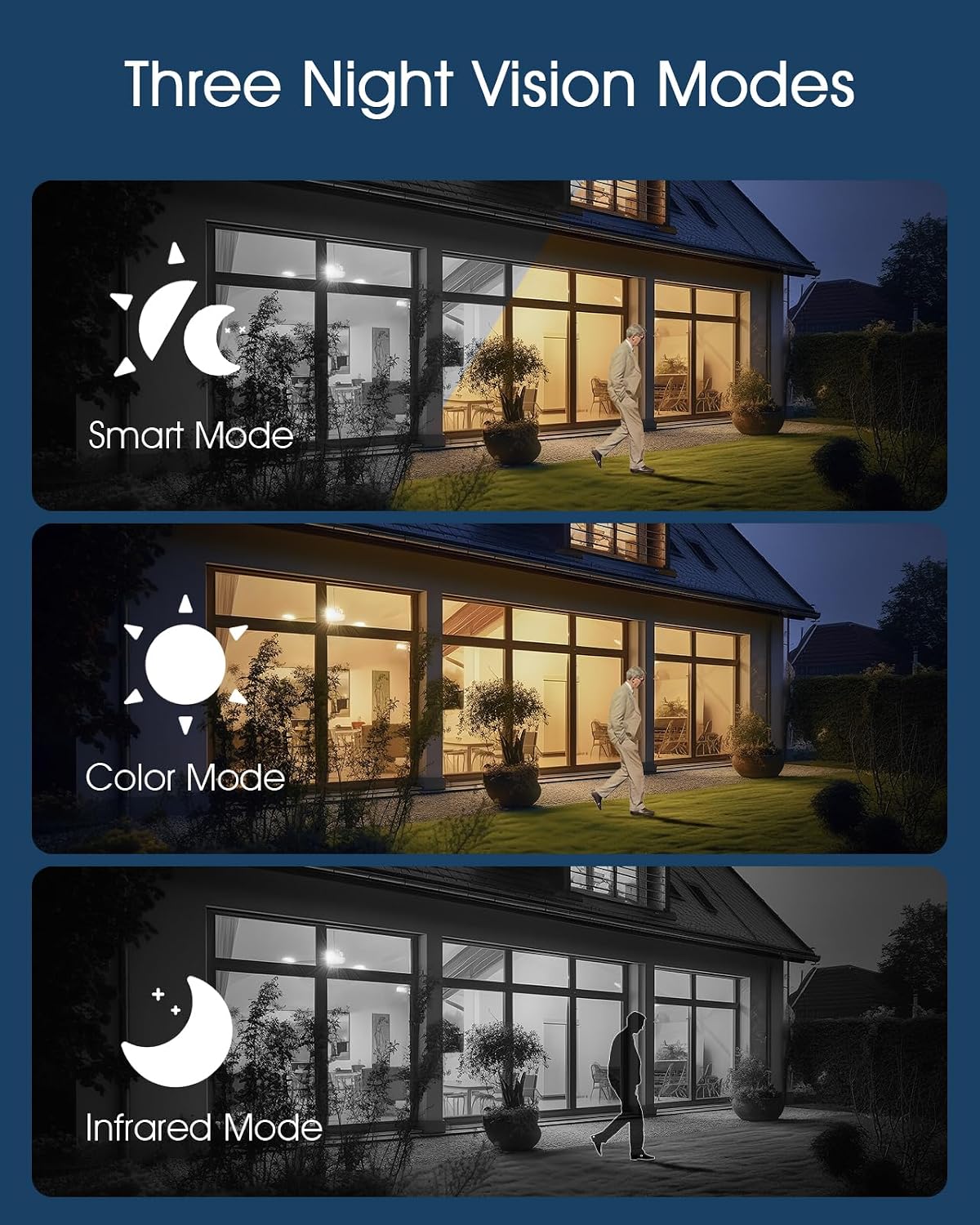
Image: Visual representation of the three night vision modes (Smart, Color, Infrared) available on the ANRAN Q04 camera, showing their distinct appearances.
4. Hareket Algılama Ayarları
Configure motion detection sensitivity, detection zones, and notification preferences within the ANRAN app. This allows you to receive alerts only for relevant events.
Bakım
1. Temizlik
- Kamera lensini ve güneş panelini düzenli olarak yumuşak bir bezle silin.amp tozu, kiri veya kalıntıları temizlemek için bez.
- Verimli şarj için güneş panelinin temiz olduğundan emin olun.
- Sert kimyasallar veya aşındırıcı temizleyiciler kullanmayın.
2. Pil Bakımı
- The camera is designed for continuous solar charging. Ensure the solar panel receives adequate direct sunlight daily.
- If the camera is installed in a shaded area or during prolonged periods of low sunlight, occasional manual charging via USB may be required.
- Avoid extreme temperatures that can degrade battery performance.

Image: ANRAN Q04 black solar security camera with its solar panel, illustrating its capability for 365 days of non-stop solar power due to the 9600mAh battery and IP66 waterproof rating.
Sorun giderme
| Sorun | Olası Çözüm |
|---|---|
| Kamera açılmıyor. | Ensure the battery is charged. Connect to a USB power source for initial charging. Check the power button. |
| No 4G signal. | Verify the SIM card is correctly inserted and activated with a data plan. Check network coverage in the installation area. Try restarting the camera. |
| Uygulamaya bağlanılamıyor. | Ensure the camera is powered on and the SIM card has an active data connection. Restart the app and the camera. Follow the pairing steps again. |
| Geceleyin video kalitesi düşük. | Check night vision settings in the app (Smart, Color, Infrared). Ensure the camera lens is clean and not obstructed. |
| Pil güneş enerjisiyle şarj olmuyor. | Ensure the solar panel is clean and receives at least 4-6 hours of direct sunlight daily. Reposition the camera or panel if necessary. |
Özellikler
- Modeli: Q04
- Bağlantı: 4G LTE (SIM kart gereklidir)
- Güç: Solar Panel with 9600mAh Rechargeable Battery
- Depolamak: MicroSD Card (up to 128GB, not included), Cloud Storage (subscription optional)
- Hava Koşullarına Dayanıklılık: IP66 Su Geçirmez ve Toz Geçirmez
- Çalışma Sıcaklığı: -40°F ila 140°F (-40°C ila 60°C)
- Gece Görüşü: Smart, Color, Infrared Modes
- Ses: Çift yönlü ses

Image: ANRAN Q04 white solar security camera operating outdoors in the rain, demonstrating its IP66 waterproof and dustproof rating and ability to withstand temperatures from -40°F to 140°F.
Garanti ve Destek
ANRAN products typically come with a limited warranty. Please refer to the warranty card included in your package or visit the official ANRAN webAyrıntılı garanti şartları ve koşulları için siteyi ziyaret edin.
For technical support, troubleshooting assistance, or warranty claims, please contact ANRAN customer service through their official website veya ürün ambalajınızda yer alan iletişim bilgileri.
Webalan: www.anran-cctv.com (Please verify official webSite)