
1. Giriş
This manual provides detailed instructions for the proper use and maintenance of your BAOFENG UV-32 10W Ham Radio. The UV-32 is a multi-band two-way radio featuring 10W selectable power, GPS navigation, a 2.0-inch color display, and multiple programming options including wireless app connectivity. Please read this manual thoroughly before operating the device to ensure safe and efficient communication.
2. Güvenlik Bilgileri
Observe the following safety precautions to prevent injury or damage to the radio:
- Radyoyu patlayıcı ortamlarda (örneğin yanıcı gazlar, toz parçacıkları, metal tozları) çalıştırmayın.
- Anten bağlı olmadan yayın yapmayın.
- Keep the antenna at least 2.5 cm (1 inch) away from your body when transmitting.
- Yalnızca BAOFENG onaylı piller ve şarj cihazları kullanın. Yetkisiz aksesuarlar hasara veya yangına neden olabilir.
- Radyoyu sökmeyin veya değiştirmeyin. Onarımlar yalnızca kalifiye teknisyenler tarafından yapılmalıdır.
- Uzun süre doğrudan güneş ışığına veya aşırı sıcaklıklara maruz kalmaktan kaçının.
- Do not operate the radio while driving or performing other activities that require full attention.
3. Paket İçeriği
Paketinizde tüm öğelerin mevcut olduğundan emin olun:
- 1 x BAOFENG UV-32 Radio
- 1 x 2500mAh Pil
- 1 x USB-C Charger
- 1 x Desktop Charger Base
- 1 x Standard UV Antenna
- 1 x Long Airband Antenna
- 1 x Kulaklık
- 1 x Kemer Klipsi
- 1 x Radio Case Holder

Image: The BAOFENG UV-32 radio shown with its complete set of accessories, including the battery, charger, antennas, headset, belt clip, and case holder.
4. Ürün Bittiview
UV-32 radyonuzun ana bileşenlerini tanıyın.

Resim: Ön view of the BAOFENG UV-32 radio, highlighting the 2.0-inch color display, alphanumeric keypad, and function buttons.
Temel Bileşenler:
- Anten Bağlantısı: For attaching the standard UV or airband antenna.
- Güç/Ses Düğmesi: Radyoyu açıp kapatır ve ses seviyesini ayarlar.
- Görüntülemek: Frekans, kanal, pil durumu ve diğer göstergeleri gösteren 2.0 inç renkli ekran.
- PTT Düğmesi: İletim için bas-konuş düğmesi.
- Side Keys (P1, P2): Customizable function keys.
- Klavye: Alphanumeric input for frequencies, channels, and menu navigation.
- USB-C Şarj Portu: Doğrudan pil şarjı için.
- Aksesuar Jakı: For connecting the headset or programming cable.
5. Kurulum
5.1 Pilin Takılması ve Şarj Edilmesi
- Align the 2500mAh Li-ion battery with the grooves on the back of the radio.
- Pili yerine oturana kadar yukarı doğru kaydırın.
- To charge, connect the USB-C charger directly to the battery's USB-C port or place the radio with the battery attached into the desktop charging base.
- The charging indicator on the desktop base will show red during charging and green when fully charged.

Image: A close-up of the 2500mAh Li-ion battery for the UV-32, highlighting its integrated USB-C charging port.
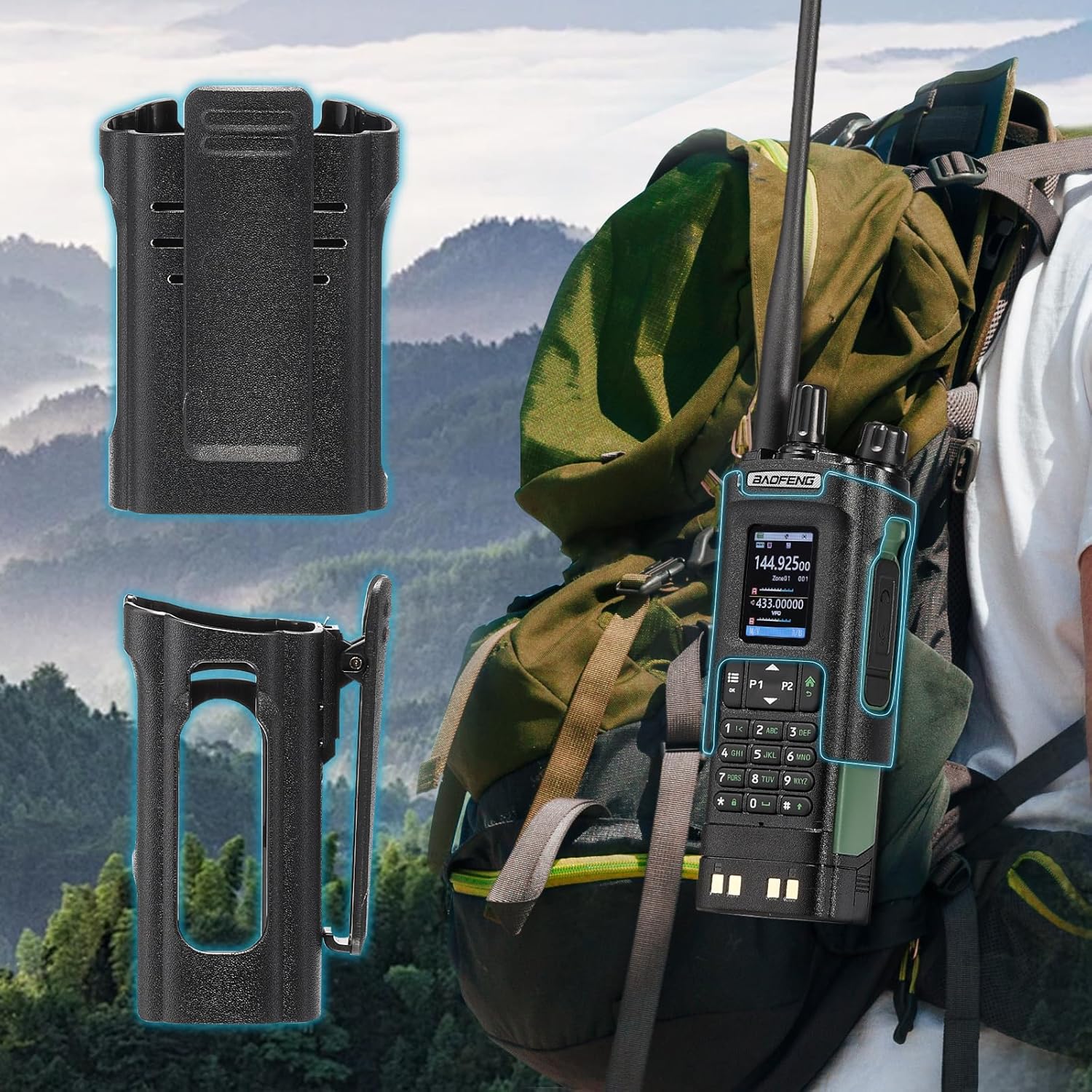
Image: The BAOFENG UV-32 radio demonstrating both direct USB-C charging and charging via its desktop cradle.
5.2 Anten Kurulumu
- Select the appropriate antenna: the standard UV antenna for general VHF/UHF use or the long airband antenna for enhanced aviation signal reception.
- Seçtiğiniz anteni, radyonun üst kısmındaki anten konektörüne saat yönünde çevirerek parmaklarınızla sıkılaşana kadar vidalayın. Aşırı sıkmayın.

Image: The BAOFENG UV-32 radio illustrating the use of two different antennas: a standard antenna for UHF/VHF and a longer antenna specifically designed for airband reception.
5.3 Kemer Klipsi Montajı
- Kemer klipsini radyonun arkasındaki vida delikleriyle hizalayın.
- Kemer klipsini verilen vidaları kullanarak sabitleyin.
- The radio case holder can be used to attach the radio to a backpack or belt for secure carrying.

Image: The BAOFENG UV-32 radio securely mounted to a backpack strap using its belt clip and an additional case holder, demonstrating portability.
6. Radyoyu Çalıştırma
6.1 Güç Açma/Kapatma ve Ses
Radyoyu açmak ve sesi artırmak için Güç/Ses düğmesini saat yönünde çevirin. Sesi azaltmak ve radyoyu kapatmak için saat yönünün tersine çevirin.
6.2 Ekran Üstüview
The 2.0-inch color display provides essential information:
- Frequency/Channel: Displays the current operating frequency or channel number.
- Pil Seviyesi: Kalan pil şarjını gösterir.
- Sinyal Gücü: Shows the strength of received signals.
- Mod Göstergeleri: Icons for various functions like GPS, Bluetooth, power level, etc.

Image: A close-up of the BAOFENG UV-32's 2-inch color display, showing detailed frequency, channel, and status information.
6.3 Kanal Modu ve Frekans Modu Arasındaki Fark
The radio operates in two primary modes:
- Frekans Modu (VFO): Allows direct input of frequencies for scanning or temporary use.
- Kanal Modu (MR): Uses pre-programmed channels for quick access to stored frequencies.
Basın MENÜ button and navigate to the mode setting to switch between VFO and MR modes.
6.4 Frekans Seçimi
- Klavye: In Frequency Mode, directly enter the desired frequency using the numeric keypad.
- Quick Channel Knob: Rotate the top knob to quickly scroll through frequencies or channels.
- Yukarı/Aşağı Oklar: Use the arrow keys (P1/P2) to fine-tune frequencies or navigate channels.
6.5 İletim ve Alma
- Ensure an antenna is properly connected.
- İstediğiniz frekansı veya kanalı seçin.
- İletmek için, tuşuna basın ve basılı tutun PTT Telsizin yan tarafındaki düğmeye basın. Mikrofona net bir şekilde konuşun.
- Serbest bırak PTT İletimi durdurup alım moduna dönmek için düğmeye basın.
- Güç Seviyeleri: The UV-32 offers High (H), Medium (M), and Low (L) power settings. Adjust this in the menu to balance range and battery life.
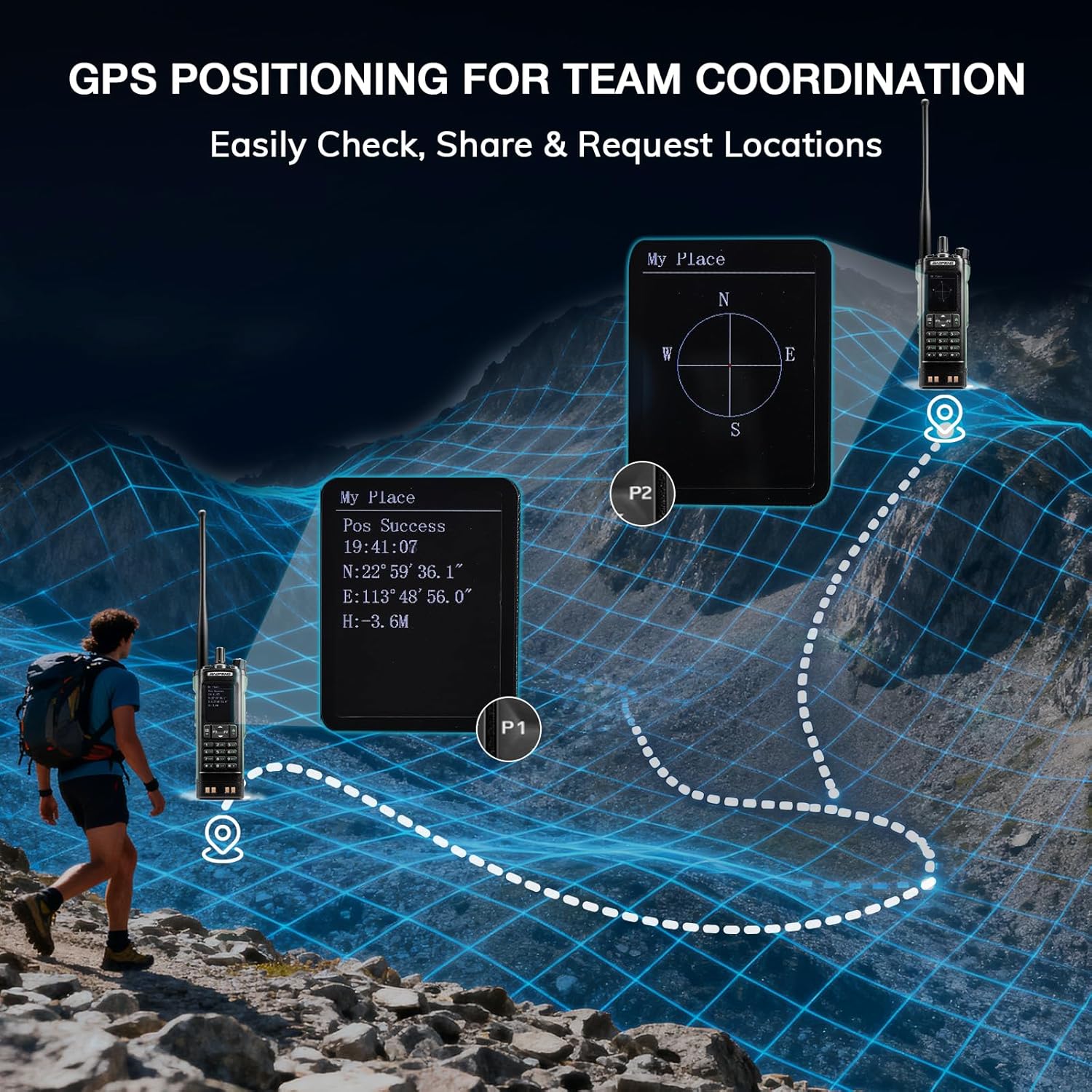
Image: The BAOFENG UV-32 radio's display showing different power output levels (High, Medium, Low) and an external SWR meter for measurement.
6.6 Programlama Seçenekleri
The UV-32 offers several methods for programming frequencies and settings:
- Kablosuz APP Programlama: Connect your radio to a smartphone (iOS/Android) via Bluetooth using the dedicated BT app for quick and wireless programming.
- CHIRP Yazılımı: For advanced or bulk programming, use CHIRP software on a PC. Select "UV-17ProGPS" as the radio model in CHIRP.
- Tuş Takımı Programlama: Basic programming can be done directly on the radio using the keypad and menu system.
- Tek Tuşla Frekans Kopyalama: This feature allows for easy cloning of frequencies from another radio. Refer to the radio's on-screen prompts or full manual for specific steps.

Image: An illustration depicting the various programming methods available for the BAOFENG UV-32, including mobile app (Bluetooth), CPS software, CHIRP software, and direct keypad input.

Image: Two BAOFENG radios illustrating the one-key frequency copy function, allowing for quick and easy channel cloning between devices.
6.7 GPS Navigasyonu
The integrated GPS module provides real-time location data:
- Access the GPS function through the radio's menu.
- View your current latitude, longitude, and altitude.
- The radio supports sharing your location or requesting coordinates from other team members for improved coordination.

Image: A visual representation of the BAOFENG UV-32's GPS functionality, showing how it displays coordinates and facilitates location sharing for team coordination in outdoor environments.
6.8 Enhanced Airband Reception
For clearer reception of aviation signals, utilize the dedicated AM antenna included with your UV-32. This specialized antenna is designed to provide more accurate and stable airband listening compared to standard UV dual-band antennas.
6.9 NOAA Hava Durumu Radyosu
The UV-32 can receive NOAA weather alerts. Consult the radio's menu for instructions on how to scan for and select NOAA channels in your area.
6.10 Özelleştirilebilir Yan Tuşlar
The radio features four customizable side keys (P1, P2, and two others). These can be programmed via the menu or programming software to quickly access frequently used functions such as scan, monitor, or power level adjustment.

Image: A close-up of the BAOFENG UV-32's side, highlighting the customizable P1 and P2 function keys.
7. Bakım
7.1 Radyonun Temizlenmesi
Radyo yüzeyini yumuşak bir bezle silin.amp Bezle silin. Sert kimyasallar veya aşındırıcı temizleyiciler kullanmayın. Kullanmadan önce tüm bağlantı noktalarının kuru olduğundan emin olun.
7.2 Pil Bakımı
- İlk kullanımdan önce pili tam olarak şarj edin.
- Pili aşırı şarj etmekten veya tamamen boşaltmaktan kaçının.
- Uzun süre kullanılmayacaksa pili serin ve kuru bir yerde saklayın.
7.3 Depolama
When storing the radio for a long time, remove the battery and store it separately. Keep the radio in a dry, dust-free environment away from direct sunlight and extreme temperatures.
8. Sorun Giderme
| Sorun | Olası Neden | Çözüm |
|---|---|---|
| Radyo açılmıyor | Pil doğru takılmamış veya boşalmış. | Pilin güvenli bir şekilde takıldığından emin olun. Pili tamamen şarj edin. |
| İletilemiyor | Antenna not connected. Incorrect frequency/channel. Low power setting. | Attach antenna. Verify frequency/channel. Increase power level. |
| Zayıf alım/iletim menzili | Obstructions. Low power setting. Incorrect antenna. | Move to an open area. Increase power. Ensure correct antenna is used and properly connected. |
| Programming errors with CHIRP/APP | Incorrect radio model selected. Connection issues. Outdated software/firmware. | Ensure "UV-17ProGPS" is selected in CHIRP. Re-establish Bluetooth connection. Update software/firmware if available. |
9. Özellikler
| Özellik | Detay |
|---|---|
| Marka | BAOFENG |
| Model Numarası | UV-32 |
| Kanal Sayısı | 1000 |
| Frekans Aralığı | UHF, VHF |
| Güç Çıkışı | Up to 10W (selectable High, Medium, Low) |
| Görüntülemek | 2.0" Renkli Ekran |
| Pil | 2500mAh Li-ion (dahil) |
| Şarj etme | USB-C, Desktop Charger Base |
| Özel Özellikler | Digital Display, Dual Band, USB-C Rechargeable, Wireless APP Programming, Wireless Channel Clone, GPS, NOAA Reception |
| Bağlantı Protokolü | Bluetooth |
| Ürün Boyutları | 1.2"D x 2.2"G x 4"Y |
| Su Direnç Seviyesi | Suya dayanıklı değil |
10. Garanti ve Destek
Your BAOFENG UV-32 radio comes with an 18 ay garanti. BAOFENG also provides ömür boyu destek Bu ürün için.
For technical assistance, warranty claims, or further inquiries, please visit the official BAOFENG website or contact their customer support directly. Keep your purchase receipt as proof of purchase for warranty services.