
giriiş
This manual provides essential information for the safe and efficient use of your Google Pixel 9 Pro 5G smartphone. Please read these instructions carefully before operating your device.

Şekil 1: Ön view of the Google Pixel 9 Pro 5G.
Kutuda Neler Var?
Tüm öğelerin ambalajda mevcut olduğunu doğrulayın:
- Google Pixel 9 Pro Akıllı Telefon
- USB-C - USB-C Kablosu (1m, USB 2.0)
- SIM Tepsisi Çıkarma Aracı
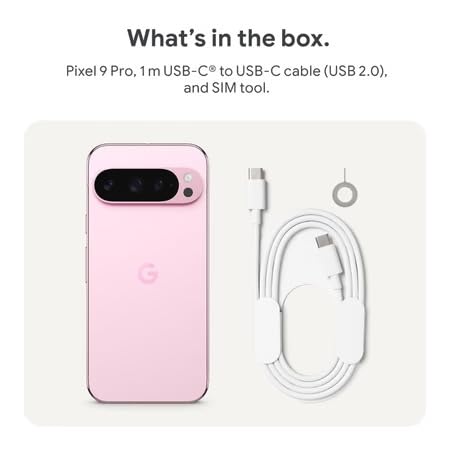
Figure 2: Included items in the Pixel 9 Pro packaging.
Kurmak
1. SIM Kart Takılması
- Locate the SIM tray on the side of your Pixel 9 Pro.
- Insert the provided SIM ejector tool into the small hole on the SIM tray and press gently until the tray pops out.
- Place your Nano-SIM card into the tray with the gold contacts facing down. Ensure it is seated correctly.
- Carefully push the SIM tray back into the device until it is flush.
2. İlk Şarj
İlk kullanımdan önce cihazınızı tam şarj etmeniz önerilir.
- USB-C kablosunu telefonunuzun alt kısmında bulunan şarj portuna bağlayın.
- Connect the other end of the cable to a compatible USB power adapter (sold separately) and plug it into a power outlet.
- Ekranda bulunan pil ikonu şarj durumunu gösterecektir.
3. Açma/Kapama
- Açmak İçin: Press and hold the Power button (located on the right side) until the Google logo appears on the screen.
- Kapatmak İçin: Güç düğmesine basılı tutun, ardından ekranda 'Kapat' seçeneğine dokunun.
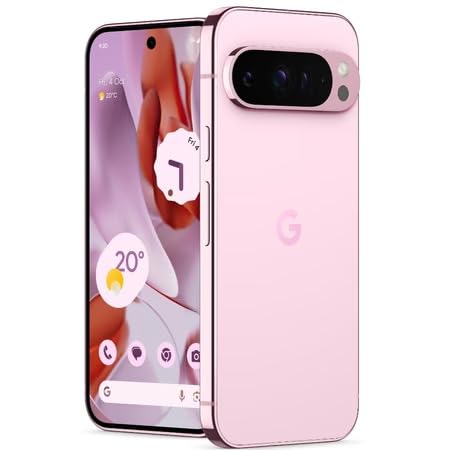
Figure 3: Power and volume buttons on the side of the device.
4. İlk Kurulum Sihirbazı
Upon powering on for the first time, follow the on-screen instructions to:
- Dilinizi ve bölgenizi seçin.
- Bir Wi-Fi ağına bağlanın.
- Google hesabınızla giriş yapın veya yeni bir hesap oluşturun.
- Set up security features such as fingerprint unlock, face unlock, PIN, pattern, or password.
- Eski cihazdan veri aktarımı (isteğe bağlı).
Kullanım Talimatları
Temel Gezinme
- Dokunmatik Ekran Hareketleri: Interact with the device using taps, swipes, pinches (for zoom), and long presses.
- Ana Ekran: Access your applications, widgets, and customize your layout.
- Bildirimler: için ekranın üst kısmından aşağı doğru kaydırın. view bildirimler.
- Hızlı Ayarlar: Swipe down twice from the top of the screen to access quick settings toggles (Wi-Fi, Bluetooth, etc.).
Kamera İşlemi
The Pixel 9 Pro features a powerful triple rear camera system.
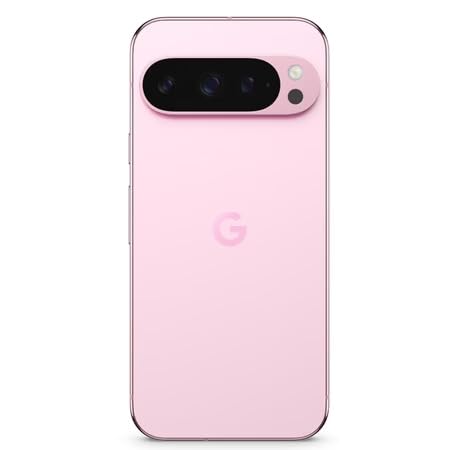
Figure 4: Rear camera system of the Pixel 9 Pro.
- Kamerayı Açma: Ana ekranınızda veya kilit ekranınızda Kamera uygulaması simgesine dokunun.
- Lens Değiştirme: Tap the icons on the viewfinder to switch between wide, ultrawide, and 5x telephoto lenses.
- Çekim Modları: Select from various modes such as Night Sight for low-light conditions, Astrofotoğrafçılık for capturing stars, Makro for close-up shots, Uzun pozlama for creative effects, and Portre for depth-of-field effects.
- Süper Çözünürlüklü Yakınlaştırma: Pinch the screen to digitally zoom up to 30x. For video, Super Res Zoom supports up to 20x.
- Profesyonel Kontroller: Access advanced camera settings like shutter speed and manual focus for greater creative control.
Pil Yönetimi
- Pil Seviyesinin Kontrol Edilmesi: View pil yüzdesitage in the status bar or in Settings > Battery.
- Aşırı Pil Tasarrufu: Enable this mode in Settings > Battery > Extreme Battery Saver to significantly extend battery life.
- Şarj: Use the provided USB-C cable and a compatible power adapter for optimal charging speed.
Güvenlik Özellikleri
Your Pixel 9 Pro incorporates multiple hardware security layers to protect your data.
- Parmak İzi Kilidi: Ayarlar > Güvenlik ve gizlilik > Cihaz kilidini açma bölümünden parmak izlerinizi kaydedin.
- Yüz Tanıma Kilidi: Kolay kilit açma için yüz tanıma özelliğini ayarlayın.
- PIN/Desen/Şifre: Always set a strong screen lock method.
- Yazılım Güncellemeleri: Regularly install system updates to ensure your device has the latest security patches.
Sıcaklık Sensörü
The Pixel 9 Pro includes a thermometer for measuring temperature.
- Open the dedicated Thermometer app.
- Follow the on-screen instructions to measure body temperature or the temperature of objects.
- Temperature data can be saved and tracked within the Fitbit application.
Bakım
Cihazınızı Temizleme
- Telefonunuzun ekranını ve gövdesini temizlemek için yumuşak, tüy bırakmayan bir bez kullanın.
- Aşındırıcı malzemelerden, sert kimyasallardan veya aerosol spreylerden kaçının.
- Do not submerge the device in water, despite its water-resistant rating.
Yazılım Güncellemeleri
Google regularly releases software updates to improve performance, add features, and enhance security.
- To check for updates, go to Settings > System > System update.
- Ensure your device is connected to Wi-Fi and has sufficient battery charge before installing updates.
Fiziksel Bakım
The Pixel 9 Pro is built with Corning Gorilla Glass Victus 2 and is water-resistant, offering durability against everyday drops and spills.
- While durable, avoid excessive impacts or drops to prevent damage.
- Consider using a screen protector and a protective case for additional safeguarding.
Sorun giderme
Cihaz Yanıt Vermiyor
If your phone becomes unresponsive, perform a force restart:
- Cihaz yeniden başlatılana kadar Güç düğmesini yaklaşık 10-15 saniye basılı tutun.
Uygulamalar Çöküyor veya Donuyor
- Sorunlu uygulamayı kapatıp tekrar açın.
- Clear the app's cache: Go to Settings > Apps > See all apps > [App Name] > Storage & cache > Clear cache.
- Uygulamanın Google Play Store'dan en son sürüme güncellendiğinden emin olun.
- Telefonunuzu yeniden başlatın.
Network Connectivity Issues (Wi-Fi/Cellular)
- Toggle Wi-Fi or cellular data off and then back on.
- Telefonunuzu yeniden başlatın.
- Verify that your SIM card is correctly inserted.
- Ağ ayarlarını sıfırlayın: Ayarlar > Sistem > Sıfırlama seçenekleri > Wi-Fi, mobil ve Bluetooth'u sıfırla seçeneğine gidin.
Pil Hızla Tükeniyor
- Ayarlar > Pil bölümünden pil kullanımını kontrol ederek güç tüketen uygulamaları belirleyebilirsiniz.
- Ekran parlaklığını ve ekran zaman aşımı süresini azaltın.
- Disable unnecessary features like GPS, Bluetooth, and Wi-Fi when not in use.
- Enable Extreme Battery Saver mode.
Fabrika Ayarlarına Sıfırlama (Son Çare)
Warning: A factory reset will erase all data from your phone. Back up all important data before proceeding.
- Ayarlar > Sistem > Sıfırlama seçenekleri > Tüm verileri sil (fabrika ayarlarına sıfırla) seçeneğine gidin.
- Confirm your decision when prompted.
Özellikler
| Özellik | Detay |
|---|---|
| Marka | |
| Örnek | Piksel 9 Pro |
| İşletim Sistemi | Android 15 |
| İşlemci | Google Tensor G4 (3.1 GHz) |
| Veri deposu | 16 GB |
| Dahili Depolama | 256 GB |
| Görüntülemek | 6.3 Inches LTPO OLED (Actua), 1280 x 2856 Pixels, 120 Hz Refresh Rate |
| Arka Kamera | 50 MP wide + 48 MP ultrawide (Macro) + 48 MP 5x telephoto |
| Ön Kamera | 42 MP |
| Pil Kapasitesi | 4700 Miliamp Hours (up to 24 hours average life) |
| Bağlantı | 5G, Wi-Fi 7, Bluetooth 5.3, NFC, UWB, USB-C |
| SIM Kart | Tek Nano SIM |
| Suya Dayanıklılık | Su geçirmez |
| Boyutlar | 8 x 72 x 153 milimetre |
| Ağırlık | 198 Gram |
Garanti ve Destek
Garanti Bilgileri
Your Google Pixel 9 Pro 5G comes with a 1 Yıl Üretici Garantisi Satın alma tarihinden itibaren geçerlidir. Bu garanti, normal kullanım koşullarındaki üretim hatalarını kapsar. Garanti talepleriniz için lütfen satın alma belgenizi saklayın.
Müşteri Desteği
For technical assistance, warranty claims, or other support inquiries, please contact Google customer service:
- Üretici: Google LLC, 1600 Amphitheatre Parkway, Dağ View, CA 94043, ABD
- Phone Support (India): +91 7718892303
- İthalatçı İletişim Bilgileri (Hindistan): Nexora Axis Private Limited (+91 7718892303)
For the most up-to-date support information, please visit the official Google Pixel support webalan.