
1. Ürün Bittiview
This Ossuret car radio features the Android 14 operating system, an 8-core 1.8GHz CPU, 4GB RAM, and 32GB internal storage. It is equipped with a 9.7-inch QLED touchscreen display (768*1024 resolution) for clear visuals and responsive interaction. Key functionalities include wireless Apple CarPlay and Android Auto, integrated GPS navigation, FM/AM radio with RDS, and a built-in DSP for enhanced audio control. The unit supports 4G LTE connectivity (SIM card slot and antenna included) and WiFi, allowing for online navigation, streaming, and app usage. Steering wheel control compatibility ensures safe and convenient operation.
Temel Özellikler:
- İşletim Sistemi: Android 14
- İşlemci: 8-Core 1.8GHz CPU (2*A75 + 6*A5)
- Bellek saklama alanı: 4GB RAM + 32GB Flaş
- Görüntülemek: 9.7-inch QLED Touch Screen (768*1024)
- Bağlantı: Wireless Apple CarPlay, Wireless/Wired Android Auto, Bluetooth, WiFi, 4G LTE (modem not included, supports external USB Dongle)
- Navigasyon: Built-in GPS with offline map data, supports online navigation apps (Maps, Waze)
- Ses: FM/AM Radio with RDS, Built-in DSP (BU32107EFV), DAB/DAB+ (optional)
- Multimedya: Music, Video (up to 1280P), Photo Viewer
- Ek Fonksiyonlar: Steering Wheel Control, Dual Zone, Mirror Link, APK Installer, Wallpapers, OBD2 (optional), DVR (USB Camera)
2. Uyumluluk
This car radio is specifically designed for the following vehicle models and years:
- Opel Zafira C: 2010, 2011, 2012, 2013, 2014, 2015, 2016
- Vauxhall Zafira C: 2010, 2011, 2012, 2013, 2014, 2015, 2016
Önemli Not: This unit is not compatible with the original rearview camera of the vehicle. Please confirm your vehicle's center console before installation.

Image 2.1: Visual guide for compatible and incompatible vehicle console types. The image displays four different car console configurations, with checkmarks indicating compatibility for three and an 'X' for one, specifically noting incompatibility with the original rearview kamera.
3. Kurulum ve Kurulum
3.1 Kutuda Neler Var:
- USB kablosu
- RCA Kablo Demeti
- GPS Anteni
- 4G Anten
3.2 Kurulum Kılavuzu:
Professional installation is highly recommended to ensure correct wiring and functionality. Incorrect installation may damage the unit or vehicle electronics. Ensure the vehicle's power is disconnected before beginning installation.
- Carefully remove the original car radio or infotainment system.
- Connect the main power harness to the vehicle's wiring. Ensure all connections are secure.
- GPS antenini bağlayın ve net görüş sağlayan bir yere yerleştirin. view En iyi sinyal alımı için gökyüzünün.
- If using 4G, connect the 4G antenna and insert your 4G SIM card into the designated slot before powering on the device.
- Connect the RCA harness for audio/video output and input, if applicable.
- Connect any additional accessories such as USB cables, external cameras (DVR), or OBD2 devices.
- Mount the new Ossuret car radio securely into the dashboard.
- Aracın güç bağlantısını yeniden yapın ve gösterge panelini tamamen yeniden monte etmeden önce tüm fonksiyonları test edin.
4. Kullanım Talimatları
4.1 Kullanıcı Arayüzü Bittiview and Key Features Demonstration:
Video 4.1: This video provides a comprehensive demonstration of the Ossuret Android 14 car radio's user interface and key functionalities. It showcases system settings, various applications including Bluetooth, Radio, Music, Navigation (Google Maps, Android Auto), DSP audio controls, CarAPP features (car info, AC settings, amplifier info), steering wheel control learning, and voice assistant interaction for music and navigation.
4.2 Apple CarPlay and Android Auto:
The unit supports both wireless Apple CarPlay and wireless/wired Android Auto. Connect your smartphone via Bluetooth or USB to access phone functions, online navigation, calls, messages, and music directly on the car radio display. This feature allows you to focus on driving while staying connected.

Image 4.2: The car radio display showing both Apple CarPlay (wireless) and Android Auto (wireless/wired) interfaces, highlighting seamless smartphone integration for navigation, communication, and entertainment.
4.3 Steering Wheel Control (SWC):
Control the car radio directly from your vehicle's steering wheel buttons. This allows for easy adjustment of music, volume, and other functions, enhancing driving safety by minimizing distractions.

Image 4.3: The car radio display illustrating the steering wheel control setup, enabling users to map vehicle steering wheel buttons to various radio functions for convenient and safe operation.
4.4 4G LTE and WiFi Connectivity:
The radio supports 4G network connectivity via a dedicated SIM card slot and antenna, as well as built-in WiFi. This enables online navigation, music streaming, video playback, and access to various internet services while on the go. Ensure the SIM card is inserted before powering on the device.
4.5 Digital Sound Processor (DSP):
Equipped with a built-in DSP (BU32107EFV), this unit allows for precise sound adjustments. You can customize the sound effect, enhance bass, and reduce car noise, providing a superior audio experience.

Image 4.4: The car radio display showing the Digital Sound Processor (DSP) interface with various sound adjustment options, including equalizer presets, surround sound, bass enhancement, and sound field settings.
4.6 Picture-in-Picture (PIP) and Split Screen:
The Picture-in-Picture (PIP) feature allows you to watch video in a small, resizable window on top of other applications. The split-screen function enables you to run two applications simultaneously, such as navigation and music, for enhanced multitasking.

Image 4.5: The car radio display demonstrating the Picture-in-Picture (PIP) feature, where a video plays in a small, adjustable window while other applications are visible.
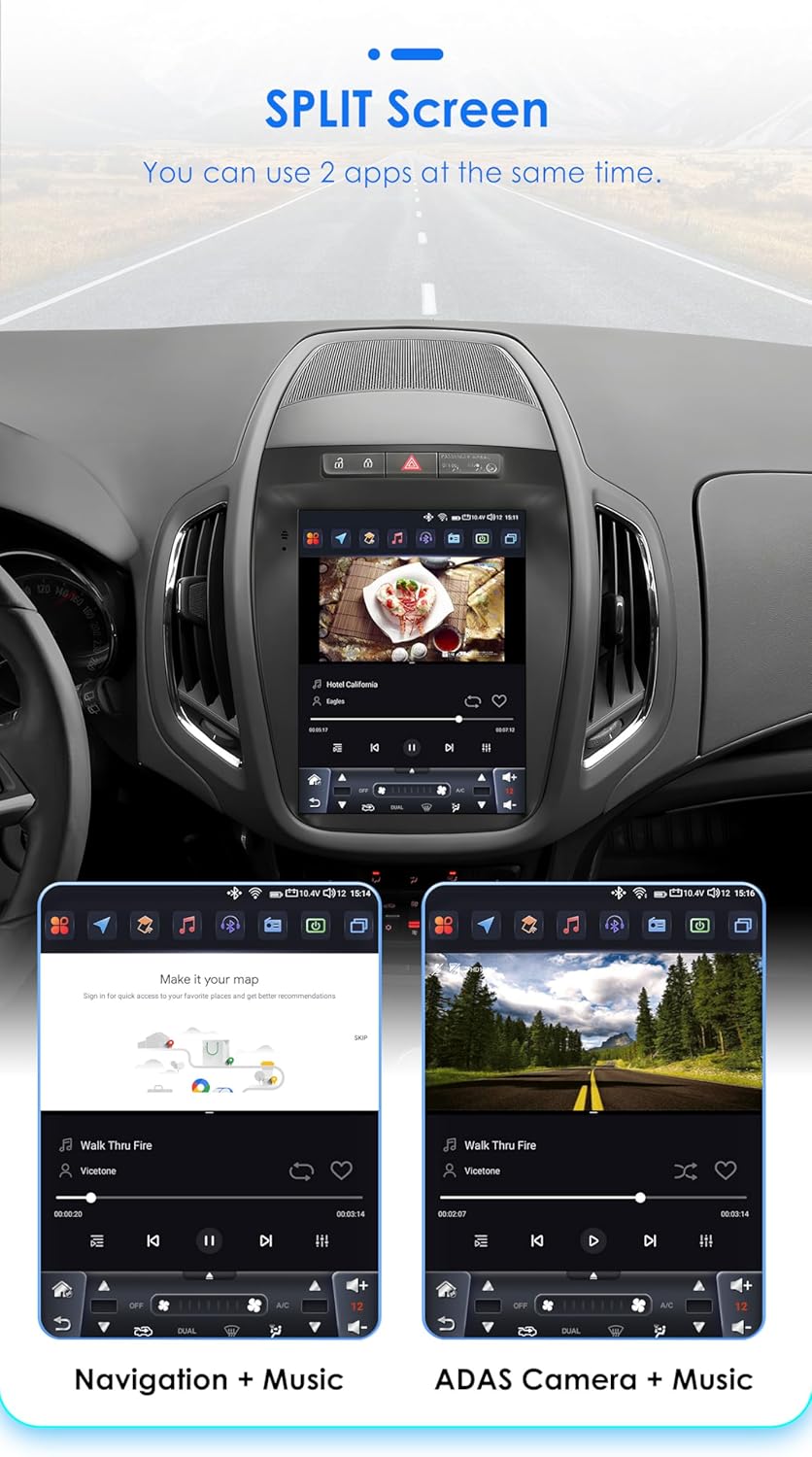
Image 4.6: The car radio display showcasing the split-screen feature, allowing two applications, such as navigation and a music player, to run side-by-side for improved user experience.
4.7 Original Car Information Display:
The unit can display original car information, integrating seamlessly with your vehicle's existing systems to provide relevant data directly on the screen.

Image 4.7: The car radio display showing the 'Original Car Information Display' interface, which provides access to various vehicle data and settings.
5. Bakım
Ossuret araç radyonuzun uzun ömürlü ve optimum performans göstermesi için aşağıdaki bakım yönergelerini izleyin:
- Temizlik: Ekranı ve dış yüzeyi temizlemek için yumuşak, kuru bir bez kullanın. İnatçı lekeler için hafifçe kurulayın.ampBezi su veya ekran temizleyicisiyle silin. Aşındırıcı malzemelerden veya sert kimyasallardan kaçının.
- Yazılım Güncellemeleri: Sistemin verimli çalışmasını ve en yeni özelliklere ve güvenlik yamalarına sahip olmasını sağlamak için düzenli olarak mevcut yazılım güncellemelerini kontrol edin ve yükleyin.
- Sıcaklık: Cihazı uzun süre aşırı sıcak veya soğuk sıcaklıklara maruz bırakmaktan kaçının.
- Güç yönetimi: Ensure the vehicle's electrical system is in good condition to prevent power fluctuations that could affect the unit.
6. Sorun Giderme
Araç radyonuzla ilgili sorunlarla karşılaşırsanız, aşağıdaki yaygın sorunlar ve çözümlerine göz atın:
- Güç Yok:
- Check the power connections and fuses.
- Aracın kontak anahtarının açık olduğundan emin olun.
- Ses Yok:
- Hoparlör bağlantılarını doğrulayın.
- Ses seviyelerini ve sessize alma ayarlarını kontrol edin.
- Doğru ses kaynağının seçildiğinden emin olun.
- GPS Sinyal Sorunları:
- GPS anteninin düzgün şekilde bağlandığından ve net bir görüşe sahip olduğundan emin olun view gökyüzünün.
- Gerekirse harita verilerini güncelleyin.
- Bluetooth Bağlantı Sorunları:
- Hem araç radyosunda hem de cihazınızda Bluetooth'un etkinleştirildiğinden emin olun.
- Önceki eşleştirmeleri silin ve yeniden bağlanmayı deneyin.
- Her iki cihazı da yeniden başlatın.
- Dokunmatik Ekran Tepki Vermiyor:
- Üniteyi tekrar başlatın.
- Ekranın temiz ve kalıntılardan arınmış olduğundan emin olun.
Sorun devam ederse lütfen daha fazla yardım için müşteri desteğiyle iletişime geçin.
7. Özellikler
| Özellik | Şartname |
|---|---|
| İşletim Sistemi | Android 14 |
| İşlemci | 8-Core 1.8GHz (2*A75 6*A5) |
| Veri deposu | 4 GB |
| Flaş Depolama | 32 GB |
| Ekran Boyutu | 9.7 inç |
| Ekran Türü | QLED Dokunmatik Ekran |
| Çözünürlük | 768*1024 |
| Araba Oynatma | Kablosuz |
| Android Auto | Kablosuz/Kablolu |
| Radyo Tuner | FM/AM, RDS (DAB/DAB+ optional) |
| DSP | Built-in BU32107EFV |
| Bağlantı | Bluetooth, USB, WiFi, 4G LTE (external dongle support) |
| Küresel Konumlama Sistemi | Yes, with offline map data (Europe map type) |
| Ses Çıkışı Modu | Stereo |
| Uyumlu Cihazlar | Akıllı telefon |
| Kontrol Yöntemi | Application, Buttons, Touchscreen |
| Paket Boyutları | 20x10x10 cm |
| Ağırlık | 2 kilo |
| Menşei ülke | Çin |
8. Garanti ve Destek
This Ossuret car radio comes with a 1 yıllık garanti Satın alma tarihinden itibaren geçerlidir. Bu garanti, üretim hatalarını ve normal kullanım koşullarındaki arızaları kapsar.
8.1 What is Covered:
- Malzeme ve işçilik kusurları.
- Malfunctions occurring during normal operation.
8.2 What is Not Covered:
- Yanlış montaj veya yetkisiz onarımlardan kaynaklanan hasar.
- Damage due to accidents, misuse, abuse, neglect, or external causes.
- Cosmetic damage, including scratches, dents, or broken plastic on ports.
- Damage from operating the product outside the permitted or intended uses described in this manual.
8.3 Müşteri Desteği:
For technical assistance, warranty claims, or any questions regarding your Ossuret car radio, please contact your retailer or the manufacturer's customer service. Please have your purchase receipt and product model information ready when contacting support.