
1. Giriş
This manual provides detailed instructions for the setup, operation, maintenance, and troubleshooting of your Muddy Pro Cam 20 MP Trail Camera. Please read this manual thoroughly before using the camera to ensure proper function and longevity of the device. The Muddy Pro Cam 20 MP is designed for capturing high-resolution images and videos of wildlife with its 20MP sensor and 720p video capabilities.

Şekil 1: Ön view of the Muddy Pro Cam 20 MP Trail Camera.
2. Paket İçeriği
Aşağıda listelenen tüm öğelerin paketinizde bulunduğunu doğrulayın:
- Muddy Pro Cam 20 Megapixel Trail Camera with Video Function
3. Temel Özellikler
- Yüksek Çözünürlüklü Görüntüleme: 20MP camera with 850nm LEDs for clear day and night captures. Supports 20MP, 8MP, and 4MP resolution images.
- Yüksek Çözünürlüklü Video: Captures 720p videos at 30 frames per second (FPS).
- Hızlı Tetikleme Hızı: 0.5-second trigger speed to capture quick movements.
- Versatile Burst Mode: Captures 1 to 3 images per triggering event.
- Extensive Detection Range: 80-foot detection range for broad coverage.
- Güç Kaynağı: Operates on eight AA batteries.
- Güvenlik: Integrated Python lock latch for theft deterrence.
4. Kurulum
4.1. Pil Kurulumu
- Open the camera housing latch.
- Pil bölmesini bulun.
- Insert eight (8) AA batteries, ensuring correct polarity (+/-) as indicated inside the compartment.
- Pil bölmesini sıkıca kapatın.
4.2. SD Kart Kurulumu
- With the camera powered off, locate the SD card slot.
- Insert a standard SD card (up to 32GB, not included) into the slot with the metal contacts facing down, until it clicks into place.
- To remove, press the SD card gently to release it.
4.3. Kameranın Montajı
The camera can be mounted using the included strap or a compatible mounting accessory.
- Uygun bir yer seçin, örneğin bir ağaç veya direk, ve çevrenin açık olduğundan emin olun. view İstenilen alanın.
- Montaj kayışını kameranın arkasındaki yuvalardan geçirin.
- Securely fasten the strap around the mounting surface.
- Adjust the camera angle to optimize the field of view and detection zone.
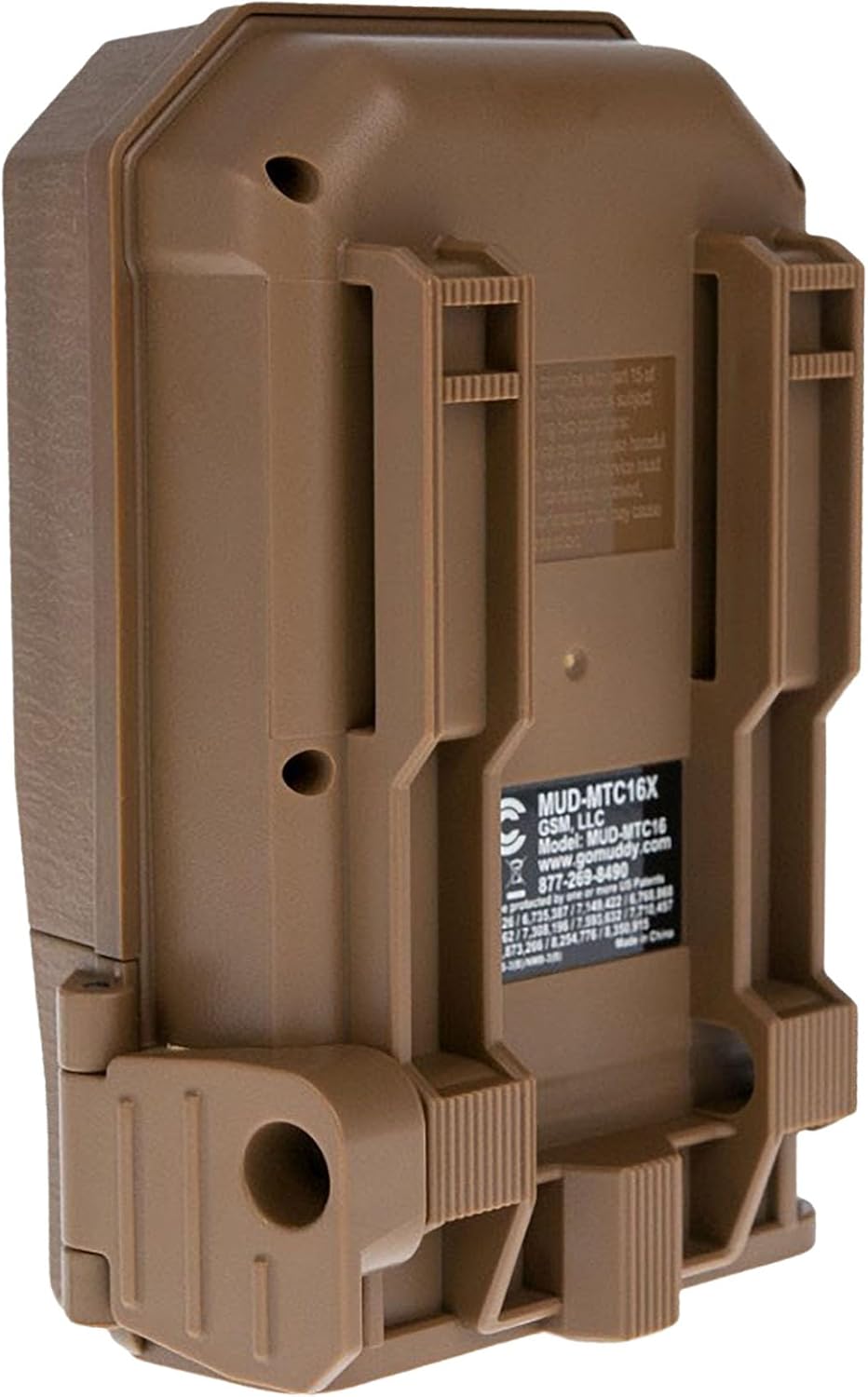
Şekil 2: Geri view of the camera showing mounting slots and product label.
5. Kullanım Talimatları
5.1. Açma/Kapama
- To power on, slide the power switch to the 'ON' position. The camera will perform a self-check.
- Cihazı kapatmak için güç düğmesini 'KAPALI' konumuna getirin.
5.2. Menü Navigasyonu
Use the navigation buttons (Up, Down, Left, Right, OK) to move through the menu options and confirm selections. The display screen will show current settings.
5.3. Photo Mode Settings
In the menu, navigate to 'Photo Settings' to adjust:
- Çözünürlük: Select 20MP, 8MP, or 4MP for image quality. Higher resolution results in larger file boyutları.
- Patlama Modu: Set the number of images captured per trigger (1 to 3 photos).
- Gecikme: Set the time interval between consecutive triggers.
5.4. Video Modu Ayarları
In the menu, navigate to 'Video Settings' to adjust:
- Çözünürlük: Set to 720p for video capture.
- Video Uzunluğu: Specify the duration of each video clip.
- Ses Kaydı: Enable or disable audio capture with video.
5.5. Detection and Trigger
The camera features an 80-foot detection range and a 0.5-second trigger speed. Ensure the detection area is clear of obstructions that might cause false triggers, such as swaying branches.
6. Bakım
6.1. Pil Değişimi
When the battery indicator shows low power, replace all eight AA batteries with new ones to ensure optimal performance and prevent data loss.
6.2. SD Kart Yönetimi
Regularly check the SD card capacity. Format the SD card periodically to maintain optimal performance and prevent corruption. Always power off the camera before inserting or removing the SD card.
6.3. Temizlik
Use a soft, dry cloth to clean the camera lens and housing. Avoid using abrasive cleaners or solvents. Ensure the camera is dry before closing the housing.
7. Sorun Giderme
- Kamera açılmıyor: Pillerin montajını kontrol edin ve pillerin yeni olduğundan emin olun.
- Görüntü/video yakalanmadı: Verify SD card is inserted correctly and has sufficient space. Check camera settings for proper mode selection and trigger delay.
- Kötü görüntü/video kalitesi: Ensure the lens is clean. Check resolution settings.
- Yanlış tetikleyiciler: Adjust camera placement to avoid moving branches or excessive sunlight in the detection zone.
8. Özellikler
| Özellik | Şartname |
|---|---|
| Model Numarası | MUD-MTC20X |
| Görüntü Çözünürlüğü | 20MP, 8MP, 4MP |
| Video Çözünürlüğü | 720p @ 30 FPS |
| Algılama Aralığı | 80 feet |
| Tetik Hızı | 0.5 saniye |
| Flash Bellek Türü | SD (32 GB'a kadar) |
| Güç Kaynağı | 8 x AA Pil |
| Fotoğraf Sensörü Teknolojisi | CMOS |
| Bağlantı Teknolojisi | Kızılötesi |
| Ürün Ağırlığı | 12.3 ons |
| Ürün Boyutları | 1 x 1 x 1 inç |
9. Garanti Bilgileri
For detailed warranty information, please refer to the official MUDDY webWeb sitesini ziyaret edin veya müşteri desteğiyle iletişime geçin. Satın alma belgesi olarak satın alma fişinizi saklayın.
10. Destek
If you require further assistance or have questions not covered in this manual, please visit the MUDDY support page on their official webweb sitesi veya müşteri hizmetleri departmanıyla iletişime geçin. İletişim bilgileri genellikle ürün ambalajında veya üreticinin web sitesinde bulunabilir. webalan.