
1. Giriş
Thank you for choosing the EasySMX X05PRO PC Controller. This manual provides detailed instructions for setting up, operating, and maintaining your controller. The X05PRO offers versatile connectivity options, advanced features, and multi-platform compatibility for an enhanced gaming experience.
2. Paket İçeriği
- EasySMX X05PRO PC Controller
- 2.4G Kablosuz Alıcı
- USB-C Şarj/Veri Kablosu
- Kullanım Kılavuzu (bu belge)
3. Ürün Düzeni
Familiarize yourself with the buttons and components of your EasySMX X05PRO controller.
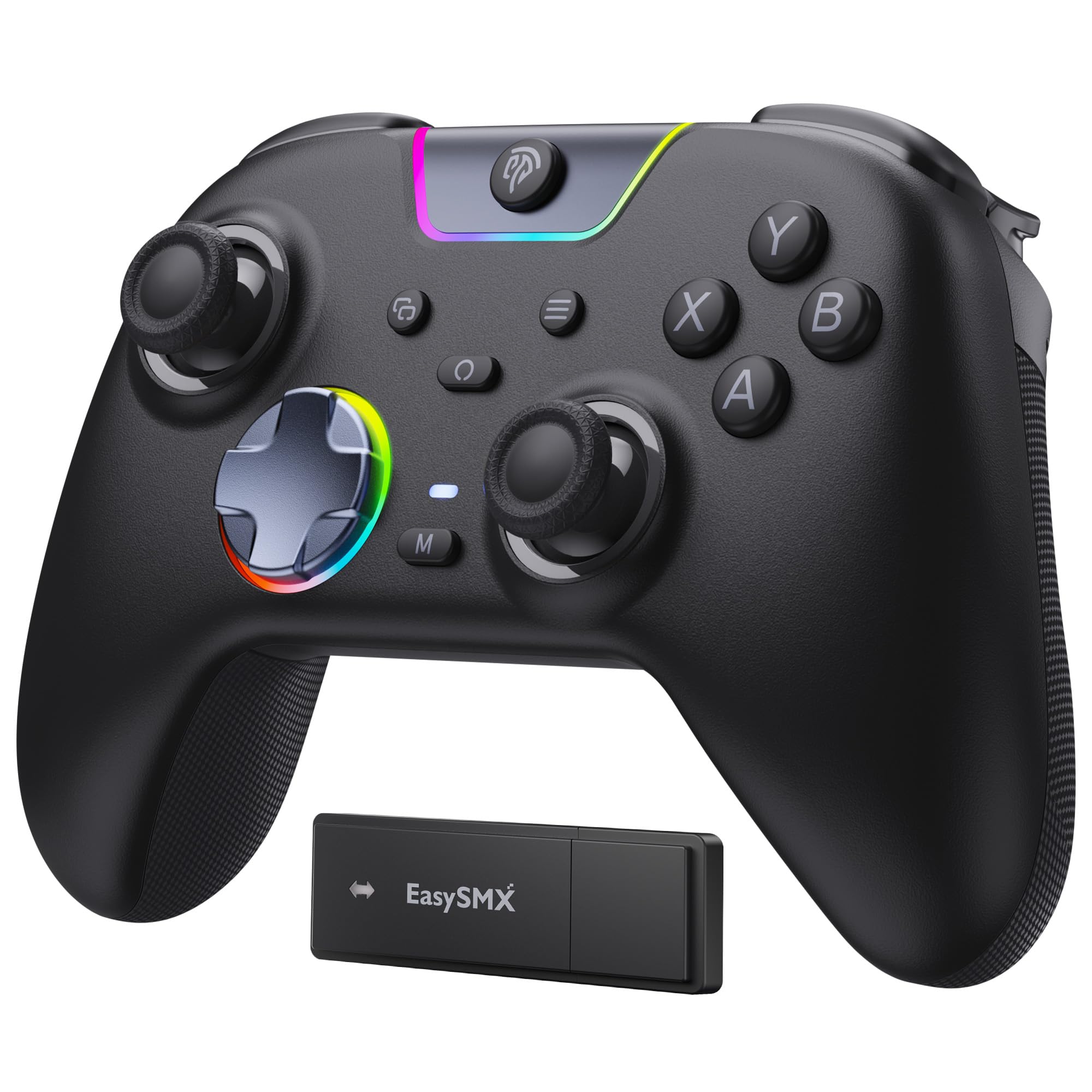
Figure 1: EasySMX X05PRO Controller Overview
- A/B/X/Y Düğmeleri: Standart eylem düğmeleri.
- Yön Düğmesi: 8-direction digital input.
- Sol/Sağ Analog Çubuklar: Hassas hareket ve kamera kontrolü için.
- LB/RB Düğmeleri: Sol ve Sağ Tampon düğmeleri.
- LT/RT Tetikleyicileri: Left and Right Analog Triggers with two-stage işlevselliği.
- Ana menü tuşu: Kontrol cihazını açar/kapatır ve sistem menülerine erişim sağlar.
- BAŞLAT/SEÇ Düğmeleri: Oyuna özgü işlevler.
- M1/M2 Düğmeleri: Programmable buttons on the top of the controller.
- USB-C Bağlantı Noktası: Kablolu bağlantı ve şarj için.
- Mod Anahtarı: For selecting connection modes (if applicable).
4. Kurulum ve Bağlantı
4.1. 2.4G Wireless Connection (PC Windows)
- Insert the 2.4G wireless receiver into an available USB port on your PC.
- Press and hold the HOME button on the controller until the indicator lights turn on, indicating it's powered on.
- The controller will automatically connect to the receiver. Once connected, the indicator light will stabilize.
4.2. Bluetooth Connection (Switch, Android, iOS)
- Cihazınızın Bluetooth özelliğinin etkin olduğundan emin olun.
- On the controller, press and hold the HOME button along with the appropriate mode button (refer to the controller's specific button combination for Bluetooth pairing, usually a small button near the USB port or a combination with HOME).
- The indicator lights will flash rapidly, indicating pairing mode.
- On your device, search for new Bluetooth devices and select "EasySMX X05PRO" (or similar) to pair.
- Once paired, the indicator light on the controller will stabilize.
4.3. Wired Connection (PC, Switch, Steam Deck)
- Connect the USB-C end of the cable to the controller and the USB-A end to your device (PC, Switch dock, Steam Deck).
- The controller will automatically be recognized by your device and switch to wired mode.
- This mode is ideal for competitive gaming due to minimal input lag and also allows charging while playing.

Figure 2: Multi-platform Connectivity
5. Kullanım Talimatları
5.1. Silent Buttons
The X05PRO features a redesigned full-button structure with silicone dampers, providing ultra-quiet operation. This is ideal for late-night gaming sessions without disturbing others.

Figure 3: Silent Button Design
5.2. İki-Stage Hall Triggers
The adjustable trigger locks allow you to switch between short (3mm) and long (9mm) trigger strokes. Short strokes are optimized for rapid firing in FPS games, while long strokes provide precise control for racing games.

Şekil 4: İki-Stage Hall Triggers
5.3. Upgraded 8-Direction D-Pad
The D-pad features a dome switch and concave pivot design, enabling smooth diagonal inputs and precise 8-direction operation, ideal for fighting games and retro titles.

Figure 5: Upgraded 8-Direction D-Pad
5.4. Dynamic RGB Backlight
Customize your gaming experience with dynamic RGB lighting effects. The controller offers various lighting modes and 7 color combinations. Refer to the manual for detailed settings.

Figure 6: Dynamic RGB Lighting
5.5. Programmable Buttons (M1/M2)
The two additional customizable buttons (M1 and M2) located on the top of the controller are designed to prevent accidental presses during intense gameplay, a common issue with back paddles. These buttons can be programmed to various functions. Consult the full manual for programming instructions.

Şekil 7: Programlanabilir M1/M2 Düğmeleri
5.6. 1000Hz Polling Rate & Hall Effect Sticks
Experience virtually no input delay with a 1000Hz polling rate in both wired and 2.4G wireless modes. The high-precision 11-bit Hall effect sensors ensure drift-free accuracy and extended lifespan for the joysticks and triggers.

Figure 8: Hall Effect Technology and 1000Hz Polling Rate
5.7. Titreşim Geri Beslemesi
The controller features a 2+2 internal rumble motor system, providing realistic feedback for impacts, drifts, and collisions. Vibration intensity can be adjusted to your preference.

Figure 9: 4-Zone Vibration Feedback
5.8. Turbo Fonksiyonu
The controller supports a manual Turbo function for rapid, repeated button presses. This feature can be configured for specific action buttons (A/B/X/Y/LB/RB/LT/RT) and offers 3 speed levels.
5.9. Ergonomik Tutuş
The soft-touch silicone coating provides a sweat-resistant, non-slip grip, ensuring comfort during extended gaming sessions.

Figure 10: Ergonomic Grip
6. Şarj Etme
The controller is equipped with a built-in 1000mAh rechargeable battery, ensuring long playtimes. To charge, connect the controller to a power source using the provided USB-C cable. Charging typically takes approximately 3 hours. An indicator light will show charging status (e.g., red for charging, green for fully charged).
7. Özellikler
| Özellik | Tanım |
|---|---|
| Model Numarası | X05PRO |
| Bağlantı | Kablolu (USB-C), 2.4G Kablosuz, Bluetooth |
| Anket Oranı | 1000Hz (Kablolu ve 2.4G), 125Hz (Bluetooth) |
| Pil Kapasitesi | 1000 mAh Lityum İyon |
| Şarj Süresi | Yaklaşık 3 saat |
| Titreşim | 4-zone adjustable rumble motors |
| Tetikleyiciler | İki-stage Hall Effect Triggers (3mm/9mm) |
| Joystick'ler | Hall Etkili Joystick'ler |
| Yön Tuşu | Upgraded 8-direction with dome switch and concave pivot |
| Aydınlatma | Dynamic RGB Backlight (customizable) |
| Programlanabilir Düğmeler | M1, M2 |
| Boyutlar | 18.1x14.4x7.4 cm |
| Ağırlık | 390 gr |
| Desteklenen Platformlar | PC (Windows), Steam Deck, Switch, Android, iOS |
8. Bakım
- Kontrol cihazını kuru ve yumuşak bir bezle silerek temiz tutun.
- Kontrol cihazını aşırı sıcaklıklara, neme veya doğrudan güneş ışığına maruz bırakmaktan kaçının.
- Garanti geçersiz olabileceğinden, kumandayı sökmeye çalışmayın.
- Hasar görmemesi için kumanda cihazını kullanılmadığı zamanlarda güvenli bir yerde saklayın.
9. Sorun Giderme
- Kontrolör bağlanmıyor:
Ensure the controller is charged. For 2.4G, verify the receiver is properly inserted. For Bluetooth, ensure the device's Bluetooth is on and the controller is in pairing mode. Try restarting both the controller and the device. - Input lag in wireless mode:
Ensure there are no obstructions between the controller and the receiver/device. Move closer to the receiver/device. For critical gaming, consider using a wired connection. - Tuşlar veya joystickler tepki vermiyor:
Check if the controller is properly connected. If using wired, try a different USB port or cable. If the issue persists, perform a factory reset (refer to the full manual for specific instructions, usually a small reset button or button combination). - Titreşim çalışmıyor:
Ensure vibration is enabled in the game settings and on the controller. Some games may require specific in-game support for trigger vibration. - RGB ışıkları çalışmıyor/özelleştirilemiyor:
Refer to the full manual for specific button combinations to adjust RGB modes and colors. Ensure the controller is powered on. - D-Pad diagonal inputs are difficult:
The upgraded D-pad is designed for precision. Practice with the new design. If issues persist, ensure the controller firmware is up to date (check EasySMX support webalan).
10. Garanti ve Destek
EasySMX products come with a standard warranty. For specific warranty terms, technical support, or any issues not covered in this manual, please contact EasySMX customer service or visit the official EasySMX website. Please have your product model (X05PRO) and purchase information ready when contacting support.

Figure 11: Technical Compliance Information