
1. Giriş
The Xiaomi Redmi Pad 2 is an 11-inch tablet designed for versatile use, offering powerful performance in a lightweight and durable unibody metal design. It features a sharp 2.5K (2560 x 1600 px) display with 10-bit color depth and 600 nits peak brightness, enhanced by a 90 Hz AdaptiveSync refresh rate and TÜV Rheinland blue light certification for comfortable viewIng.
Equipped with a MediaTek G100-Ultra processor, the tablet ensures fluid multitasking. Its audio experience is enriched by four stereo speakers supporting Hi-Res Audio and Dolby Atmos. The device boasts a 9000 mAh battery with 18W fast charging via USB-C, providing extended autonomy. Running on Xiaomi HyperOS, it offers smart productivity and connectivity with Wi-Fi 5 and Bluetooth 5.3, alongside expandable storage up to 2 TB.

Şekil 1.1: Ön view of the Xiaomi Redmi Pad 2 tablet.
2. Kutuda Neler Var?
Upon unboxing your Xiaomi Redmi Pad 2, please verify that all the following items are included:
- Xiaomi Redmi Pad 2 Tablet
- Kullanım Kılavuzu (bu belge)
- USB-C Charging Cable or Connector
3. Kurulum
3.1. Cihazın Şarj Edilmesi
Before initial use, fully charge your Redmi Pad 2. Connect the provided USB-C cable to the tablet's USB-C port and the other end to a compatible power adapter (not always included) or a computer's USB port. The tablet supports 18W fast charging.
3.2. Açma/Kapama
- Açmak İçin: Press and hold the Power button located on the side of the tablet until the Xiaomi logo appears on the screen.
- Kapatmak İçin: Press and hold the Power button until the power options appear. Select "Power off" from the menu.
- Yeniden başlatmak: Press and hold the Power button until the power options appear. Select "Restart" from the menu.
3.3. İlk Kurulum
Tablet ilk açıldığında, sizi ilk kurulum sürecinde yönlendirecektir. Bu süreç şunları içerir:
- Dil Seçimi: Tercih ettiğiniz dili seçin.
- Wi-Fi Bağlantısı: Connect to a Wi-Fi network to access the internet and complete the setup.
- Google hesabı: Sign in with your Google account or create a new one. This is essential for downloading apps from the Google Play Store and syncing data.
- Xiaomi Account: You may be prompted to sign in or create a Xiaomi account for additional services and cloud backup.
- Güvenlik Ayarları: Set up a screen lock (PIN, pattern, password, or facial recognition).
3.4. Genişletilebilir Depolama
The Redmi Pad 2 supports expandable storage up to 2 TB via a microSD card. Locate the microSD card slot on the side of the tablet, insert your card carefully until it clicks into place. You can then use this storage for photos, videos, and other files.
4. Kullanım Talimatları
4.1. Görüntüleme ve Gezinme
The 11-inch 2.5K display offers a vibrant visual experience. Navigate the tablet using touch gestures:
- Musluk: Bir öğe seçin veya bir uygulama açın.
- Tokatlamak: Scroll through pages, home screens, or menus.
- Yakınlaştırmak için sıkıştırma: Zoom in or out on photos, maps, and web sayfalar.
- Uzun basma: Bağlamsal menülere erişin veya uygulama simgelerini taşıyın.
The 90 Hz AdaptiveSync refresh rate provides smooth scrolling and responsiveness. The TÜV Rheinland blue light certification helps reduce eye strain during prolonged use.
4.2. Ses Özellikleri
The Redmi Pad 2 is equipped with four stereo speakers, providing an immersive audio experience. It supports Hi-Res Audio and Dolby Atmos for enhanced sound quality when watching movies, listening to music, or playing games.
4.3. Performans ve Çoklu Görev
Powered by the MediaTek G100-Ultra processor, the tablet delivers efficient performance for daily tasks and multitasking. Xiaomi HyperOS optimizes system resources for a smooth user experience.
4.4. Bağlantı
- Kablosuz 5: Connect to wireless networks for internet access. Go to Settings > Wi-Fi to manage connections.
- Bluetooth 5.3: Pair with Bluetooth devices such as headphones, speakers, or keyboards. Go to Settings > Bluetooth to manage pairings.
- USB C: Use the USB-C port for charging, data transfer, and connecting to other peripherals.
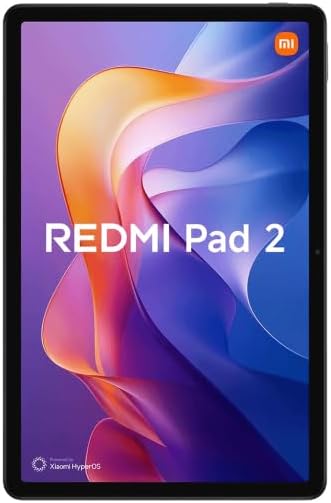
Şekil 4.1: Geri view of the Xiaomi Redmi Pad 2 tablet.
5. Bakım
5.1. Tabletin Temizlenmesi
To clean your tablet, power it off and disconnect all cables. Use a soft, lint-free cloth slightly dampened with water or a screen cleaner specifically designed for electronics. Avoid using harsh chemicals, abrasive materials, or excessive moisture.
5.2. Pil Bakımı
The Redmi Pad 2 features a 9000 mAh battery with an average life of 12 hours. To prolong battery lifespan:
- Aşırı sıcaklıklardan kaçının.
- Pilinizin tamamen boşalmasına çok sık izin vermeyin.
- Use the original charging cable or a certified compatible one.
- Pil tamamen dolduğunda şarj aletini prizden çıkarın.
5.3. Yazılım Güncellemeleri
Regularly check for and install software updates to ensure optimal performance, security, and access to new features. Go to Settings > About tablet > System update to check for available updates.
6. Sorun Giderme
If you encounter issues with your Redmi Pad 2, try the following steps:
- Cihaz Yanıt Vermiyor: Yeniden başlatmayı zorlamak için Güç düğmesini yaklaşık 10-15 saniye basılı tutun.
- Bağlantı Sorunları (Wi-Fi/Bluetooth): Turn Wi-Fi or Bluetooth off and then on again. If the issue persists, restart the tablet and your router/Bluetooth device.
- Uygulamalar Çöküyor/Donuyor: Close the app and reopen it. If the problem continues, clear the app's cache (Settings > Apps > [App Name] > Storage > Clear cache) or uninstall and reinstall the app.
- Pil Hızla Boşalıyor: Check background app usage (Settings > Battery). Reduce screen brightness, disable unnecessary features like GPS or Bluetooth when not in use.
- Yavaş Performans: Kullanılmayan uygulamaları kapatın, önbelleği temizleyin ve yeterli depolama alanınız olduğundan emin olun. Fabrika ayarlarına sıfırlamayı son çare olarak düşünün (öncelikle verilerinizi yedekleyin).
Daha karmaşık sorunlar için resmi Xiaomi desteğine başvurun website veya müşteri hizmetleriyle iletişime geçin.
7. Özellikler
| Özellik | Detay |
|---|---|
| Model Numarası | VHU5973EU |
| Ekran Boyutu | 11 inç |
| Ekran Çözünürlüğü | 2560 x 1600 piksel (2.5K) |
| Yenileme Hızı | 90 Hz AdaptiveSync |
| İşlemci | MediaTek G100-Ultra (3.4 GHz max clock speed) |
| Veri deposu | 8 GB |
| Dahili Depolama | 256 GB |
| Genişletilebilir Depolama | 2 TB'a kadar (microSD) |
| İşletim Sistemi | Xiaomi HyperOS (based on Android) |
| Pil Kapasitesi | 9000 mAh (tipik) |
| Pil Ömrü (Ortalama) | 12 saat |
| Şarj etme | 18W Hızlı Şarj (USB-C) |
| Bağlantı | Wi-Fi 5 (802.11ac), Bluetooth 5.3 |
| Boyutlar (U x G x Y) | 15 x 15 x 20 cm (yaklaşık) |
| Ağırlık | 890 gram (yaklaşık) |
| Ses | Quad Stereo Speakers, Hi-Res Audio, Dolby Atmos |
| Camera Resolution (Digital Zoom) | 7 Mpx |
| Kulaklık girişi | 3.5 mm |
8. Garanti ve Destek
8.1. Garanti Bilgileri
The Xiaomi Redmi Pad 2 comes with a Üretim hatalarına karşı üç yıl garanti.Bu garanti, normal kullanım koşullarındaki malzeme ve işçilik kusurlarını kapsar. Garanti talepleriniz için lütfen satın alma belgenizi saklayın.
8.2. Müşteri Desteği
Daha fazla yardım, teknik destek veya garanti talepleri için lütfen resmi Xiaomi destek sayfasını ziyaret edin website or contact their customer service. You can usually find contact information and FAQs on the official Xiaomi webBölgeniz için site.
Çevrimiçi Kaynaklar: Xiaomi Resmi Desteği


