JONR T5 Pro Gen 2 Robot Vacuum Cleaner and Mop User Manual
Model: T5 Pro Gen2
1. Giriş
This manual provides essential instructions for the safe and efficient operation of your JONR T5 Pro Gen 2 Robot Vacuum Cleaner and Mop. Please read this manual thoroughly before using the product and retain it for future reference. The JONR T5 Pro Gen 2 is designed to provide comprehensive floor cleaning with powerful suction, mopping capabilities, automatic dust collection, and hot air mop drying.
2. Güvenlik Bilgileri
Before using the JONR T5 Pro Gen 2, please observe the following safety precautions:
İlk kullanımdan önce robotun tamamen şarj olduğundan emin olun.
Robotu ıslak yüzeylerde veya su birikintisi olan alanlarda kullanmayın.
Robotun yolunun üzerinde gevşek kablolar, perdeler ve robotun dolanabileceği diğer nesneleri uzak tutun.
Çocukların veya evcil hayvanların robotla oynamasına izin vermeyin.
Do not use the robot to pick up large or sharp objects, liquids, or burning materials.
En iyi performansı korumak için fırçaları ve sensörleri düzenli olarak temizleyin.
Only use the original charging base and power adapter.
Güç kablosu hasarlıysa tehlikeleri önlemek için üretici veya yetkili servis tarafından değiştirilmelidir.
3. Paket İçeriği
Paketin tüm bileşenlerinin mevcut olduğunu doğrulayın:
JONR T5 Pro Gen 2 Robot Vacuum Cleaner and Mop
Hepsi Bir Arada Baz İstasyonu
2 Paspas Pedi
Ramp Uzatma Plakası
Yan fırça
Güç Adaptörü
Kullanım Kılavuzu (bu belge)
Image: JONR T5 Pro Gen 2 Robot Vacuum Cleaner and Mop with its All-in-One Base Station.
4. Ürün Bittiview
4.1 Robot Süpürge Bileşenleri
Lidar Sensor: Hassas navigasyon ve haritalama için.
Güç/Temizleme Düğmesi: To start/pause cleaning or power on/off.
Şarj Butonu: To send the robot back to the base station.
Çöp kovası: Collects dry debris.
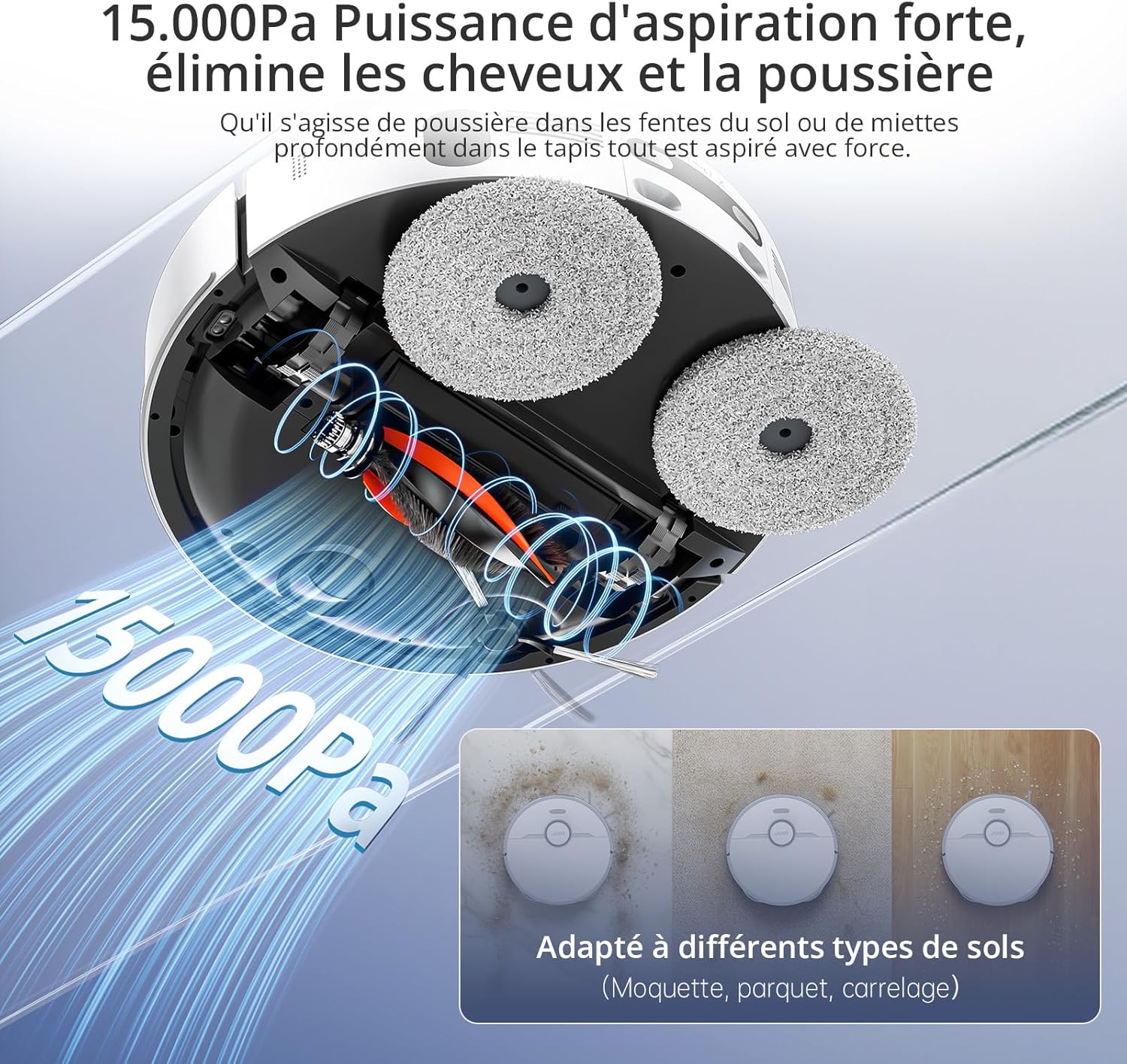
Ana Fırça: Halı ve sert zeminlerin derinlemesine temizliği için.
Yan Fırça: Kenar ve köşelerdeki döküntüleri süpürür.
Resim: Üst view of the JONR T5 Pro Gen 2 robot vacuum, showing the Lidar sensor and control buttons.
4.2 Base Station Components
Temiz Su Tankı: Holds fresh water for mopping and mop cleaning. (4.0 L capacity)
Kirli Su Deposu: Collects used water from mop cleaning. (3.5 L capacity)
Toz Torbası Bölmesi: Houses the disposable dust bag for automatic dust collection. (2.5 L capacity)
Şarj Kişileri: For robot charging.
Paspas Yıkama Tepsisi: Area where mopping pads are cleaned and dried.
Image: The JONR T5 Pro Gen 2 base station with its clean and dirty water tanks visible.
5. Kurulum
İlk kurulum için şu adımları izleyin:
Bileşenleri Ambalajından Çıkarın: Tüm ürünleri ambalajından dikkatlice çıkarın.
Baz İstasyonunu Konumlandırın: Place the base station against a wall with at least 0.26ft (8cm) clear space on both sides and 3.94ft (1.2m) in front. Ensure it is near a power outlet.
R'yi takınamp Extension Plate: r'yi sabitleyinamp extension plate to the front of the base station.
Su Depolarının Kurulumu: Insert the clean and dirty water tanks into their respective slots in the base station.
Yan Fırçayı Takın: Snap the side brush onto the designated post on the underside of the robot.
Attach Mopping Pads: Securely attach the mopping pads to the bottom of the robot.
Temiz Su Deposunu Doldurun: Open the clean water tank and fill it with clean tap water.
Gücü bağlayın: Ana istasyonu bir elektrik prizine takın.
Güç Açma ve Şarj Etme:
Robotu açmak için üzerindeki güç düğmesine 3 saniye basılı tutun.
Place the robot onto the base station to begin charging. The robot will automatically power on and start charging when docked.
Uygulama Bağlantısı:
Download the "Xiaomi Home" app by scanning the QR code on the robot's panel or searching in your app store.
Open the app and tap the "+" icon to add a device.
Select "Scan" to scan the QR code on the robot or search for "JONR T5 Pro Gen2".
To pair, press and hold both the power and recharge buttons on the robot for 3 seconds until you hear a voice prompt.
2.4GHz Wi-Fi ağınızı seçin ve şifrenizi girin.
Bağlantıyı tamamlamak için uygulama içi talimatları izleyin.
Video: Step-by-step guide on unboxing, assembling, and connecting the JONR T5 Pro Gen 2 robot vacuum to the mobile application.
6. Kullanım Talimatları
6.1 Temizleme Döngüsünü Başlatma
Uygulama aracılığıyla: Open the Xiaomi Home app, select your JONR T5 Pro Gen 2, and tap "Clean" to start a cleaning cycle. You can choose between different cleaning modes (e.g., whole home, room, zone).
Robot Butonu ile: Press the Power/Clean button on the robot once to start a full cleaning cycle.
Ses Kontrolü: The robot supports voice commands via Alexa and Google Home. For example, say "Alexa, start cleaning" (if integrated).
Image: The JONR T5 Pro Gen 2 robot vacuum being controlled via the mobile application, showing mapping and zone selection.
6.2 Akıllı Özellikler
LiDAR Navigasyon: The robot uses LiDAR to create a precise map of your home, ensuring efficient and thorough cleaning without repetition. It can map up to 4 floors.
Engel kaldırma: Advanced sensors allow the robot to recognize and bypass obstacles like furniture, cables, and pet bowls.
Girilmesi Yasak Bölgeler: Use the app to define specific areas the robot should avoid, such as pet feeding areas or delicate zones.
Halı Tespiti: The robot automatically detects carpets and adjusts suction power. During mopping, it intelligently lifts the mop pads by 10mm to avoid wetting carpets.
Kenar Temizleme: An extendable side mop ensures thorough cleaning along walls and into corners.
Image: Illustration of the JONR T5 Pro Gen 2 using LiDAR navigation to map a home environment.
Image: The JONR T5 Pro Gen 2 robot vacuum demonstrating its obstacle avoidance capabilities.
7. Bakım
Düzenli bakım robot süpürgenizin optimum performansını sağlar ve kullanım ömrünü uzatır.
Kirli Su Deposunu Temizleme: Regularly empty and clean the dirty water tank to prevent odors and bacterial growth.
Clean Dustbin and Filter: Remove the robot's dustbin, empty it, and clean the HEPA filter under running water. Allow the filter to dry completely before reinserting.
Yan Fırçayı Temizle: Remove any tangled hair or debris from the side brush.
Ana Fırçayı Temizleyin: Remove the main brush and clear any tangled hair or debris. The anti-tangle design minimizes hair entanglement.
Sensörleri Temizleyin: Wipe all sensors (cliff sensors, obstacle avoidance sensors, charging contacts) with a clean, dry cloth.
Toz torbasını değiştirin: When the dust bag in the base station is full (indicated by the app or indicator light), replace it with a new one.
Temiz Paspas Pedleri: The base station automatically cleans and hot-air dries the mop pads after each cleaning cycle. Periodically remove and hand-wash the mop pads for deeper cleaning.
Video: Demonstrates routine maintenance tasks including cleaning the dirty water tank, dustbin, filter, side brush, and replacing the dust bag.
8. Sorun Giderme
Sorun
Olası Neden
Çözüm
Robot açılmıyor.
Pil seviyesi düşük; doğru şekilde yuvaya yerleştirilmemiş.
Ensure the robot is fully charged on the base station. Press and hold the power button for 3 seconds.
Robot Wi-Fi'ye bağlanamıyor.
Yanlış Wi-Fi şifresi; 5GHz ağ; robot yönlendiriciden çok uzakta.
Ensure correct 2.4GHz Wi-Fi password. Move robot closer to router. Reset Wi-Fi on robot (hold power and recharge buttons for 3s).
Zayıf temizleme performansı.
Full dustbin; dirty filters/brushes; clogged sensors.
Empty dustbin, clean/replace filters, clean main/side brushes, wipe all sensors.
Robot sık sık takılıyor.
Obstacles; loose cables; narrow spaces.
Clear obstacles. Use the app to set no-go zones for problematic areas.
Mop pads are not cleaning effectively.
Kirli su deposu dolu; temiz su deposu boş; paspas pedleri aşınmış.
Empty dirty water tank, refill clean water tank. Replace worn mop pads.
9. Özellikler
Özellik
Detay
Marka
JONR
Model Numarası
T5 Pro Gen2
Emiş Gücü
15000 Pa
Pil Ömrü
2.5 saate kadar
Temiz Su Tankı Kapasitesi
4.0 Litre
Kirli Su Tankı Kapasitesi
3.5 Litre
Toz Torbası Kapasitesi
2.5 Liters (up to 75 days maintenance-free)
Gezinme Türü
LiDAR
Paspas Kaldırma Yüksekliği
10 mm (for carpets)
Engel Geçiş Yüksekliği
20 mm'ye kadar
Gürültü Seviyesi
<60 dB
Filtre Türü
HEPA
Bağlantı
Wi-Fi (2.4GHz), Mobile App (Xiaomi Home), Voice Control (Alexa, Google Home)
Boyutlar (Robot)
33U x 33G x 10Y cm
Dimensions (Base Station)
40L x 34W x 56H cm (approximate, derived from product dimensions)
Ağırlık
12 Kilograms (total item weight)
10. Garanti ve Destek
JONR provides 365-day support for the T5 Pro Gen 2 Robot Vacuum Cleaner and Mop. For any issues or inquiries, please contact JONR customer service. We aim to resolve all problems within 24 hours.
For spare parts availability, please refer to the product's official website or authorized retailers. Spare parts are generally available for 5 years.
Ask a question about this manual
Ask about setup, troubleshooting, compatibility, parts, safety, or missing instructions. Manuals+ will review the question and use this page’s manual context to help answer it.