
1. Giriş
Thank you for choosing the T-Wolf T61 60% Wired Mechanical Gaming Keyboard. This manual provides detailed instructions for setting up, operating, and maintaining your keyboard to ensure optimal performance and longevity. Please read this manual carefully before using the product.
2. Ürün Bittiview
2.1 Temel Özellikler
- Mekanik Anahtarlar: Delivers precise tactile feedback and long-lasting performance.
- Kablolu USB Bağlantısı: Stable USB 2.0 plug-and-play interface; no drivers required.
- %60 Kompakt Düzen: Functional design that saves space while maintaining key usability.
- Multi-Key Rollover: Supports simultaneous key presses without input errors, ensuring precise performance during intense typing or gaming sessions.
- RGB Arka Aydınlatmalı: Customizable vibrant RGB backlighting for enhanced aesthetics.
- Düşük Gürültülü Çalışma: Moderate sound level suitable for various environments.
- Dökülmeye Karşı Dayanıklı Tasarım: Helps protect against light spills (not waterproof).
2.2 Paket İçeriği
- 1 x T-Wolf T61 60% Wired Mechanical Gaming Keyboard
- 1 x Kullanım Kılavuzu (bu belge)
2.3 Klavye Şeması
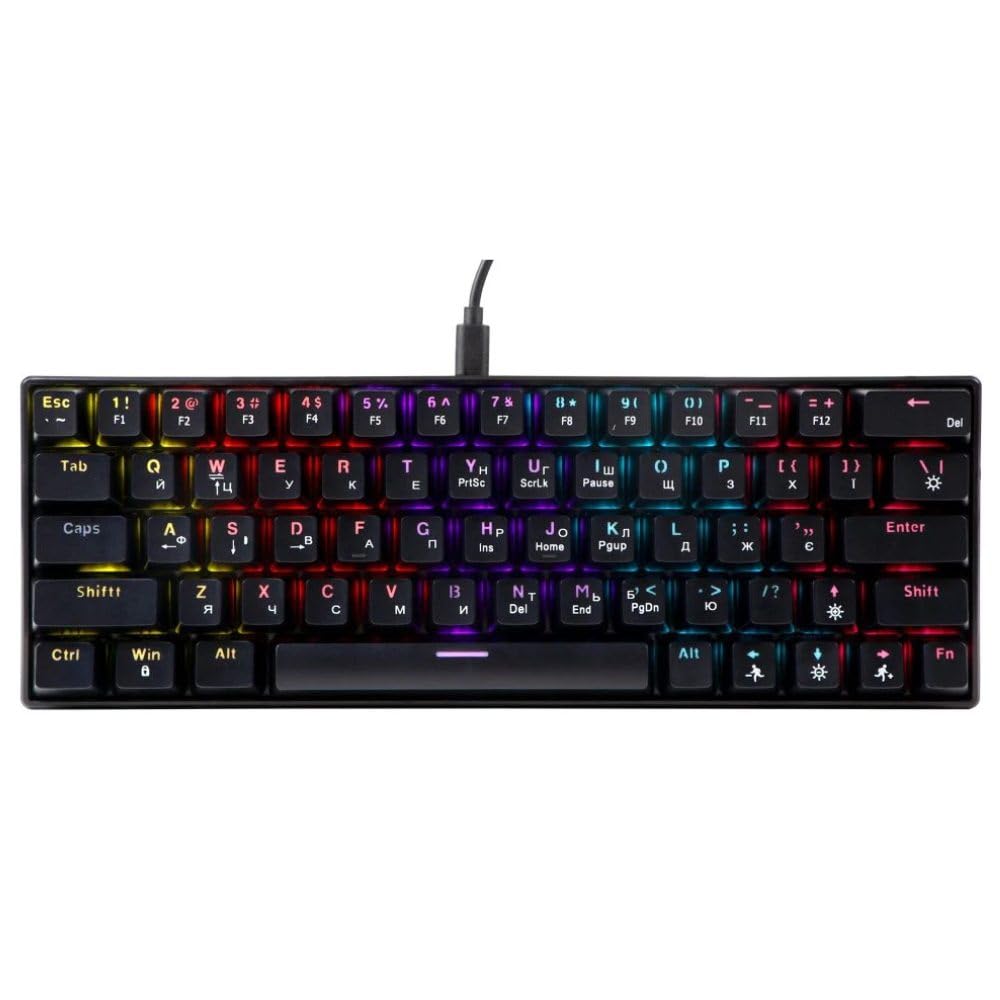
An image showing the T-Wolf T61 60% Wired Mechanical Gaming Keyboard, highlighting its compact layout and design.
3. Kurulum
- Klavyeyi Paketinden Çıkarın: Klavyeyi ve tüm aksesuarları ambalajından dikkatlice çıkarın.
- Cihazınıza Bağlanın: Locate an available USB port on your computer (PC, laptop) or gaming console. Insert the USB connector of the T-Wolf T61 keyboard into the USB port.
- Otomatik Sürücü Kurulumu: The keyboard is plug-and-play. Your operating system will automatically detect and install the necessary drivers. This process may take a few moments.
- Kullanıma hazır: Sürücüler yüklendikten sonra klavye hemen kullanıma hazırdır.
4. Kullanım Talimatları
The T-Wolf T61 keyboard functions as a standard QWERTY layout keyboard. Its 60% compact design means some functions are accessed via key combinations.
4.1 RGB Arka Aydınlatma Kontrolü
The keyboard features customizable RGB backlighting. Specific key combinations are used to change lighting modes and effects. Refer to the keyboard's function layer markings for exact controls, typically involving the Fn key combined with other keys (e.g., Fn + \| for mode changes, Fn + [{ or Fn +]} for brightness/speed adjustments).
- Aydınlatma Modlarını Değiştirme: Basmak Fn + \| Çeşitli RGB aydınlatma efektleri arasında geçiş yapmak için.
- Parlaklığın Ayarlanması: Kullanmak Fn + [{ parlaklığı azaltmak için ve Fn +]} parlaklığı artırmak için.
- Hızın Ayarlanması: Kullanmak Fn +; etki hızını azaltmak için ve Fn + '" Etki hızını artırmak için.
4.2 Multi-Key Rollover
The T61 keyboard supports multi-key rollover, allowing multiple keys to be pressed simultaneously without ghosting or missed inputs. This feature is particularly beneficial for fast typing and complex gaming commands.
5. Bakım
Doğru bakım, klavyenizin uzun ömürlü olmasını ve yüksek performans göstermesini sağlar.
- Temizlik: Use a soft, dry cloth to wipe the surface of the keyboard. For deeper cleaning, use a can of compressed air to remove dust and debris from between the keycaps. For stubborn dirt, a slightly damp Hafif bir temizleme solüsyonu içeren bir bez kullanılabilir, ancak klavyeye sıvı girmemesine dikkat edilmelidir.
- Dökülmeye Karşı Dayanıklı Tasarım: While the keyboard features a spill-resistant design to protect against light spills, it is su geçirmez değil. In case of a spill, immediately disconnect the keyboard from your device, gently wipe away any liquid, and allow it to air dry completely before reconnecting.
- Depolamak: Klavyeyi serin, kuru ve doğrudan güneş ışığından ve aşırı sıcaklıklardan uzak bir yerde saklayın.
6. Sorun Giderme
If you encounter issues with your T-Wolf T61 keyboard, please refer to the following common solutions:
- Klavye Yanıt Vermiyor:
- USB kablosunun hem klavyeye hem de cihazınıza güvenli bir şekilde bağlı olduğundan emin olun.
- Klavyeyi farklı bir USB portuna bağlamayı deneyin.
- Test the keyboard on another computer to rule out a device-specific issue.
- Bilgisayarınızı yeniden başlatın.
- RGB Arka Aydınlatma Çalışmıyor/Yanlış Ayarlanmış:
- Klavyenin düzgün şekilde beslendiğinden emin olun.
- Cycle through the RGB modes using the designated key combinations (e.g., Fn + \|).
- Adjust brightness settings (e.g., Fn + [{ / Fn +]}).
- Anahtarlar Kayıt Olmuyor veya Çift Yazılıyor:
- Clean the affected keycap and switch area using compressed air to remove any debris.
- Ensure no software conflicts are present (e.g., other keyboard drivers or utilities).
Bu adımları denedikten sonra sorun devam ederse lütfen müşteri desteğiyle iletişime geçin.
7. Özellikler
| Özellik | Tanım |
|---|---|
| Marka | T-KURT |
| Örnek | T61 |
| Bağlantı Teknolojisi | Kablolu USB |
| Klavye Açıklaması | Mekanik |
| Anahtar Sayısı | 65 |
| Klavye Düzeni | Q klavye |
| Özel Özellikler | RGB Backlit, Multi-Key Rollover, Low-Noise Operation, Spill-Resistant Design |
| Uyumlu Cihazlar | PC, laptop, gaming consoles |
| Malzeme | Metal, Plastik |
| Renk | Siyah |
| Menşei ülke | Çin |
8. Garanti ve Destek
The T-Wolf T61 keyboard comes with a standard manufacturer's warranty. Please refer to the warranty card included with your purchase or contact your retailer for specific warranty terms and conditions.
For technical support, troubleshooting assistance, or warranty claims, please contact the retailer where you purchased the product or visit the official T-Wolf webDestek kaynakları için site.