1. Önemli Güvenlik Bilgileri
Lütfen cihazı kullanmadan önce tüm talimatları dikkatlice okuyun. Bu kılavuzu ileride başvurmak üzere saklayın.
- Do not use if you have a pacemaker, artificial joints, or electronic medical devices.
- Consult a physician before use if you have any pre-existing medical conditions, skin sensitivities, or are pregnant.
- Do not use on open wounds, swollen areas, or areas with skin irritation.
- Çocukların erişemeyeceği yerde saklayınız.
- Cihazı suya batırmayın veya aşırı nemli ortamlarda kullanmayın.
- Yalnızca ürünle birlikte verilen şarj kablosunu ve güç adaptörünü kullanın.
- Herhangi bir rahatsızlık veya ağrı hissederseniz, kullanımı derhal bırakın.
2. Ürün Bittiview
The HX-601/603 Wireless Knee Massager is designed to provide therapeutic massage and integrated heating for your knees. Its ergonomic and portable design allows for comfortable use at home, in the office, or during travel.
2.1 Bileşenler
- Main Massager Unit with Control Panel
- Ayarlanabilir Kayışlar
- Magnetic Battery Compartment
- USB Şarj Kablosu
2.2 Özellikler
- Kablosuz Çalışma: Enjoy massage without tangled cords.
- Integrated Heating: Therapeutic heat to improve circulation and relax muscles.
- 3 Yoğunluk Seviyesi: Customize your massage experience.
- 15 Dakika Zamanlayıcı: Automatic shut-off for safety and optimal session duration.
- Dijital Kontrol Paneli: Easy adjustment of settings with LED display.
- Ergonomik Tasarım: Conforms to the knee for maximum comfort and effectiveness.
- Comfortable Fabrics: Made with breathable materials for extended use.

The image displays the wireless knee massager worn on a knee, illustrating the integrated heating function with red arrows indicating heat flow.
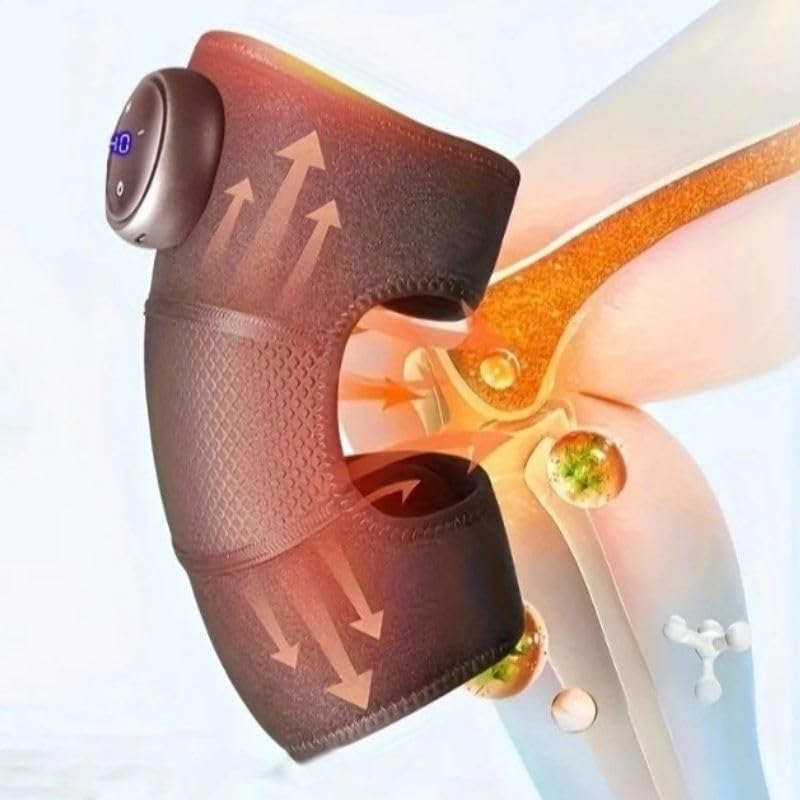
This image highlights the device's control panel with a digital display and buttons, along with the magnetic battery compartment for wireless operation.

Ayrıntılı view of the massager's fabric, emphasizing its comfortable, breathable, and non-stuffy texture.
3. Kurulum
3.1 Cihazı Şarj Etme
- Locate the charging port on the massager unit.
- Connect the USB charging cable to the device and to a compatible USB power adapter (not included) or computer USB port.
- The LED indicator on the control panel will show charging status. A full charge typically takes several hours.
- En iyi pil ömrü için, cihazı ilk kullanımdan önce tamamen şarj ettiğinizden emin olun.
3.2 Attaching to the Knee
- Unfold the knee massager.
- Position the main unit over your knee, ensuring the massage elements are centered.
- Secure the massager using the adjustable straps, ensuring a snug but comfortable fit. Do not overtighten.
4. Kullanım Talimatları
4.1 Güç Açma/Kapatma
- To turn on: Press and hold the Power button (usually marked with a circle or power symbol) on the control panel for 2-3 seconds. The LED display will illuminate.
- To turn off: Press and hold the Power button again for 2-3 seconds. The display will turn off.
4.2 Adjusting Massage Intensity
- Once powered on, press the Intensity button (usually marked with '+' or '-') to cycle through the 3 available intensity levels.
- The current intensity level will be indicated on the LED display.
4.3 Activating Heating Function
- Press the Heat button (usually marked with a wave or heat symbol) to activate or deactivate the integrated heating function.
- The heating indicator on the display will light up when active.
4.4 Automatic Timer
The device is equipped with an automatic 15-minute timer. After 15 minutes of continuous operation, the massager will automatically shut off. You can restart the device for another session if desired, but it is recommended to take breaks between sessions.
5. Bakım
5.1 Temizlik
- Temizlemeden önce cihazın kapalı ve fişinin çekilmiş olduğundan emin olun.
- Masaj aletinin yüzeyini yumuşak bir bezle silin.amp Kumaş.
- Aşındırıcı temizleyiciler, çözücüler veya sert kimyasallar kullanmayın.
- Cihazı suya daldırmayın.
5.2 Depolama
- Cihazı serin, kuru, doğrudan güneş ışığından ve aşırı sıcaklıklardan uzak bir yerde saklayın.
- Keep it away from sharp objects that could damage the fabric or internal components.
6. Sorun Giderme
| Sorun | Olası Neden | Çözüm |
|---|---|---|
| Cihaz açılmıyor. | Pil seviyesi düşük veya cihaz şarj edilmemiş. | Charge the device fully. Ensure the power button is pressed and held for 2-3 seconds. |
| Hiç ısı yok veya çok az ısı. | Heating function not activated or low battery. | Ensure the heat button is pressed. Charge the device. |
| Masajın şiddeti çok az/çok fazla. | Yanlış yoğunluk ayarı. | Adjust the intensity using the '+' or '-' buttons. |
| Cihaz beklenmedik şekilde duruyor. | Automatic 15-minute timer activated or low battery. | This is normal operation due to the timer. Recharge the device if the battery is low. |
7. Özellikler
| Model Numarası | HX-601/603 |
| Marka | Genel |
| Güç Kaynağı | Pil ile çalışır |
| Cilttage | 5V |
| Güç | 7W |
| Ürün Boyutları | 25x14x8 cm |
| Ürün Ağırlığı | 100 Gram |
| Malzeme | Electronic Components, Plastic, Fabric |
| Zamanlayıcı | 15 dakika (otomatik kapanma) |
| Yoğunluk Seviyeleri | 3 |
| Menşei ülke | Brezilya |
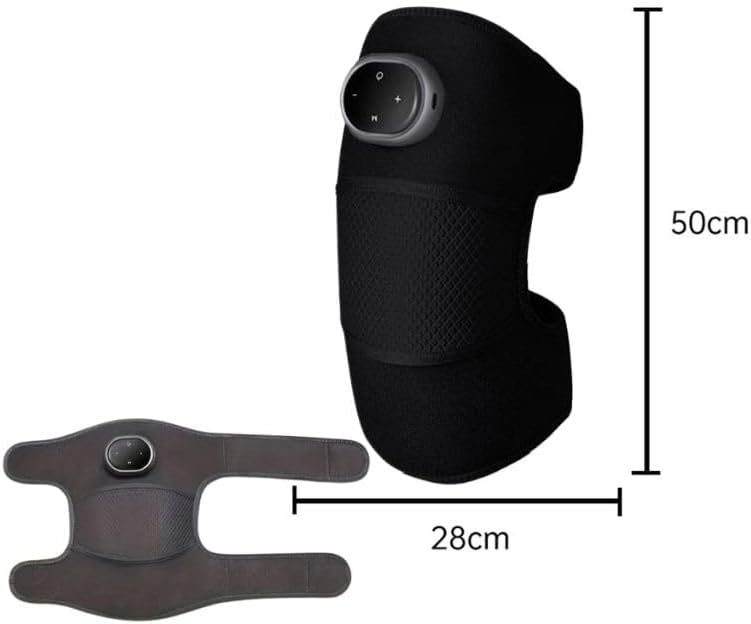
This image provides the physical dimensions of the knee massager, indicating a length of 50cm and a width of 28cm when laid flat.
8. Garanti ve Destek
This product is manufactured by Knee. For warranty information or technical support, please contact your retailer or the manufacturer directly. Please retain your proof of purchase.
Not: Belirli garanti koşulları bölgeye ve perakendeciye göre değişiklik gösterebilir.


