
giriiş
Thank you for choosing the Womier VK66 PRO Green Mechanical Gaming Keyboard. This 60% layout keyboard is designed for optimal desk space utilization while retaining essential functionality. It features a gasket-mounted design, hot-swappable switches, QMK/VIA programmability, and customizable RGB backlighting. This manual provides detailed instructions for setup, operation, maintenance, and troubleshooting to ensure you get the most out of your keyboard.
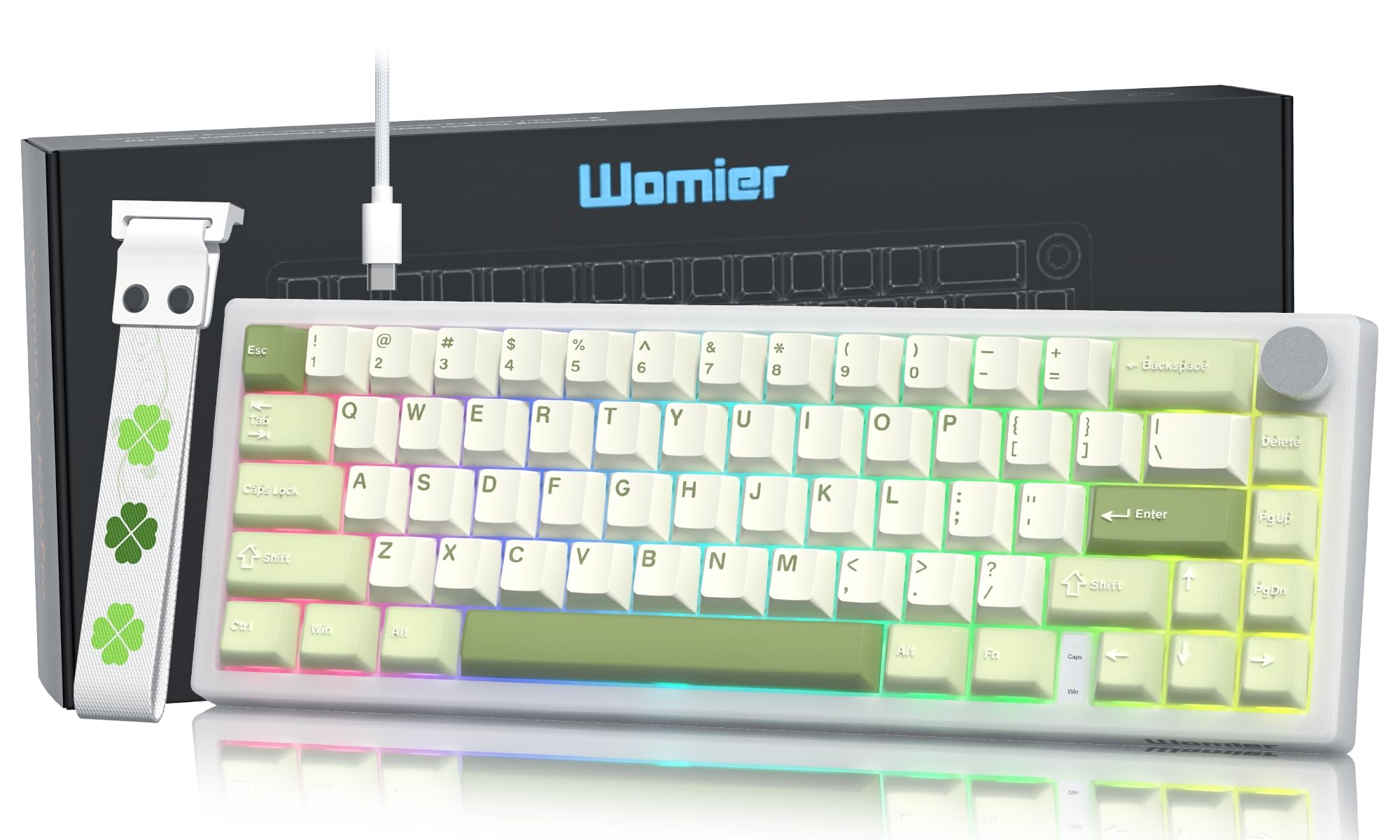
The Womier VK66 PRO Green Mechanical Gaming Keyboard, showcasing its compact 60% layout and vibrant green keycaps.
Paket İçeriği
Başlamadan önce lütfen paketinizde tüm öğelerin mevcut olduğundan emin olun:
- 1 x VK66 PRO Keyboard
- 1 x USB-A to USB Type-C Cable
- 1 x 2'si 1 arada Tuş Kapağı ve Anahtar Sökücü
- 1 x Kullanım Kılavuzu
- 3 x Extra POM Switches

Bir fazlaview of the items included in the Womier VK66 PRO keyboard package.
Kurulum Talimatları
- Klavyeyi Bağlayın: Use the provided USB Type-C cable to connect the keyboard to an available USB port on your computer (Laptop or PC). The keyboard is plug-and-play and should be recognized automatically by your operating system (macOS, Windows, or Linux).
- Klavye Ayaklarını Ayarlayın: Klavyede 2 saniyelik tuş takımı bulunmaktadır.tage kickstand design. Adjust the feet on the underside of the keyboard to your preferred typing angle for ergonomic comfort.
- Attach Keyboard Strap (Optional): The detachable keyboard strap can be installed or removed based on your preference. Note that the strap is primarily for aesthetic purposes and should not be used to carry the keyboard due to its adhesive attachment.

The Womier VK66 PRO keyboard connected to a computer via its USB-C cable.
Kullanım Talimatları
Multimedya Kontrol Düğmesi
The metal control knob located on the top right of the keyboard provides convenient multimedia control:
- Saat Yönünde Döndür: Sesi artırın.
- Saat yönünün tersine döndürün: Sesi azaltın.
- Kısa Basış: Sesi kapat/aç.
RGB Arka Aydınlatma
The keyboard features dynamic 16.8 million-color RGB backlighting with various effects. Specific key combinations for changing lighting modes and brightness are typically detailed in the included user manual or can be customized via VIA software.
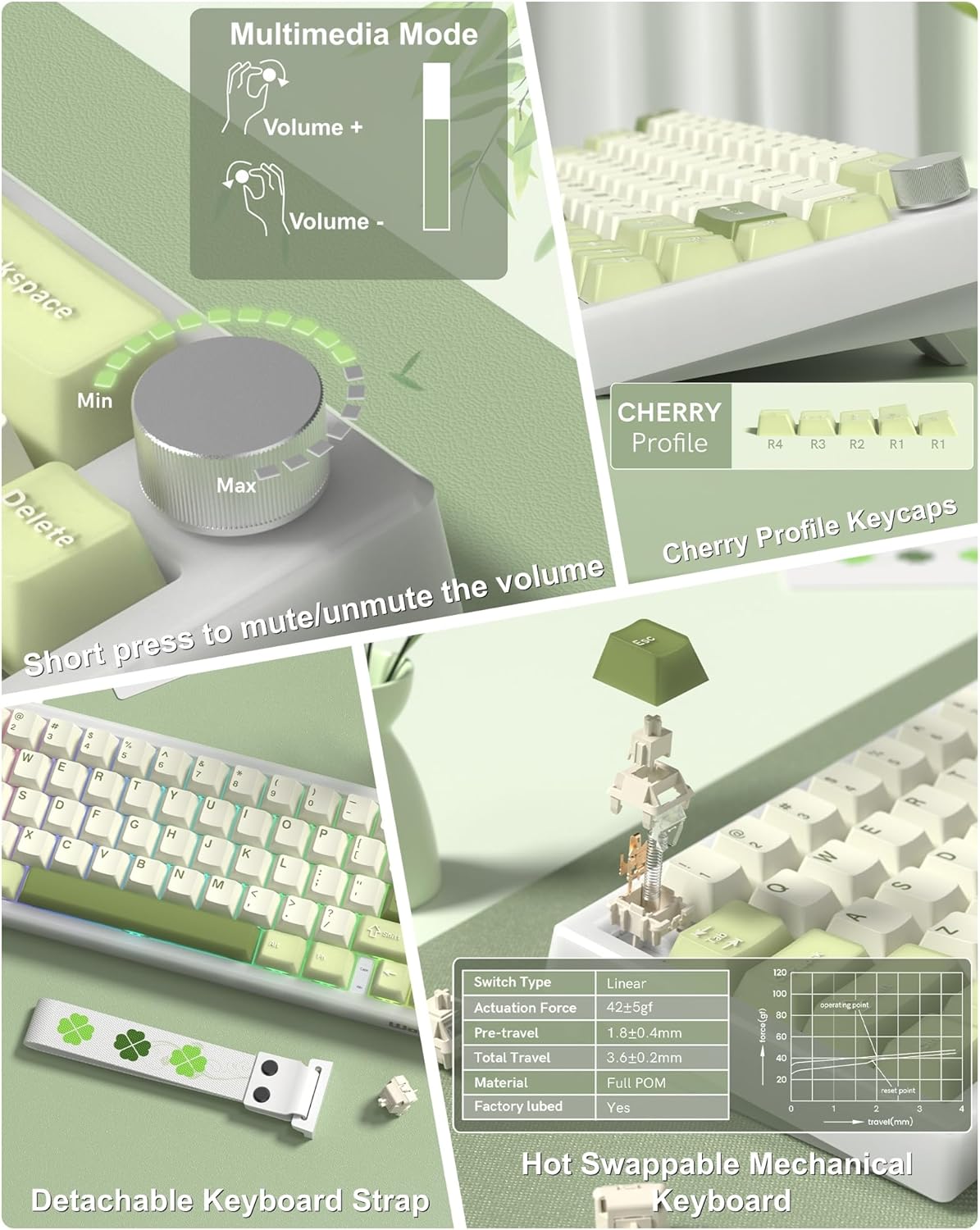
Kapatmak view of the multimedia control knob and PBT keycaps on the Womier VK66 PRO keyboard.

Various RGB backlighting effects displayed on the Womier VK66 PRO keyboard.
Customization with QMK/VIA
The Womier VK66 PRO keyboard supports QMK/VIA open-source software, allowing extensive customization of key layouts, macros, and lighting effects across macOS, Windows, and Linux systems.
Accessing VIA Software
- Download the VIA software from the official Womier webSite veya VIA GitHub deposu.
- Since the VK66 PRO does not have native VIA compatibility, you will need to download the specific .JSON keymap file for your keyboard model from the Womier webalan.
- Launch the VIA software (desktop application or web (versiyon).
- Navigate to the 'Design' tab within VIA and use the 'Upload' button to load the downloaded .JSON file for your VK66 PRO keyboard.
- Once loaded, you can remap keys, create macros, and adjust RGB lighting settings. Changes are applied in real-time to the keyboard.

The Womier VK66 PRO keyboard shown with an overlay of the QMK/VIA customization software interface.

A visual representation of the QMK/VIA software interface, highlighting options for key redefinition, macro editing, and RGB backlight adjustments.
Sıcak Değiştirilebilir Anahtarlar
The VK66 PRO keyboard is equipped with a hot-swappable PCB, allowing for easy replacement of 3-pin and 5-pin mechanical switches without soldering. This feature enables users to customize their typing experience with different switch types.
Anahtarların Değiştirilmesi
- Tuş kapağını çıkarın: İstenilen tuş başlığını yavaşça çıkarmak için verilen tuş başlığı çıkarıcısını kullanın.
- Anahtarı Kaldır: Use the switch puller to carefully grip the switch and pull it straight up from the PCB. Avoid wiggling to prevent damage to the switch pins or PCB socket.
- Yeni Anahtar Takın: Align the pins of the new switch with the holes on the PCB. Press the switch firmly until it clicks into place. Ensure the pins are straight before insertion to prevent bending.
- Tuş kapağını değiştirin: Tuş kapağını yeni anahtar gövdesine geri yerleştirin.
The keyboard comes with pre-lubed POM linear switches, known for their smooth and consistent keystrokes and an 80 million keystroke lifespan.

Ayrıntılı view of the hot-swappable switches and PBT keycaps on the Womier VK66 PRO keyboard.
The hot-swappable feature of the Womier VK66 PRO, demonstrating the ease of switch replacement with a switch puller.
Conta Montaj Tasarımı
The VK66 PRO utilizes a gasket-mounted structure with multiple layers of sound-dampening material between the PCB, positioning plate, and switches. This design enhances typing feel by providing a softer, more elastic keypress and significantly reduces acoustic resonance for a quieter typing experience.

bir patladı view illustrating the multi-layer gasket-mounted structure of the Womier VK66 PRO keyboard.

The Womier VK66 PRO highlighting its gasket-mounted design, which optimizes elasticity and stability for a softer typing feel.
Bakım
- Temizlik: Regularly clean the keyboard with a soft, dry cloth. For deeper cleaning, remove keycaps using the provided puller and use compressed air to clear debris from between switches.
- Tuş Başlığı Bakımı: The PBT keycaps are durable. Avoid using harsh chemicals for cleaning. A damp cloth with mild soap and water can be used if necessary, ensuring keycaps are completely dry before reattaching.
- Switch Longevity: While switches have an 80 million keystroke lifespan, proper handling during hot-swapping will prevent damage to the switch pins and PCB sockets.
Sorun giderme
- Klavye Yanıt Vermiyor:
- USB-C kablosunun hem klavyeye hem de bilgisayara güvenli bir şekilde bağlı olduğundan emin olun. Farklı bir USB bağlantı noktası veya kablo deneyin. Bilgisayarınızı yeniden başlatın.
- RGB Işıklar Çalışmıyor/Yanlış Ayarlanmış:
- Check if the lighting is turned off or set to a very low brightness. Use the keyboard's built-in lighting controls (if any) or the VIA software to adjust settings. Ensure the VIA .JSON file is correctly loaded.
- Çalışmayan Belirli Tuşlar:
- If a single key is not responding, the switch might be faulty or not seated correctly. Use the switch puller to remove and re-insert the switch. If the issue persists, try replacing it with one of the extra POM switches provided.
- VIA Yazılımı Klavyeyi Algılmıyor:
- Ensure the keyboard is connected and recognized by your operating system. Verify that you have downloaded and loaded the correct .JSON file for the VK66 PRO model in the VIA software's 'Design' tab.
Özellikler
| Özellik | Detay |
|---|---|
| Marka | Kadınlar |
| Model Adı | V-K66PRO |
| Model Numarası | TC-VK66PRO-Green |
| Bağlantı Teknolojisi | USB-C (Kablolu) |
| Klavye Açıklaması | Kablolu Mekanik Oyun Klavyesi |
| Anahtar Sayısı | 67 |
| Anahtar Türü | Mechanical (POM Linear) |
| Özel Özellikler | Backlit (RGB), Control Knob, Hot-Swappable, Keyboard Strap, QMK/VIA Programmable, Gasket Mount |
| Malzeme | Plastic, PBT (Keycaps), POM (Switches) |
| Renk | Yeşil |
| Uyumlu Cihazlar | Dizüstü Bilgisayar |
| Güç Kaynağı | Elektrikli USB |
| Klavye Düzeni | Q klavye |
Garanti ve Destek
Garanti Bilgileri
The Womier VK66 PRO keyboard comes with a 1 yıllık garanti Satın alma tarihinden itibaren geçerlidir. Bu garanti, normal kullanım koşullarındaki üretim hatalarını kapsar. Garanti talepleriniz için lütfen satın alma belgenizi saklayın.
Müşteri Desteği
For technical assistance, troubleshooting, or warranty inquiries, please contact Womier customer support through the seller's contact information on the platform where the product was purchased, or visit the official Womier webDestek kaynakları için site.