
1. Giriş
Thank you for choosing the ieGeek 3K (5MP) Wireless Solar PTZ Outdoor Security Camera. This manual provides essential information for the proper installation, operation, and maintenance of your device. Please read it thoroughly before use and retain it for future reference.
2. Ürün Bittiview
The ieGeek ZS GX4S is a high-performance outdoor security camera designed for comprehensive surveillance. It features 3K (5MP) resolution, solar power for continuous operation, 360° pan/tilt/zoom capabilities, intelligent PIR human detection, color night vision, and two-way audio communication.
2.1 Temel Özellikler
- 3K (5MP) Ultra HD Çözünürlük: Provides clearer images than 1080p and 3MP cameras.
- %100 Kablosuz ve Güneş Enerjili: Easy installation with a 5200mAh rechargeable battery and efficient solar panel.
- 360° PTZ Görüntüleme: 355° horizontal pan and 120° vertical tilt via the ieGeek Cam app.
- Intelligent PIR Human Detection: Advanced AI algorithms reduce false alarms from insects or leaves.
- Renkli Gece Görüşü: Clear color images up to 15 meters, day and night.
- İki Yönlü Ses: Built-in speaker and microphone for remote communication.
- Akıllı Alarm Sistemi: Triggers sound, white light, or both upon detection to deter intruders.
- IP65 Hava Koşullarına Dayanıklı: Çeşitli dış mekan koşullarına dayanacak şekilde tasarlanmıştır.
- Yerel ve Bulut Depolama: Supports Micro SD cards up to 128GB and optional cloud storage.
- Alexa Uyumluluğu: Integrate with your smart home system.
2.2 Paket İçeriği
Lütfen paketi aşağıdaki öğeler açısından kontrol edin:
- ieGeek ZS GX4S Security Camera
- Güneş paneli
- Montaj Braketi
- Montaj Vidaları ve Duvar Dübelleri
- USB Şarj Kablosu
- Kullanıcı Kılavuzu
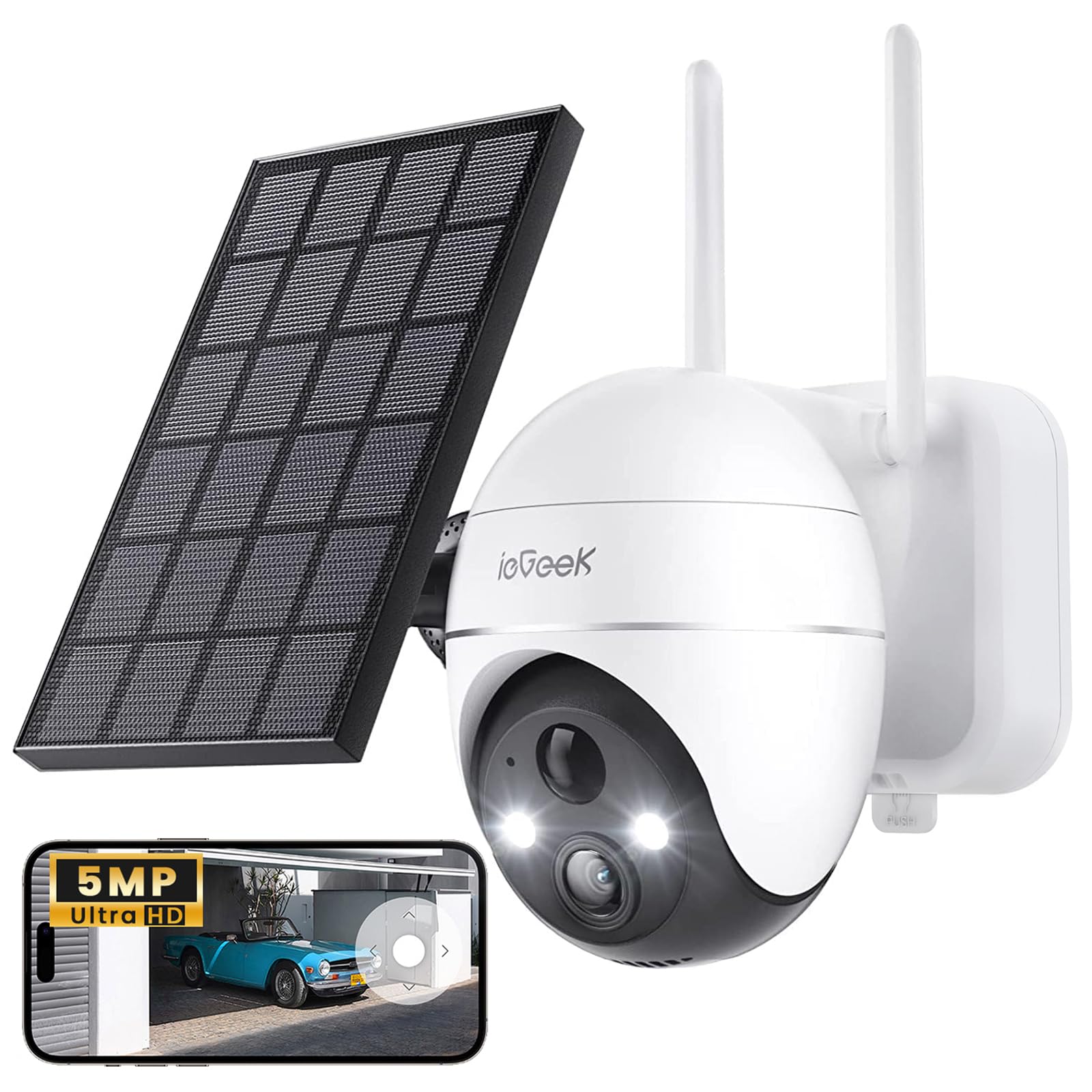
Image: ieGeek ZS GX4S Security Camera with its solar panel.

Resim: Yakın çekim view of the camera lens, infrared LEDs, and light sensors.
3. Kurulum
3.1 İlk Şarj
Before first use, fully charge the camera's built-in battery using the provided USB cable and a 5V/2A power adapter (not included). The charging indicator light will turn solid blue when fully charged.
3.2 Uygulama Kurulumu
İndir ieGeek Kamerası app from the Google Play Store (for Android) or the Apple App Store (for iOS). Alternatively, scan the QR code below to download the app.

Image: A woman using the ieGeek Cam app on her smartphone, demonstrating app usage.
3.3 Kamera Eşleştirme
- Open the ieGeek Cam app and create an account or log in.
- Yeni bir cihaz eklemek için "+" simgesine dokunun.
- Ekranda gösterilen talimatları izleyerek kamerayı açın ve gerekirse sıfırlayın.
- Select your 2.4GHz Wi-Fi network and enter the password. (Note: 5GHz Wi-Fi is not supported).
- Telefonunuzda görüntülenen QR kodunu kamera merceğiyle tarayın.
- Bağlantı kurulduktan sonra kameranıza bir isim verin ve kurulumu tamamlayın.
3.4 Kamera ve Güneş Panelinin Montajı
Choose a suitable location for installation, ensuring good Wi-Fi signal strength and adequate sunlight exposure for the solar panel. The camera is IP65 weatherproof, suitable for outdoor use.

Image: The ieGeek camera connected to its solar panel, illustrating the wireless setup with a single power line.
- Kamera Yerleşimi: Optimum algılama menzili ve görüş alanı için kamerayı 2-3 metre (6.5-10 feet) yüksekliğe monte edin. view.
- Güneş Paneli Yerleşimi: Position the solar panel in a location that receives direct sunlight for several hours each day to ensure continuous charging. Connect the solar panel cable to the camera's charging port.
- Use the provided screws and wall plugs to securely attach the mounting bracket to a wall or other stable surface.
- Attach the camera to the mounting bracket and adjust its angle as needed.

Image: The ieGeek camera and solar panel mounted on the exterior of a house, demonstrating solar charging efficiency.
4. Kameranın Çalıştırılması
4.1 Canlı View ve Oynatma
ieGeek Cam uygulamasına erişmek için view the live feed from your camera. You can also review kaydedilmiş footage stored on the Micro SD card or cloud service.
4.2 Pan, Tilt ve Yakınlaştırma (PTZ) Kontrolü
Use the controls within the ieGeek Cam app to remotely adjust the camera's viewing angle. The camera supports 355° horizontal pan and 120° vertical tilt, allowing you to cover a wide area.

Image: The ieGeek camera illustrating its 360-degree pan and tilt rotation capabilities.
The camera also features 4x digital zoom, accessible through the app, to view ayrıntıları daha yakından inceleyelim.

Image: The camera demonstrating its 5x automatic zoom feature on a swimming pool, maintaining clarity.
4.3 İki Yönlü Ses
Use the microphone and speaker functions in the app to communicate with visitors or deter unwanted guests. Tap the microphone icon in the live view to speak, and release to listen.

Image: A delivery person interacting with the camera, showcasing the two-way audio feature for package instructions.
4.4 Hareket Algılama ve Alarmlar
The camera utilizes advanced PIR human detection to minimize false alarms. You can customize detection zones and sensitivity settings within the app.

Image: The ieGeek camera demonstrating 99% accurate smart human detection as a person approaches a doorstep.
Upon detection, the camera can trigger a siren, white light, or both, and send instant notifications to your smartphone (within 1.5 seconds).

Image: The ieGeek camera activating its siren and white light alarm to deter a potential intruder at night.

Image: A smartphone and smartwatch displaying a motion detection alert from the ieGeek Cam app.
4.5 Gece Görüşü
The camera provides clear color night vision up to 15 meters, ensuring detailed surveillance even in low-light conditions.

Image: The ieGeek camera providing clear color night vision up to 15 meters, capturing details in the dark.

Image: A comparison showing the difference between traditional black and white night vision and the camera's clearer color night vision.
4.6 Depolama Seçenekleri
The camera supports local storage via a Micro SD card (up to 128GB, not included) and offers optional cloud storage services for secure backup of your recordings.

Image: The ieGeek Cloud icon alongside a smartphone displaying a video album, indicating cloud storage functionality.
5. Bakım
5.1 Pil Yönetimi
The camera is powered by a 5200mAh rechargeable battery, continuously charged by the solar panel. Ensure the solar panel is clean and receives adequate sunlight for optimal performance. In periods of low sunlight, the battery may require occasional manual charging via the USB port.
5.2 Temizlik
- Fotoğraf makinesinin objektifini ve güneş panelini düzenli olarak yumuşak bir bezle temizleyin.amp cloth to ensure clear image quality and efficient solar charging.
- Sert kimyasallar veya aşındırıcı temizleyiciler kullanmayın.
5.3 Firmware Güncellemesi
Periodically check the ieGeek Cam app for available firmware updates. Keeping your camera's firmware up-to-date ensures optimal performance, security, and access to new features.
6. Sorun Giderme
If you encounter issues with your ieGeek camera, please refer to the following common problems and solutions:
| Sorun | Olası Çözüm |
|---|---|
| Kamera açılmıyor | Ensure the battery is charged. Connect to a USB power source to confirm. Check solar panel connection. |
| Wi-Fi'ye bağlanılamıyor | Ensure you are using a 2.4GHz Wi-Fi network. Check Wi-Fi password. Move camera closer to the router. Reset the camera and try pairing again. |
| Kötü görüntü kalitesi | Clean the camera lens. Ensure there is sufficient lighting. Check Wi-Fi signal strength. |
| Sık yanlış alarmlar | Adjust PIR sensitivity settings in the app. Define specific detection zones to exclude irrelevant areas. |
| SD karta kayıt yapılmıyor. | Ensure the Micro SD card is inserted correctly and formatted within the app. Check if the card is full or corrupted. |
| İki yönlü ses çalışmıyor | Check microphone and speaker permissions for the app on your phone. Ensure camera's speaker volume is not muted in the app. |
7. Özellikler
| Özellik | Detay |
|---|---|
| Model Adı | ZS GX4S |
| Çözünürlük | 5 Megapixels (3K) |
| Bağlantı Teknolojisi | Kablosuz (Wi-Fi 2.4GHz) |
| Güç Kaynağı | Battery Powered (5200mAh) with Solar Panel |
| Pan / Eğim Açısı | 355° Döndürme, 120° Eğme |
| Gece Görüş Aralığı | 15 Metre (Renkli Gece Görüşü) |
| Su Direnç Seviyesi | IP65 (Su geçirmez) |
| Depolamak | Mikro SD (128 GB'a kadar), Bulut Depolama |
| Kontrol Yöntemi | Application (ieGeek Cam) |
| Uyumlu Cihazlar | Akıllı telefon, Bilgisayar, Dizüstü bilgisayar |
| Video Kodlama | H.265 |
| Boyutlar | 17 x 16 x 12.6 santimetre |
8. Garanti ve Destek
ieGeek provides dedicated customer support for its products. If you encounter any issues or have questions regarding your ieGeek 3K (5MP) Wireless Solar PTZ Outdoor Security Camera, please contact our support team.
8.1 Garanti Bilgileri
Please refer to the warranty card included in your product packaging or visit the official ieGeek webAyrıntılı garanti şartları ve koşulları için lütfen siteyi ziyaret edin. Satın alma belgesi olarak satın alma fişinizi saklayın.
8.2 Müşteri Desteği
Our support team is available to assist you with any technical issues or inquiries. You can typically reach us through the contact information provided on the ieGeek official website or within the ieGeek Cam application.

Image: Icons representing ieGeek customer support services including contact, 24/7 service, maintenance, and product returns.