
1. Giriş
The Unihertz Jelly Star is a compact 3-inch mini smartphone designed for portability and functionality. It operates on Android 13 and features a MediaTek Helio G99 processor, 8GB RAM, and 256GB ROM. This manual provides essential information for the safe and efficient use of your device.

Resim 1.1: Ön ve yan view of the Unihertz Jelly Star Mini Smartphone. This image displays the compact size and design of the device, highlighting its screen and side buttons.
2. Kutuda Neler Var?
Upon unpacking your Unihertz Jelly Star, please verify that all the following items are included:
- Unihertz Jelly Star Smartphone
- Telefon Kılıfı
- Güç Adaptörü
- SIM Tepsisi Çıkarıcı
- Screen Protector (one pre-applied, one extra)
- USB Kablosu (Tip-C)
- Kullanım Kılavuzu (bu belge)
- Garanti Kartı
- Telefon Askısı

Resim 2.1: Diagram illustrating the contents of the Unihertz Jelly Star retail box, including the phone, case, charger, cables, and documentation.
3. Kurulum
3.1 SIM Kartın Takılması
- Locate the SIM tray on the side of your Jelly Star.
- SIM kart tepsisi çıkarma aracını tepsinin yanındaki küçük deliğe yerleştirin ve tepsi dışarı çıkana kadar yavaşça itin.
- Place your Nano SIM card(s) into the tray, ensuring proper orientation. The Jelly Star supports dual Nano SIMs.
- SIM tepsisini dikkatlice telefona geri takın.
3.2 İlk Güç Açma ve Kurulum
- Press and hold the power button (located on the right side) until the Unihertz logo appears.
- Dilinizi seçmek, Wi-Fi'ye bağlanmak ve Google hesabınızı kurmak için ekrandaki talimatları izleyin.
- Configure security settings, including fingerprint unlock, for enhanced device protection.
3.3 Verizon Network Activation (Important)
For Verizon users, please note the following specific activation procedure:
- Unihertz phones are unlocked.
- Local Verizon stores may not be able to assist with activation as these phones are not in Verizon's local database.
- Activate your SIM card with another Verizon-certified phone first, then transfer the activated SIM card to your Jelly Star.

Resim 3.1: Important instructions for Verizon users regarding SIM card activation with the Unihertz Jelly Star.
4. Kullanım Talimatları
4.1 Temel Gezinme
The Jelly Star runs on Android 13. Navigate the interface using touch gestures on the 3-inch display. Swipe up from the bottom for the app drawer, swipe down from the top for notifications and quick settings.
4.2 Programlanabilir Düğme
The device features a customizable programmable button. You can assign various functions to this button through the phone's settings, such as launching an app, activating the flashlight, or taking a screenshot.
4.3 LED Notification Light
The transparent back design incorporates a dynamic LED notification light. This light provides visual alerts for incoming calls, messages, and other notifications. Settings for the LED light can be adjusted in the phone's display or notification settings.

Resim 4.1: Arka ve yan view of the Unihertz Jelly Star, showcasing its transparent design and LED notification light.
4.4 Kamera Kullanımı
The Jelly Star is equipped with a 48MP camera. Open the camera application from the home screen or app drawer. Tap to focus, and press the shutter button to capture photos or videos. Explore the camera settings for various modes and adjustments.
4.5 Parmak İziyle Kilit Açma
To set up fingerprint unlock, go to Ayarlar > Güvenlik ve gizlilik > Cihaz kilidini açma > Parmak izi. Follow the on-screen instructions to register your fingerprint(s). Once set up, you can unlock your phone by placing your registered finger on the fingerprint sensor.
4.6 Audio Jack and FM Radio
The device includes a 3.5mm audio jack for connecting headphones or external speakers. To use the FM radio, plug in wired headphones (which act as an antenna) and open the FM Radio application.
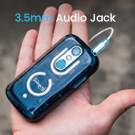
Resim 4.2: Close-up of the Unihertz Jelly Star highlighting the 3.5mm audio jack.
4.7 USB On-The-Go (OTG)
The Jelly Star supports USB OTG, allowing you to connect USB devices such as flash drives, keyboards, or mice directly to your phone using a compatible OTG adapter (sold separately).
5. Bağlantı ve Uyumluluk
The Unihertz Jelly Star offers versatile connectivity options and broad network compatibility.
- Ağ Uyumluluğu: Compatible with T-Mobile and Verizon networks only. (Refer to Section 3.3 for Verizon activation details). Note: Not compatible with AT&T.
- Kablosuz bağlantı: Supports Wi-Fi, Bluetooth, NFC, and Infrared.
- Navigasyon: Konum belirleme hizmetleri için entegre GPS.
- SIM Yuvaları: Dual Nano SIM slots for managing two phone numbers or different carriers.
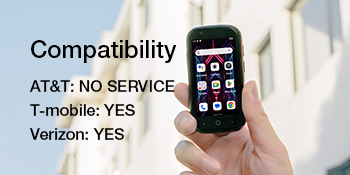
Resim 5.1: Visual representation of the Unihertz Jelly Star's network compatibility, indicating support for T-Mobile and Verizon.
Video 5.1: An official product video demonstrating the compact size and various features of the Unihertz Jelly Star Mini Phone. This video highlights the phone's design and portability.
6. Bakım
6.1 Pil Bakımı
The Jelly Star is equipped with a 2000mAh battery. To maximize battery life:
- Aşırı sıcaklıklardan kaçının.
- Use the provided power adapter and USB cable for charging.
- Pilin sık sık tamamen boşaltılmasından kaçının.
- Optimize screen brightness and close unused background applications.
6.2 Cihazınızı Temizleme
Use a soft, lint-free cloth to clean the screen and body of your phone. Avoid using harsh chemicals or abrasive materials, which can damage the device.
6.3 Yazılım Güncellemeleri
Cihazınızın en son özelliklere, güvenlik yamalarına ve performans iyileştirmelerine sahip olduğundan emin olmak için yazılım güncellemelerini düzenli olarak kontrol edin ve yükleyin. Bu seçeneği genellikle şurada bulabilirsiniz: Ayarlar > Sistem > Sistem güncellemesi.
7. Sorun Giderme
If you encounter issues with your Unihertz Jelly Star, refer to the following common troubleshooting steps:
- Cihaz açılmıyor: Pilin şarjlı olduğundan emin olun. Telefonu şarj cihazına bağlayın ve tekrar açmayı denemeden önce birkaç dakika bekleyin.
- Ağ bağlantı sorunları:
- Check if your SIM card is properly inserted (refer to Section 3.1).
- Verify that your mobile data or Wi-Fi is enabled.
- Cihazı yeniden başlatın.
- For Verizon users, confirm SIM activation as per Section 3.3.
- Uygulamaların çökmesi veya donması:
- Close and restart the problematic app.
- Uygulamanın önbelleğini ve verilerini temizle Ayarlar > Uygulamalar > [Uygulama Adı] > Depolama ve önbellek.
- Uygulamanın en son sürüme güncellendiğinden emin olun.
- Kısa pil ömrü:
- Ekran parlaklığını azaltın.
- İhtiyaç duyulmadığında Bluetooth, GPS veya Wi-Fi gibi kullanılmayan özellikleri devre dışı bırakın.
- Identify and close power-consuming background apps.
If these steps do not resolve your issue, please contact Unihertz customer support for further assistance.
8. Özellikler
Below are the key technical specifications for the Unihertz Jelly Star Mini Smartphone:
| Model Adı | Jelly Star |
| İşletim Sistemi | Android 13.0 |
| CPU Modeli | MediaTek Helio G99 |
| CPU Hızı | 2200 MHz |
| Kurulu RAM Bellek Boyutu | 8 GB |
| Bellek Depolama Kapasitesi | 256 GB |
| Ayakta Ekran Görüntüleme Boyutu | 3 inç |
| Çözünürlük | 480x854 |
| Yenileme Hızı | 60 Hz |
| Pil Kapasitesi | 2000 Miliamp Saat |
| Ürün Boyutları | 3.75 x 1.95 x 0.74 inç |
| Ürün Ağırlığı | 4.3 ons |
| Bağlantı Teknolojileri | Bluetooth, Kızılötesi, NFC, USB, Wi-Fi |
| Ses Jakı | 3.5 mm |
| Küresel Konumlama Sistemi | Doğru |
9. Garanti ve Destek
9.1 Ürün Garantisi
The Unihertz Jelly Star comes with a one-year warranty from the date of purchase. This warranty covers manufacturing defects and malfunctions under normal use. Please retain your proof of purchase for warranty claims.
9.2 Teknik Destek
Unihertz provides long-term technical support and efficient online customer service. For any technical issues, questions, or support needs not covered in this manual, please visit the official Unihertz websitesine gidin veya müşteri hizmetleri ekibiyle iletişime geçin.
Daha fazla bilgi ve destek kaynaklarına şu adresten ulaşabilirsiniz: Unihertz Mağazası Amazon'da.