
1. Giriş
Thank you for choosing the COTOE G7 Bluetooth Headset. This manual provides detailed instructions for setting up, operating, and maintaining your headset. Please read this manual carefully before use to ensure optimal performance and longevity of your device.
The COTOE G7 is a wireless Bluetooth headset designed for clear communication and audio playback. It features an LED digital display for battery status, extended standby time, and Active Noise Cancellation (ANC) for an enhanced audio experience.
2. Paket İçeriği
Lütfen paketi aşağıdaki öğeler açısından kontrol edin:
- COTOE G7 Bluetooth Headset (Gray)
- Şarj Kutusu
- USB Şarj Kablosu
- Kulak Uçları (çeşitli boyutlarda)
- Kullanıcı Kılavuzu
3. Ürün Bittiview
Familiarize yourself with the components of your COTOE G7 Bluetooth Headset.
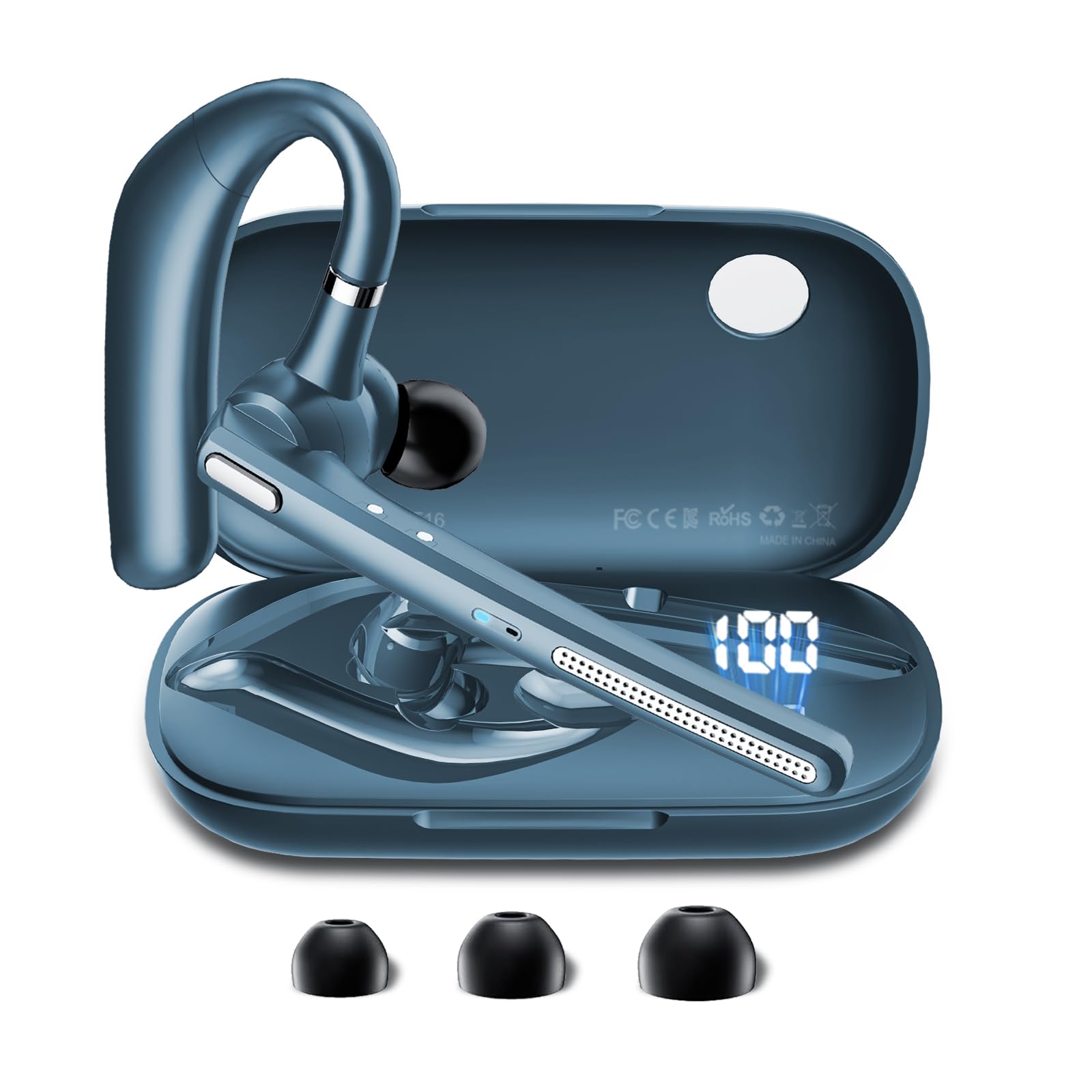
Image: The COTOE G7 Bluetooth Headset (gray) shown with its charging case. The headset features an ergonomic in-ear design, and the charging case is compact.
Temel Bileşenler:
- Kulaklık: The main unit worn in the ear, containing the speaker, microphone, and control buttons.
- Şarj Kutusu: Used to store and charge the headset. Features an LED digital display.
- LED Dijital Ekran: Located on the charging case, indicates the charging status of the headset and the power level of the case.
4. Kurulum
4.1 Kulaklığın ve Şarj Kutusunun Şarj Edilmesi
- USB şarj kablosunu kasanın üzerindeki şarj portuna ve bir güç kaynağına (örneğin USB duvar adaptörü, bilgisayar USB portu) bağlayın.
- The LED digital display on the charging case will show the current battery level and charging status.
- Place the headset into the charging case. Ensure proper alignment for charging. The headset's indicator light will show charging status.
- A full charge typically takes approximately 1-2 hours for the headset and 2-3 hours for the charging case.
Not: The headset offers up to 12 hours of music playback and the charging case provides 120 hours of standby time.
4.2 Bluetooth Cihazıyla Eşleştirme
- Kulaklığın şarjlı olduğundan emin olun.
- Take the headset out of the charging case. It will automatically enter pairing mode, indicated by a flashing LED light (usually blue and red).
- On your mobile phone or other Bluetooth-enabled device, go to the Bluetooth settings.
- Arama available devices. You should see "COTOE G7" in the list.
- Select "COTOE G7" to connect. Once connected, the headset's LED light will stop flashing and may turn solid blue or turn off.
- Şifre sorulursa "0000" (dört sıfır) girin.
- The headset will automatically reconnect to the last paired device when powered on and within range.
5. Kullanım Talimatları
5.1 Güç Açma/Kapatma
- Güç Açık: Take the headset out of the charging case, or press and hold the Multi-function Button for approximately 3 seconds.
- Kapat: Place the headset back into the charging case, or press and hold the Multi-function Button for approximately 5 seconds.
5.2 Çağrı Yönetimi
- Cevap Çağrısı: Çok Fonksiyonlu Düğmeye bir kez basın.
- Çağrı Sonu: Görüşme sırasında Çok Fonksiyonlu Düğmeye bir kez basın.
- Çağrıyı Reddet: Çok fonksiyonlu düğmeye yaklaşık 2 saniye basılı tutun.
- Son Numarayı Tekrar Ara: Çok Fonksiyonlu Düğmeye iki kez basın.
5.3 Müzik Oynatma
- Oynat/Duraklat: Çok Fonksiyonlu Düğmeye bir kez basın.
- Sonraki Parça: Sesi Açma tuşuna basılı tutun.
- Önceki parça: Sesi Azaltma düğmesini basılı tutun.
5.4 Ses Kontrolü
- Sesi arttır: Sesi Açma tuşuna basın.
- Sesi Azalt: Sesi Azalt tuşuna basın.
5.5 Aktif Gürültü Önleme (ANC)
The COTOE G7 features Active Noise Cancellation to reduce ambient noise. To activate or deactivate ANC, locate the dedicated ANC button (if present) or refer to the specific button combination in your quick start guide. Typically, a long press on a designated button toggles ANC.
6. Bakım
- Temizlik: Use a soft, dry, lint-free cloth to clean the headset and charging case. Do not use harsh chemicals or abrasive materials.
- Depolamak: Store the headset in its charging case when not in use to protect it from dust and damage. Avoid extreme temperatures.
- Pil Bakım: To prolong battery life, avoid fully discharging the headset frequently. Charge it regularly, even if not used for extended periods.
- Suya Dayanıklılık: The headset is not waterproof. Avoid exposure to liquids and moisture.
7. Sorun Giderme
| Sorun | Çözüm |
|---|---|
| Kulaklık açılmıyor. | Ensure the headset is charged. Place it in the charging case to confirm charging. |
| Cihazla eşleştirilemiyor. | Make sure Bluetooth is enabled on your device. Ensure the headset is in pairing mode. Try restarting both the headset and your device. Clear previous Bluetooth connections on your device. |
| Ses yok veya ses seviyesi düşük. | Check the volume levels on both the headset and your connected device. Ensure the headset is properly connected. Try playing different audio sources. |
| Bağlantı kesintisi. | Ensure the headset is within the effective range of your Bluetooth device (typically 10 meters/33 feet). Avoid obstacles between the headset and device. |
8. Özellikler
- Marka: COTOE
- Modeli: G7
- Renk: Gri
- Kulak Yerleşimi: Kulakta
- Form Faktörü: Kulakta
- Gürültü kontrolü: Aktif Gürültü Önleme
- Bekleme Süresi: 120 saate kadar (şarj kutusu ile)
- Müzik Çalma Süresi: 12 saate kadar (şarj kutusu ile)
9. Garanti ve Destek
The COTOE G7 Bluetooth Headset comes with a standard manufacturer's warranty. Please refer to the warranty card included in your package for specific terms and conditions.
For technical support, troubleshooting assistance, or warranty claims, please contact COTOE customer service through the retailer where you purchased the product or visit the official COTOE webiletişim bilgileri için site.