
1. Önemli Güvenlik Talimatları
Lütfen bu cihazı kullanmadan önce tüm talimatları dikkatlice okuyun ve ileride başvurmak üzere saklayın. Bu talimatlara uyulmaması elektrik çarpmasına, yangına veya ciddi kişisel yaralanmalara neden olabilir.
- Güç kaynağı hacmini sağlayıntage cihazın üzerindeki derecelendirme etiketiyle eşleşiyor.
- Vantilatörü hasarlı bir kablo veya fişle çalıştırmayın. Kablo hasarlıysa, tehlikeyi önlemek için üretici, servis temsilcisi veya benzer şekilde yetkili kişiler tarafından değiştirilmelidir.
- Temizlemeden, bakımını yapmadan veya yerini değiştirmeden önce mutlaka vantilatörün fişini prizden çekin.
- Çalışırken fan ızgarasına parmaklarınızı veya herhangi bir nesneyi sokmayın.
- Keep the fan away from water or other liquids. Do not use it in wet or damp ortamlar.
- Bu cihaz sadece kapalı alanda kullanım içindir. Açık havada kullanmayın.
- Do not place the fan near heat sources such as radiators, heat registers, stoves, or other appliances that produce heat.
- Cihazla oynamadıklarından emin olmak için çocukları denetleyin.
- Do not use the fan in areas where gasoline, paint, or flammable liquids are stored.
2. Ürün Bittiview
The Altus AL 40 TFB is a sleek and efficient tower air cooler designed for indoor use. It features a compact design, multiple speed settings, and easy-to-use push-button controls.
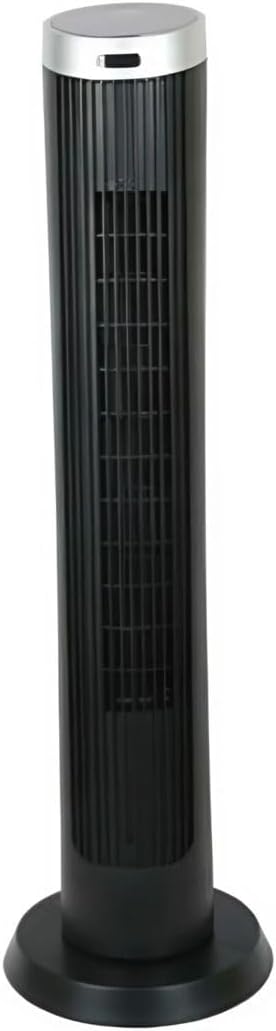
Şekil 2.1: Ön view of the Altus AL 40 TFB Tower Air Cooler. This image shows the tall, slender black body of the fan with its air outlet grille and a stable round base.
Bileşenler:
- Kontrol Paneli: Tüm fonksiyonlara kolay erişim için ünitenin üst kısmında yer almaktadır.
- Hava Çıkış Izgarası: Vertical grille on the front for air dispersion.
- Temel: Güvenli yerleştirme için sağlam yuvarlak taban.
- Güç Kablosu: Ünitenin arka tarafında yer almaktadır.

Şekil 2.2: Ayrıntılı view of the control panel on top of the Altus AL 40 TFB Tower Air Cooler. The panel features a digital display showing '28' and several push buttons for various functions.
3. Kurulum
Follow these steps to set up your Altus AL 40 TFB Tower Air Cooler:
- Paketi aç: Carefully remove the fan from its packaging. Retain the packaging for future storage or transport.
- Taban Montajı (gerekirse): Some models may require minor base assembly. If your unit's base is detached, align the base sections and secure them according to the diagrams in the packaging. Ensure it is firmly attached.
- Atama: Place the fan on a firm, level surface. Ensure there is adequate space around the fan for proper airflow, at least 30 cm (12 inches) from walls or furniture. This appliance is designed for indoor use only.
- Güç Bağlantısı: Plug the power cord into a standard electrical outlet. Ensure the outlet meets the voltagÜrün etiketinde belirtilen gereksinimler.
4. Kullanım Talimatları
Your Altus AL 40 TFB Tower Air Cooler is equipped with user-friendly push-button controls on the top panel.
Kontrol Paneli Fonksiyonları:
- Güç düğmesi (⏻): Press once to turn the fan ON, press again to turn it OFF.
- Hız Düğmesi (💨): Press repeatedly to cycle through the 3 available fan speeds: Low, Medium, and High. The current speed setting may be indicated on the digital display.
- Mod Düğmesi (M): If available, press to select different operating modes (e.g., Normal, Natural, Sleep). Refer to the digital display for the active mode.
- Salınım Düğmesi (↔): Press to activate or deactivate the oscillation function, which allows the fan to rotate from side to side to distribute air over a wider area.
- Zamanlayıcı Düğmesi (🕒): If available, press to set an automatic shut-off timer. Each press typically increases the timer duration by a set increment (e.g., 1 hour).
Genel İşlem:
- Fanı uygun bir elektrik prizine takın.
- Güç tuşuna baş (⏻) to turn on the fan.
- Select your desired fan speed using the Speed Button (💨).
- Activate oscillation if desired by pressing the Oscillation Button (↔).
- To turn off the fan, press the Power Button (⏻) Tekrar.
5. Bakım
Regular maintenance ensures optimal performance and extends the lifespan of your Altus AL 40 TFB Tower Air Cooler.
Temizlik:
- Temizlemeden önce mutlaka fanın fişini çekin.
- Dış Temizlik: Fanın dış yüzeylerini yumuşak bir bezle silin.amp Bez kullanın. Yüzeye zarar verebileceğinden aşındırıcı temizleyiciler, cilalar veya parlatıcılar kullanmayın.
- Hava Giriş/Çıkış Izgaraları: Use a vacuum cleaner with a brush attachment to gently remove dust and debris from the air inlet and outlet grilles. Do not attempt to disassemble the fan for cleaning.
- Tekrar prize takmadan ve çalıştırmadan önce fanın tamamen kuru olduğundan emin olun.
Depolamak:
When not in use for extended periods, store the fan in a cool, dry place. It is recommended to store it in its original packaging to protect it from dust and damage.
6. Sorun Giderme
If you encounter any issues with your Altus AL 40 TFB Tower Air Cooler, please refer to the following common problems and solutions:
- Fan açılmıyor:
- Güç kablosunun çalışan bir elektrik prizine güvenli bir şekilde takılı olup olmadığını kontrol edin.
- Kontrol panelindeki güç düğmesine basıldığından emin olun.
- Verify that the household circuit breaker or fuse has not tripped.
- Zayıf hava akışı:
- Check if the fan speed is set to a higher setting.
- Ensure the air inlet and outlet grilles are not blocked by dust or obstructions. Clean them if necessary.
- Olağandışı gürültü:
- Vantilatörün sağlam ve düz bir yüzeye yerleştirildiğinden emin olun.
- Check for any foreign objects that might have fallen into the fan grilles.
- Gürültü devam ederse, kullanımı bırakın ve müşteri desteğiyle iletişime geçin.
If the problem cannot be resolved using the above steps, please contact Altus customer support.
7. Özellikler
Detailed technical specifications for the Altus AL 40 TFB Tower Air Cooler:
| Özellik | Şartname |
|---|---|
| Marka | Altus |
| Model Adı | AL 40 TFB |
| Renk | Siyah |
| Elektrikli Fan Tasarımı | Floor Fan (Tower Type) |
| Güç Kaynağı | Kablolu Elektrik |
| Ürün Boyutları (D x G x Y) | 29D x 29G x 101Y cm |
| Montaj Tipi | Kat Dağı |
| Bitiş Türü | Boyalı |
| İç/Dış Mekan Kullanımı | Kapalı |
| Kontrol Yöntemi | Basmalı Düğme |
| Güç Seviyesi Sayısı | 3 |
| Kablosuz | HAYIR |
8. Garanti ve Destek
Altus provides comprehensive support for its products. For any assistance or warranty-related inquiries, please contact our customer service.

Şekil 8.1: Altus customer service and warranty information. The image displays the Altus logo, a message about service availability, and a contact number for support.
Our services are always available for your Altus products. You can benefit from our door-to-door service by calling our support line for any assistance you may need.
Arçelik Service Warranty: For products under warranty, our home product pickup service is provided free of charge.
Customer Support Line: 0850 210 0 888
Please have your product model number (AL 40 TFB) and purchase details ready when contacting support.