
giriiş
This manual provides detailed instructions for the installation, operation, and maintenance of your Ossuret 7-inch Android 14 Car Stereo. Please read this manual thoroughly before using the product to ensure proper functionality and to prevent damage.
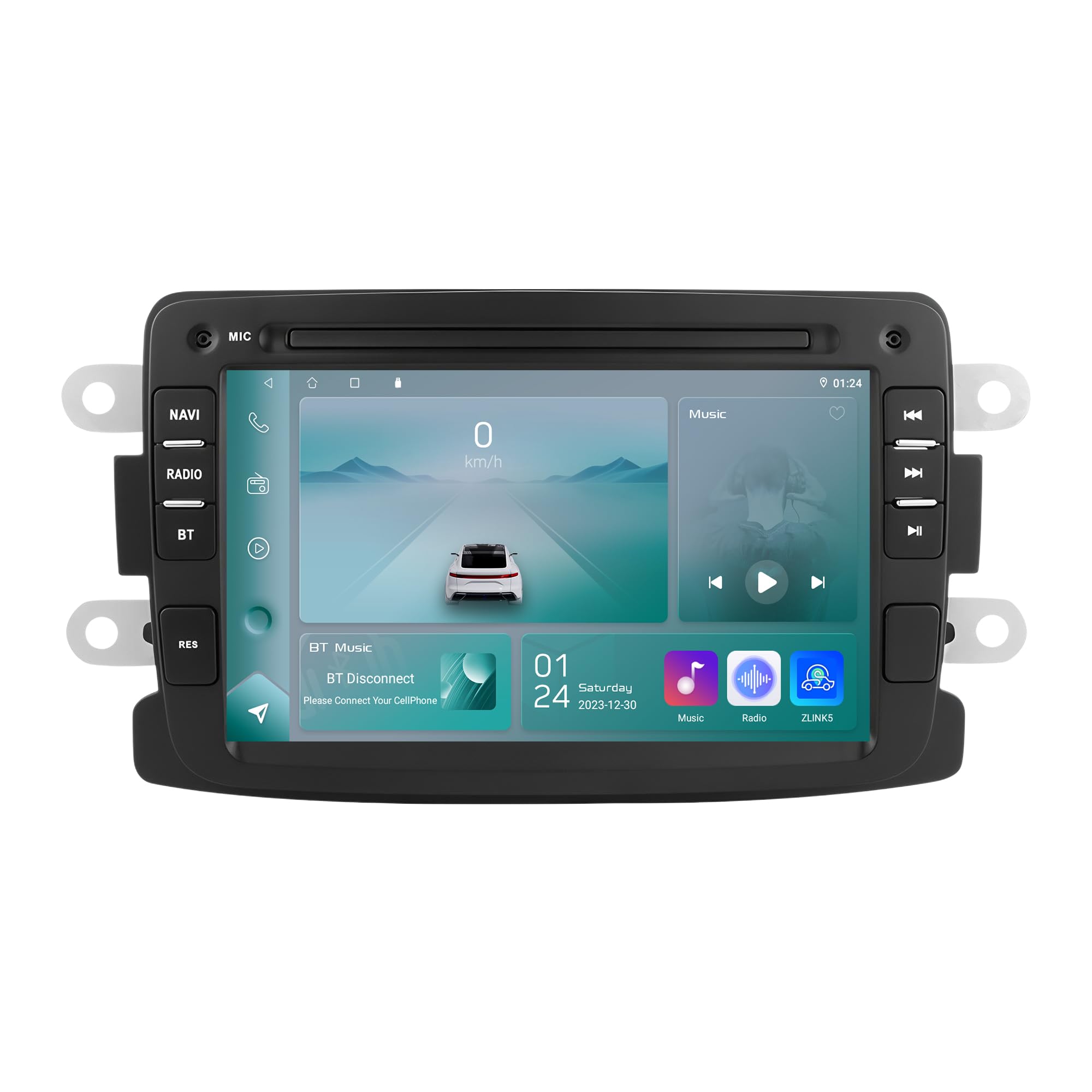
Figure 1: Ossuret 7-Inch Android 14 Car Stereo. This image shows the main unit with its display.
Araç Uyumluluğu
This car stereo is designed for specific vehicle models. Please verify your vehicle's compatibility before installation.
- Dacia için: Logan (2012-2017), DOKKER (2012-2017), Duster (2011-2017), Sandero (2012-2017), Lodgy (2012-2017)
- Renault'a özel: Captur (2013-2017), Sembol (2013-2017)
- For LADA: Xray 2 (Note: Some steering wheel control buttons may not function with LADA Xray 2)
Kutuda Neler Var?
Ensure all components listed below are present in the package before proceeding with installation.

Şekil 2: Paket İçeriği. This image displays all items included with your Ossuret car stereo, such as various cables, adapters, and the main unit.
- USB kablosu
- RCA Kablo Demeti
- GPS Anteni
- Arka Kamera Girişi RCA Kablosu
- Harici Mikrofon
- 4 Pinli USB Kablosu
- 6 Pinli USB Kablosu
- Güç kablosu
- Canbus Dekoder
- Radyo Anteni Adaptör Kablosu
- Radyo Anten Adaptörü
Kurulum Kılavuzu
Professional installation is recommended. Disconnect the vehicle's battery before starting the installation process. Refer to your vehicle's specific wiring diagrams for accurate connections.

Figure 3: Before and After Installation. This image illustrates the visual transformation of the dashboard after the Ossuret car stereo is installed, replacing the original unit.
Genel Kurulum Adımları:
- Hazırlık: Aracın kapalı olduğundan ve akünün söküldüğünden emin olun.
- Eski Üniteyi Kaldır: Mevcut araç teybinizi ve iç trim panellerini dikkatlice çıkarın.
- Kablolamayı Bağlayın: Connect the power cable, RCA harness, GPS antenna, and other necessary cables to the new Ossuret unit. Ensure all connections are secure.
- Canbus Dekoderi: If your vehicle requires a Canbus decoder (included), connect it as per the wiring diagram to ensure proper communication with vehicle systems.
- Test İşlevselliği: Before fully reassembling the dashboard, reconnect the battery and test the basic functions of the stereo (power, audio, touch screen).
- Güvenli Ünite: Yeni stereo sistemini gösterge panelindeki açıklığa güvenli bir şekilde monte edin.
- Yeniden birleştirme: Reinstall all trim panels and ensure a neat finish.
Operating Your Car Stereo
Temel İşlemler
- Güç Açma/Kapatma: Cihazı açmak veya kapatmak için (genellikle ön panelde bulunan) güç düğmesine basılı tutun.
- Ses Kontrolü: Adjust the volume using the physical knob or the on-screen controls.
- Dokunmatik Ekran: Navigate through menus and applications using the capacitive touch screen.
- Ana Ekran: Access the main Android interface by pressing the Home button or icon.
Kablosuz Carplay / Android Auto
The unit supports wireless Apple Carplay and Android Auto via the pre-installed Zlink application. This allows seamless integration of your smartphone's features onto the car stereo display.

Figure 4: Carplay and Android Auto System. This image demonstrates how your smartphone's interface can be mirrored and controlled directly from the car stereo screen.
- Akıllı telefonunuzun Wi-Fi ve Bluetooth özelliklerinin etkinleştirildiğinden emin olun.
- On the car stereo, open the "Zlink" application.
- Follow the on-screen prompts to connect your phone via Bluetooth or Wi-Fi.
- Bağlantı kurulduktan sonra, telefonunuzun uyumlu uygulamaları stereo ekranda görünecektir.
Bluetooth ™ İşlevi
Eller serbest görüşme ve ses akışı için cep telefonunuzu Bluetooth üzerinden bağlayın.

Figure 5: Bluetooth Functionality. This image highlights the hands-free calling feature and the built-in microphone for clear communication.
- Eşleştirme: Stereo cihazınızdaki ve telefonunuzdaki Bluetooth ayarlarına gidin. Arama available devices and select "Ossuret" (or similar name). Enter the PIN if prompted (usually 0000).
- Eller Serbest Arama: Once paired, you can make and receive calls directly from the stereo. The built-in microphone captures your voice.
- Bluetooth Müzik (A2DP): Stream audio from your phone to the car stereo. Control playback (play/pause, skip) from the stereo screen.
- Telefon Rehberini İndir: The unit supports downloading your phone's contact list for easy access.
GPS Navigasyon
The car stereo features integrated GPS navigation with preloaded European maps and supports online navigation apps.

Şekil 6: GPS Navigasyonu. This image shows the detailed map interface with navigation guidance and support for various navigation applications.
- Çevrimdışı Gezinme: Use the preloaded maps without an internet connection.
- Çevrimiçi Gezinme: Connect to Wi-Fi and use popular navigation apps like Google Maps, Waze, etc.
- Sesli Rehberlik: Receive turn-by-turn voice directions.
- Çift Bölge Fonksiyonu: Navigate while listening to music or other audio.
USB Bağlantısı
Connect external USB devices for media playback or data transfer. The unit supports up to 2TB external memory.

Şekil 7: USB Bağlantısı. Bu görsel şunu göstermektedir: file browsing capability when a USB device is connected, allowing access to various media and data files.
- Insert your USB drive into the designated USB port.
- Erişim file manager or media player application to browse and play content.
Multimedya Oynatma
The unit supports a wide range of audio and video formats for an enhanced entertainment experience.

Figure 8: Multimedia Playback. This image shows the car stereo playing a video, indicating its support for various multimedia formats.
- Müzik Formatları: MP3, WMA, AAC, RM, FLAC, vb.
- Video Formatları: MPEG-1/2/4, H264, H263, VC1, RV, RMVB, DivX, Sorenson Spark, Spark, VP8, AVS Stream, etc.
- Resim Biçimleri: JPG/BMP/JEPG/GIF/PNG
Direksiyon Kontrolü
The car stereo is compatible with your vehicle's factory steering wheel controls, allowing you to manage volume, tracks, and channels without taking your hands off the wheel. This feature helps minimize distractions while driving.
Arka View Kamera Girişi
Bu ünite arka tarafı destekler. view camera (not included). When the vehicle is shifted into reverse gear, the display will automatically switch to the rear camera feed, providing a clear view of obstacles behind the vehicle and assisting with safe parking.
Bakım ve Onarım
- Ekranın Temizlenmesi: Use a soft, lint-free cloth to gently wipe the touch screen. Avoid abrasive cleaners or solvents that may damage the screen.
- Genel Temizlik: Keep the unit free from dust and debris. Use a soft, dry cloth for cleaning the exterior.
- Sıcaklık: Cihazı aşırı sıcaklıklara, uzun süre doğrudan güneş ışığına veya yüksek neme maruz bırakmaktan kaçının.
- Yazılım Güncellemeleri: Üreticinin periyodik olarak kontrol edin webEn iyi performansı ve yeni özellikleri sağlamak için mevcut yazılım güncellemeleri için siteyi ziyaret edin.
Sorun giderme
If you encounter issues, refer to the table below for common problems and their solutions. If the problem persists, contact customer support.
| Sorun | Olası Neden | Çözüm |
|---|---|---|
| Ünite açılmıyor. | Gevşek güç bağlantısı, atmış sigorta, araç aküsü sorunu. | Güç kablolarını ve bağlantılarını kontrol edin. Araç sigortalarını inceleyin. Araç aküsünün şarjlı olduğundan emin olun. |
| Ses yok. | Ses seviyesi çok düşük, sessize alma etkinleştirilmiş, yanlış ses kaynağı, hoparlör kablolama sorunu. | Sesi artırın. Sessiz modun etkin olup olmadığını kontrol edin. Doğru ses kaynağını seçin. Hoparlör bağlantılarını doğrulayın. |
| Dokunmatik ekran çalışmıyor. | Yazılım hatası, ekran kalibrasyon sorunu. | Restart the unit. If available, perform screen calibration in settings. |
| Bluetooth bağlantı sorunları. | Telefon bulunamıyor, yanlış eşleştirme, parazit. | Ensure phone Bluetooth is on and discoverable. Delete previous pairings and re-pair. Move phone closer to the unit. |
| GPS sinyali kayıp veya hatalı. | GPS antenna obstruction, poor satellite reception, outdated maps. | GPS anteninin net bir görüşe sahip olduğundan emin olun view Gökyüzüne ait. Gerekirse haritaları güncelleyin. |
Teknik Özellikler
| Özellik | Şartname |
|---|---|
| Marka | Ossuret |
| İşletim Sistemi | Android 14 |
| Veri deposu | 2 GB |
| ROM | 32 GB |
| İşlemci | 4 Çekirdekli*A53 1.5 GHz |
| Ekran Boyutu | 7 inç |
| Dokunmatik Ekran Türü | Kapasitif dokunmatik ekran |
| Ekran Çözünürlüğü | 1024x600 |
| Bağlantı Teknolojisi | Bluetooth, USB, Wi-Fi |
| Özel Özellikler | Android Auto, Apple CarPlay, GPS Navigation, Steering Wheel Control, Rear Camera Input |
| Uyumlu Cihazlar | Akıllı telefon |
| Ses Çıkışı Modu | Stereo |
| Kanal Sayısı | 2.0 |
| Kontrol Yöntemi | Dokunsal |
| USB Port Compatibility | 2 TB'a kadar harici bellek |
| Garanti | 1 yıl |
| Menşei ülke | Çin |
Garanti ve Destek
Garanti Bilgileri
Bu Ossuret araç teybi şunlarla birlikte geliyor: 1 yıllık garanti Satın alma tarihinden itibaren geçerlidir. Bu garanti, üretim hatalarını ve normal kullanımdaki arızaları kapsar. Garanti talepleriniz için lütfen satın alma belgenizi saklayın.
Müşteri Desteği
For technical assistance, troubleshooting beyond this manual, or warranty inquiries, please contact Ossuret customer support through the retailer where the product was purchased or visit the official Ossuret webiletişim bilgileri için site.