
1. Ürün Bittiview
The UYIKOO GLS12 Sport Camera Sunglasses integrate a high-definition camera into a durable, wearable design. These sunglasses are equipped with UV protective polarized lenses and are designed for capturing video and photos during various outdoor activities. The device features a built-in rechargeable battery and supports loop recording.

Figure 1: UYIKOO GLS12 Sport Camera Sunglasses and included accessories.
Temel Özellikler:
- Video Çözünürlüğü: 1920 x 1080P at 30 frames/second.
- Fotoğraf Sensörü Teknolojisi: CMOS.
- Mercekler: UV Protection Polarized Lenses.
- Depolamak: Supports Micro SD Card (16GB included, up to 32GB).
- Pil: Built-in rechargeable battery with approximately 1.5 hours of working time.
- Kayıt: Loop recording function (saves video files every 3-6 minutes).
- Bağlantı: USB BAĞLANTI.
2. Kurulum
2.1 Cihazı Şarj Etme
Before first use, fully charge the sunglasses. Connect the provided USB cable to the charging port located on the frame and plug the other end into a USB power source (e.g., computer, wall adapter). The charging indicator light will show the charging status.
2.2 Micro SD Kartın Takılması
- Locate the Micro SD card slot on the inner side of the right temple arm.
- Gently insert the provided 16GB Micro SD card into the slot until it clicks into place. Ensure the card is inserted in the correct orientation.
- To remove the card, gently push it inward until it springs out.
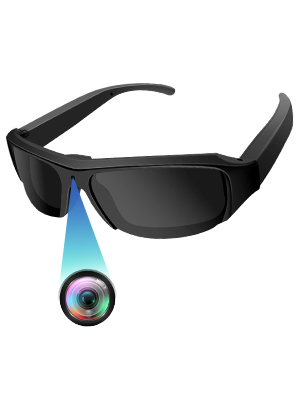
Figure 2: Proper insertion of the Micro SD card into the sunglasses.
3. Kullanım Talimatları
3.1 Güç Açma/Kapatma
- Güç Açık: Long press the power button (located on the inner side of the right temple arm) for a few seconds until the indicator light illuminates.
- Kapat: Long press the power button again until the indicator light turns off.
3.2 Video Kaydetme
- Ensure the device is powered on and in video mode (check the mode switch if available).
- Short press the power button to start video recording. The indicator light will flash to confirm recording is in progress.
- Short press the power button again to stop recording. The indicator light will stop flashing.
3.3 Fotoğraf Çekme
- Ensure the device is powered on and in photo mode (check the mode switch if available).
- Short press the power button to take a photo. The indicator light will briefly flash.

Figure 3: Simple one-button operation for capturing video and photos.
3.4 Bilgisayara Bağlanma
Connect the sunglasses to your computer using the provided USB cable. The device will appear as a removable disk, allowing you to access and transfer your recorded video and photo files.
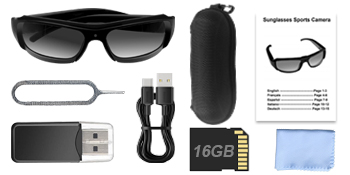
Figure 4: Connecting the sunglasses to a computer via USB for file yönetmek.
4. Media Examples
4.1 Ürün Görselleri

Figure 5: Sunglasses in use, demonstrating discreet camera placement.

Figure 6: Visual representation of battery capacity and loop recording functionality.

Şekil 7: Ör.amples of outdoor activities where the camera sunglasses can be utilized.
4.2 Resmi Ürün Videoları
Video 1: Bittiview of the mini camera glasses, demonstrating features and usage. This video is provided by the seller, OhOsunshine.
5. Bakım
- Lens Temizliği: Use the provided microfiber cloth to gently clean the polarized lenses. Avoid abrasive materials that could scratch the lenses.
- Depolamak: Store the sunglasses in the portable glasses case when not in use to protect them from dust and damage.
- Pil Bakım: To prolong battery life, avoid fully discharging the battery frequently. Charge regularly, especially if not used for extended periods.
- Suya Maruz Kalma: The device is not waterproof. Avoid exposure to heavy rain or submersion in water.
6. Sorun Giderme
- Cihaz Açılmıyor: Pilin şarjlı olduğundan emin olun. Bir güç kaynağına bağlayın ve tekrar deneyin.
- Cannot Record: Check if the Micro SD card is properly inserted and has sufficient free space. The device supports loop recording, but a full card might prevent new recordings if the loop function is not active or configured.
- Düşük Video/Fotoğraf Kalitesi: Ensure lenses are clean. Record in well-lit environments for optimal results.
- Bilgisayar Aygıtı Tanımıyor: Try a different USB port or cable. Ensure the device is powered on when connected.
7. Özellikler
| Özellik | Şartname |
|---|---|
| Marka Adı | UYIKOO |
| Model Adı | GLS12 |
| Ürün Ağırlığı | 5 ons |
| Paket Boyutları | 7.01 x 2.68 x 2.6 inç |
| Piller | 1 A pil gereklidir (dahil) |
| Renk | Sarı |
| Fotoğraf Sensörü Teknolojisi | CMOS |
| Video Yakalama Çözünürlüğü | 1080p |
| Video Yakalama Formatı | MP4 |
| Desteklenen Ses Biçimi | AAC, MP3 |
| Bağlantı Teknolojisi | USB |
| Özel Özellikler | Wearable Design, Built-in Rechargeable Battery with Loop Recording, UV Protection Polarized Lenses, Easy to Use with Simple On/Off Button |
8. Destek
If you have any questions or encounter issues with your UYIKOO GLS12 Sport Camera Sunglasses, please feel free to contact us. We are committed to resolving any problems within 24 hours.