
1. Giriş
The UMEIJA OBD2 Scanner with Battery Tester (Model OBD-V620-04) is a comprehensive diagnostic tool designed for vehicles compliant with OBD II protocols. This device allows users to quickly read and clear engine error codes, view live data streams, perform battery tests, and conduct O2/EVAP diagnostics. It is an essential tool for understanding vehicle health and performing maintenance.
2. Ürün Bittiview
The UMEIJA OBD2 Scanner is a compact and durable device featuring an upgraded microprocessor for fast and accurate results. Its user-friendly interface and plug-and-play design make it accessible for both mechanics and DIY enthusiasts.
Temel Özellikler:
- Multi-Function Diagnostics: Reads and clears engine error codes, displays live data streams with graphic displays, views freeze frame data, and checks MIL readiness status.
- Geniş Araç Uyumluluğu: Supports all OBDII protocols (KWP2000, J1850 VPW, ISO9141, J1850 PWM, CAN) for most US (1996+), EU, and Asian (2000+) cars, SUVs, and light trucks.
- Durable & Compact Design: Weighs 9.9 ounces, measures 8.9 x 6.9 x 1.4 inches, and includes a 2.5-foot heavy-duty cable with a standard 16-pin OBD connector.
- Fast & Accurate Results: Upgraded microprocessor ensures real-time vehicle diagnostics.
- Gelişmiş Özellikler: Integrated battery tester for monitoring battery life and voltage, plus O2 sensor and EVAP system diagnostics.
- Çoklu Dil Desteği: Supports English, German, French, Spanish, Finnish, Dutch, Russian, and Portuguese.

Figure 1: UMEIJA OBD2 Scanner displaying various diagnostic functions including Voltage, Read DTC, O2 Sensor, Clear DTC, EVAP, Vehicle Info, I/M, OBD/EOBD, RT Curve, Freeze, Live Data, and DTC Lib.
3. Kurulum
- OBD2 Portunu Bulun: OBD2 portu genellikle aracın sürücü tarafında, gösterge panelinin altında bulunur. Tam konum için aracınızın kullanım kılavuzuna bakın.
- Tarayıcıyı Bağlayın: Plug the 16-pin OBD connector from the scanner into your vehicle's OBD2 port. Ensure a secure connection.
- Güç Açık: The scanner will automatically power on once connected to the vehicle's OBD2 port. If it does not, ensure your vehicle's ignition is in the 'ON' position (engine off).
Figure 2: UMEIJA OBD2 Scanner connected to a car's OBD2 port, showing the easy setup process.
4. Kullanım Talimatları
The scanner features intuitive buttons for easy navigation. Use the directional arrows to move through menus and 'OK' to confirm selections. 'ESC' is used to go back.
Temel Gezinme:
- Ok Düğmeleri: Navigate up, down, left, or right through menu options.
- Tamam Düğmesi: Confirm a selection or enter a sub-menu.
- ESC Düğmesi: Exit the current screen or return to the previous menu.
- DTC Düğmesi: Directly access Diagnostic Trouble Code functions.
- BAT Düğmesi: Directly access Battery Test functions.
5. Tanısal Fonksiyonlar
5.1. Reading and Clearing DTCs (Diagnostic Trouble Codes)
- Ana menüden 'OBD/EOBD' seçeneğini belirleyin veya 'DTC' düğmesine basın.
- Choose 'Read DTC' to view current, pending, or permanent trouble codes. The scanner will display the code and its definition.
- To clear codes, select 'Clear DTC'. Confirm your choice when prompted. This will turn off the Check Engine Light.
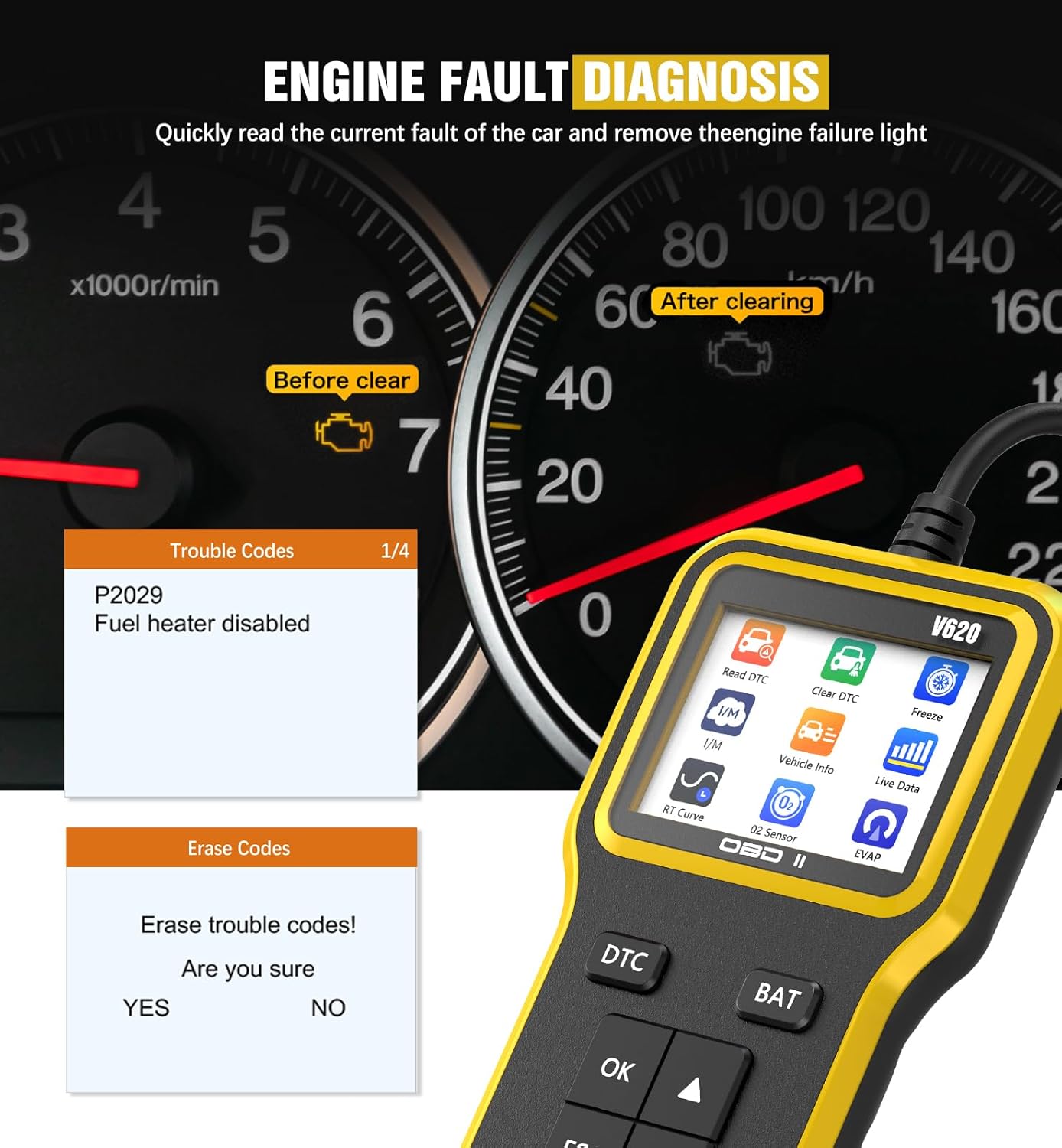
Figure 3: UMEIJA OBD2 Scanner displaying engine fault codes (e.g., P02029) and the option to erase them, indicating a successful diagnosis and clearing process.
5.2. Canlı Veri Akışı
- From the main menu, select 'Live Data' or navigate to the 'Data Stream' option.
- The scanner will display real-time sensor data from your vehicle, such as RPM, speed, coolant temperature, and more.
- Use the arrow buttons to scroll through different data parameters.

Figure 4: UMEIJA OBD2 Scanner displaying multiple real-time data streams, including FUEL SYS, LOAD_PCT, ECT, SHRFT, LONGFT, FRP, MAP, RPM, SPEED, and SPARKADV, providing a comprehensive view of vehicle performance.
5.3. Pil Testi
- From the main menu, select 'Battery' or press the 'BAT' button.
- Tarayıcı mevcut pil seviyesini gösterecektir.tage, helping you assess the battery's health.
5.4. O2 Sensor and EVAP System Diagnostics
- Navigate to the 'O2 Sensor' or 'EVAP' options from the main menu.
- These functions allow for advanced diagnostics related to oxygen concentration, fuel injection control, and evaporative emission systems, contributing to improved fuel efficiency and reduced emissions.
6. Sorun Giderme
- Tarayıcı Açılmıyor:
- Verify the OBD2 connector is securely plugged into the vehicle's port.
- Ensure the vehicle's ignition is in the 'ON' position (engine off).
- Aracın aküsünün voltajını kontrol edin.tage using the scanner's battery test function. A low battery might prevent the scanner from powering on.
-
Ask a question about this manual
Ask about setup, troubleshooting, compatibility, parts, safety, or missing instructions. Manuals+ will review the question and use this page’s manual context to help answer it.