
1. Giriş
The NZXT H2 Flow (CI-H21FB-01) is a compact vertical Mini-ITX PC case designed to maximize airflow and save space while accommodating high-performance components. It features smart cable management, tool-less access, and includes dual top fans and a premium PCIe 5.0 riser cable for a streamlined building experience.
Temel Özellikler:
- Hybrid Glass-and-Mesh Side Panel: Showcases your build while supporting up to a 280 mm radiator for efficient cooling.
- Kompakt Tasarım: A 20.7 L volume fits most GPUs up to 331 mm, offering high-end power in a small footprint.
- High Airflow Panels: Ultra-fine mesh panels on multiple sides maximize fresh air intake and filter dust, keeping components cooler and cleaner.
- Effortless Building: Tool-less panels, integrated cable routing Velcro straps, and intuitive wire management channels simplify installation.
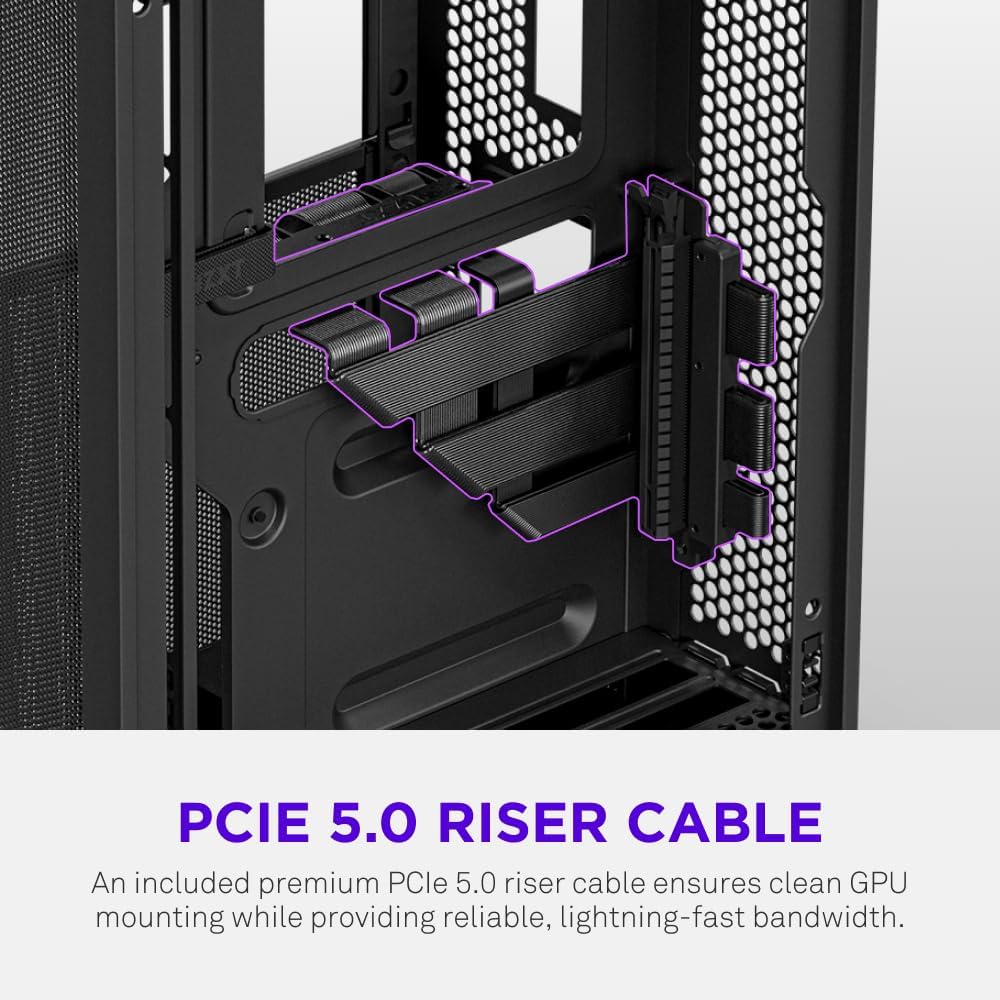
- Pre-Installed Performance: Includes a premium PCIe 5.0 riser cable for vertical GPU mounting and dual F120Q CV fans for immediate exhaust cooling.
2. Güvenlik Bilgileri
WARNING: Always disconnect power from your PC before performing any installation, maintenance, or troubleshooting. Failure to do so may result in personal injury or damage to components.
- Kurulumdan önce tüm talimatları dikkatlice okuyun.
- Bileşenlerin elektrostatik deşarj (ESD) hasarından korunması için antistatik bileklik takın veya sık sık topraklanmış metal bir nesneye dokunun.
- Handle components with care. Avoid touching pins or exposed circuitry.
- Küçük parçaları ve ambalaj malzemelerini çocuklardan uzak tutun.
- Aşırı ısınmayı önlemek için bilgisayar kasasının etrafında yeterli havalandırma olduğundan emin olun.
3. Paket İçeriği
Verify that all items are present in your NZXT H2 Flow package:
- NZXT H2 Flow Mini-ITX PC Case
- 2 x 120mm F120Q CV Top Fans (pre-installed)
- Premium PCIe 5.0 Riser Cable (pre-installed)
- Aksesuar Kutusu (vidalar, kablo bağları ve diğer küçük parçaları içerir)
4. Bileşen Uyumluluğu
The NZXT H2 Flow case is designed to accommodate specific component sizes for optimal performance and fit:
- Anakart: Mini ITX
- Grafik Kartı (GPU): Up to 331 mm in length
- Radyatör: Up to 280 mm (for liquid cooling solutions)
- Güç Kaynağı (PSU): SFX/SFXL form factor is recommended for best compatibility and cable management.
- Hayranlar: Includes 2 x 120mm top fans. Additional fan mounting options may be available depending on other component choices.
5. Kurulum ve Yükleme
Follow these steps to assemble your PC within the NZXT H2 Flow case. Refer to your individual component manuals for specific installation details.
5.1. Dava Bittiview ve Boyutlar
The NZXT H2 Flow is a compact vertical Mini-ITX case. Understanding its dimensions is crucial for planning your build.

5.2. Accessing the Case Interior
The H2 Flow features tool-less panels for easy access to the interior.

5.3. Motherboard and CPU Installation
Install your Mini-ITX motherboard and CPU (with cooler) before placing it into the chassis.
5.4. Güç Kaynağı Ünitesi (PSU) Kurulumu
The case supports SFX/SFXL power supplies. Mount the PSU in its designated area, typically at the bottom of the case.

5.5. Kablo Yönetimi
Utilize the integrated cable routing channels and Velcro straps for a clean and organized interior.
5.6. Grafik Kartı (GPU) Kurulumu
The H2 Flow supports GPUs up to 331 mm in length and includes a premium PCIe 5.0 riser cable for vertical mounting.

5.7. Soğutma Sistemi
The case comes with two pre-installed 120mm F120Q CV fans at the top for exhaust. It also supports up to a 280mm radiator for liquid cooling.


5.8. Ürün Bittiview Video
Görsel olarak daha fazlasını öğrenmek için bu resmi videoyu izleyin.view of the NZXT H2 Flow Mini-ITX PC Gaming Case.
6. Kullanım Talimatları
6.1. Güç Açma/Kapatma
Press the power button located on the front I/O panel to turn your PC on or off.
6.2. Ön G/Ç Bağlantı Noktaları
Ön giriş/çıkış paneli aşağıdakilere kolay erişim sağlar:
- USB 3.0 Bağlantı Noktaları
- USB-C bağlantı noktası
- Audio Jack (if applicable)
Connect your peripherals such as keyboards, mice, and headsets to these ports.
7. Bakım
7.1. Toz Filtrelerinin Temizlenmesi
The NZXT H2 Flow features ultra-fine mesh panels that act as dust filters. Regularly clean these panels to maintain optimal airflow and prevent dust buildup inside your PC.
- Gently remove the mesh panels from the case.
- Biriken tozu temizlemek için basınçlı hava veya yumuşak bir fırça kullanın.
- Reattach the panels securely.
7.2. Genel Temizlik
Yumuşak bir d kullanınamp cloth to wipe down the exterior of the case. Avoid abrasive cleaners or solvents.
8. Sorun Giderme
Bilgisayarınızın kurulumuyla ilgili sorunlarla karşılaşırsanız, aşağıdaki yaygın sorun giderme adımlarını göz önünde bulundurun:
- Güç Yok: Tüm güç kablolarının (güç kaynağı ile duvar prizi arası, güç kaynağı ile anakart arası, işlemci ve ekran kartı arası) güvenli bir şekilde bağlı olduğundan emin olun. Güç kaynağındaki güç anahtarını kontrol edin.
- Görüntü yok: Verify that your monitor is connected to the graphics card (not the motherboard I/O unless using integrated graphics) and that the GPU has proper power connections. Reseat the GPU and RAM.
- Aşırı Isınma: Check fan connections and orientation. Ensure mesh panels are clean and not obstructed. Verify CPU cooler installation and thermal paste application.
- Bileşen Algılanamadı: Reseat the component (GPU, RAM, storage drives). Check power and data connections.
For more complex issues, consult your individual component manuals or NZXT customer support.
9. Özellikler
| Özellik | Detay |
|---|---|
| Marka | NZXT |
| Model Adı | NZXT H2 Flow |
| Dava Türü | küçük kule |
| Anakart Uyumluluğu | Mini ITX |
| GPU Uzunluk Desteği | 331 mm'ye kadar |
| Radyatör Desteği | 280 mm'ye kadar |
| Dahil Fanlar | 2 x 120mm F120Q CV Top Fans |
| Included Riser Cable | Premium PCIe 5.0 |
| Güç Kaynağı Montaj Tipi | Bottom Mount (SFX/SFXL recommended) |
| Soğutma Yöntemi | Hava, Sıvı |
| Renk | Siyah |
| Malzeme | Cam, Metal |
| Ürün Ağırlığı | 4.55 Kilogram |
| Total USB 3.0 Ports | 1 |
| Other Special Features | Tool-less Installation, Integrated Cable Management |
10. Garanti ve Destek
10.1. Garanti Bilgileri
The NZXT H2 Flow Mini-ITX PC Case comes with a 2 Yıllık Üretici GarantisiLütfen garanti talepleriniz için satın alma belgenizi saklayın.
10.2. Müşteri Desteği
For technical assistance, troubleshooting, or warranty inquiries, please visit the official NZXT support websitesine gidin veya müşteri hizmetleri ekibiyle iletişime geçin.
NZXT Store: Amazon'daki NZXT Mağazasını ziyaret edin.