
1. Ürün Bittiview
This Ossuret car stereo is designed to upgrade the infotainment system in your Renault Clio 3 (models 2005-2014). It features a 9-inch Android 13 touchscreen, offering modern connectivity and navigation capabilities. The system integrates seamlessly with your vehicle's existing controls and provides a range of multimedia options.

Image: The Ossuret 9-inch Android 13 Car Stereo seamlessly integrated into a Renault Clio 3 dashboard, showcasing its large display and modern interface.
2. Kurulum ve Kurulum
2.1 Paket İçeriği
Kurulumdan önce tüm bileşenlerin mevcut olduğundan emin olun:
- Main Head Unit (9-inch Android 13 Car Stereo)
- Güç kablosu
- Harici Mikrofon
- GPS Anteni
- RCA Kablo Demeti (yalnızca WiFi sürümü için)
- USB Kabloları (2 adet)
- Arka Kamera Girişi RCA Kablosu
- Canbus Dekoder
- Fabrika USB Adaptörü
- Radyo Anteni Adaptör Kablosu
- Radyo Anten Adaptörü

Image: A comprehensive layout of all included accessories, such as power cables, USB cables, GPS antenna, external microphone, RCA harness, Canbus decoder, and various adapters.
2.2 Uyumluluk
This car stereo is specifically designed for Renault Clio 3 models manufactured between 2005 and 2014. Ensure your vehicle falls within this range for proper fitment and functionality.
2.3 Kurulum Adımları (Genel Kılavuz)
Installation typically involves removing the factory radio and installing the new head unit using the provided frame and wiring harnesses. Professional installation is recommended.
- Hazırlık: Herhangi bir elektrik işine başlamadan önce aracın aküsünün bağlantısını kesin.
- Remove Factory Unit: Carefully remove the existing car stereo and trim panels from your Renault Clio 3 dashboard.
- Kablolamayı Bağlayın: Connect the provided power cable, RCA harness, USB cables, and antenna adapters to the new head unit and the vehicle's wiring. The Canbus decoder ensures compatibility with factory features like steering wheel controls.
- GPS Antenini Takın: GPS antenini açık bir yere monte edin view Gökyüzüne ait bir şey, genellikle gösterge panelinde veya ön camın altında bulunur.
- Bağlantıları Test Edin: Before fully reassembling, temporarily connect the battery and test the unit's basic functions (power, audio, display).
- Güvenli Ünite: Mount the new head unit into the dashboard using the custom frame, ensuring a secure and flush fit.
- Yeniden birleştirme: Reinstall all trim panels and reconnect the vehicle battery.

Image: A visual comparison showing the original Renault Clio 3 dashboard setup (left) versus the modernized dashboard with the Ossuret 9-inch car stereo installed (right).
3. Kullanım Talimatları
3.1 Güç Açma/Kapatma ve Temel Navigasyon
Press and hold the power button (usually located on the front panel or side) to turn the unit on or off. Navigate the Android 13 interface using the responsive 9-inch capacitive touchscreen.

Image: A hand demonstrating interaction with the responsive touchscreen interface of the car stereo.
3.2 Kablosuz CarPlay ve Android Auto
The unit supports wireless Apple CarPlay and Android Auto via the pre-installed and activated Zlink application. Connect your smartphone via Wi-Fi or Bluetooth to access phone functions, navigation, music, and messages directly on the car stereo display.
- Bağlantı: Enable Wi-Fi and Bluetooth on your smartphone. Open the Zlink app on the car stereo and follow the on-screen instructions to pair your device.
- Özellikler: Access apps like Google Maps, Spotify, Podcasts, and make calls hands-free.

Image: The car stereo displaying the Apple CarPlay and Android Auto interfaces, showing various compatible applications like Phone, Music, Maps, and Messages.
3.3 Bluetooth İşlevselliği
Eller serbest görüşme ve ses akışı için cep telefonunuzu Bluetooth üzerinden bağlayın.
- Eşleştirme: Go to the Bluetooth settings on the car stereo and your phone. Select the car stereo from your phone's available devices to pair.
- Çağrılar: Use the built-in microphone for clear hands-free conversations. You can download your phone's contacts to the radio.
- Müzik akışı: Telefonunuzdaki sesi aracın hoparlörlerinden çalın.

Image: The car stereo displaying a phone dialer interface, indicating an active Bluetooth connection for hands-free calling, with a built-in microphone for voice input.
3.4 GPS Navigasyonu
The unit features integrated GPS navigation with support for online and offline map applications (e.g., Waze, Navitel, Google Maps). It offers voice guidance and a dual-zone function, allowing navigation to run in the background while other media plays.
- Harita Güncellemeleri: Ensure your map data is up-to-date for accurate navigation.
- Çevrimiçi Gezinme: Connect to Wi-Fi to use online navigation apps.
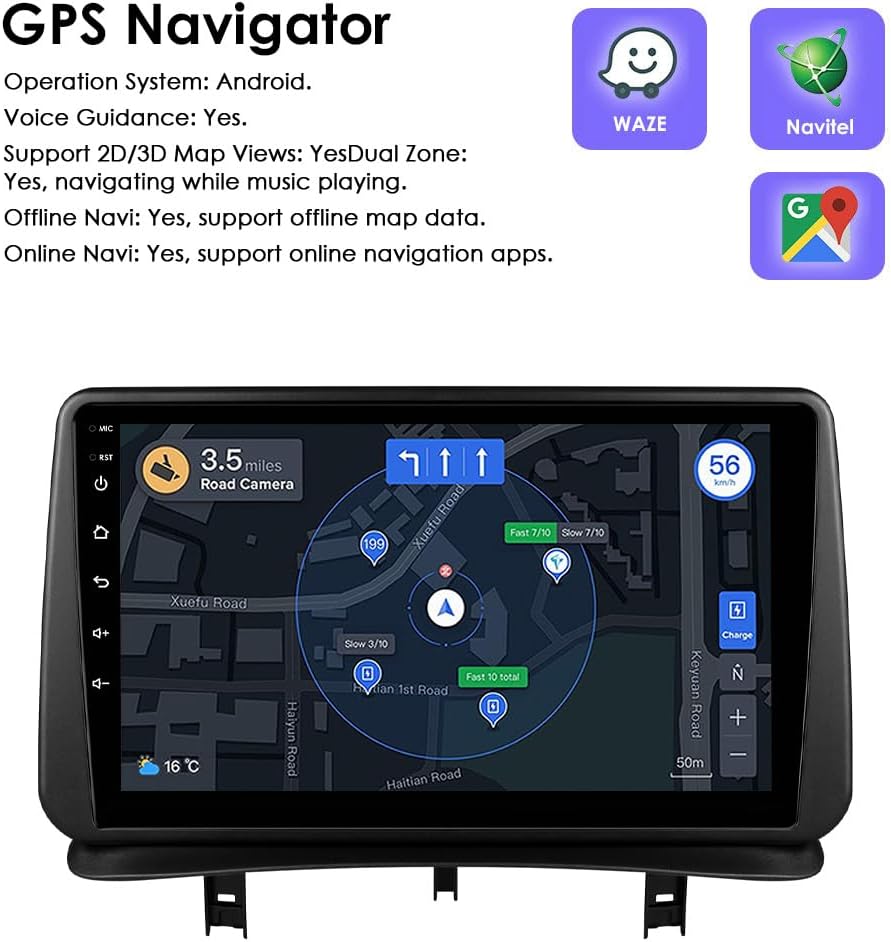
Image: The car stereo displaying a detailed GPS navigation map with route information, current speed, and road camera alerts.
3.5 USB Medya Oynatma
Connect external USB devices (up to 2TB) to play audio and video files. The unit supports various multimedia formats.
- Desteklenen Ses Biçimleri: MP3, WMA, AAC, RM, FLAC, vb.
- Desteklenen Video Formatları: MPEG-1/2/4, H264, H263, VC1, RV, RMVB, DivX, Sorenson Spark, VP8, AVS Stream, etc.

Image: The car stereo displaying a file browser interface for USB storage, showing various folders and files, with two USB ports connected at the bottom.
3.6 FM Radyo
Access the FM radio function to listen to local stations. The interface allows for easy tuning and station saving.

Image: The car stereo displaying the FM radio interface, showing frequency tuning and station presets.
3.7 Direksiyon Kontrolü
The unit is compatible with your vehicle's factory steering wheel controls. This allows you to adjust volume, change tracks, and answer calls without taking your hands off the wheel.

Image: The car stereo displaying media playback controls, indicating compatibility with steering wheel controls for safe operation.
3.8 Geri Görüş Kamerası Girişi
The system supports a rear-view camera input. When the vehicle is shifted into reverse, the display automatically switches to the camera feed, providing a clear view of the area behind your car and assisting with parking maneuvers.

Image: A technical diagram illustrating the backup camera display interface on the car stereo, complete with dynamic parking guidelines.
3.9 Bölünmüş Ekran Görüntüsü
Utilize the split-screen feature to run two applications simultaneously, such as navigation and music playback, or a camera feed and music, enhancing multitasking capabilities.

Image: The car stereo displaying a split-screen view, with navigation on one side and music playback on the other, demonstrating simultaneous application usage.
3.10 Ses Kontrolü
The system supports voice commands, allowing you to control various functions hands-free. Voice control sensitivity is enhanced for better responsiveness.

Image: The car stereo interface showing voice command prompts, such as "Hey Siri, find a restaurant" and "OK, Navigate home," indicating active voice control functionality.
3.11 Wi-Fi Bağlantısı
Connect the car stereo to a Wi-Fi hotspot (e.g., from your smartphone) to access online features, download apps, and browse the internet.

Image: The car stereo displaying a YouTube interface, with a smartphone showing a Wi-Fi signal, illustrating the unit's Wi-Fi connectivity for online content.
3.12 Sound Adjustment (Built-in DSP)
The integrated Digital Sound Processor (DSP) allows for advanced audio customization, including a 48-band EQ adjustment, to optimize sound quality to your preference.

Image: The car stereo displaying a graphic equalizer interface, indicating the presence of a built-in DSP for detailed sound adjustments.
4. Bakım
Ossuret araç teybinizin uzun ömürlü ve optimum performans göstermesi için aşağıdaki bakım yönergelerini izleyin:
- Temizlik: Use a soft, dry cloth to clean the touchscreen and exterior. For stubborn smudges, a slightly damp cloth with a mild, non-abrasive cleaner can be used, followed by drying. Avoid harsh chemicals or abrasive materials.
- Yazılım Güncellemeleri: Periodically check for available software updates to ensure the system runs efficiently and has the latest features and security patches.
- Sıcaklık: Cihazı uzun süre aşırı sıcaklıklara maruz bırakmaktan kaçının.
- Bağlantılar: Tüm kabloların sağlam bir şekilde bağlı olduğundan emin olun. Gevşek bağlantılar aralıklı sorunlara yol açabilir.
5. Sorun Giderme
Araç müzik sisteminizde sorun yaşıyorsanız, aşağıdaki yaygın sorunlar ve çözümlerine göz atın:
| Sorun | Olası Neden | Çözüm |
|---|---|---|
| Ünite açılmıyor. | Gevşek güç bağlantısı, atmış sigorta, araç aküsü sorunu. | Güç kablosu bağlantılarını kontrol edin. Araç sigortalarını inceleyin. Araç aküsünün şarjlı olduğundan emin olun. |
| Ses yok veya bozuk. | Speaker wiring issues, incorrect audio settings, volume too low. | Verify speaker connections. Adjust volume and audio settings (EQ, balance). |
| Direksiyon kumandaları çalışmıyor. | Canbus decoder not correctly installed or configured. | Ensure the Canbus decoder is properly connected and configured in the system settings. Refer to the installation guide for specific wiring. |
| GPS sinyali zayıf veya doğru değil. | GPS antenna improperly placed, environmental interference. | GPS antenini daha net ışık alan bir konuma taşıyın. view Gökyüzünün. Engellerden kaçının. |
| CarPlay/Android Auto bağlantısı kurulmuyor. | Bluetooth/Wi-Fi off on phone, Zlink app not running, phone compatibility. | Ensure Bluetooth and Wi-Fi are active on your phone. Restart the Zlink app. Check phone compatibility with CarPlay/Android Auto. |
| System is slow or freezes. | Çok fazla uygulama çalışıyor, bellek yetersiz, yazılım hatası. | Close unnecessary applications. Restart the unit. Check for and install any available software updates. |
6. Özellikler
- Marka: Ossuret
- Uyumlu Araç: Renault Clio 3 (2005-2014)
- Ekran Boyutu: 9 inç
- İşletim Sistemi: Android 13
- Hafıza: 2GB RAM + 32GB Depolama
- Özel Özellikler: Wireless CarPlay, Android Auto, GPS Navigation, Bluetooth, Wi-Fi, Steering Wheel Control, Backup Camera Input, Split Screen Display, Voice Control, Built-in DSP
- Bağlantı Teknolojisi: Bluetooth, USB, Wi-Fi
- Kontrol Yöntemi: Dokunma, Ses
- Ses Çıkış Modu: Stereo
- Uyumlu Cihazlar: Akıllı telefon

Image: A graphic highlighting key specifications such as 48 EQ adjustment, Quad-Core processor, 2GB RAM, and 32GB storage, alongside the car stereo interface.
7. Garanti ve Destek
7.1 Garanti Bilgileri
Bu Ossuret araç teybi şunlarla birlikte geliyor: 1 yıllık garanti Satın alma tarihinden itibaren geçerlidir. Bu garanti, üretim hatalarını ve normal kullanımdaki arızaları kapsar. Garanti talepleriniz için lütfen satın alma belgenizi saklayın.
7.2 Müşteri Desteği
For technical assistance, troubleshooting beyond this manual, or warranty inquiries, please contact Ossuret customer support through the retailer where the product was purchased. You may also visit the official Ossuret webEk kaynaklar ve iletişim bilgileri için site.