
Ürün Bittiview
The Ratakee Digital Alarm Clock Radio RA01 is designed for ease of use and clear readability, making it suitable for bedrooms, offices, and kitchens. It features a large 1.4-inch LED display, AM/FM radio with presets, multiple alarm tones, a sleep timer, and a convenient snooze function. Dual power options ensure reliability, even during power outagee.
Temel Özellikler:
- Kolay Kullanım: Simplified controls with switches for alarm functions.
- Büyük LED Ekran: 1.4-inch green LED digits for clear visibility.
- Dijital AM/FM Radyo: Tune into favorite stations with 20 AM and 20 FM presets.
- Multiple Alarm Tones: Choose from AM/FM radio, music, or classic beep.
- Ayarlanabilir Alarm Sesi: Levels 5-15 for personalized wake-up experience.
- Kısılabilir Ekran: Rotary knob for 0-100% brightness adjustment.
- Uyku Zamanlayıcısı: Auto-off radio function (10-90 minutes).
- Kulaklık girişi: For private listening with stereo sound.
- Çift Güç: AC 120V outlet or 3 AA batteries (not included) for backup.
- Large Snooze Button: Provides an extra 9 minutes of sleep.
Başlarken
Kutunun Açılması ve İlk Kurulum
Upon receiving your Ratakee Digital Alarm Clock Radio, carefully remove it from its packaging. The package includes the alarm clock radio, a user manual, and a warranty card.
Video Açıklaması: This video provides a comprehensive guide to the Ratakee Digital Alarm Clock Radio. It covers unboxing the device, connecting it to power, setting the time, adjusting the display brightness, and demonstrating the classic beep and music alarm sounds. Specific segments include unboxing (0:00-0:29), plugging into a receptacle (0:30-0:49), setting the time (0:50-1:50), adjusting the dimmer (1:51-2:09), setting the alarm to beep (2:10-2:17), and setting the alarm to music (2:18-2:53).
Güç Bağlantısı
The alarm clock radio offers two power methods: AC power and battery backup.
- AC Gücü: Insert the AC power cord into the port on the back of the unit, then plug it into a standard AC 110-120V outlet. The display will light up.
- Pil Yedekleme: For battery backup, open the battery compartment on the bottom of the unit. Install 3 AA batteries (not included), ensuring correct polarity. Close the compartment cover. In case of AC power loss, the batteries will power the clock, alarm, and radio, though the display will auto-dim after 20 seconds of no operation to conserve power.

Resim Açıklaması: This image illustrates the dual power options for the Ratakee Digital Alarm Clock Radio. It shows the clock displaying '1:02 AM', an AC power plug ready to be connected, and three AA batteries, emphasizing that the device can be powered by an outlet or batteries for backup.
Temel İşlemler
Kontrol Düzeni
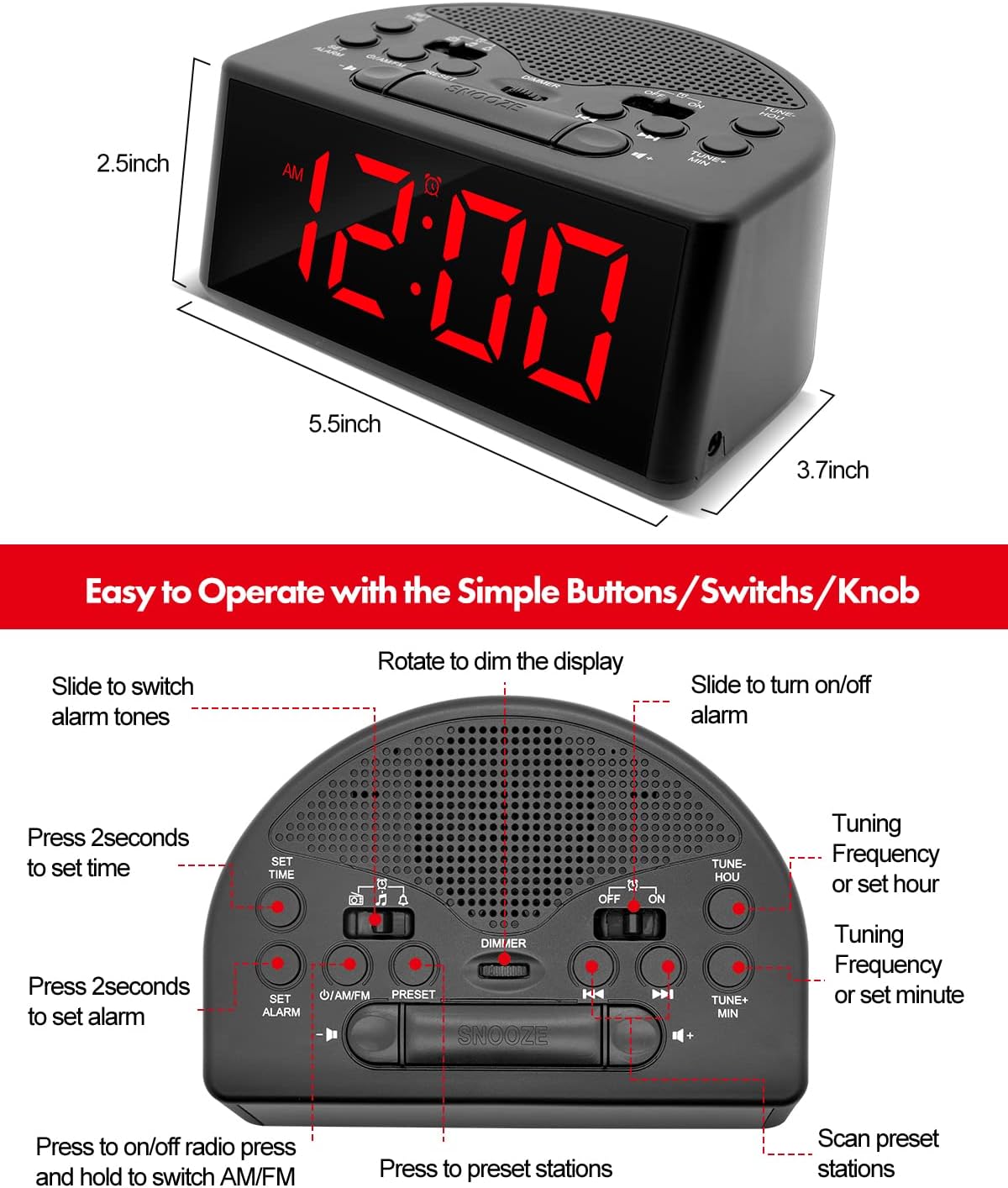
Resim Açıklaması: Detaylı bir yukarıdan aşağıya bakış view of the Ratakee Digital Alarm Clock Radio, labeling its various controls. These include buttons for 'SET TIME', 'SET ALARM', 'ON/OFF', 'PRESET', 'TUNE+ MIN', 'TUNE- HOU', and a large 'SNOOZE' button. It also shows switches for 'AM/FM' radio, alarm tone selection (music/beep/radio), and 'OFF/ON' for the alarm, along with a 'DIMMER' rotary knob.
Zamanı Ayarlama
- Basılı tutun AYARLANAN ZAMAN button for 2 seconds until the display flashes.
- Kullanın TUNE+ HOU Saati ve zamanı ayarlamak için düğme TUNE+ MIN button to adjust the minutes. Observe the AM/PM indicator.
- Basmak AYARLANAN ZAMAN Tekrar onaylamak ve zaman ayarı modundan çıkmak için.
Video Açıklaması: This segment of the instructional video demonstrates how to set the current time on the Ratakee Digital Alarm Clock Radio. It shows the user pressing the 'SET TIME' button and then using the hour and minute adjustment buttons to set the desired time.
Alarmı Ayarlama
The alarm clock offers three selectable alarm sounds: classic beep, music, or AM/FM radio.
- Basılı tutun ALARM KURMAK button for 2 seconds until the alarm time flashes.
- Kullanın TUNE+ HOU button to adjust the alarm hour and the TUNE+ MIN Alarm dakikalarını ayarlamak için düğmeye basın.
- Slide the alarm tone switch (located near the AM/FM switch) to select your desired alarm sound: Bip sesi (bell icon), Müzik (note icon), or Radyo (radio icon).
- Basmak ALARM KURMAK Tekrar onaylamak için.
- Alarmı etkinleştirmek için kaydırın. AÇIK/KAPALI alarm switch (located on the right side of the top panel) to the 'ON' position.
- The alarm volume is adjustable from levels 5-15. The default is 10. Adjust using the volume buttons.

Resim Açıklaması: This image highlights the three selectable alarm sounds on the Ratakee Digital Alarm Clock Radio. It displays '12:00 AM' and shows visual cues for 'Beep', 'Radio', and 'Music' alarm options, along with an adjustable alarm volume bar.
Video Açıklaması: This segment demonstrates setting the alarm to the classic beep sound. The clock displays '8:29 PM' and the beep alarm activates.
Video Açıklaması: This segment demonstrates setting the alarm to a music melody. The clock displays '8:30 PM' and a pleasant melody plays as the alarm sound.
AM/FM Radyo Çalışması
- Kaydırın AÇIK/KAPALI radio switch to 'ON' to turn on the radio.
- Kaydırın Sabah/FM switch to select between AM or FM bands.
- Kullanın DÜZENLE+ or AYAR- buttons to manually tune to a station. Press and hold to auto-scan for the next available station.
- Ön Ayarları Ayarlama: To save a station, tune to the desired frequency, then press and hold the ÖN AYAR button until the preset number flashes. Use DÜZENLE+ or AYAR- to select a preset number (up to 20 AM and 20 FM stations), then press ÖN AYAR tekrar kaydetmek için.
- Ön Ayarların Geri Çağrılması: Kısaca basın ÖN AYAR Kaydedilmiş istasyonlar arasında geçiş yapmak için düğme.
- Uyku Zamanlayıcısı: Radyo açıkken, tuşuna basın. UYKU ZAMANLAYICISI button (often integrated with other controls, refer to the control layout image) to set a duration (10-90 minutes) after which the radio will automatically turn off.

Resim Açıklaması: This image showcases the AM/FM radio capabilities of the Ratakee Digital Alarm Clock Radio. It displays 'FM 102 MHz' with illustrative radio wave graphics and icons indicating features like AM/FM Radio, Radio Volume (1-16 Levels), Auto Search and Storage, and Good Reception.
Dimmer Ekranı
Adjust the brightness of the LED display from 0% (off) to 100% using the rotary dimmer knob located on the top panel. This allows you to customize the display intensity for comfort, especially in dark environments.

Resim Açıklaması: This image displays three Ratakee Digital Alarm Clock Radios, each showing '10:10 AM' but with varying display brightness levels. A slider graphic illustrates the 0-100% dimmable range, emphasizing the rotary knob for brightness adjustment.
Video Açıklaması: This segment of the instructional video demonstrates the full dimmable range of the display using the rotary knob. The clock's display brightness changes from bright to dim and back, showing the flexibility of the dimmer function.
Erteleme Fonksiyonu
Alarm çaldığında, büyük düğmeye basın. UYUKLAMA button located on the top center of the unit to temporarily silence the alarm for 9 minutes. You can use the snooze function up to 3 times. To stop the alarm completely until the next day, press any other button except SNOOZE.

Resim Açıklaması: This image shows a person's hand pressing the prominent snooze button on the Ratakee Digital Alarm Clock Radio, which displays '9:00 AM'. The scene suggests the ease of using the snooze function for extra rest.
Kulaklık Girişi
A 3.5mm earphone jack is provided on the side of the unit for private listening to the radio. When earphones are connected, the stereo mode will automatically activate, providing an enhanced listening experience without disturbing others.
Bakım
Temizlik ve Bakım
- To clean the unit, wipe it with a soft, dry cloth.
- Cilaya zarar verebileceğinden aşındırıcı temizleyiciler, cilalar veya çözücüler kullanmayın.
- Keep the unit away from direct sunlight, extreme temperatures, and moisture.
- Ensure proper ventilation and do not block the speaker grille.
Sorun giderme
Yaygın Sorunlar ve Çözümleri
| Sorun | Olası Neden | Çözüm |
|---|---|---|
| Ekranda görüntü yok/Cihaz açılmıyor | AC power cord not connected or loose; batteries depleted or incorrectly installed. | Ensure AC cord is securely plugged in. Check battery installation and replace if necessary. |
| Alarm çalmıyor | Alarm etkinleştirilmedi; alarm sesi çok düşük; yanlış alarm saati ayarlandı. | Slide the alarm ON/OFF switch to 'ON'. Increase alarm volume. Verify alarm time and AM/PM setting. |
| Zayıf radyo alımı | Weak signal; antenna not extended; interference from other electronics. | Extend and adjust the FM wire antenna for better reception. For AM, rotate the unit. Move away from other electronic devices. |
| Ekran çok parlak/loş | Dimmer ayarının yapılması gerekiyor. | Rotate the dimmer knob on the top panel to adjust brightness to your preference. |
Özellikler
- Marka: Komisyoncu
- Model Numarası: RA01
- Görüntüleme Türü: Dijital LED
- Güç Kaynağı: Corded Electric (AC 120V) / 3 AA Batteries (backup, not included)
- Ürün Ölçüleri: 5.4"G x 2.44"Y
- Ürün Ağırlığı: 7.2 ons
- Oda Tipi: Yatak odası
- Özel Özellikler: Adjustable Brightness, Adjustable Volume, Large Display, Loud Alarm, AM/FM Radio, Earphone Port, Sleep Timer, Snooze
- Malzeme: Plastik
Garanti ve Destek
This Ratakee product comes with a 1 yıllık sınırlı garanti ve bir 90 günlük para iade garantisi. For any support inquiries, troubleshooting assistance, or warranty claims, please refer to the contact information provided on your warranty card or visit the official Ratakee support webalan.