
1. Giriş
Thank you for choosing the Schneider 43A1 4K UHD LED TV. This television combines advanced display technology with smart features to provide an immersive viewing experience. Featuring a 4K Ultra High Definition display, QLED-LCD technology with Direct LED backlighting, and the VIDAA Smart TV platform, your new TV offers vibrant colors, deep blacks, and access to a wide range of entertainment.
This manual provides essential information for the safe and efficient use of your television. Please read it thoroughly before operating the device and retain it for future reference.
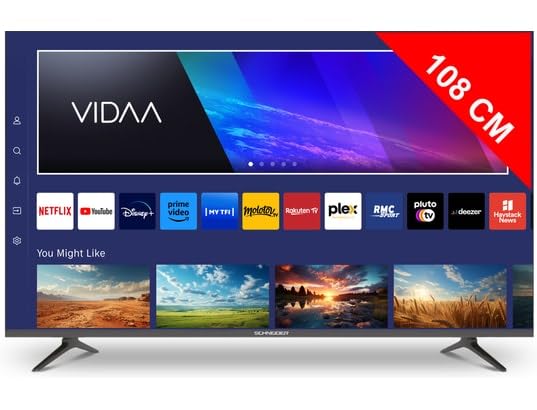
Resim 1.1: Ön view of the Schneider 43A1 TV with VIDAA interface.
2. Güvenlik Bilgileri
Güvenli çalışmayı sağlamak ve hasarı önlemek için lütfen aşağıdaki güvenlik önlemlerine uyun:
- Atama: Position the TV on a stable, level surface. Avoid placing it in direct sunlight, near heat sources, or in environments with high humidity or dust.
- Havalandırma: Ensure adequate ventilation around the TV. Do not block ventilation openings. Maintain a minimum distance of 10 cm from walls or other objects.
- Güç Kaynağı: Yalnızca belirtilen güç kaynağı hacmini kullanıntage. Ensure the power cord is not pinched or walked on. Disconnect the power plug during lightning storms or when unused for extended periods.
- Temizlik: Temizlemeden önce televizyonun fişini çekin. Yumuşak, kuru bir bez kullanın. Sıvı veya aerosol temizleyiciler kullanmayın.
- Sıvılar: Do not expose the TV to dripping or splashing liquids. Do not place objects filled with liquids, such as vases, on the TV.
- Çocuklar: Supervise children to ensure they do not climb on the TV or furniture.
- Duvara Montaj: If wall-mounting, use a VESA compatible bracket (200 x 200 mm) and ensure proper installation by qualified personnel to prevent injury.
3. Paket İçeriği
Lütfen tüm ürünlerin mevcut ve iyi durumda olduğundan emin olun:
- Schneider 43A1 4K UHD LED TV
- Uzaktan kumanda
- Güç kablosu
- TV Sehpası (2 adet)
- TV Sehpası Vidaları
- Kullanım Kılavuzu (bu belge)
4. Kurulum
4.1 Paketin açılması
Carefully remove the TV from its packaging. It is recommended to keep the original packaging for potential future transport or service needs.
4.2 Stand Kurulumu
If you are not wall-mounting the TV, attach the included stand pieces to the bottom of the TV using the provided screws. Ensure the stand is securely fastened before placing the TV upright.
4.3 Duvara Montaj (Opsiyonel)
The Schneider 43A1 is compatible with VESA 200 x 200 mm wall mounts. For safe installation, it is highly recommended to use a professional installer. Refer to your wall mount's instructions for specific details.
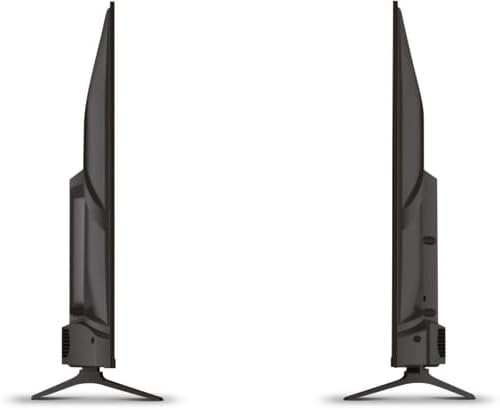
Resim 4.1: Yan view of the Schneider 43A1 TV, illustrating its profile for placement or wall mounting.
4.4 Harici Cihazların Bağlanması
Televizyonunuz çeşitli bağlantı seçenekleri sunmaktadır:
- HDMI: Connect up to three HDMI 2.0 devices (e.g., Blu-ray player, game console, set-top box) to the HDMI ports.
- USB BAĞLANTI: Medya oynatmak için USB depolama aygıtlarını bağlamak üzere iki adet USB bağlantı noktası mevcuttur.
- AV/Audio Input: Kompozit video ve stereo ses gerektiren eski cihazlar için.
- Koaksiyel Çıkış: Harici bir ses sistemine bağlanmak için.
- Anten/Kablo Girişi: DVB-T/T2/C/S2 yayını almak için anteninizi veya kablolu TV sinyalinizi bağlayın.
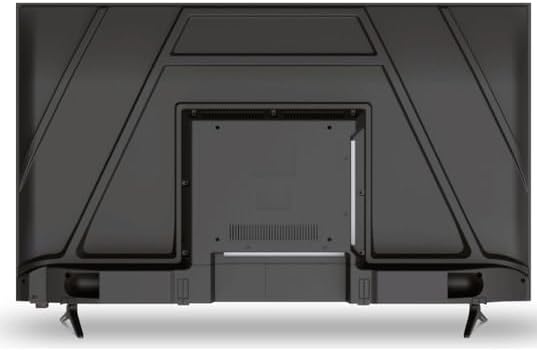
Resim 4.2: Arka view of the Schneider 43A1 TV, highlighting connection ports.
4.5 Gücün Bağlanması
Plug the power cable into the TV's power input, then into a suitable wall outlet.
4.6 İlk Kurulum Sihirbazı
Upon first power-on, the TV will guide you through an initial setup process. This includes selecting your language, connecting to a Wi-Fi network, and scanning for available channels (DVB-T/T2/C/S2).
5. Çalıştırma
5.1 Uzaktan Kumanda İşlevleri
Uzaktan kumanda, televizyonun özelliklerini kontrol etmenizi sağlar:
- Güç Düğmesi: Televizyonu açar veya kapatır.
- Sesi Aç/Kapat: Ses seviyesini ayarlar.
- Kanal Yukarı/Aşağı: TV kanallarını değiştirir.
- Giriş/Kaynak: Selects the input source (HDMI, USB, TV Tuner).
- Yön tuşları: Menü gezintisi için.
- Akıllı TV Düğmeleri: Direct access to popular apps like Netflix, Prime Video, YouTube.
5.2 Smart TV (VIDAA)
The integrated VIDAA Smart TV platform provides access to a variety of applications and streaming services. Connect your TV to the internet via Wi-Fi to enjoy features like Netflix, Prime Video, and YouTube. Bluetooth connectivity allows for wireless connection to compatible audio devices.

Resim 5.1: Açısal ön view of the Schneider 43A1 TV, displaying the VIDAA Smart TV interface.
5.3 Giriş Seçimi
Press the 'Input' or 'Source' button on your remote control to switch between connected devices (HDMI 1, HDMI 2, HDMI 3, USB, AV, TV Tuner).
5.4 Görüntü ve Ses Ayarları
Access the TV's menu to adjust picture and sound settings. The 4K UHD resolution, QLED-LCD technology, and Direct LED backlighting ensure a high-quality visual experience. The TV also features upscaling to enhance lower-resolution content. Audio is delivered via 2 x 8 W RMS stereo speakers with Dolby Audio support.
5.5 PC Monitor Mode
The TV can be used as a PC monitor by connecting your computer via an HDMI cable. This mode optimizes the display for computer use.
6. Bakım
6.1 TV'nin temizlenmesi
Before cleaning, ensure the TV is unplugged from the power outlet.
- Ekran: Ekranı yumuşak, tiftiksiz bir bezle nazikçe silin. İnatçı lekeler için hafifçe silin.ampBezi su veya özel bir ekran temizleyicisi ile silin (doğrudan ekrana sıkmayın).
- Dış: Televizyonu silmek için yumuşak, kuru bir bez kullanın.asing. Aşındırıcı temizleyicilerden veya çözücülerden kaçının.
6.2 Yazılım Güncellemeleri
Televizyonunuz, performansı artırmak ve yeni özellikler eklemek için yazılım güncellemeleri alabilir. Bu güncellemeleri otomatik olarak almak için televizyonunuzun internete bağlı olduğundan emin olun veya ayarlar menüsünden manuel olarak kontrol edin.
7. Sorun Giderme
Televizyonunuzda sorunlarla karşılaşırsanız, aşağıdaki yaygın sorunlara ve çözümlere bakın:
- Güç Yok:
- Güç kablosunun televizyona ve duvardaki prize sağlam bir şekilde takılı olup olmadığını kontrol edin.
- Duvar prizinin çalıştığından emin olun (başka bir cihazla test edin).
- Uzaktan kumandadaki veya televizyonun üzerindeki güç düğmesine basın.
- Görüntü/Ses Yok:
- Doğru giriş kaynağının seçildiğini doğrulayın (örneğin, HDMI 1, TV).
- Televizyon ile harici cihazlar arasındaki tüm kablo bağlantılarını kontrol edin.
- Ses seviyesinin kısık veya minimuma ayarlanmış olmadığından emin olun.
- Anten kullanıyorsanız, anten bağlantısını kontrol edin ve kanal taraması yapın.
- Uzaktan Kumanda Çalışmıyor:
- Uzaktan kumandanın pillerini değiştirin.
- Uzaktan kumanda ile televizyonun kızılötesi sensörü arasında herhangi bir engel olmadığından emin olun.
- Smart TV/Network Issues:
- Wi-Fi yönlendiricinizi ve internet bağlantınızı kontrol edin.
- Go to the TV's network settings to re-connect to your Wi-Fi network.
- Restart the TV and your router.
Bu çözümleri denedikten sonra sorun devam ederse lütfen müşteri desteğiyle iletişime geçin.
8. Özellikler
| Özellik | Şartname |
|---|---|
| Örnek | Schneider 43A1 |
| Ekran Boyutu | 109 cm (43 inç) |
| Çözünürlük | 4K Ultra HD (3840 x 2160 piksel) |
| Ekran Teknolojisi | QLED-LCD with Direct LED Backlight |
| Kontrast Oranı | 1100:1 |
| Parlaklık | 200 cd/m² |
| Ses Çıkışı | 2 x 8 W RMS Stereo |
| Ses Teknolojisi | Dolby Ses |
| HDMI Bağlantı Noktaları | 3 (HDMI 2.0) |
| USB Bağlantı Noktaları | 2 |
| Diğer Girişler | AV/Audio Input |
| Çıktılar | Koaksiyel Çıkış |
| Ayarlayıcı | DVB-T/T2/C/S2 |
| Akıllı TV Platformu | VIDAA (Netflix, Prime Video, YouTube) |
| Kablosuz Bağlantı | Wi-Fi, Bluetooth |
| VESA Uyumluluğu | 200x200 mm |
| Ağırlık | 7.5 Kilogram |