
giriiş
This manual provides essential information for setting up, operating, maintaining, and troubleshooting your XIAOMI Redmi 15C smartphone. Please read it carefully to ensure proper use and to maximize the device's performance and longevity.
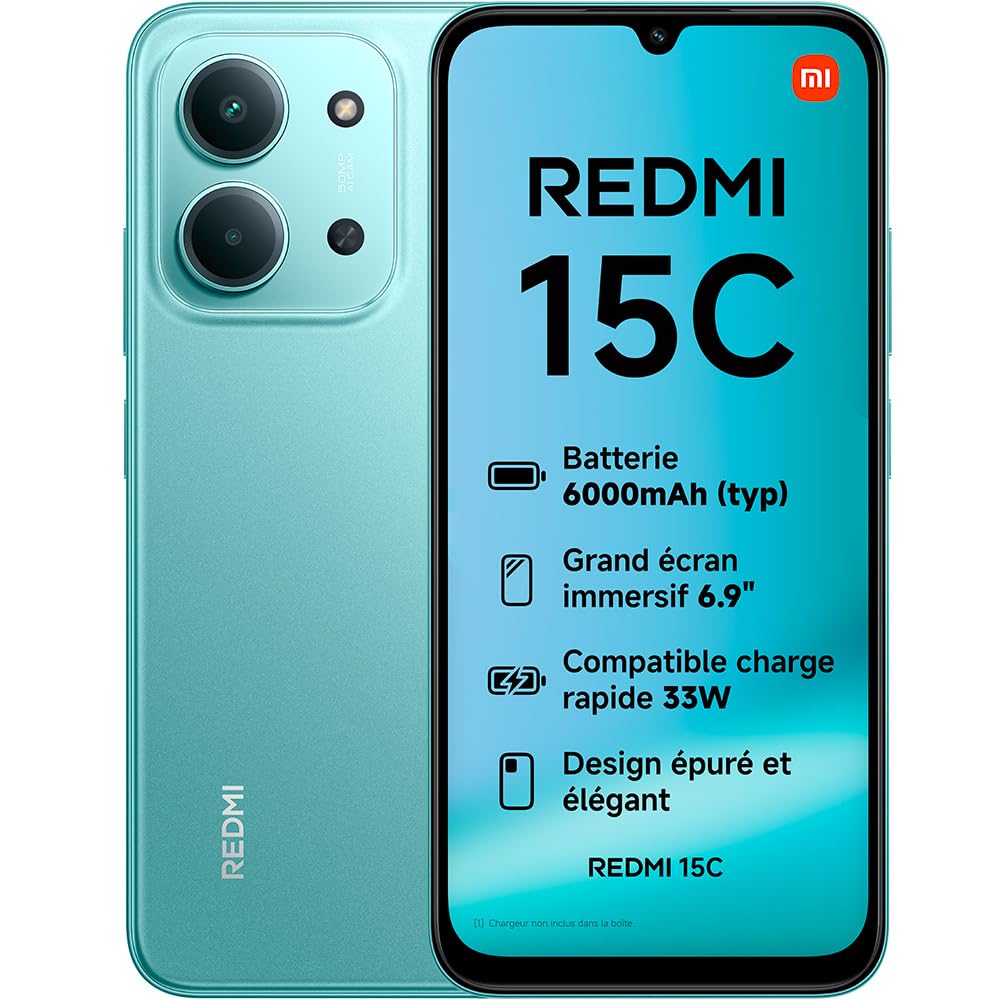
Image: The XIAOMI Redmi 15C smartphone, showcasinşık tasarımı ve geniş ekranıyla.
The Redmi 15C features a long-lasting 6000 mAh battery, an immersive 6.9-inch 120Hz display, and a powerful MediaTek Helio G81-Ultra octa-core processor. It is equipped with a 50 MP AI dual camera system and boasts IP64 dust and water resistance.
Kurmak
1. Kutuda Neler Var?
- XIAOMI Redmi 15C Akıllı Telefon
- USB Kablosu (Tip-C)
- SIM Çıkarma Aleti
Note: A charger is not included and must be purchased separately.

Image: Illustration of the items included in the Redmi 15C packaging: the smartphone, a USB-C cable, and a SIM ejection tool.
2. SIM Kartın Takılması
- Cihazınızın yan tarafında bulunan SIM kart tepsisini bulun.
- Insert the SIM ejection tool into the small hole next to the tray and press firmly until the tray pops out.
- Nano-SIM kartlarınızı altın renkli kontaklar aşağı bakacak şekilde tepsiye yerleştirin. Doğru hizalandıklarından emin olun.
- Tepsiyi yerine oturana kadar dikkatlice itin.
3. İlk Şarj ve Güç Açma
- Connect the USB Type-C cable to your Redmi 15C and to a compatible power adapter (not included).
- Allow the device to charge for at least 30 minutes before first use.
- To power on, press and hold the power button until the XIAOMI logo appears.
Cihazınızı Çalıştırma
Görüntüleme ve Etkileşim
The Redmi 15C features a large 6.9-inch immersive display with an AdaptiveSync refresh rate of up to 120Hz, providing a smooth visual experience for browsing and media consumption. The display also holds TÜV Rheinland certifications for Low Blue Light, Flicker Free, and Circadian Friendly, designed for optimal visual comfort.

Image: The immersive 6.9-inch display of the Redmi 15C, highlighting its visual quality.
Performans
Powered by the MediaTek Helio G81-Ultra octa-core processor, the Redmi 15C delivers consistent and fluid performance for daily tasks and extended use. It supports up to 16GB of RAM with memory extension for enhanced multitasking.

Image: A visual representation of the smartphone's RAM, indicating memory extension capabilities.
Kamera Sistemi
The device features a 50 MP AI dual camera system on the rear, capable of capturing fine details and vibrant colors. The front camera allows for high-quality selfies with a dedicated beauty mode.
- Ultra HD Mode: Captures exceptionally clear and detailed photos.
- Portre modu: Enhances portraits with artistic depth effects.
- Selfie Beauty Mode: Refines selfies for a naturally polished look.

Resim: Ayrıntılı view of the 50 MP AI dual camera system on the back of the Redmi 15C.
Pil ve Şarj
Equipped with a 6000 mAh battery, the Redmi 15C offers extended usage, providing up to 2.14 days of battery life, 22 hours of video playback, or 82 hours of music playback. It supports 33W turbo charging, allowing for rapid power replenishment.

Image: The Redmi 15C connected to a charger, displaying the 33W turbo charging status.
The device also supports reverse charging, allowing it to act as a portable power bank for other compatible devices.

Image: The Redmi 15C connected via cable to another smartphone, demonstrating its reverse charging capability.
İşletim Sistemi
The Redmi 15C runs on Xiaomi HyperOS 2, offering a fluid user experience and enhanced interconnectivity with other Xiaomi devices. It comes with pre-installed Google applications for immediate functionality.

Image: The logo for Xiaomi HyperOS 2, indicating the device's operating system.
Bakım
Toz ve Suya Dayanıklılık
The Redmi 15C features an IP64 rating for dust and water resistance, providing protection against dust ingress and splashes of water. This rating does not imply full waterproofing; avoid submerging the device in water.
Genel Bakım
- Keep your device clean using a soft, dry cloth.
- Telefonu aşırı sıcaklıklara veya uzun süre doğrudan güneş ışığına maruz bırakmaktan kaçının.
- Ekranı korumak için ekran koruyucu kullanın ve fiziksel hasarlardan korunmak için koruyucu kılıf takın.
Sorun giderme
Yaygın Sorunlar ve Çözümleri
| Sorun | Olası Çözüm |
|---|---|
| Cihaz açılmıyor | Pilinin dolu olduğundan emin olun. Güç düğmesini en az 10 saniye basılı tutun. |
| Ekran tepkisiz | Restart the device. If unresponsive, force restart by holding the power button. |
| Zayıf pil ömrü | Close background applications, reduce screen brightness, disable unnecessary features like GPS or Bluetooth when not in use. |
| Ağ bağlantı sorunları | Check SIM card insertion. Toggle Airplane Mode on and off. Restart the device. Contact your network provider if issues persist. |
| Uygulamalar çöküyor veya donuyor | Clear app cache and data. Update the app to the latest version. Restart the device. |
Özellikler
| Özellik | Detay |
|---|---|
| Marka | XIAOMI |
| Model Adı | Redmi 15C |
| İşletim Sistemi | Hyper OS |
| Veri deposu | 4 GB (expandable up to 16 GB) |
| Depolama Kapasitesi | 256 GB |
| Ekran Boyutu | 6.9 inç |
| Ekran Çözünürlüğü | 1080x2400 |
| Yenileme Hızı | 120 Hz |
| CPU Modeli | MediaTek Helio G81-Ultra |
| Arka Kamera Çözünürlüğü | 50 Megapixels (Dual AI Camera) |
| Front Camera Count | 1 |
| Pil Kapasitesi | 6000 mAh |
| Şarj etme | 33W Hızlı Şarj, Ters Şarj |
| Su Direnç Seviyesi | IP64 (Toza ve Sıçramaya Dayanıklı) |
| SIM Kart Yuvaları | Single SIM (Nano) |
| Bağlantı | 4G, Bluetooth, LTE, Wi-Fi |
| Biyometrik Güvenlik | Parmak İzi Tanıma |
| Kulaklık girişi | 3.5 mm |
Garanti ve Destek
Garanti Bilgileri
The XIAOMI Redmi 15C comes with a 2 yıllık üretici garantisiGaranti talepleri için lütfen satın alma belgenizi saklayınız. Garanti, normal kullanım koşullarındaki üretim hatalarını kapsar.
Yedek Parça Bulunabilirliği
Spare parts for the Redmi 15C are available for a period of 2 yıl satın alma tarihinden itibaren.
Müşteri Desteği
For further assistance, technical support, or warranty service, please visit the official XIAOMI support website or contact their customer service directly. Refer to the packaging or official XIAOMI webBölgenize özel iletişim bilgileri için siteyi ziyaret edin.