
giriiş
This manual provides essential information for setting up, operating, and maintaining your XIAOMI REDMI 15C smartphone. Please read it carefully to ensure optimal performance and longevity of your device.
Kutuda Neler Var?
Upon opening your XIAOMI REDMI 15C package, you should find the following items:
- XIAOMI REDMI 15C Smartphone
- USB kablosu
- (Note: Charger may not be included and needs to be purchased separately.)
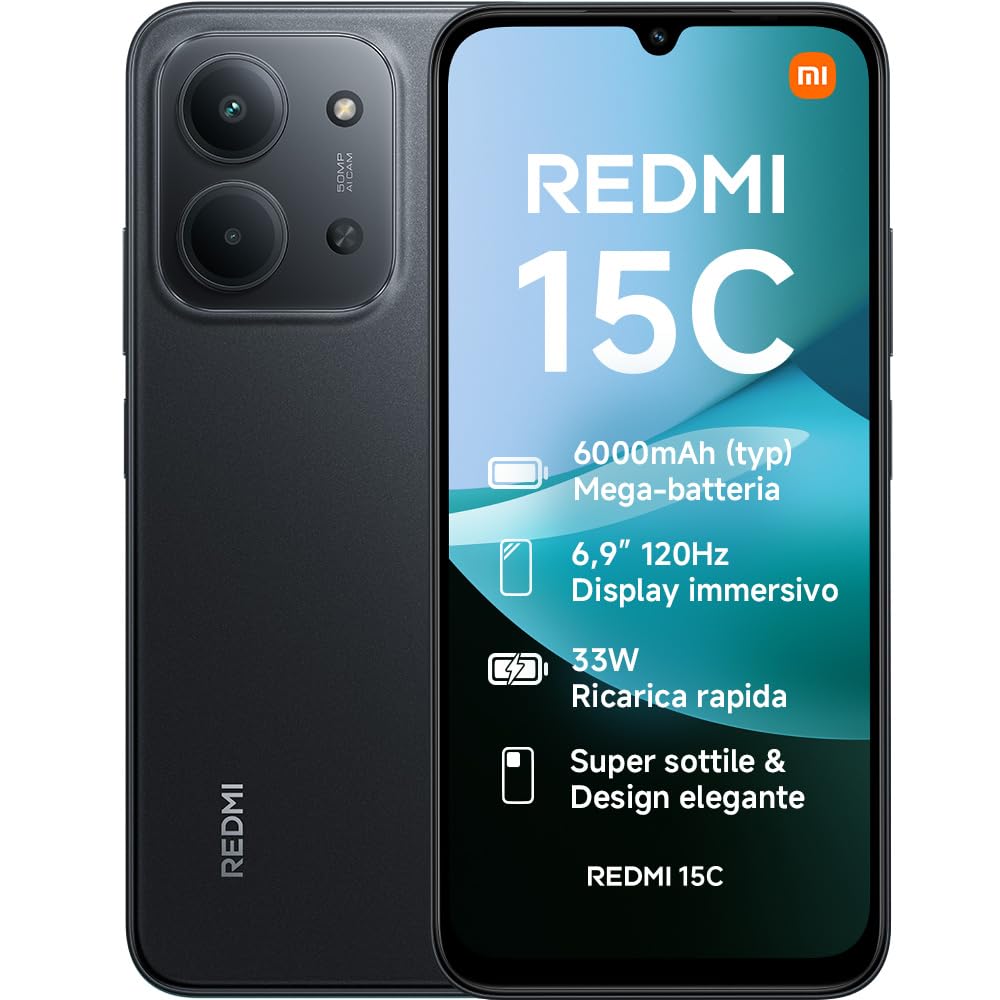
Image: The XIAOMI REDMI 15C smartphone, showcasinŞık tasarımıyla dikkat çekiyor.
Kurmak
1. SIM Kartın Takılması
Locate the SIM card tray on the side of your device. Use the provided SIM ejector tool to open the tray. Insert your Nano SIM card(s) and/or microSD card into the designated slots. Ensure the tray is fully reinserted to maintain water and dust resistance.
2. İlk Şarj
Before first use, it is recommended to fully charge your device. Connect the USB cable to the phone's USB-C port and to a compatible power adapter (not included). The phone supports 33W fast charging.

Image: The XIAOMI REDMI 15C connected to a charger, illustrating the fast charging capability.
3. Güç Açma ve İlk Yapılandırma
Press and hold the power button until the XIAOMI logo appears. Follow the on-screen instructions to select your language, connect to Wi-Fi, set up your Google account, and configure security features like facial recognition.
Cihazınızı Çalıştırma
Ekran ve Gezinme
The Redmi 15C features an immersive 6.9-inch display with AdaptiveSync up to 120Hz, providing a smooth and responsive visual experience for browsing and media consumption. The display is also TÜV Rheinland certified for low blue light, flicker-free, and circadian friendly viewing, ensuring prolonged visual comfort.

Image: The XIAOMI REDMI 15C display, highlighting its immersive visual experience.
Pil Yönetimi
Equipped with a 6000mAh battery, the Redmi 15C offers extended usage. Utilize the 33W ultra-fast charging for quick power-ups. The device also supports reverse charging, allowing it to act as a power bank for other devices.
- Up to 22 hours of video playback
- 82 saate kadar müzik çalma
- Up to 20 hours of reading

Image: An illustration of the 6000mAh battery capacity within the XIAOMI REDMI 15C.
Kamera Özellikleri
Capture moments with the 50MP AI dual camera system. It supports Ultra HD mode for detailed photos and Portrait mode for artistic depth effects. The front camera also offers a beauty selfie mode for enhanced self-portraits.

Image: Close-up of the XIAOMI REDMI 15C's 50MP AI dual camera system.
Performans ve Yazılım
Powered by an octa-core MediaTek Helio G81-Ultra processor and up to 16GB of RAM (with memory expansion), the Redmi 15C ensures smooth performance for daily tasks. It runs on Xiaomi HyperOS 2, offering a fluid user experience and seamless interconnectivity with other Xiaomi devices.
Bağlantı ve Güvenlik
The device supports 4G LTE, Bluetooth, and Wi-Fi connectivity. For security, it includes facial recognition. The USB-C port is used for charging and data transfer.
Bakım
Su ve Toz Direnci
The Redmi 15C features IP64 water and dust resistance, providing protection against splashes and dust ingress. While resistant, it is not waterproof; avoid submerging the device in water.

Image: The XIAOMI REDMI 15C, illustrating its IP64 water and dust resistance.
Ekran Bakımı
The display incorporates Wet Touch 2.0 technology, allowing for precise responses even with wet, oily, or soapy hands. To clean the screen, use a soft, lint-free cloth. Avoid harsh chemicals.

Image: A hand interacting with the XIAOMI REDMI 15C display in an outdoor setting, demonstrating Wet Touch 2.0 technology.
Genel Bakım
Avoid exposing your device to extreme temperatures, direct sunlight for prolonged periods, or strong magnetic fields. Use only approved accessories. Regular software updates are recommended for optimal performance and security.
Sorun giderme
If you encounter issues with your Redmi 15C, consider the following common solutions:
- Cihaz yavaş veya yanıt vermiyor: Close unnecessary background applications. Restart the device. Ensure sufficient storage space is available.
- Pil çabuk bitiyor: Reduce screen brightness. Disable unused features like Bluetooth or GPS. Check for power-intensive apps in settings.
- Ağ bağlantı sorunları: Uçak modunu açıp kapatın. Cihazı yeniden başlatın. SIM kartın doğru takılı olduğundan emin olun.
- Camera quality issues: Ensure the camera lens is clean. Take photos in well-lit environments for best results.
- Görüntüleme sorunları: Adjust display settings. If the screen is unresponsive, perform a forced restart (refer to the device's specific instructions for forced restart).
For persistent issues, refer to the official XIAOMI support website veya müşteri hizmetleriyle iletişime geçin.
Özellikler
| Özellik | Detay |
|---|---|
| Marka | XIAOMI |
| Model Adı | Redmi 15C |
| İşletim Sistemi | Hyper OS |
| RAM Bellek Boyutu | 4 GB |
| CPU Modeli | MediaTek Helio G81-Ultra |
| Depolama Kapasitesi | 256 GB |
| Ekran Boyutu | 6.9 inç |
| Ekran Çözünürlüğü | 1080 x 2246 (1080p Full HD) |
| Yenileme Hızı | 120 Hz |
| Ekran Türü | LCD |
| Kablosuz Sağlayıcı | Kilidi Açıldı |
| Renk | Siyah |
| SIM Kart Yuvaları | Tek SIM |
| Biyometrik Tanımlama | Yüz Tanıma |
| Su Direnç Seviyesi | Suya Dayanıklı (IP64) |
| Arka Kamera Çözünürlüğü | 50 MP |
| Number of Rear Cameras | 2 |
| Max Battery Power | 6000 mAh |
| Konuşma Zamanı | 6 Saat |
| Bağlantı Teknolojisi | 4G LTE, Bluetooth, Wi-Fi |
| Yıl Modeli | 2025 |
| Menşei ülke | Çin |
Garanti ve Destek
Garanti Bilgileri
Your XIAOMI REDMI 15C comes with a 2 yıllık üretici garantisi. Spare parts availability in the EU is also guaranteed for 2 years. Please retain your proof of purchase for warranty claims.
Müşteri Desteği
For further assistance, technical support, or warranty service, please visit the official XIAOMI support webDaha fazla bilgiyi sitelerinde bulabilir veya müşteri hizmetleri departmanlarıyla iletişime geçebilirsiniz. Amazon'daki XIAOMI Mağazası.
Additional documents like the Safety Information and Data Transparency Statement are available in PDF format: