
1. Giriş
Thank you for choosing the roborock Q10 S5 Robot Vacuum and Mop Cleaner. This manual provides essential information for setting up, operating, and maintaining your device to ensure optimal performance and longevity. Please read this manual thoroughly before using the product and keep it for future reference.
2. Güvenlik Bilgileri
To reduce the risk of injury, electric shock, fire, or damage, please observe the following safety precautions:
- Bu cihaz, güvenli bir şekilde cihazın kullanımı konusunda gözetim veya talimat verilmesi ve içerdiği tehlikelerin anlaşılması halinde 8 yaş ve üzeri çocuklar ve fiziksel, duyusal veya zihinsel yetenekleri azalmış veya deneyim ve bilgi eksikliği olan kişiler tarafından kullanılabilir.
- Çocukların cihazla oynamamalarını sağlamak için gözetim altında tutulmaları gerekir.
- Temizlik ve kullanıcı bakımı gözetimsiz olarak çocuklar tarafından yapılmamalıdır.
- Do not use the robot in areas with open flames or fragile objects.
- Şarj istasyonunun düz bir yüzeye, duvara yaslanarak yerleştirildiğinden emin olun.
- Yalnızca cihazla birlikte verilen orijinal güç adaptörünü kullanın.
- Do not expose the robot to direct sunlight or moisture.
- Temizliğe başlamadan önce, elektrik kablolarını, küçük nesneleri ve kırılgan eşyaları yerden kaldırın.
3. Ürün Bittiview
Familiarize yourself with the components of your roborock Q10 S5 robot vacuum.
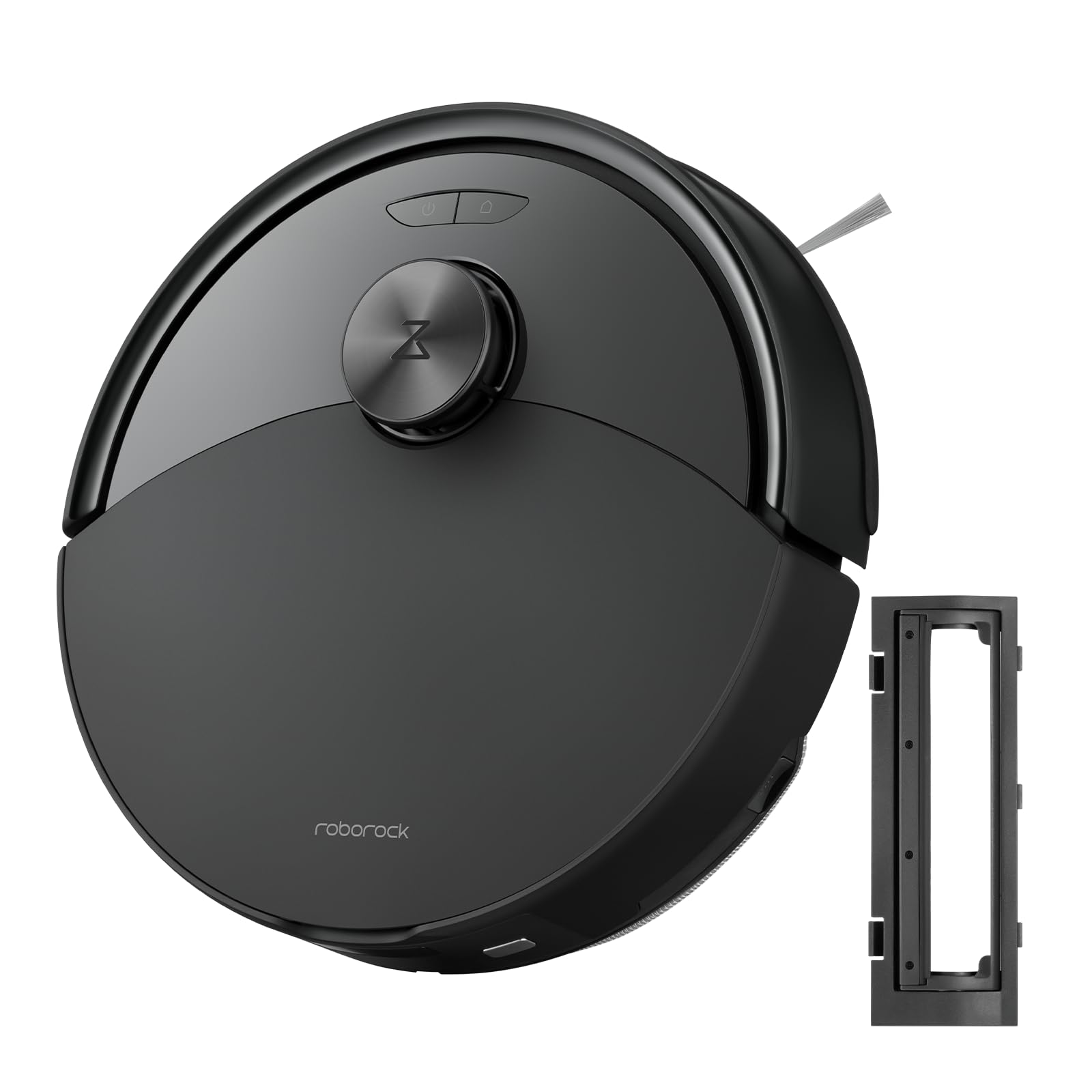
Şekil 1: The roborock Q10 S5 Robot Vacuum and Mop Cleaner. This image shows the top view of the robot, highlighting its sleek black design and main control buttons.
Robot Bileşenleri:
- Kapak: Lifts to reveal the dustbin and Wi-Fi indicator.
- Güç/Temizleme Düğmesi: Press to start/pause cleaning, hold to turn on/off.
- Dock/Spot Clean Button: Press to send the robot back to the dock, hold for spot cleaning.
- LDS Sensor: Navigasyon ve haritalama için.
- Tampon: Engelleri algılar.
- Yan Fırça: Kenar ve köşelerdeki döküntüleri süpürür.
- Ana Fırça: Collects dirt and debris from floors. Features a floating design for better contact.
- Çok Yönlü Tekerlek: For movement.
- Şarj Kişileri: Şarj istasyonuna bağlanır.
- Uçurum Sensörleri: Robotun merdivenlerden düşmesini engeller.
- Su Deposu ve Paspas Pedi: For mopping functionality.
Şarj İstasyonu:
- Dock Location Beacon: Helps the robot locate the dock.
- Şarj Kişileri: Gücü robota aktarır.
- Güç Kablosu Bağlantı Noktası: Güç adaptörünü bağlar.
4. Kurulum
- Robotu Paketinden Çıkarın: Robotu ve tüm aksesuarlarını ambalajından dikkatlice çıkarın. Koruyucu filmleri veya nakliye malzemelerini çıkarın.
- Yan fırçayı takın: Press the side brush onto its post until it clicks into place.
- Şarj istasyonunu yerleştirin:
- Şarj istasyonunu sert, düz bir yüzeye, duvara yaslayarak yerleştirin.
- İskelenin her iki tarafında en az 0.5 metre (1.6 fit) ve önünde 1.5 metre (4.9 fit) boş alan olduğundan emin olun.
- Connect the power cable to the charging dock and plug it into a wall outlet.
- Başlangıç ücreti: Place the robot on the charging dock. The robot will automatically turn on and begin charging. For first-time use, fully charge the robot before operation (approximately 4-6 hours). The power indicator light will breathe white during charging and turn solid white when fully charged.
- Uygulamayı indirin: Arama "Roborock" in the App Store or Google Play Store, or scan the QR code on the packaging to download and install the app.
- Wi-Fi'ye bağlanın:
- Open the Roborock app and follow the on-screen instructions to add your device.
- Telefonunuzun 2.4 GHz Wi-Fi ağına bağlı olduğundan emin olun.
- Basılı tutun Rıhtım Ve Güç buttons simultaneously for 3 seconds until you hear the "Resetting Wi-Fi" voice alert.
- Follow the app's instructions to complete the connection.
5. Kullanım Talimatları
Temizliğe Başlamak:
- Robot'tan: Basın Güç button once. The robot will start cleaning.
- Uygulamadan: Open the Roborock app and tap the "Clean" button.
Pausing/Resuming/Stopping:
- Duraklama: Robotun üzerindeki herhangi bir düğmeye basın veya uygulamada "Duraklat"a dokunun.
- Sürdürmek: Basın Güç button or tap "Resume" in the app.
- Durdur: To stop a cleaning cycle, press the Rıhtım button to send the robot back to the charging dock, or tap "Stop" in the app.
Paspaslama Fonksiyonu:
- Su deposunu doldur: Open the water tank cover, fill with clean water, and close securely.
- Paspas pedini takın: Wet the mop pad and wring it out. Slide it into the mop pad slot until it is securely attached.
- Start Mopping: The robot will automatically detect the mop module and switch to mopping mode. You can adjust water flow levels in the app.
Uygulama Özellikleri:
- Harita Yönetimi: Create and save maps, set no-go zones, virtual walls, and invisible barriers.
- Seçici Oda Temizliği: Choose specific rooms to clean.
- Programlı Temizlik: Farklı saatler ve günler için temizlik programları belirleyin.
- Özel Temizleme Modları: Emiş gücünü ve su akış seviyelerini ayarlayın.
- Uzaktan kumanda: Robotun hareketini manuel olarak kontrol edin.
6. Bakım
Regular maintenance ensures your roborock Q10 S5 operates efficiently. Always turn off the robot and unplug the charging dock before performing any maintenance.
Dustbin and Filter (Weekly):
- Robotun üst kapağını kaldırın.
- Çöp kutusunu çıkarın.
- Çöp kutusunun kapağını açın ve içindekileri çöp kutusuna boşaltın.
- Remove the filter. Tap it gently to remove dust. The filter can be rinsed with water; ensure it is completely dry before reinstallation (allow 24 hours).
- Rinse the dustbin with water if necessary and allow it to dry completely.
- Reinstall the dry filter and dustbin.
Main Brush (Weekly):
- Robotu ters çevirin.
- Press the tabs to remove the main brush cover.
- Ana fırçayı kaldırın.
- (Varsa) temizleme aletini veya makası kullanarak fırçanın etrafına dolanmış saç veya kalıntıları kesip çıkarın.
- Reinstall the main brush and cover, ensuring it clicks into place.
Side Brush (Monthly):
- Yan fırçayı sökün.
- Herhangi bir saç veya kalıntıyı temizleyin.
- Reattach and tighten the screw.
Sensors and Charging Contacts (Monthly):
- Wipe all sensors (cliff sensors, wall sensor, LDS sensor window) and the charging contacts on both the robot and the dock with a soft, dry cloth.
Mop Pad (After Each Use):
- Paspas pedini su deposundan çıkarın.
- Rinse thoroughly with water and allow it to air dry completely before next use.
7. Sorun Giderme
If you encounter issues with your robot, please refer to the following table before contacting support.
| Sorun | Olası Neden | Çözüm |
|---|---|---|
| Robot açılmıyor. | Pil zayıf veya şarj edilmemiş. | Robotu şarj istasyonuna yerleştirin ve şarj olduğundan emin olun. |
| Robot Wi-Fi'ye bağlanamıyor. | Hatalı Wi-Fi şifresi, 5GHz ağı veya zayıf sinyal. | Ensure correct 2.4GHz Wi-Fi, reset Wi-Fi on robot, move closer to router. |
| Robot sık sık takılıyor. | Obstacles, tangled cables, or dirty sensors. | Clear floor, clean sensors, use no-go zones in app. |
| Zayıf temizleme performansı. | Full dustbin, dirty filter, tangled brushes. | Empty dustbin, clean/replace filter, clean main/side brushes. |
| Robot alışılmadık bir ses çıkarıyor. | Debris in main brush, side brush, or wheels. | Inspect and clean all brushes and wheels for obstructions. |
If the problem persists, please refer to the Roborock app for more detailed error messages or contact customer support.
8. Özellikler
| Özellik | Detay |
|---|---|
| Örnek | Q10 S5 |
| Boyutlar | Yaklaşık 353 x 350 x 96.5 mm (13.9 x 13.8 x 3.8 inç) |
| Ağırlık | Yaklaşık 3.7 kg (8.16 lbs) |
| Pil | Lithium-Ion (Capacity not specified, typical for robot vacuums) |
| Anma Gücü | Approx. 60W (Typical for robot vacuums) |
| Çöp Kovası Kapasitesi | Approx. 470 ml (Typical for robot vacuums) |
| Su Tankı Kapasitesi | Approx. 300 ml (Typical for robot vacuums) |
| Emiş Gücü | Up to 10,000 Pa (HyperForce Suction Power from feature bullets) |
| Wi-Fi Bağlantısı | 2.4 GHz |
Not: Özellikler önceden haber verilmeksizin değiştirilebilir.
9. Garanti ve Destek
roborock products are manufactured to the highest quality standards. For detailed warranty information, please refer to the warranty card included in your product packaging or visit the official roborock website. For technical support, troubleshooting assistance, or to purchase replacement parts, please contact roborock customer service through the app or their official webalan.
Resmi Webalan: www.roborock.com